Up to: DataONE Cluster Overview
The Kubernetes control plane is a replicated set of services that controls all cluster services, and sits behind a load balancer to provide fault tolerance. It is configured as a "Stacked" typology, with each control plane node also hosting one of the replicas of the etcd configuration service.
Creating a fault-tolerant cluster requires that redundant control planes are available should one fail. The recommended minimal configuration is to host three control planes using a stacked etcd topology:
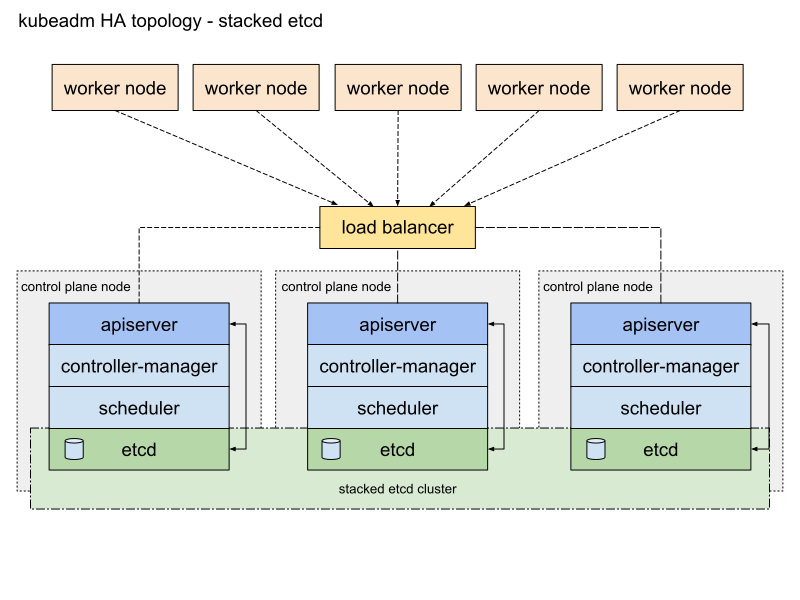
(TO DO): This is the approach that we propose to take for the DataONE cluster. One of the three control-plane nodes can be taken offline to be upgraded, maintained, or migrated to a new host, and the remaining two can still achieve a quorum.
Describe control-plane configuration...
Describe Load Balancer configuration...
Describe etcd service configuration...
The DataONE k8s Cluster uses the open source Traefik proxy (pronounced "traffic") to route traffic to k8s services from clients outside the cluster. (This is a replacement for ingress-nginx, which was retired in March 2026).
Important
Because we don't yet have an external load-balancer, and because we need access to the original client IP addresses, the Traefik proxy is currently installed in hostNetwork mode, meaning it is installed on a specific node, and bound to ports 80 & 443. This single-point-of-failure is not ideal, but it is a temporary solution. When we have an external load balancer in place, Traefik can be installed in ClusterIP mode, allowing us to run multiple pods across nodes. At that point, the following instructions should be updated accordingly.
-
First create a
PriorityClassobject if it does not already exist, using the definition in ./ingress/traefik/priorityclass--traefik.yaml. This ensures that the Traefik pod is never evicted from the target node, even if that node is under resource pressure (see Kubernetes documentation for details):# check if exists: $ kc get priorityclass ingress-critical Error from server (NotFound): priorityclasses.scheduling.k8s.io "ingress-critical" not found # create kubectl create -f priorityclass--traefik.yaml
-
Traefik may be installed or upgraded via the official helm chart, using the values overrides defined in ./ingress/traefik/values-overrides-traefik.yaml (IMPORTANT: don't forget to set the correct values for
$CHART_VERSIONand$TARGET_NODE, below!):# example: to install: # - chart version 39.0.6 (deploys Traefik 3.6.11) CHART_VERSION="39.0.6" # - on k8s-node-8 for prod, or k8s-dev-node-5 for dev TARGET_NODE="k8s-node-8" helm upgrade --install traefik traefik/traefik \ --version=$CHART_VERSION \ --namespace traefik --create-namespace \ --set "nodeSelector.kubernetes\.io/hostname=${TARGET_NODE}" \ -f values-overrides-traefik.yaml
Important
If you are upgrading an existing deployment, your new pod will stay in Pending state until you delete the old pod (kubectl delete pod <podname>), because both are trying to bind to the same ports on the same node.
NOTE THAT DELETING THE POD WILL CAUSE A BRIEF INTERRUPTION TO TRAFFIC (a few seconds, while the new pod starts up.)
-
Once Traefik is running on the target node, you must open ports 80 (for LetsEncrypt verification) and 443 (for web traffic) on the firewall for that node, to allow external traffic to reach the Traefik proxy.
ssh k8s-node-8.dataone.org

$ sudo ufw status
Status: active

To                         Action      From
--                         ------      ----
Anywhere                   ALLOW       128.111.196.0/23
Anywhere                   ALLOW       128.111.85.0/24
Anywhere                   ALLOW       207.71.230.208/29
22/tcp                     ALLOW       128.111.61.0/24
22/tcp                     ALLOW       128.111.64.0/22
22/tcp                     ALLOW       128.111.180.0/22
22/tcp                     ALLOW       128.111.188.0/22
22/tcp                     ALLOW       128.111.151.0/25

$ sudo ufw allow 80/tcp comment 'Open for LE ACME protocol'
Rule added
Rule added (v6)

$ sudo ufw allow 443/tcp comment 'Open for web traffic to Traefik proxy'
Rule added
Rule added (v6)
Tip
To find the available traefik versions:
First add the Traefik helm repository (one-time setup):
helm repo add traefik https://traefik.github.io/chartsThen refresh the repo and view a list of available versions
helm repo update
helm search repo traefik/traefik --versionsWarning
NGINX support is deprecated and will be removed in future!
Even though our Traefik setup currently supports legacy nginx ingress classes, please DO NOT use nginx-specific config for any new ingress resources. Use only the traefik ingress class, and standard Traefik annotations, providers or Middleware
Traefik requires that a k8s IngressClass is defined. This associates Traefik with one class of ingress. Using this approach, it is therefore possible to have multiple ingress controllers of different types (e.g. HAproxy, NGINX, additional Traefik proxies, etc.), running on the same cluster.
An IngressClass resource is automatically created by the helm installation, so does not need to be manually created or configured.
When IngressClass is started it will search all namespaces for Ingress objects with an ingress class that matches the ingress class name traefik. Since we are using the Traefik kubernetesIngressNginx Provider, it will also search for nginx ingress objects and interpret those.
An Ingress resource specifies the routing from the ingress controller to a k8s service. Each k8s application that runs on the k8s cluster must create an Ingress resource in order to provide routing. In addition, the cert-manager facility interacts with the Ingress resource to provide a Let's Encrypt certificate for TLS termination for the service (this is described in the Authentication section).
These ingress resources are created in the same namespace as the services that they route to, so for example, the metadig ingress is defined in the metadig namespace, where the metadig-controller service that it routes to is located.
- Install an external load balancer, and configure Traefik to use
ClusterIPmode, allowing us to run multiple pods across nodes, and remove the single-point-of-failure of the currenthostNetworkmode. - Retire existing
ingress-nginxingress resources to use thetraefikingress class instead ofnginx, adapting custom nginx configuration snippets and annotations to the Traefik equivalent as needed. - Move to the Kubernetes Gateway API instead of the Ingress spec. Traefik supports the Gateway API specification