
I ran a tiny controlled experiment because the "reasoning knob" is one of those AI features that sounds obvious in theory and slippery in practice.
If I ask the same model to think less or think much harder, do I actually get better software? Or do I just get a bigger transcript, a slower run, and the warm feeling that someone spent more tokens on my behalf?
So I made it concrete.
Same prompt. Same blank starting directory. Same machine. No follow-up questions. The task was to build a small Windows 11 desktop widget called System Pulse that shows live CPU, RAM, GPU, disk, and a 60-second CPU history chart.
Then I gave one run Low reasoning and the other xHigh reasoning.
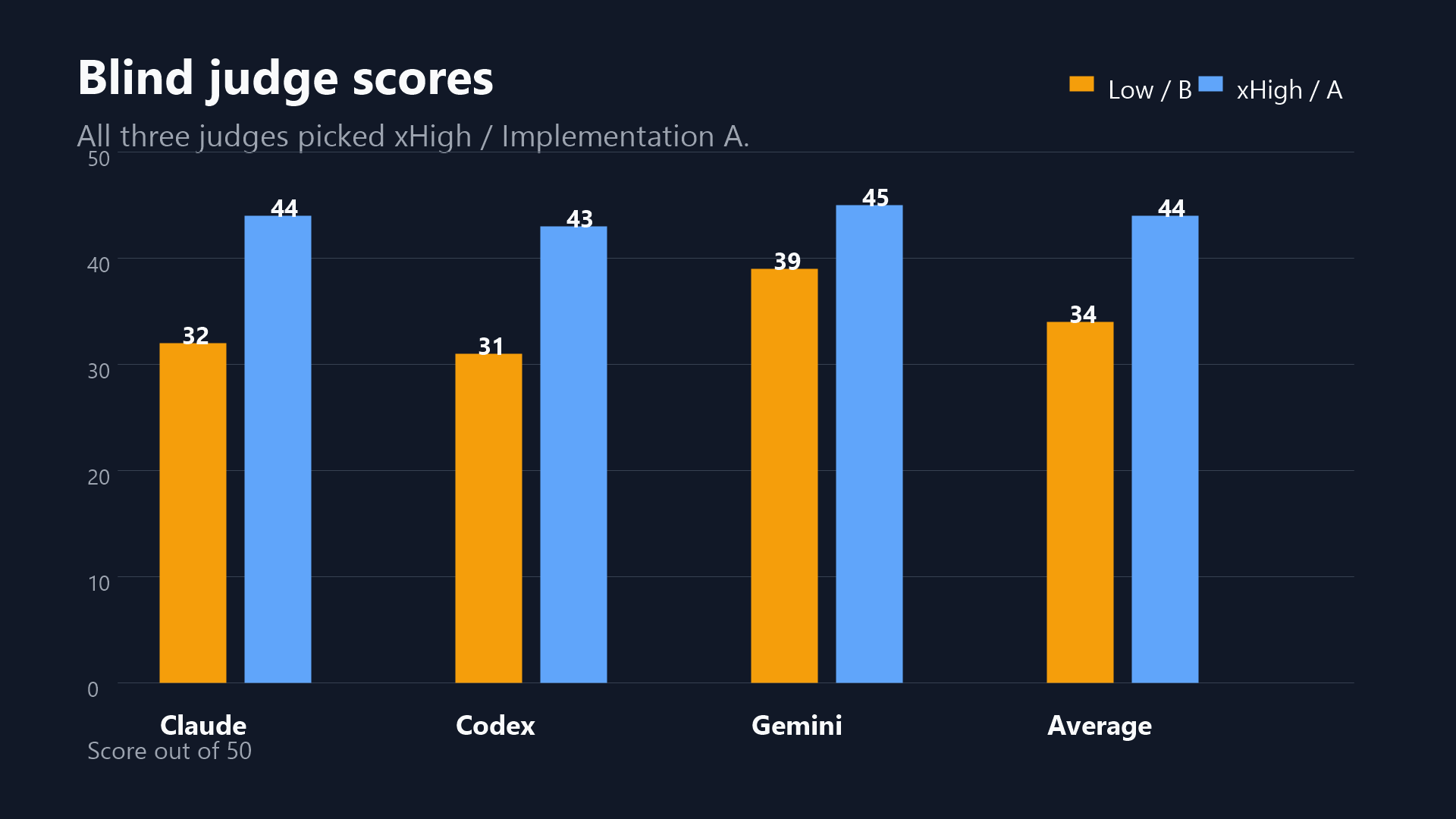
The result: xHigh won all three blind judgments, averaging 44/50 versus 34/50 for Low.
That win was not free. xHigh used 2.49x output tokens and took 1.59x wall-clock time. The interesting part is what that extra thinking bought.
The prompt was deliberately small but not trivial. The model had to choose the stack, shape the UI, collect real Windows metrics, handle missing GPU counters, write docs, explain decisions, and leave behind a runnable artifact.
The hard requirements:
- Single command to run after install.
- Updates at least once per second.
- App stays under 5% CPU.
- Shows CPU, RAM, GPU if available, and primary disk.
- Includes at least one historical view.
- Handles missing GPU cleanly.
- Looks at home pinned to a screen corner.
- Includes README, screenshot, and a short
DECISIONS.md.
Everything else was left to the model.
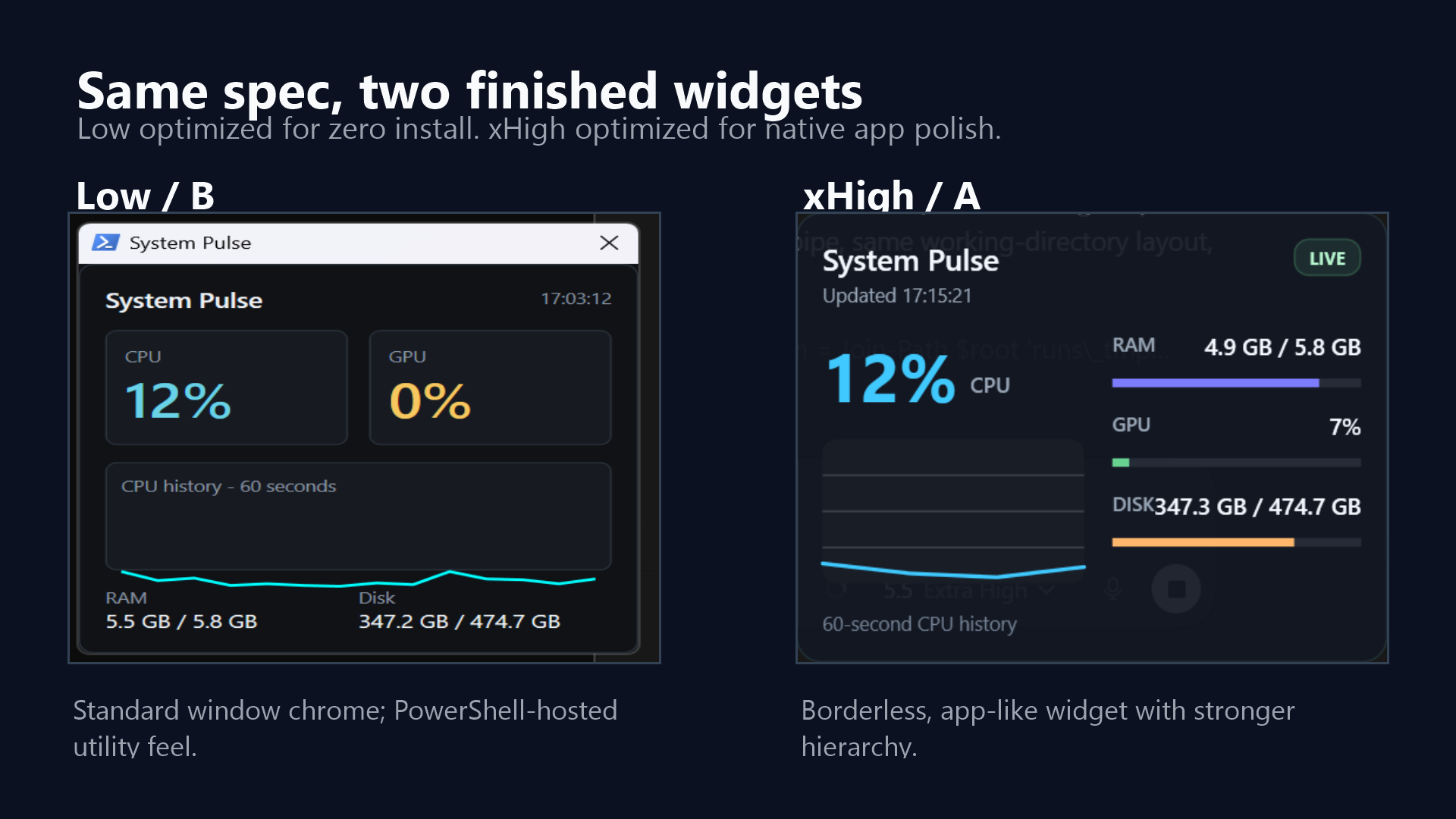
The xHigh run built a .NET 8 WPF app. It used native Windows APIs and PDH GPU counters, split the code into services, models, controls, and UI, and produced a borderless always-on-top widget.
The Low run built a single PowerShell/WPF script. That was a genuinely smart distribution choice: almost no install friction, no build step, and still a working live widget.
That is one reason I like this experiment. Low did not faceplant. It made a coherent engineering trade-off. xHigh just made more of the trade-offs feel product-ready.
Metric comparisons:
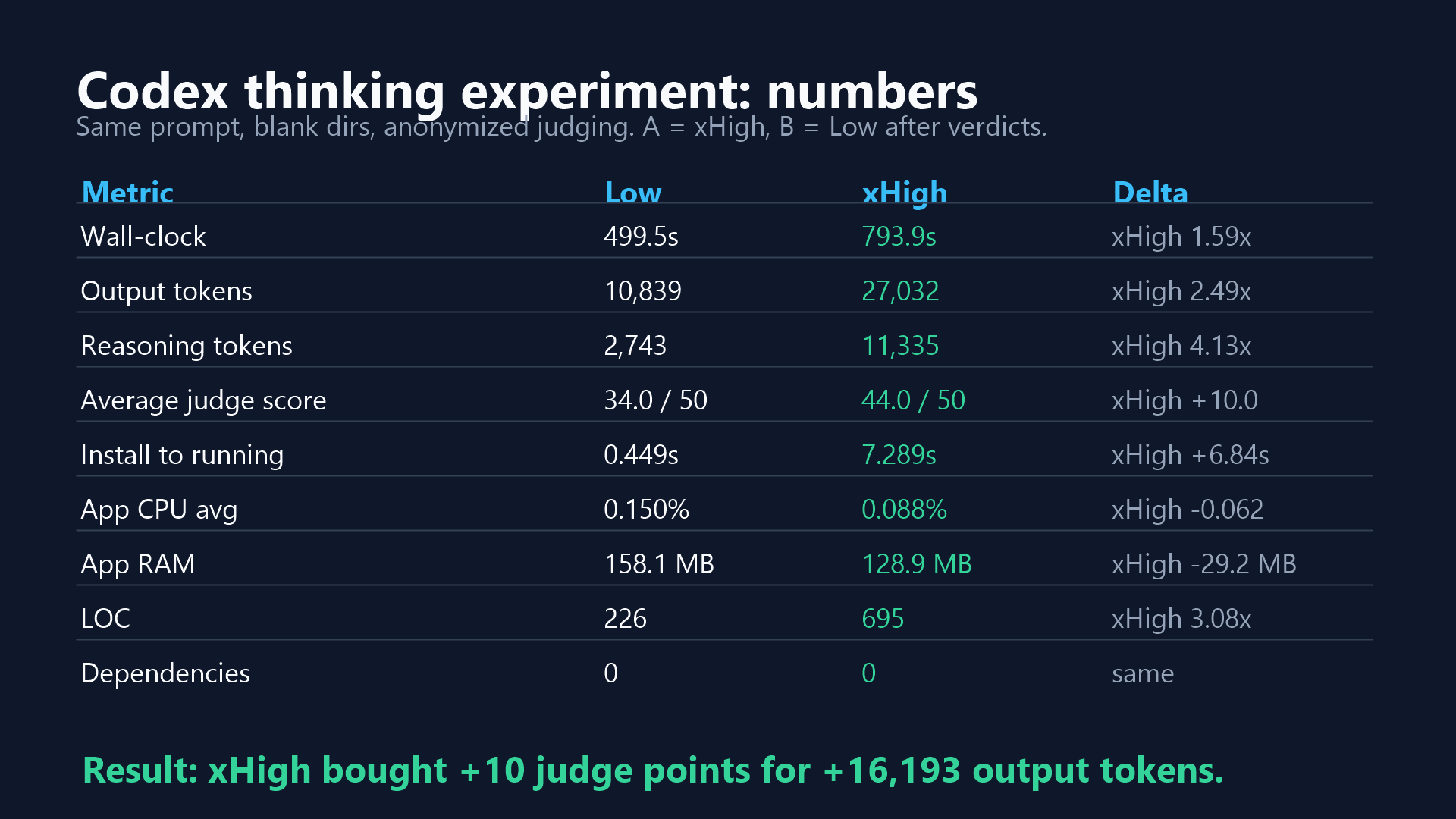
Wall-clock seconds: Low: 499.5 xHigh: 793.9
Output tokens: Low: 10,839 xHigh: 27,032
Reasoning output tokens: Low: 2,743 xHigh: 11,335
Install to running: Low: 0.449s xHigh: 7.289s
App CPU avg: Low: 0.150% xHigh: 0.088%
App RAM: Low: 158.1 MB xHigh: 128.9 MB
LOC: Low: 226 xHigh: 695
Average judge score: Low: 34/50 xHigh: 44/50
xHigh was slower and more expensive. It also produced a bigger codebase. The question is whether that extra structure was useful or just decorative.
The judges thought it was useful.
Three LLM judges reviewed anonymized artifacts as Implementation A and Implementation B. They did not see the Low/xHigh mapping or the quantitative metrics while judging.
After all verdicts were in, the mapping was revealed:
- Implementation A = xHigh
- Implementation B = Low
Judge score averages:
Functionality: Low: 7.67 xHigh: 9.33
Design quality: Low: 6.00 xHigh: 8.67
Code quality: Low: 6.33 xHigh: 9.00
Decision quality: Low: 8.00 xHigh: 8.33
Polish: Low: 6.00 xHigh: 8.67
Total: Low: 34.00 xHigh: 44.00
All three judges picked xHigh.
The pattern was consistent: both versions mostly met the checklist, but xHigh felt more like a real desktop utility. Low felt more like a clever prototype.
The biggest delta was not "can the app run?" Both apps ran. Both displayed metrics. Both handled the GPU fallback. Both had a README and design notes.
The difference showed up in the details that make software feel finished:
- xHigh used a borderless pinned widget instead of standard window chrome.
- xHigh separated metric collection, UI state, and chart rendering.
- xHigh had a right-click exit path and drag-to-move behavior.
- xHigh's UI looked more like something you would leave running.
- xHigh used fewer measured resources in the local run despite being the larger codebase.
Low still had one excellent move: it optimized for "just run this on Windows" by using PowerShell and WPF. If I wanted a quick personal utility, that may be the more appealing artifact.
But if the question is "which one would you publish as a small app tomorrow?", the answer from this run was xHigh.
This is where the simple "more reasoning is better" story gets less clean.
Low used 10,839 output tokens and averaged 34/50.
xHigh used 27,032 output tokens and averaged 44/50.
That means the 10-point lift cost 16,193 additional output tokens, or roughly 1,619 extra output tokens per added judge-score point.
That may be an easy yes for code that matters. It may be silly for throwaway glue.
The useful rule is not "always use xHigh." The useful rule is:
- Use Low for quick local utilities, sketches, and first-pass prototypes.
- Use xHigh when maintainability, UI polish, and "could I ship this tomorrow?" matter.
This is not a benchmark suite.
It is one task, on one machine, judged by LLMs, with a small sample size of exactly one. No statistics are hiding behind the curtain. There is no curtain.
Still, it is a concrete artifact comparison. The repo includes both apps, the prompt, the rubric, judge verdicts, measurements, and postable charts so people can inspect the difference directly.
For this task, turning the reasoning knob up did build better software.
Low produced a useful zero-install widget. xHigh produced a more polished, maintainable, app-like widget. The extra reasoning did not just create more code; it spent that complexity on decisions the judges could see and defend.
Small experiment. Real artifacts. Slightly unfair to the humble PowerShell script, but honestly, it held up better than I expected.