Authors:
- 陳映樵 B07901184
- 吳宜庭 B07901095
In this project, we have created an simple treasure hunting game played with motion control. We integrated several sensors in STM32 board with our own motion detection algorithm, object class wrapper and multi-threading techniques.
We started from the idea of building a reality game in which players can trigger different tasks based on their locations and complete the tasks by performing specified movements. We thought controlling the game by motion rather than pressing buttons would add more fun to the user experience, and combining location service with motion service could serve for wider purposes in the future. We also aimed at refining the codes in previous works as well as adding the detection for more wide-ranged motions. In the end, we achieved code refinement and motion control. However, the location service was omitted due to some hardware issues.

In the sensor, there are 4 logical threads:
- Event Thread: handle the dispatching of events
- Sensing Thread:sense raw physical data like acce, gyro, ...
- Motion Thread: determine user’s motion based on sensor data
- WiFi Thread:handle WiFi connection, send motion type to game server
The data sensor class processes the accelerometer and gyroscope sensor values. The classification of motions' type is entirely carried out on this layer rather than on the game server side. It also provides an interface getSensorType() for WiFi layer to call, the data type is of a simple "type":$motion format.
We implement a wifi wrapper class over the data sensor, which request for motion type from the sensor on a certain interval, then send this information to the game server. Note that this layer can be replaced to any connection service, but in our case we use WiFi for convenience.
We write our game program based on a spaceship shooting game from a web tutorial. The player have to move around the space to find the treasures. If the player collides with asteroids, the player lose the game. If the player collect all treasures, the player wins.
Calibration
Right after the DataSensor::start(), we call calibration() to collect the first 1000 sensor data samples within a second. We take the mean of these samples as the offsets. All the following sensor values will be subtracted by the offsets.
Sliding Window
To avoid glitches in the raw data, we used a sliding window technique to acquire the data. For the accelerometer, we recorded the sensor data every 1 ms and store it in a buffer of size 10. We calculated the standard deviation of 10 consecutive buffer values every 10 ms. Larger standard deviation means that there is more motion in that direction. In the meantime, we also calculated the difference of sensor value each millisecond compared to the previous millisecond. This allowed us to easily differentiate between motions of different frequencies. The amplitude value was also recorded.
stm_x/stm_y/stm_z: Standard deviation values every 10 ms.stm_diff: Amplitude difference between milliseconds.stm_all: Amplitude of each milliseconds.

As for the gyroscope, we used Riemann sum in place of integration to convert the angular velocity to angles.
angle[i] += (pGyroDataXYZ[i] + pGyroDataXYZ_prev[i]) / 2 * STD_TIMESTEP * SCALE_MULTIPLIER * 0.001
Like the accelerometer, we kept the difference of angles compared to the previous millisecond in a buffer and calculated its standard deviation every 10 ms (stm_angle).
Preliminary Motions
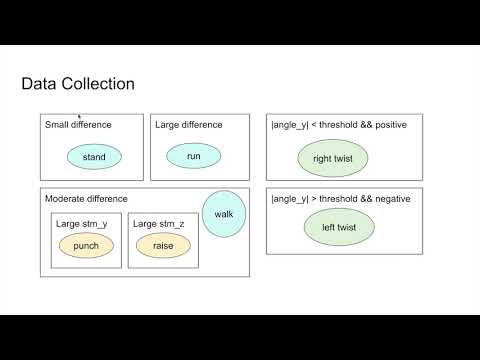
In this project, seven motion types are identified: Stand, Walk, Run, Left twist, Right twist, Punch and Raise hand.

The difference stm_diff serves as an index to distinguish between motions of different frequencies. The smallest value corresponds to standing, while the largest value is further evaluated for its continual time period -- if the value exceeds a threshold for a longer period of time, we classified it as running. For the rest of the movements, we looked at its stm_y and stm_z for its main axis of activity. Motions with a larger stm_y resembles punching, those with a larger stm_z resembles raising hands, and those with moderate values in both directions resembles walking.
As for wrist twisting, we looked at the absolute value of stm_angle in the y direction, since this value is dominant only in the wrist twisting movements. The sign of such value helps us decide the direction of twists.
Motion Refinement
After acquiring the motion types with above algorithm, we found that there were some glitches while we were performing the same movement. To eliminate such inconsistency, we added another window similar than that mentioned in the sliding window technique. The preliminary motions are computed every 10 ms and stored in a buffer. Every 100 ms, a final motion type is generated from the past 10 buffer values. This way, the motion types are more consecutive, and the data transmission rate is also closer to what is desired.

In our original design, we try to use BLE tags that scattered around an area to simulate location service. In this design, each BLE tag has its own id, hardness, and some other properties. The BLE tag keeps advertising its inforamtion, when a user connect to it, the user can access this properties. Each characteristic has different privileges, such as ReadOnly, ReadWriteOnly, NotifyOnly, and so on. These privileges are for security concerns. For example, the id of the tag should not be altered anyway, but the previous challenger may be modified after some challenge events.
After the user get information from the BLE tag, the game in the user's device will do actions based on the information it just received. This approach is not only easy to implement but also more flexible. The IoT boards usually have less computing power. When it comes to games, the operations in games are usually too heavy for the IoT board to carry out. Therefore it is reasonable to put all complex operations on the game server instead of the BLE tags. Another advantage is the immutability of the IoT board. When the developers want to change the some parts of the game, they do not have to change the configuration of the BLE tags, but only change the program of the game.
A more general approach is indeed to let BLE tags change its configuration. However, it requires a lot more complex coding to be done. Also, some serious issues may arise. For instance, to make a BLE tag capable of changing its settings dynamicly, the tag has to run another connection service on the background. Sadly, in our experiments, it is hard to do this kind of thing on STM32 board. This part is left for future research.
We create two threads in the game. One thread is a worker thread, listening data coming from the sensor. The other one is the main thread, which handles the game logic. By doing so, we prevent the blocking nature of wifi connection, resulting in the enhanced performance of the game.
-
Configure the Wi-Fi shield to use.
Edit
mbed_app.jsonto include the correct Wi-Fi shield, SSID and password. In our example,wifi-shieldis "WIFI_ISM43362". Notice that STM32 usually support only 802.11g, so you may have to check your wifi configuration."config": { "wifi-shield": { "help": "Options are WIFI_IDW0XX1", "value": "WIFI_IDW0XX1" }, "wifi-ssid": { "help": "WiFi SSID", "value": "\"SSID\"" }, "wifi-password": { "help": "WiFi Password", "value": "\"Password\"" } } -
Import Sensor library
BSP_B-L475E-IOT01andwifi-ism43362. There is a button under the bottom right corner of the screen.
- If you have not installed pygame previously, run
pip install -r requirements.txtundergame/project.
- Under
game/project, runpython treasure-hunt. - Make sure STM32 board is held in right hand with hand vertical to ground and press the restart button.
- The pygame window will automatically pops up when the wifi connection is successfully established.
- Game instructions:
- Eat the two treasures and avoid getting hit by aesteroids.
- Stand: remain in the same spot.
- Walk: move forward.
- Right twist: turn right.
- Run: fire.
- Raise hand: accelerate.
In the previous works, either motions that vary greatly on the frequencies (eg. walking versus running) or those limited to a smaller frame (eg. tilting the boards in different directions) are detected. For the full-body motions, several sensors were connected to different body parts. However, in our project, we managed to detect both confined movements (eg. wrist twisting) and wide-ranged motions of various directions (eg. raising hands and punching) by using only a single accelerometer and gyroscope. Though the precision can be improved, our project has brought about the possibility of detecting a greater amount of motions in a more user-friendly setting.
- 2019-STM Fit (NTUEE-ESLab Project)