Compiling The Project
The AudioMoth library and example application in this repository can be downloaded and compiled using either the Silicon Labs Simplicity Studio IDE or simple command line tools.
The project contains a build folder with a Makefile and linker script to build the firmware from the command line in macOS, Linux or within the Windows Subsystem for Linux.
To use this approach first download the required GNU Arm Embedded Toolchain. Current and previous versions for all operating systems are available here, and even older versions are available here.
We typically use multiple versions of this toolchain and thus we link to the appropriate version within the Makefile rather than adding its executables to PATH. To do so, save the extracted toolchain somewhere convenient, and then change line 9 of the Makefile to point to bin directory within it. For example, if the toolchain in ```/Library/Toolchains/''':
# Set the toolpath parameter to the location of the GNU Arm Embedded Toolchain

TOOLCHAIN_PATH = /Library/Toolchains/

TOOLCHAIN_VERSION = gcc-arm-none-eabi-10.3-2021.10

# Determine the path to the toolchain binary

TOOLPATH = $(TOOLCHAIN_PATH)/$(TOOLCHAIN_VERSION)/bin/
Note that the trailing / is necessary. You can then build the firmware by simply executing:
> make
If running on macOS, the first time you run this command you will be issued with a sequence of security warnings as each of the sub-programs (the actually compiler and the linker) are executed. Each time, you will need to allow the program in the 'Security and Privacy' controls within the System Preferences, and then re-run the command. You only need to do this once the first time you execute the command.
You can remove the resulting binary file and the object files that were created using:
> make clean
The Makefile tracks dependencies appropriately and will only the re-compile files which themselves been changed, or whose dependencies have changed, since the audiomoth.bin binary file was created.
You can use the AudioMoth Flash App to write the firmware to an AudioMoth device.
To use the Silicon Labs Simplicity Studio IDE follow the instructions below.
-
Download the appropriate version of Simplicity Studio 4 or 5 for your operating system (https://www.silabs.com/products/development-tools/software/simplicity-studio) and follow the installation instructions. You can use either Simplicity Studio 4 or 5 to build this project, but the instructions and screenshots here are for Simplicity Studio 4.
-
Start Simplicity Studio, log in with the account you created in the step above, and select 'Update Software'.
-
Select 'Install by Product Group' from the window that appears.
-
Select '32-bit Microcontrollers' to show a list of possible updates and download all the suggested entries in the 'Recommended (based on selections in previous step)' list.
-
The project requires a GNU ARM Toolchain but does not use the Gecko MCU SDK. In Simplicity Studio 4 we have previously used 'GNU ARM Toolchain (v4.9.2015.q3)' to compile all AudioMoth firmware. If you repeat the step above but now deselect 'Show Latest Versions' next to the 'Other Options' title, you can then select and download 'GNU ARM Toolchain (v4.9.2015.q3)'. In Simplicity Studio 5 we use 'GNU ARM Toolchain (v7.2.2017.q4)' which is currently the only option. Different versions of the toolchain will yield binary files of slightly different sizes but the underlying functionality of the firmware will not change.
-
Once all the downloads have completed, open the 'File' menu in the 'Simplicity IDE', select 'Import...' and navigate to the 'AudioMoth-Project' folder that you have downloaded'.
-
The project should appear and compile correctly.
Alternatively a new project can be created through the standard Simplicity Studio tools. There are a number of key settings that are required:
- The project should include the appropriate source and header files from the Silicon Labs libraries:
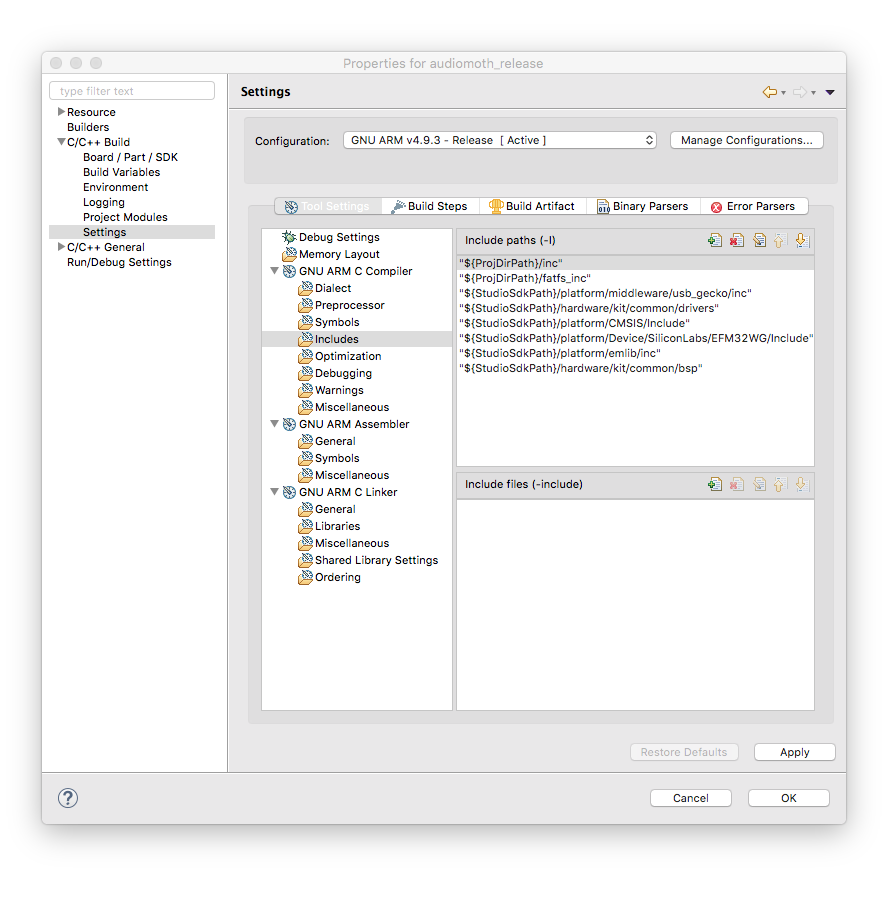
- The project should declare symbols to use the appropriate optimised maths library, processor, and FPU.
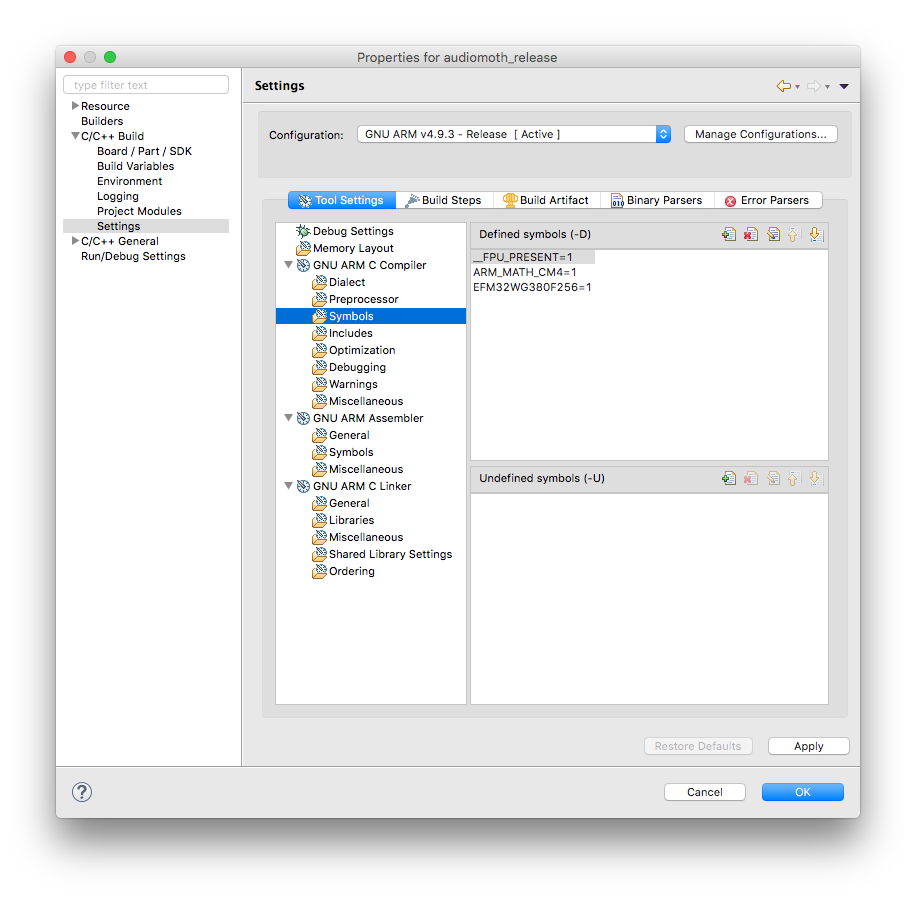
- The project should enable the hardware FPU using the default hard ABI.
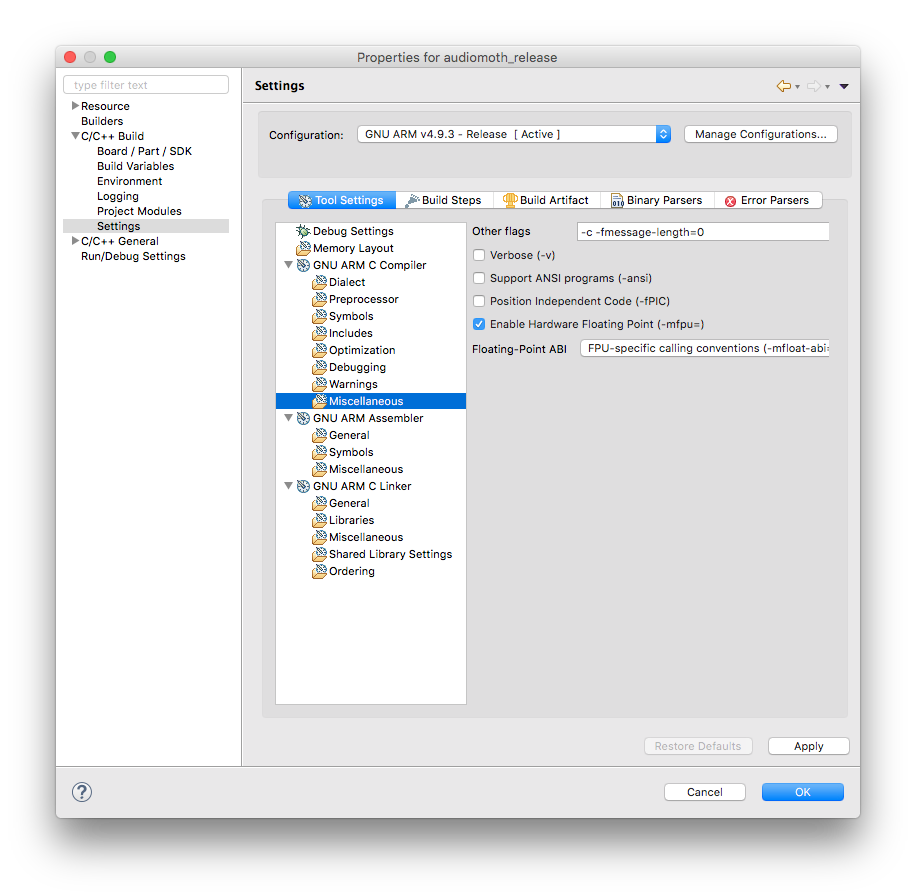
- To work correctly with the bootloader, the start address of the code should be set to 0x4000 with the overall flash size reduced appropriately to 0x3C000 bytes.
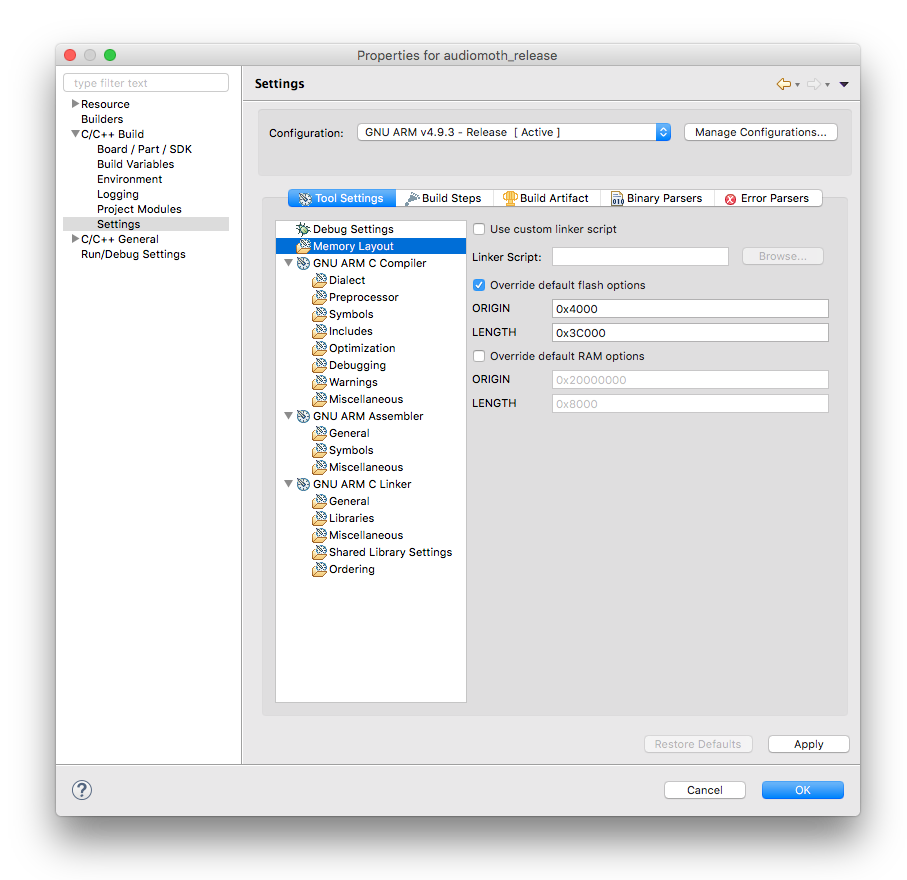
As above, you can use the AudioMoth Flash App to write any resulting firmware to an AudioMoth device.