This is Exceptional Code 2024-2025. Our programming experts have graduated, and its time for us to start fresh, with some new programmers.
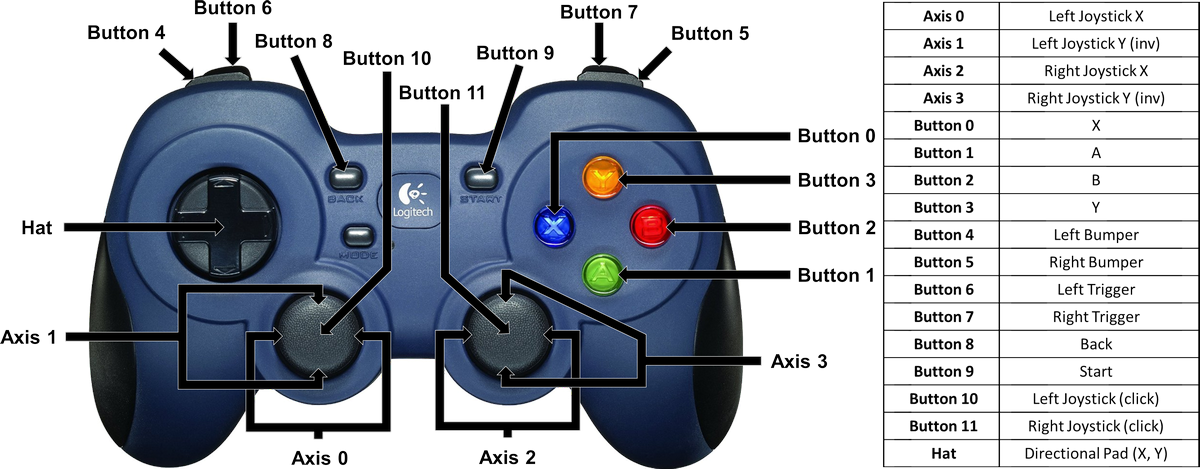
Gamepad 1 (start + a)
- Left stick: Main robot movement (forwards, backwards, strafing, etc.)
- Right stick: Turning (no action for vertical stick movement)
- A button: Field-centric/robot-centric toggle
- B button: Unused
- X button: Reset yaw (in field-centric mode, this will redefine north)
- Y button: Unused
- Pad up: Move pixel collector in reverse (not a toggle, only will move backwards when held down)
- Pad down: Toggles pixel collector (can be overwritten by pad up)
- Pad right: Move pixel collector down
- Pad left: Move pixel collector up
- Right bumper: Increase speed by 0.1 (max is 1)
- Left bumper: Decrease speed by 0.1 (min is 0.2)
- Right trigger: Pixel drop right
- Left trigger: Pixel drop left
- Left stick button: "Calm down" message
- Right stick button: "Calm down" message
Gamepad 2 (start + b)
- Left stick: Unused
- Right stick: Unused
- A button: Close wrist servo
- B button: Open wrist servo (if arm is high enough to be safe)
- X button: Unused
- Y button: Unused
- Pad up: Linear slide to max height
- Pad down: Linear slide to min height
- Pad right: Linear slide to middle position
- Pad left: Unused
- Right bumper: Open gripper servo (if arm is high enough to be safe)
- Left bumper: Close gripper servo
- Right trigger: Unused
- Left trigger: Unused
- Left stick button: "Calm down" message
- Right stick button: "Calm down" message
Classes To Know
Note: ~ refers to the directory TeamCode/src/main/java/org/firstinspires/ftc/teamcode
- Bot (
~/Bot.java): This is perhaps the most important class in our code. It is a way to initialize hardware objects all at once instead of having to do them individually in the teleop/auto class. Once all of the classes are initialized in Bot, they are very easy to access. For example, instead of having to import and initialize MecanumBase, Pose, and many other classes, you can just import and initialize Bot usingBot.init()in the main teleop/auto class, and then callBot.base.move(),Bot.pose.returnPose(), etc. from anywhere in the code. This cleans up the constructor class, the imports, and makes it easier to keep track of classes. - Config (
~/Config.java): Config stores the configurations for many things on the robot, like motor, servo, and odometer names, odometer constants, PID constants, servo positions, and more. These values can be easily accessed throughConfig.*value*(after importing Config). - Pose (
~/SelfDrivingAuto/Pose.java): Pose allows the robot to always know where it is in space. This is needed for PID (implementation of PID) and autos. Pose uses odometry and april tag (WIP) data to calculate the pose of the robot. Pose is already initialized in Bot, so you can access it usingBot.pose.returnPose()to get the robot's x, y, and theta. - General teleop class (
~/OpModes/Teleop/*): The teleop class/classes are the classes that control the robot with human input. Whenever a human is driving the robot, this class is used. This class imports Bot, LinearOpMode, and a few other classes to run. It contains the main run loop for driving, which is why it is important to **not have while loops in the main thread (teleop class) **, as this will prevent the program from running. If you need to do something that needs to be in a loop, like moving the linear slide, use the run loop and update the slide class each loop, instead of placing a loop inside the slide class. - General auto class (
~/OpModes/Autos/*): The auto class/classes are very similar to teleop classes, except that they are autonomous (no human control). The auto class also uses Bot and LinearOpMode, but makes more use of PID, pose, and the camera.
File and Code Structure In the "home" directory (see above), there are three main directories: Hardware, Helpers, and OpModes. There may be other directories but these are the most important ones. Hardware contains classes for all the physical components of the robot, including MecanumBase which controls the movement of the robot, LinearSlide for the linear slide, and more. All of these are initialized in Bot. Helpers houses classes that aid in and simplify other parts of the code. These include AngleUtils, which helps normalize angles and perform calculations, Toggle, for making button presses toggles instead of booleans, and Utils, which has many general utility methods. Finally in OpModes, there are the directories for TeleOps and Autos. Anything that will be run (as an entry point (yes, its a lot more complicated than that)) will be in this directory.
Overall, classes in the hardware directory and some in the helpers directory will be imported and initialized in Bot, which will then be initialized in the OpMode classes to be used. Additional helper classes may be imported and used as needed. We generally use Bot in our OpModes instead of the base hardware classes as it is easier and cleaner to use this way.