 ███████╗  ██╗   ██╗   ███████╗   ██████╗   █████╗     ████████╗
██╔═════╝  ██║   ██║  ██╔═════╝  ██╔═══██╗  ██╔══██╗   ██╔═════╝
██║        ████████║  ██║        ██║   ██║  ██║   ██╗  ████████╗
██║        ██╔═══██║  ██║        ██║   ██║  ██║  ██╔╝  ██╔═════╝
████████╗  ██║   ██║  ████████╗  ╚██████╔╝  █████╔═╝   ████████╗
 ╚══════╝  ╚═╝   ╚═╝   ╚══════╝   ╚═════╝   ╚════╝      ╚══════╝
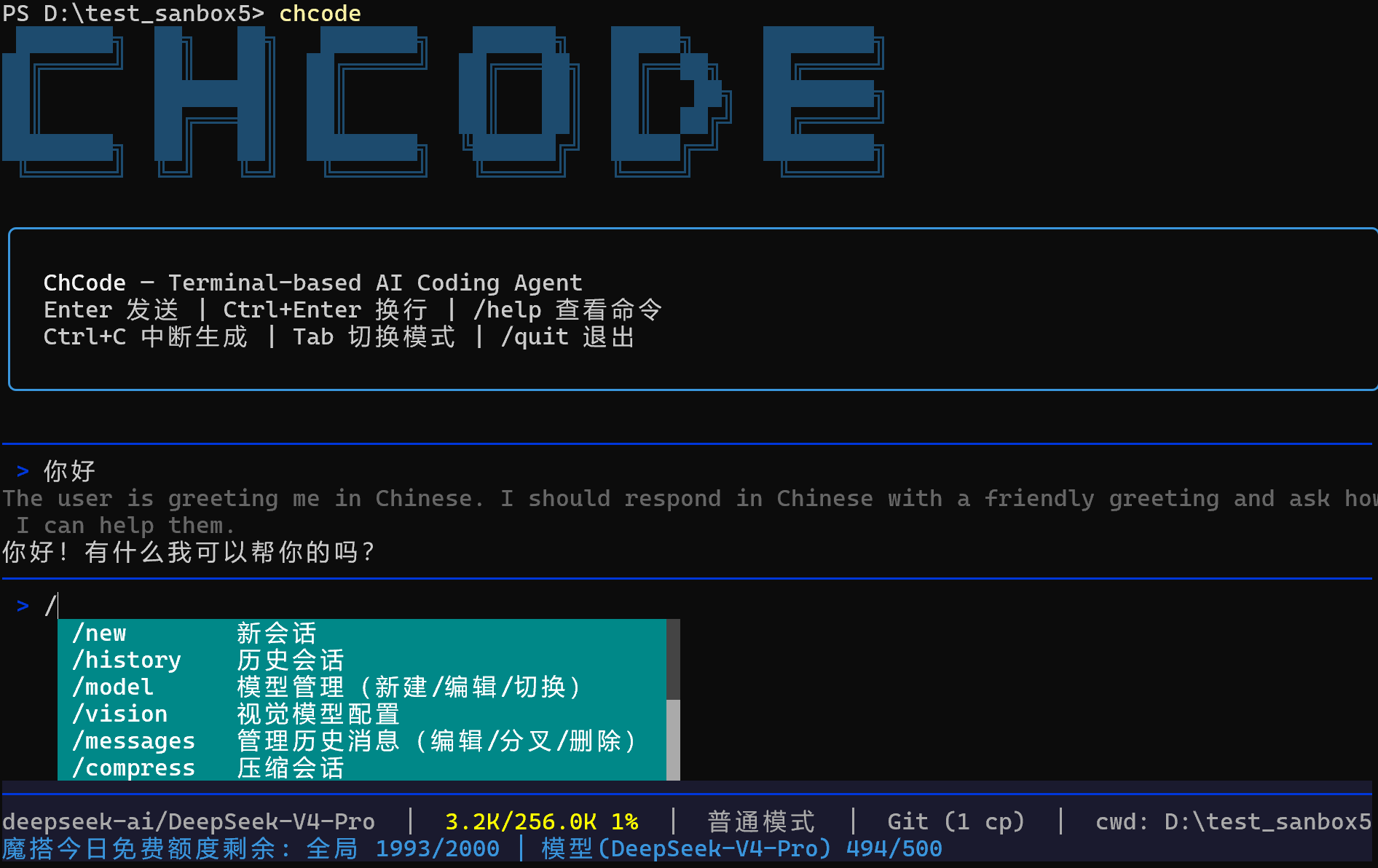
Terminal-based AI coding agent, built with LangChain + Typer + Rich.
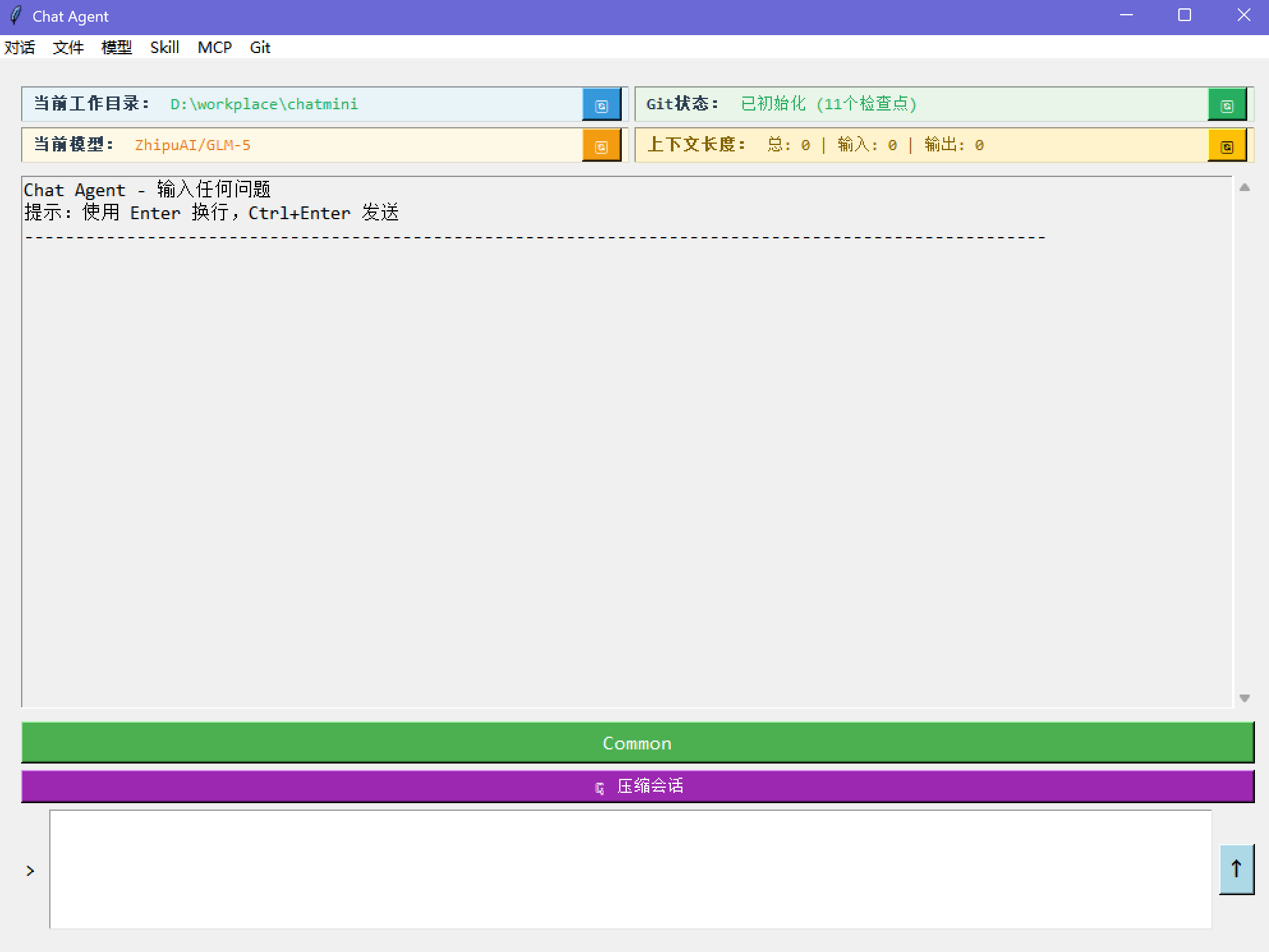
Why "ChCode"? The original prototype was a tkinter + LangChain app called chat-agent (chagent). When it evolved into a CLI tool, the name became ChCode — chat-agent, meet code.
📸 chagent — the original tkinter prototype
7000+ lines of Python, 14 built-in tools, full session persistence, git-aware workflow.


- Compatible with all OpenAI-compatible APIs (OpenAI, DeepSeek, Qwen, GLM, Claude via proxy, etc.)
- Built-in quick setup for ModelScope and major providers
- ModelScope: 2000 free model calls/day
- First-run wizard with env auto-detection (scans
OPENAI_API_KEY,DEEPSEEK_API_KEY,ZHIPU_API_KEY,ModelScopeToken, etc.) - Native reasoning/thinking model support — thinking tokens displayed in real time
- Create / edit / switch models at runtime
- Per-model hyperparameter tuning (temperature, top_p, top_k, max_completion_tokens, stop_sequences, etc.)
- Automatic retry with exponential backoff (3/10/30/60s) and fallback model switching on persistent failure
- Dedicated vision model configuration via
/visioncommand (independent from main model) - Image analysis with automatic media encoding and base64 embedding
- Video support — send videos directly to vision models for analysis (MP4, MOV, AVI, MKV, WebM)
- Automatic image resizing for oversized inputs
- Supported image formats: PNG, JPG, JPEG, GIF, BMP, WebP, TIFF
- Persistent sessions with SQLite-backed checkpoints (LangGraph)
- Session list, switch, rename, delete
- Context compression — auto-summarize when approaching token limit
- Real-time context usage display in status bar
- Working directory rolls back with message edits
- Create branches from any message (fork)
- Edit / fork / delete history messages via
/messages - Checkpoint counter in status bar
- Common mode — every tool call requires approval, with diff preview for edits. Only Explore and Plan sub-agents available.
- YOLO mode — auto-approve everything. All sub-agents available including General-purpose.
- Toggle with
Tabkey or/modecommand - Available sub-agents update dynamically when switching modes
- Per-project
.chat/directory for sessions, skills, agents - Global
~/.chat/for shared skills and settings /workdirto switch project root
- Windows — defaults to Git Bash, falls back to PowerShell
- Linux / Mac — native bash/zsh
- Persistent shell sessions with automatic CWD tracking
- Real-time status bar — context usage %, git checkpoint count, ModelScope API quota
- Streaming output with token-by-token rendering
- Slash command auto-completion
- Color-coded tool approval UI with inline diff preview for file edits
- LangSmith tracing — toggle on/off via
/langsmithcommand - Auto-disable tracing on 429 rate limit with user notification
- Three built-in agent types: Explore (codebase search, read-only), Plan (architecture design, read-only), General-purpose (full-capability coding)
- Mode-aware availability — Common mode: Explore + Plan only; YOLO mode: all three + custom agents
- Parallel execution — launch multiple agents concurrently for independent tasks, with live spinner progress display
- Sub-agents run with isolated context, protecting the main conversation from context pollution
- Read-only agents (Explore, Plan) have bash command restrictions to prevent accidental modifications
- Custom agents — define your own agent types in
.chat/agents/with dedicated tools and instructions
- Install / delete / manage skills via
/skill - Skills are injected into system prompt via LangChain middleware
- Supports project-level and global skill directories
- Real-time API quota display in status bar (daily limit remaining, per-model remaining)
- Auto-enabled when using ModelScope models
| Tool | Description |
|---|---|
read |
Read file content with line numbers and offset |
write |
Create or overwrite files |
edit |
Surgical string replacement in existing files |
glob |
Find files by name pattern |
grep |
Search file contents with regex |
list_dir |
Browse directory structure |
bash |
Execute shell commands (Git Bash / PowerShell / bash) |
load_skill |
Dynamically load skill instructions via middleware |
web_fetch |
Fetch and convert URL content to markdown |
web_search |
Web search via Tavily |
ask_user |
Single-select, multi-select, batch questions for user interaction |
agent |
Launch sub-agents (Explore, Plan, General-purpose in YOLO mode, custom), supports parallel execution |
todo_write |
Structured task tracking for complex multi-step work |
vision |
Analyze images and videos via ModelScope vision models |
# Stable release (PyPI) — choose one
pip install chcode        # pip
uv tool install chcode    # uv (recommended)
pipx install chcode       # pipx

# Latest version (GitHub) — choose one
uv tool install git+https://github.com/ScarletMercy/chcode.git    # uv (recommended)
pipx install git+https://github.com/ScarletMercy/chcode.git       # pipx

# Development (from source)
git clone https://github.com/ScarletMercy/chcode.git
cd chcode
pip install -e . # or: uv sync && uv run chcode# Start interactive session
chcode
# Start in YOLO mode
chcode --yolo
# Model management
chcode config new # add new model
chcode config edit # edit current model
chcode config switch # switch modelOn first launch, ChCode will:
- Scan environment variables for known API keys
- Guide you through model configuration
- Optionally configure Tavily for web search
| Command | Description |
|---|---|
/new |
Start new session |
/history |
Browse and switch sessions |
/model |
Model management (new / edit / switch) |
/vision |
Visual model configuration |
/messages |
Edit / fork / delete history messages |
/compress |
Compress current session |
/skill |
Manage skills |
/search |
Configure Tavily API key |
/workdir |
Switch working directory |
/mode |
Toggle Common / YOLO mode |
/git |
Show git status |
/langsmith |
Toggle LangSmith tracing |
/tools |
List built-in tools |
/quit |
Exit |
| Key | Action |
|---|---|
Enter |
Send message |
Ctrl+Enter |
New line |
Tab |
Toggle Common/YOLO mode (when input empty) |
Ctrl+C |
Interrupt generation |
ChCode intentionally does not integrate MCP (Model Context Protocol). The combination of Skills + CLI tools covers 95%+ of real-world coding agent scenarios. Skills provide structured, reusable instructions injected via middleware — simpler, faster, and more portable than MCP servers.
chcode/
├── cli.py                  # Typer CLI entry
├── chat.py                 # REPL main loop, slash commands, HITL
├── agent_setup.py          # Agent construction, middleware, model retry with fallback
├── config.py               # Model config, Tavily, env detection
├── display.py              # Rich rendering, streaming, status bar
├── prompts.py              # Interactive prompts (select/confirm/text)
├── vision_config.py        # Vision model configuration
├── agents/
│   ├── definitions.py      # Agent types (explore, plan, general)
│   ├── loader.py           # Load custom agents from .chat/agents/
│   └── runner.py           # Sub-agent execution with middleware
└── utils/
    ├── tools.py            # Built-in tools
    ├── enhanced_chat_openai.py  # Extended ChatOpenAI with reasoning support
    ├── frontmatter.py      # YAML Frontmatter parser
    ├── git_checker.py      # Git availability check
    ├── git_manager.py      # Git checkpoint management
    ├── json_utils.py       # JSON atomic read/write + mtime cache
    ├── modelscope_ratelimit.py  # ModelScope API rate limit monitor
    ├── multimodal.py       # Multimodal model detection and media encoding
    ├── session.py          # Session manager (SQLite)
    ├── skill_loader.py     # Skill discovery and loading
    ├── skill_manager.py    # Skill install/delete UI
    ├── text_utils.py       # Message content text extraction
    ├── tool_result_pipeline.py  # Output truncation and budget enforcement
    └── shell/
        ├── provider.py     # Shell provider abstraction (Bash/PowerShell)
        ├── session.py      # Interactive shell session
        ├── output.py       # Output capture and temp files
        ├── result.py       # Execution result dataclass
        └── semantics.py    # Output semantic analysis (error detection etc.)
MIT