-
Notifications
You must be signed in to change notification settings - Fork 0
Expand file tree
/
Copy pathindex.qmd
More file actions
299 lines (180 loc) · 8.76 KB
/
Copy pathindex.qmd
File metadata and controls
299 lines (180 loc) · 8.76 KB
1
2
3
4
5
6
7
8
9
10
11
12
13
14
15
16
17
18
19
20
21
22
23
24
25
26
27
28
29
30
31
32
33
34
35
36
37
38
39
40
41
42
43
44
45
46
47
48
49
50
51
52
53
54
55
56
57
58
59
60
61
62
63
64
65
66
67
68
69
70
71
72
73
74
75
76
77
78
79
80
81
82
83
84
85
86
87
88
89
90
91
92
93
94
95
96
97
98
99
100
101
102
103
104
105
106
107
108
109
110
111
112
113
114
115
116
117
118
119
120
121
122
123
124
125
126
127
128
129
130
131
132
133
134
135
136
137
138
139
140
141
142
143
144
145
146
147
148
149
150
151
152
153
154
155
156
157
158
159
160
161
162
163
164
165
166
167
168
169
170
171
172
173
174
175
176
177
178
179
180
181
182
183
184
185
186
187
188
189
190
191
192
193
194
195
196
197
198
199
200
201
202
203
204
205
206
207
208
209
210
211
212
213
214
215
216
217
218
219
220
221
222
223
224
225
226
227
228
229
230
231
232
233
234
235
236
237
238
239
240
241
242
243
244
245
246
247
248
249
250
251
252
253
254
255
256
257
258
259
260
261
262
263
264
265
266
267
268
269
270
271
272
273
274
275
276
277
278
279
280
281
282
283
284
285
286
287
288
289
290
291
292
293
294
295
296
297
298
299
---
title: "WWALK's Data & GitHub Crash Course"
date: May 19, 2026
format:
revealjs:
theme: dark
editor: visual
---
# Part I: Prep Work
## Learning Goals
My goal for this workshop is to give everyone the tools to:
::: incremental
- Confidently start a project in R
- Manage files in a way that is reproducible and easy to understand
- Allow people to document history/progress on their projects
- Know one approach to publicly archiving projects
:::
## GitHub Caveats
- Microsoft is a deeply evil company that profits from the war machine and the destruction of our planet
- GitHub is a Microsoft company
- There aren't currently a lot of alternatives, but there will be eventually and you can check out [this list](https://itsfoss.com/github-alternatives/) if you're interested
## Privacy Caveats!!!
- This lab has many examples of data that should not be uploaded to the internet, that does not mean that we can not use GitHub/Zenodo/reproducible science tools
- We need to be extremely mindful, make sure our code is anonymized
- Upload fake example data so that users can understand how our code works, with clear metadata that explains that the real data is unavailable
## Software Installation
- **CHECK-IN: does everyone have everything working/installed?**
## Transparent Workflows
- Ensuring that your workflow is transparent is important for:
- Past/Current/Future You
- WWALK Lab
- Collaborators
- Other grad students
- Scientific Community
- **PUBLIC**
# Part II: R & RStudio
## Project Management in R
Good file structure is important because it [^1]
[^1]: [Software Carpentry Project Management](https://swcarpentry.github.io/r-novice-gapminder/02-project-intro/index.html)
::: incremental
- Ensures the integrity of your data
- Makes it easier to share your code with people
- Makes it easier to upload your code/data with manuscript submission
- Makes it easier to come back after a break
:::
## File Management for R
Best practices include (but are not limited to) [^2]
[^2]: [Software Carpentry Project Management](https://swcarpentry.github.io/r-novice-gapminder/02-project-intro/index.html)
::: incremental
- Use an R Project file so that your project is easily shareable
- Always treat raw data as read-only
- Store cleaned data in a separate folder (or distinguish clearly)
- Treat output as disposable - you should always be able to re-generate with script
- Have separate function and figure scripts
:::
## Cleaning Data in R
There are some tasks that do not need to be "as reproducible" (e.g., fixing typos) - these can be done in [OpenRefine](https://openrefine.org/).
In general if you are:
- Combining data sources
- Making decisions about the data itself (e.g., removing or adding data)
- Performing calculations
- Renaming things
Do this in R (you will be grateful later!)
## Basic File Structure
```
project
└───raw-data/
└───output/
└───R/
└───graphics/
└───README.md
```
## Exercise: make a project
- Let's set up a new project using RStudio Projects
- Add raw-data, output, R, and graphics folders
- (Bonus: I recommend you have a folder on your computer dedicated to all R projects)
# Part III: GitHub
## GitHub & Version Control
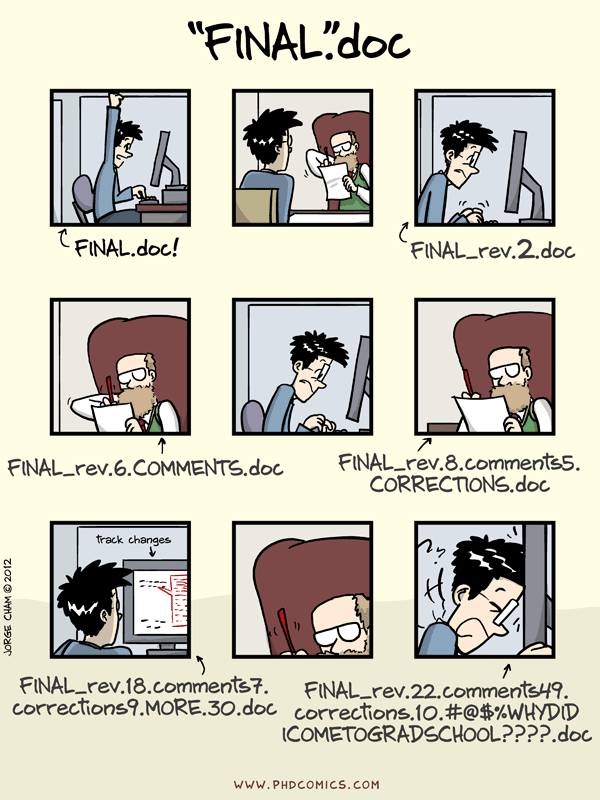{fig-align="center"}
## GitHub & Version Control
::: incremental
- GitHub is a website-software that documents your progress on a project and allows you to do *version control*
- aka it takes snapshots of your progress across time so nothing gets lost
- If you save rough drafts of your writing as you go along - that is version control
- Really useful for when you want to go back/change your mind/re-run a test/etc.
- Facilitates lower mental load + reproducible science + collaboration/sharing
:::
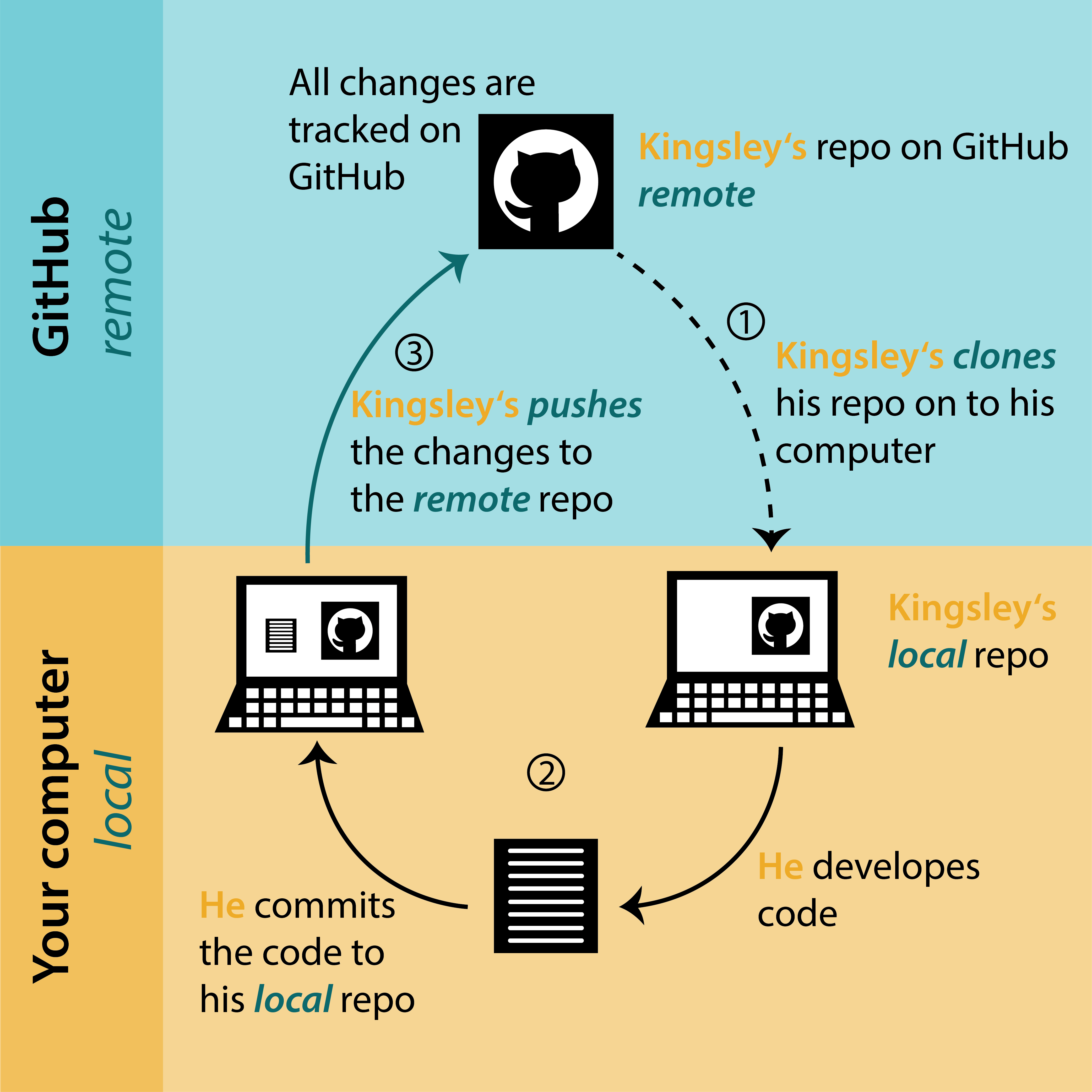
## Project Workflow with Git
{fig-align="center"}
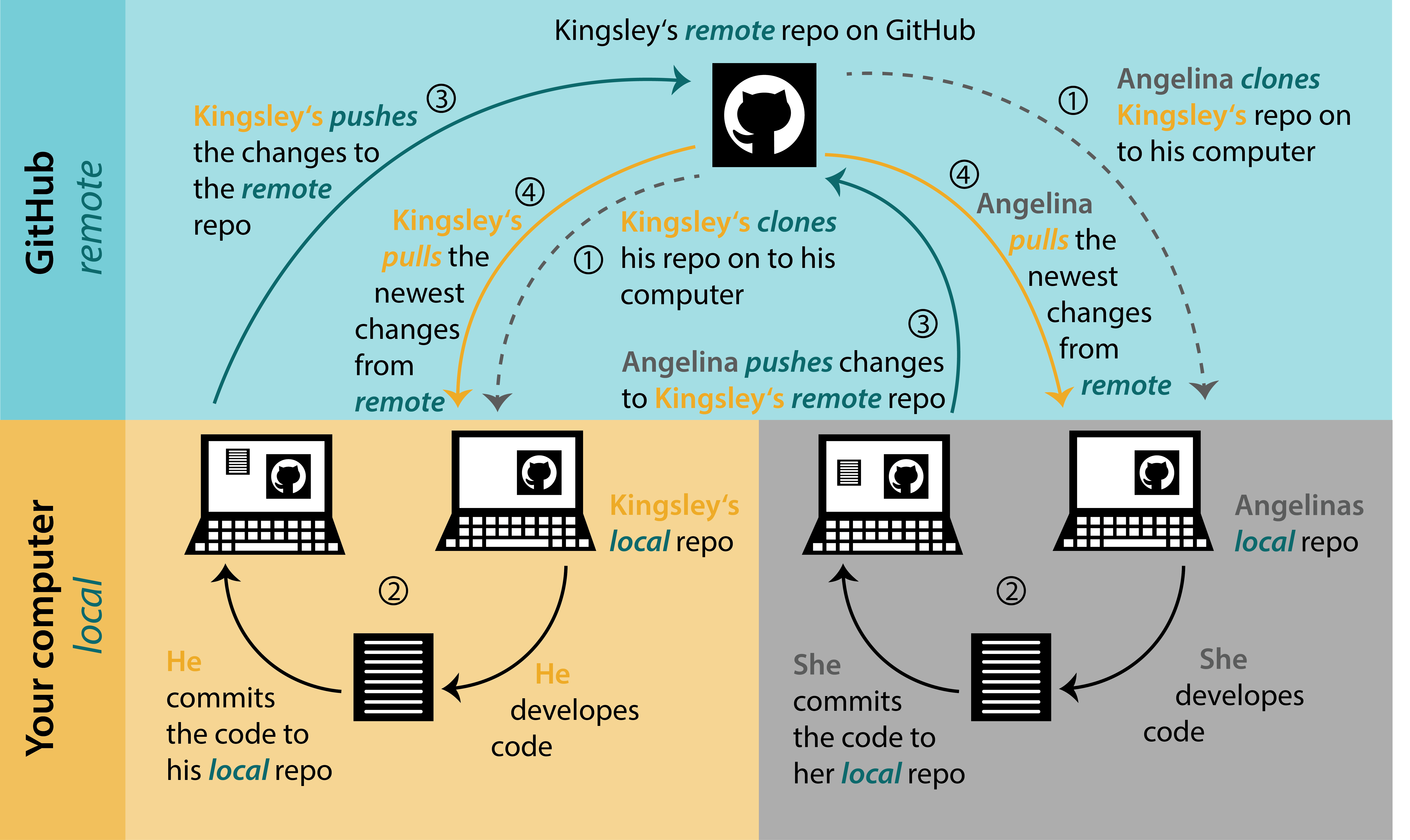
## Project Workflow with Git + Others
{fig-align="center"}
## The Basics of GitHub
- 5 basic jargon terms you need to know to use GitHub:
- Repository/repo: your project
- Clone: make a local copy of your project
- Commit: describe and commit to any changes you've made
- Push: send your changes to your online repo
- Pull: incorporate any changes to your local repo
- (BONUS branch: a side project)
- *We will do all these things today!*
## Exercise: make a repo!
[github.com/repos](www.github.com/repos)
{fig-align="center"}
## Exercise: make a repo!
{fig-align="center"}
## Exercise: make a repo!
[github.com/icrichmond/github-workshop](github.com/icrichmond/github-workshop) {fig-align="center"}
## Cloning (Download An Existing Directory)
<div>

</div>
## Committing
- GitHub tracks the changes you make to your repository on your computer
- After making changes, you have to select, describe, and *commit* them
## Committing
{fig-align="center"}
## Pushing
After committing, you push your changes to your remote repository

## Pulling (Collaboration Station)
- If you are collaborating on a project, where multiple people are contributing, make sure you pull from the remote repository **before** starting your work
- Same button as push (ctrl + shift + P)
## Bonus: Ignoring
- the [.gitignore file](https://git-scm.com/docs/gitignore) in your project directory allows you to force git to ignore specific files or folders
- there is a syntax for specifying different file types or folders, which can be found in the link above
```
# Ignore all .txt files
*.txt
# But don't ignore important.txt
!important.txt
# Ignore all files in large directory
large/*
```
# Part IV: Archiving Data
## Lab Archiving
Archiving your project in the lab requires 4 things:
1. Paper/thesis
2. Clean data
3. Metadata
4. Code
5. (Bonus: presentations you have given)
These things can be organized however you'd like, as long as they are easily understood by someone after you are gone.
## Why Using Git is not Archiving
- Does not have a DOI, so does not point to a specific moment in time
- Can be changed continuously
- Not dedicated to longevity
- Can import GitHub repository to a true data archive
## Public Archiving
- Zenodo is a great option for archiving data
- Easily links to GitHub repositories
- Preserves file structures
- Can be updated after reviews/changes with a new DOI
- FREE
- Other options include Dryad, figshare, and more topic-specific archives (e.g., GenBank)
- As always, use what works for you
## Zenodo
To connect and archive your code/data with Zenodo from GitHub, there are three main steps
1. Link your GitHub to your Zenodo account, and toggle "On" for your repository
2. Make a release of the project on GitHub
3. Obtain DOI and project page from Zenodo
(see an example workthrough [here](https://emilio-berti.github.io/idiv-git-introduction/21-github_zenodo/index.html))
NOTE: you do not need to use Git to use Zenodo, you can also upload local files
## The Ultimate Combo Deal {.scrollable}
::::: columns
::: column

:::
::: column

:::
:::::
## Resources
**This workshop - including examples & code can all be found [here](https://github.com/wwalk-lab/data-github-workshop) and formatted slides are [here](https://wwalk-lab.github.io/data-github-workshop)**
Software Carpentry: [R for Reproducible Scientific Analysis](https://swcarpentry.github.io/r-novice-gapminder/) & [Version Control with git](https://swcarpentry.github.io/git-novice/)
Data Carpentry: [Data Analysis & Visualization in R for Ecologists](https://datacarpentry.org/R-ecology-lesson/index.html) & [Data Organization in Spreadsheets for Ecologists](https://datacarpentry.org/R-ecology-lesson/index.html)
biost\@ts: [Version Control with Git and GitHub](https://biostats-r.github.io/biostats/github/)
Happy Git: [happygitwithr](https://happygitwithr.com/)
University of Bergen: [Open Access to Research Data](https://www.uib.no/en/ub/111372/open-access-research-data#metadata-describe-your-data)
## Resources
Smart People I Know: [Dr. Christie Bahlai's Reproducible Quantitative Methods Course](https://cbahlai.github.io/rqm-template/) & [Wildlife Ecology & Evolution Lab's Guide by Alec Robitaille](https://weel.gitlab.io/guide/) & [Val Lucet's Git Workshop](https://vlucet.github.io/git-and-github-with-r-workshop/)