Module that allows to recognize license plates from images basing on image processing algorithms.
Module uses several python packages:
- OpenCV - open source computer vision and machine learning software library
- pytesseract - optical character recognition (OCR) tool for python
- NumPy - fundamental package for scientific computing with Python
- imutils - series of convenience functions to make basic image processing functions
- Pillow - Python Image Library
- Matplotlib - Python 2D plotting library which produces publication quality figures in a variety of hardcopy formats and interactive environments across platforms
Be sure to have them installed before using KnowYourPlates package:
pip install opencv-contrib-python
pip install pytesseract
pip install numpy
pip install imutils
pip install Pillow
pip install matplotlib
Install this package with python package installer pip:
pip install KnowYourPlates
To recognize license plate from the image, import this package to the project and use license_plate_recognition function with path to the image as an argument. Example code:
# run.py
import argparse
from knowyourplates import alpr

ap = argparse.ArgumentParser()
ap.add_argument("-i", "--image", required=True,
                help="Path to the image")
args = vars(ap.parse_args())

recognized_text = alpr.license_plate_recognition(
    img_path=args['image'],
    new_size=None,
    blurring_method=alpr.bilateral_filter,
    binarization_method=alpr.adaptive_threshold
)
print(recognized_text)
Call from the command line:
python run.py --image ./example.jpg
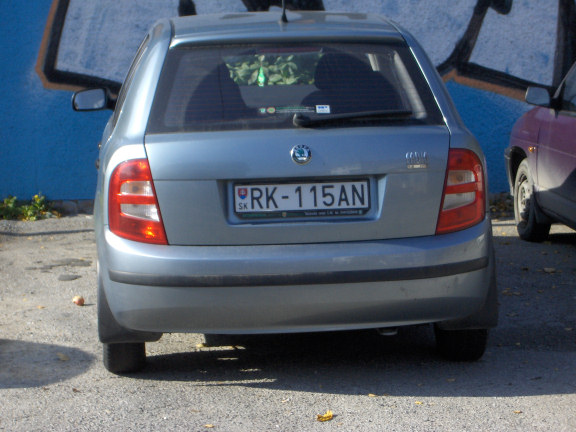
- Example image from OpenALPR Benchmark
- Result license plate image
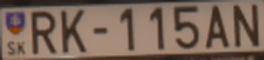
- Result: RK115AN
- license_plate_recognition(img_path: str, new_size: tuple, blurring_method: Callable, binarization_method: Callable)):
Automatic license plate recognition algorithm.
Found license plate is stored in ./results/ directiory as license_plate.jpg

Parameters
----------
img_path : str
    Path to the image
new_size  : tuple of integers
    First argument of the tuple is new width, second is the new height of the image
blurring_method : function
    Function as an object. Suggested functions from this module: gaussian_blur, median_blur, bilateral_filter
binarization_method : function
    Function as an object. Suggested functions from this module: threshold_otsu, adaptive_threshold, canny, auto_canny

Returns
-------
str
    Text recognized on the image
Blurring and filtering
- gaussian_blur(image: np.ndarray):
Wrapper for OpenCV's Gaussian blur. Image is blurred with (3, 3) kernel.

Parameters
----------
image: numpy.ndarray
    Image as numpy array. Should be converted into grayscale.

Returns
-------
numpy.ndarray
    Blurred image using Gaussian blur

Contribute
----------
Source: https://docs.opencv.org/2.4/modules/imgproc/doc/filtering.html?highlight=gaussianblur#gaussianblur
- median_blur(image: np.ndarray):
Wrapper for OpenCV's median blur. Aperture linear size for medianBlur is 3.

Parameters
----------
image: numpy.ndarray
    Image as numpy array. Should be converted into grayscale.

Returns
-------
numpy.ndarray
    Blurred image using median blur

Contribute
----------
Source: https://docs.opencv.org/2.4/modules/imgproc/doc/filtering.html?highlight=medianblur#medianblur
- bilateral_filter(image: np.ndarray):
Wrapper for OpenCV's bilateral filter. Diameter of each pixel neighborhood is 11.
Both filter sigma in the color space and filter sigma in the coordinate space are 17.

Parameters
----------
image: numpy.ndarray
    Image as numpy array. Should be converted into grayscale.

Returns
-------
numpy.ndarray
    Blurred image using bilateral filter

Contribute
----------
Source: https://docs.opencv.org/2.4/modules/imgproc/doc/filtering.html?highlight=bilateralfilter#bilateralfilter
Tresholding images
- canny(image: np.ndarray, threshold1: int, threshold2: int):
Wrapper for OpenCV's Canny algorithm.

Parameters
----------
image : numpy.ndarray
    Image as numpy array
threshold1 : int
    Lower value of the threshold
threshold2 : int
    Upper value of the threshold

Returns
-------
numpy.ndarray
    Binarized image using Canny's algorithm.

Contribute
----------
Source: https://docs.opencv.org/2.4/doc/tutorials/imgproc/imgtrans/canny_detector/canny_detector.html
- auto_canny(image: np.ndarray, sigma: float = 0.33):
Function automatically sets up lower and upper value of the threshold
based on sigma and median of the image

Parameters
----------
image : numpy.ndarray
    Image as numpy array
sigma : float


Returns
-------
numpy.ndarray
    Binarized image with Canny's algorithm

Contribute
----------
Source: https://docs.opencv.org/2.4/doc/tutorials/imgproc/imgtrans/canny_detector/canny_detector.html
- threshold_otsu(image: np.ndarray):
 Wrapper for OpenCV's Otsu's threshold algorithm.

Parameters
----------
image : numpy.ndarray
    Image as numpy array

Returns
-------
numpy.ndarray
    Binarized image using Otsu's algorithm.

Contribute
----------
Source: https://docs.opencv.org/master/d7/d4d/tutorial_py_thresholding.html
- adaptive_threshold(image: np.ndarray):
Wrapper for OpenCV's adaptive threshold algorithm.

Parameters
----------
image : numpy.ndarray
    Image as numpy array

Returns
-------
numpy.ndarray
    Binarized image using adaptive threshold.

Contribute
----------
Source: https://docs.opencv.org/master/d7/d4d/tutorial_py_thresholding.html
OCR functions
- ocr(img_path: str):
Wrapper for Tesseract image_to_string function

Parameters
----------
img_path : str
    Path to the image

Returns
-------
str
    Text recognized on the image

Contribute
----------
PyTesseract: https://pypi.org/project/pytesseract/
Image processing
- preprocess(image: np.ndarray, new_size: tuple, blurring_method: Callable, binarization_method: Callable):
Resizing, converting into grayscale, blurring and binarizing

Parameters
----------
image : numpy.ndarray
    Image as numpy array
new_size  : tuple of integers
    First argument of the tuple is new width, second is the new height of the image
blurring_method : function
    Function as an object. Suggested functions from this module: gaussian_blur, median_blur, bilateral_filter
binarization_method : function
    Function as an object. Suggested functions from this module: threshold_otsu, adaptive_threshold, canny, auto_canny

Returns
-------
numpy.ndarray
    Preprocessed image.

Contribute
----------
Grayscale conversion: https://docs.opencv.org/2.4/modules/imgproc/doc/miscellaneous_transformations.html
Bilateral filter: https://docs.opencv.org/2.4/modules/imgproc/doc/filtering.html
- plate_contours(image: np.ndarray):
Finding contours on the binarized image.
Returns only 10 (or less) the biggest rectangle contours found on the image.

Parameters
----------
image : numpy.ndarray
    Binarized image as numpy array

Returns
-------
list of numpy.ndarray
    List of found OpenCV's contours.

Contribute
----------
Finding contours: https://docs.opencv.org/2.4/modules/imgproc/doc/structural_analysis_and_shape_descriptors.html?highlight=findcontours#findcontours
- crop_image(original_img: np.ndarray, plate_cnt: np.ndarray):
Wrapper for Tesseract image_to_string function

Parameters
----------
img_path : str
    Path to the image

Returns
-------
str
    Text recognized on the image

Contribute
----------
PyTesseract: https://pypi.org/project/pytesseract/
- prepare_ocr(image: np.ndarray):
Prepares image to the OCR process by resizing and filtering (for noise reduction)

Parameters
----------
image : numpy.ndarray
    Image as numpy array

Returns
-------
numpy.ndarray
    Image prepaired to the OCR process

Contribute
----------
Resizing: https://docs.opencv.org/2.4/modules/imgproc/doc/geometric_transformations.html#void%20resize(InputArray%20src,%20OutputArray%20dst,%20Size%20dsize,%20double%20fx,%20double%20fy,%20int%20interpolation)
Bilateral filter: https://docs.opencv.org/2.4/modules/imgproc/doc/filtering.html
KnowYourPlates is released under the MIT License.