In this template, we show how to dpeloy Unity Catalog related resources such as unity metastores, account level users and groups.
This is stage 2 of UC deployment, you can also run this stage 2 template directly without stage 1 (which helps you create account admin identity), but you need to make sure using account admin identity to authenticate the databricks mws provider, instead of using account owner. One major reason of not using account owner in terraform is you cannot destroy yourself from admin list.
If you don't have an account admin identity, you can refer to stage 1:
aws-databricks-unity-catalog-bootstrap
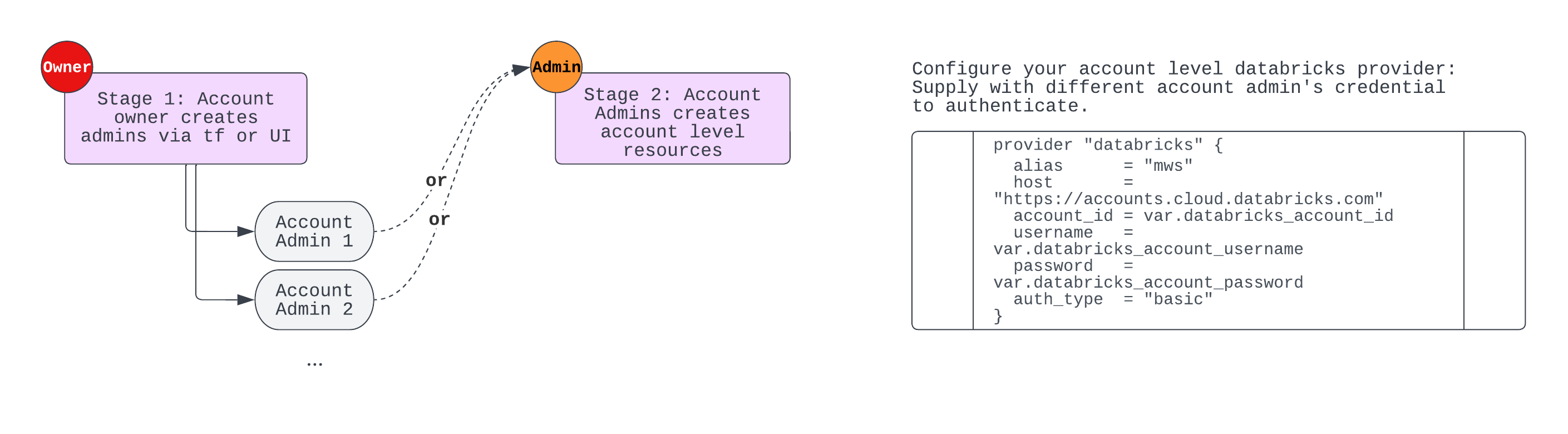
When running tf configs for UC resources, due to sometimes requires a few minutes to be ready and you may encounter errors along the way, so you can either wait for the UI to be updated before you apply and patch the next changes; or specifically add depends_on to accoune level resources
Step 1: Fill in values in terraform.tfvars; also configure env necessary variables for AWS and Databricks provider authentication. Such as:
export TF_VAR_databricks_account_client_id=your_account_level_spn_application_id
export TF_VAR_databricks_account_client_secret=your_account_level_spn_secret
export TF_VAR_databricks_account_id=your_databricks_account_id

export AWS_ACCESS_KEY_ID=your_aws_role_access_key_id
export AWS_SECRET_ACCESS_KEY=your_aws_role_secret_access_key
Step 2: Run terraform init and terraform apply to deploy the resources. This will deploy both AWS resources that Unity Catalog requires and Databricks Account Level resources.
| Name | Version |
|---|---|
| aws | ~> 4.0 |
| Name | Version |
|---|---|
| aws | 4.32.0 |
| databricks | 1.3.1 |
| databricks.mws | 1.3.1 |
| databricks.ws1 | 1.3.1 |
No modules.
| Name | Description | Type | Default | Required |
|---|---|---|---|---|
| aws_account_id | (Required) AWS account ID where the cross-account role for Unity Catalog will be created | string |
n/a | yes |
| databricks_account_admins | List of Admins to be added at account-level for Unity Catalog. Enter with square brackets and double quotes e.g ["first.admin@domain.com", "second.admin@domain.com"] |
list(string) |
n/a | yes |
| databricks_account_client_id | Application ID of account-level service principal | string |
n/a | yes |
| databricks_account_client_secret | Client secret of account-level service principal | string |
n/a | yes |
| databricks_account_id | Databricks Account ID | string |
n/a | yes |
| databricks_users | List of Databricks users to be added at account-level for Unity Catalog. should we put the account owner email here? maybe not since it's always there and we dont want tf to destroy Enter with square brackets and double quotes e.g ["first.last@domain.com", "second.last@domain.com"] |
list(string) |
n/a | yes |
| pat_ws_1 | n/a | string |
n/a | yes |
| pat_ws_2 | n/a | string |
n/a | yes |
| unity_admin_group | Name of the admin group. This group will be set as the owner of the Unity Catalog metastore | string |
n/a | yes |
| databricks_workspace_ids | List of Databricks workspace IDs to be enabled with Unity Catalog. Enter with square brackets and double quotes e.g. ["111111111", "222222222"] |
list(string) |
[ |
no |
| region | AWS region to deploy to | string |
"ap-southeast-1" |
no |
| tags | Optional tags to add to created resources | map(string) |
{} |
no |
No outputs.