- Ollama from https://github.com/ollama/ollama with CUDA enabled (found under
/bin/ollama) - Thanks to
@remy415for getting Ollama working on Jetson and contributing the Dockerfile (PR #465)
First, start the local Ollama server as a daemon in the background, either of these ways:
# models cached under jetson-containers/data
jetson-containers run --name ollama $(autotag ollama)

# models cached under your user's home directory
docker run --runtime nvidia -it --rm --network=host -v ~/ollama:/ollama -e OLLAMA_MODELS=/ollama dustynv/ollama:r36.4.0
You can then run the ollama client in the same container (or a different one if desired). The default docker run CMD of the ollama container is /start_ollama, which starts the ollama server in the background and returns control to the user. The ollama server logs are saved under your mounted jetson-containers/data/logs directory for monitoring them outside the containers.
Setting the $OLLAMA_MODELS environment variable as shown above will change where ollama downloads the models to. By default, this is under your jetson-containers/data/models/ollama directory which is automatically mounted by jetson-containers run.
Start the Ollama CLI front-end with your desired model (for example: mistral 7b)
# if running inside the same container as launched above
/bin/ollama run mistral

# if launching a new container for the client in another terminal
jetson-containers run $(autotag ollama) /bin/ollama run mistral

Or you can run the client outside container by installing Ollama's binaries for arm64 (without CUDA, which only the server needs)
# download the latest ollama release for arm64 into /bin
sudo wget https://github.com/ollama/ollama/releases/download/$(git ls-remote --refs --sort="version:refname" --tags https://github.com/ollama/ollama | cut -d/ -f3- | sed 's/-rc.*//g' | tail -n1)/ollama-linux-arm64 -O /bin/ollama
sudo chmod +x /bin/ollama

# use the client like normal (outside container)
/bin/ollama run mistral
To run Open WebUI server for client browsers to connect to, use the open-webui container:
docker run -it --rm --network=host --add-host=host.docker.internal:host-gateway ghcr.io/open-webui/open-webui:main
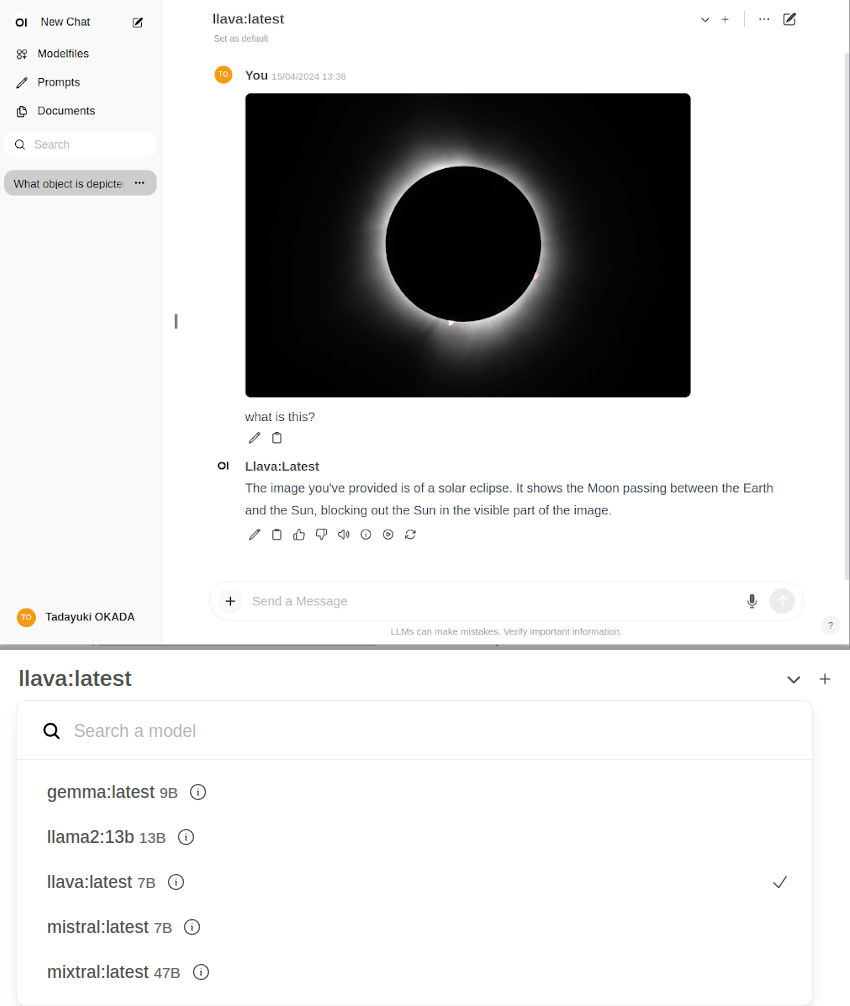
You can then navigate your browser to http://JETSON_IP:8080, and create a fake account to login (these credentials are only stored locally)
| Model | Quantization | Memory (MB) |
|---|---|---|
TheBloke/Llama-2-7B-GGUF |
llama-2-7b.Q4_K_S.gguf |
5,268 |
TheBloke/Llama-2-13B-GGUF |
llama-2-13b.Q4_K_S.gguf |
8,609 |
TheBloke/LLaMA-30b-GGUF |
llama-30b.Q4_K_S.gguf |
19,045 |
TheBloke/Llama-2-70B-GGUF |
llama-2-70b.Q4_K_S.gguf |
37,655 |
CONTAINERS
ollama:0.4.0 |
|
|---|---|
| Requires | L4T ['>=34.1.0'] |
| Dependencies | build-essential pip_cache:cu126 cuda python |
| Dockerfile | Dockerfile |
| Images | dustynv/ollama:0.4.0-r36.4.0 (2024-11-09, 3.3GB) |
ollama:0.5.1 |
|
|---|---|
| Requires | L4T ['>=34.1.0'] |
| Dependencies | build-essential pip_cache:cu126 cuda python |
| Dockerfile | Dockerfile |
| Images | dustynv/ollama:0.5.1-r36.4.0 (2024-12-12, 3.3GB) |
ollama:0.5.5 |
|
|---|---|
| Requires | L4T ['>=34.1.0'] |
| Dependencies | build-essential pip_cache:cu126 cuda python |
| Dockerfile | Dockerfile |
ollama:0.5.7 |
|
|---|---|
| Requires | L4T ['>=34.1.0'] |
| Dependencies | build-essential pip_cache:cu126 cuda python |
| Dockerfile | Dockerfile |
| Images | dustynv/ollama:0.5.7-r36.4.0 (2025-01-30, 3.1GB) |
ollama:0.6.7 |
|
|---|---|
| Requires | L4T ['>=34.1.0'] |
| Dependencies | build-essential pip_cache:cu126 cuda python |
| Dockerfile | Dockerfile |
ollama:0.7.0 |
|
|---|---|
| Requires | L4T ['>=34.1.0'] |
| Dependencies | build-essential pip_cache:cu126 cuda python |
| Dockerfile | Dockerfile |
ollama:0.8.0 |
|
|---|---|
| Requires | L4T ['>=34.1.0'] |
| Dependencies | build-essential pip_cache:cu126 cuda python |
| Dockerfile | Dockerfile |
ollama:0.9.6 |
|
|---|---|
| Aliases | ollama |
| Requires | L4T ['>=34.1.0'] |
| Dependencies | build-essential pip_cache:cu126 cuda python |
| Dependants | jetson-copilot langchain:samples llama-index:samples |
| Dockerfile | Dockerfile |
ollama:0.10.0 |
|
|---|---|
| Requires | L4T ['>=34.1.0'] |
| Dependencies | build-essential pip_cache:cu126 cuda python |
| Dockerfile | Dockerfile |
CONTAINER IMAGES
| Repository/Tag | Date | Arch | Size |
|---|---|---|---|
dustynv/ollama:0.4.0-r36.4.0 |
2024-11-09 |
arm64 |
3.3GB |
dustynv/ollama:0.5.1-r36.4.0 |
2024-12-12 |
arm64 |
3.3GB |
dustynv/ollama:0.5.7-r36.4.0 |
2025-01-30 |
arm64 |
3.1GB |
dustynv/ollama:0.6.3-r36.4.0 |
2025-03-31 |
arm64 |
5.0GB |
dustynv/ollama:0.6.8-r36.4 |
2025-05-06 |
arm64 |
5.1GB |
dustynv/ollama:0.6.8-r36.4-cu126-22.04 |
2025-05-06 |
arm64 |
5.1GB |
dustynv/ollama:main-r36.4.0 |
2025-03-31 |
arm64 |
5.0GB |
dustynv/ollama:r35.4.1 |
2024-06-25 |
arm64 |
5.4GB |
dustynv/ollama:r36.2.0 |
2024-09-02 |
arm64 |
3.5GB |
dustynv/ollama:r36.3.0 |
2024-09-30 |
arm64 |
3.5GB |
dustynv/ollama:r36.4.0 |
2025-04-09 |
arm64 |
5.0GB |
dustynv/ollama:r36.4.0-cu128-24.04 |
2025-04-09 |
arm64 |
4.2GB |
dustynv/ollama:r36.4.3 |
2025-03-11 |
arm64 |
5.0GB |
Container images are compatible with other minor versions of JetPack/L4T:
• L4T R32.7 containers can run on other versions of L4T R32.7 (JetPack 4.6+)
• L4T R35.x containers can run on other versions of L4T R35.x (JetPack 5.1+)
RUN CONTAINER
To start the container, you can use jetson-containers run and autotag, or manually put together a docker run command:
# automatically pull or build a compatible container image
jetson-containers run $(autotag ollama)

# or explicitly specify one of the container images above
jetson-containers run dustynv/ollama:0.6.8-r36.4-cu126-22.04

# or if using 'docker run' (specify image and mounts/ect)
sudo docker run --runtime nvidia -it --rm --network=host dustynv/ollama:0.6.8-r36.4-cu126-22.04
jetson-containers runforwards arguments todocker runwith some defaults added (like--runtime nvidia, mounts a/datacache, and detects devices)
autotagfinds a container image that's compatible with your version of JetPack/L4T - either locally, pulled from a registry, or by building it.
To mount your own directories into the container, use the -v or --volume flags:
jetson-containers run -v /path/on/host:/path/in/container $(autotag ollama)To launch the container running a command, as opposed to an interactive shell:
jetson-containers run $(autotag ollama) my_app --abc xyzYou can pass any options to it that you would to docker run, and it'll print out the full command that it constructs before executing it.
BUILD CONTAINER
If you use autotag as shown above, it'll ask to build the container for you if needed. To manually build it, first do the system setup, then run:
jetson-containers build ollamaThe dependencies from above will be built into the container, and it'll be tested during. Run it with --help for build options.