

-
|
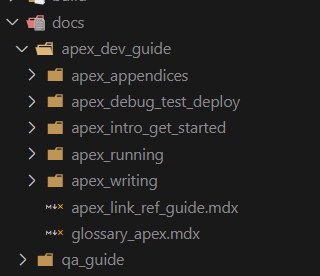
Hi All, My Docs folder has multiple sub-folders, with multiple .mdx files. Every time I try to click on the Docs tab I get a page not found error. Is there anything wrong with the setup? I'm using Docusaurus classic template. Below is my docs folder:
Here is my navbar config navbar: {
title: "Apex Docs",
logo: {
alt: "Apex Docs",
src: "img/logo.svg",
},
items: [
{
position: "left",
label: "Docs",
to: "/docs",
},
{ to: "/blog", label: "Blog", position: "left" },
// {
// href: "https://github.com/facebook/docusaurus",
// label: "GitHub",
// position: "right",
// },
],
} |
Beta Was this translation helpful? Give feedback.
Replies: 1 comment 1 reply

-
|
You must use The "docs tab" (as you call it) is not a special navbar item, it's just a regular navbar link, so you are responsible for making the link target an existing page. In your case, no page exists at |
Beta Was this translation helpful? Give feedback.

-
|
I was not aware of the |
Beta Was this translation helpful? Give feedback.


You must use
slug: /on one of your docs, so that it is hosted at the root/docs/path instead of/docs/myDocThe "docs tab" (as you call it) is not a special navbar item, it's just a regular navbar link, so you are responsible for making the link target an existing page. In your case, no page exists at
/docspath so this leads to a 404. Make sure/docspage exist before linking to it.