



An authenticated, NAS-friendly yt-dlp download queue for video, audio, and subtitles. Run it on Synology, another NAS, or any Docker host and manage downloads from a responsive web dashboard.
Current release: 26.0713 · Architectures: linux/amd64, linux/arm64
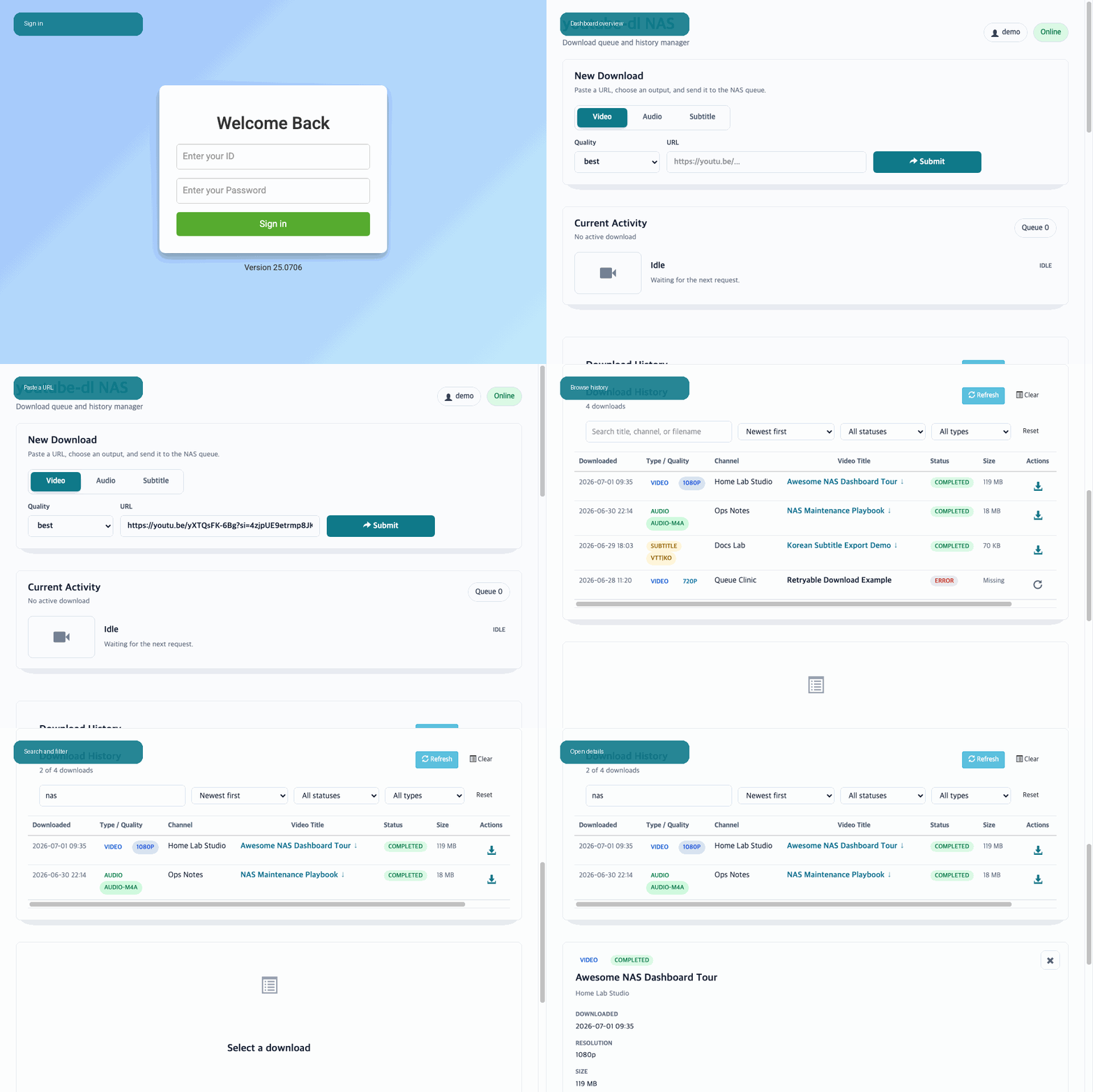
docker run -d \
  --name youtube-dl-nas \
  --restart unless-stopped \
  -e MY_ID=nas-user \
  -e MY_PW=change-this-password \
  -e TZ=Asia/Seoul \
  -v /volume2/youtube-dl:/downfolder \
  -v /volume2/docker/youtube-dl-nas:/usr/src/app/metadata \
  -p 8080:8080 \
  modenaf360/youtube-dl-nas:latest
Open http://YOUR_NAS:8080, sign in with MY_ID and MY_PW, accept the Terms of Use on first launch, and submit a URL.
The second volume is strongly recommended. It preserves download history, terms acceptance, and signed-session state across container recreation.
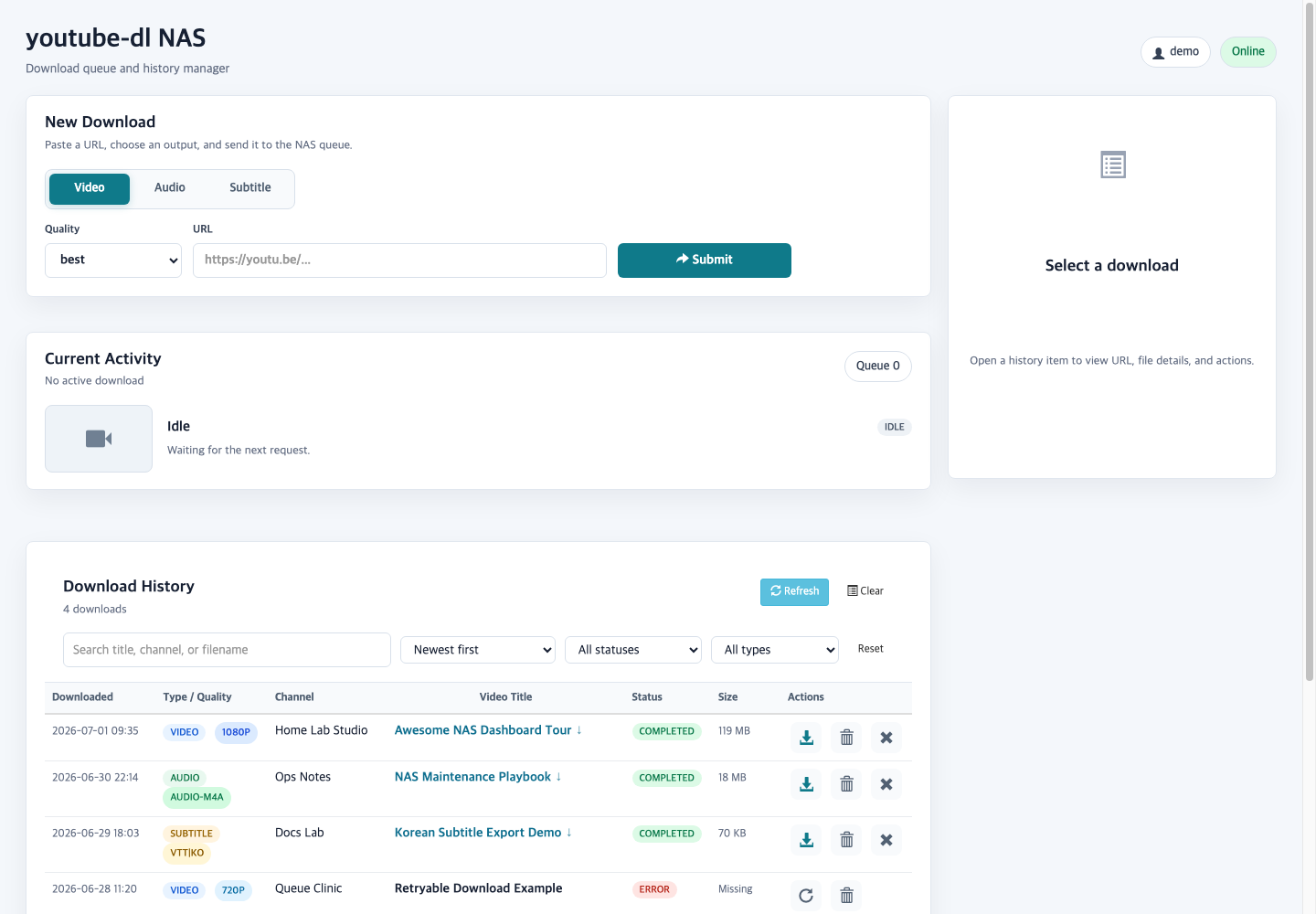
- Video up to 2160p, audio-only M4A/MP3, and SRT/VTT subtitle downloads.
- Authenticated queue with live progress, transfer speed, ETA, and the ordered list of waiting jobs.
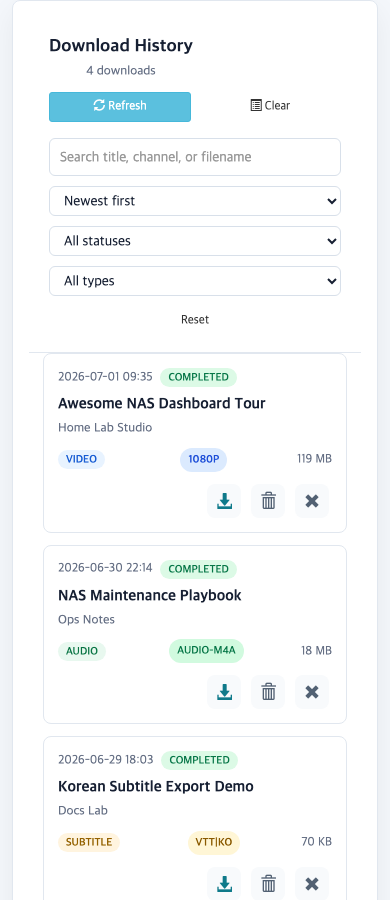
- Searchable download history with compact list and thumbnail grid views, filters, newest-first sorting, and 20-item pages.
- Mounted-file discovery for existing files in
/downfolder, including files without saved metadata. - Inline video/audio preview, retry, browser download, history-only delete, and physical-file delete actions.
- Subtitle QA for SRT/VTT/ASS/SSA files with
nlptuttiCER/WER/CRR metrics and keyword preservation. - Android PWA sharing, Android local-HTTP Shortcuts, and an installable iOS Shortcut.
- REST API with normal ID/password authentication and an optional Bearer token.
yt-dlp,yt-dlp-ejs, and Deno updates at startup and every hour by default.- Current
nlptuttiinstallation or upgrade whenever a new container starts. - Container health check plus PUID, PGID, and UMASK support.
| Container path | Purpose |
|---|---|
/downfolder |
Downloaded and pre-existing media files |
/usr/src/app/metadata |
History, terms acceptance, and session state |
| Variable | Required | Default | Purpose |
|---|---|---|---|
MY_ID |
Yes | - | Dashboard and REST login ID |
MY_PW |
Yes | - | Dashboard and REST password |
TZ |
No | System default | Container time zone, such as Asia/Seoul |
APP_PORT |
No | 8080 |
App port when using host networking |
PUID / PGID |
No | 0 |
Owner for new download and state files |
UMASK |
No | 022 |
File creation mask |
PROXY |
No | Empty | Proxy passed to yt-dlp |
YTDLP_COOKIES_FILE |
No | Empty | Mounted Netscape-format cookie file |
YTDLP_EXTRA_ARGS |
No | Empty | Administrator-controlled extra yt-dlp arguments |
NLPTUTTI_AUTO_UPDATE |
No | true |
Install or upgrade nlptutti at new-container startup for Subtitle QA |
NLPTUTTI_UPDATE_TIMEOUT |
No | 180 |
Runtime package-update timeout in seconds |
YDLNAS_API_TOKEN |
No | Empty | Optional Bearer token; ID/password remains supported |
COOKIE_SECURE |
No | false |
Set true behind an HTTPS-only reverse proxy |
See the complete Docker options for updater controls and deployment examples.
git clone https://github.com/hyeonsangjeon/youtube-dl-nas.git
cd youtube-dl-nas
cp .env.example .env
# Set MY_ID and MY_PW in .env
docker compose up -d- Android + HTTPS: install the dashboard as a PWA and share links to youtube-dl NAS.
- Android + local HTTP: import the HTTP Shortcuts template and run 1. Configure NAS once.
- iPhone / iPad: install the signed Download to NAS Shortcut.
Open the English/Korean mobile setup guide for direct installation links. GitHub Pages hosts only the guide and import files; shared URLs and credentials travel directly between the phone and the NAS.
| Tag | Use |
|---|---|
latest |
Current tested default-branch image |
26.0713 |
Current pinned release |
sha-<commit> |
Immutable build for a specific Git commit |
v0_1 |
Historical versioned Docker release from November 2018 |
Both current tags publish OCI manifests for AMD64 and ARM64. Pin 26.0713 when reproducibility matters; use latest to follow the current stable branch.
docker pull modenaf360/youtube-dl-nas:26.0713curl http://YOUR_NAS:8080/healthA healthy container returns HTTP 200. The image also includes a Docker HEALTHCHECK.
- Source and full documentation
- Installation and mobile manual
- Releases
- Changelog
- Security policy
- Issue tracker
Use this project only for content you are authorized to download. Users are responsible for following applicable laws and the terms of the source service. See the project's legal disclaimer.
MIT License · Maintained since 2018