Personal development environment configuration files managed with GNU Stow.
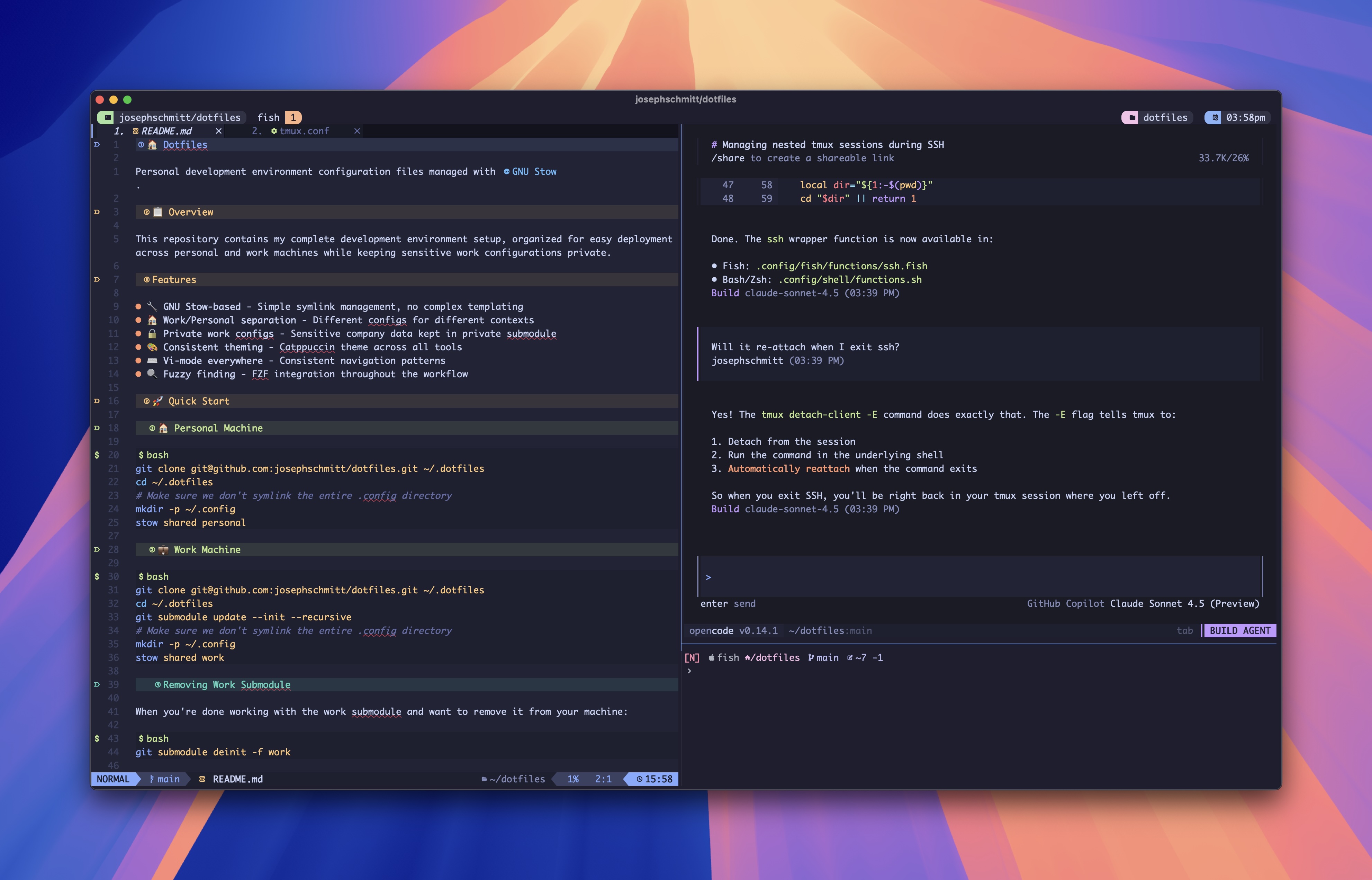
Read the blog post: The Tools That Make My Terminal Work — A deep dive into how these configurations come together into a cohesive workflow.
This repository contains my complete development environment setup, organized for easy deployment across personal and work machines while keeping sensitive work configurations private.
- 🔧 GNU Stow-based - Simple symlink management, no complex templating
- ❄️ Nix-darwin managed - Declarative macOS system configuration with reproducible environments
- 🏠 Work/Personal separation - Different configs for different contexts
- 🔒 Private work configs - Sensitive company data kept in private submodule
- 🎨 Consistent theming - Tokyo Night and Catppuccin themes across tools
- ⌨️ Vi-mode everywhere - Consistent navigation patterns
- 🔍 Fuzzy finding - FZF integration throughout the workflow
On a brand-new Mac with nothing but a shell, clone the repo and run the interactive bootstrap:
git clone git@github.com:josephschmitt/dotfiles.git ~/.dotfiles
cd ~/.dotfiles
./install.sh --bootstrap
--bootstrap is idempotent and handles each step only if needed:
- Generates an SSH key (and pauses for you to add it to GitHub)
- Offers to rename the host via
scutil - Installs Nix if it's missing
- Creates an empty
shared/.config/nix-darwin/machines/<hostname>.nixfor new hosts (auto-discovered by the flake — no manual edits) - Bootstraps nix-darwin on first run, or calls
nix_rebuildthereafter - Prompts to initialize private submodules
- Runs profile
.hooks/pre-stow.shscripts (install deps, remove conflicting files) - Runs
stowwith profiles you pick (defaults toshared personalon macOS) - Runs profile
.hooks/post-stow.shscripts (TPM install, bat cache rebuild)
cd ~/.dotfiles
nix_rebuild                    # Apply nix-darwin config
./install.sh shared personal # Symlink user-level configscd ~/.dotfiles
git submodule update --init --recursive
nix_rebuild # Auto-detects work machines via hostname
./install.sh shared workWhen you're done working with the work submodule and want to remove it from your machine:
git submodule deinit -f workThis clears the work/ directory and unregisters the submodule without affecting the main repository.
git clone git@github.com:josephschmitt/dotfiles.git ~/.dotfiles
cd ~/.dotfiles

# Install user-level configuration files
./install.sh shared ubuntu-server
See the ubuntu-server README for details on the Nix configuration and system services included.
- 🐚 Multi-Shell Setup: Fish (primary), Zsh (secondary), Bash (fallback)
- Shared configuration modules to eliminate duplication
- POSIX-compliant environment setup across all shells
- macOS login shell compatibility
- ✏️ Editors:
- Neovim (Kickstart) - Default, mapped to
nvim/vimcommands - Neovim (AstroVim) - Available via
astrovimalias - Neovim (LazyVim) - Available via
lazyvimalias - Helix - Secondary modal editor for quick edits
- Neovim (Kickstart) - Default, mapped to
- 💻 Terminal: Ghostty with optimized configuration
- 🔀 Multiplexer: tmux with plugin ecosystem, Zellij as alternative
- 🌳 Version Control: Git with comprehensive aliases
- ❄️ System Management: nix-darwin for declarative macOS configuration
- 📦 Package Management: Nix packages + Homebrew integration
- 🌐 Languages: Node.js, Rust, Python, Go configurations
- 🔨 Package Managers: pnpm, bun, cargo, asdf, volta
- ⚡ CLI Tools: FZF, EZA, Yazi, sesh, leader-key, ripgrep, fd, and more
- 🌶️ Git workflow optimization with git-spice and lazygit
- 🔍 Fuzzy finding for files, history, and processes
- 💾 Session management with sesh and tmux persistence
- ⌨️ Custom keybindings for efficient navigation
- 🤖 AI assistance with OpenCode integration
This configuration includes three complete Neovim setups that coexist independently via Neovim's NVIM_APPNAME feature:
Location: shared/.config/nvim/
Aliases: nvim, vim (bare command, no NVIM_APPNAME)
A bespoke, from-scratch configuration built on kickstart.nvim. Every plugin is intentionally chosen and understood.
Features:
- Snacks dashboard with custom JoeVim ASCII art
- Neo-tree file explorer with tmux-style navigation
- Snacks picker (fuzzy finder for files, grep, LSP symbols)
- Bufferline tab bar with ordinal numbering
- Tokyonight Moon theme with custom highlights
- Fast startup (~50ms) via aggressive lazy-loading
Documentation: See shared/.config/nvim/README.md
Location: shared/.config/astronvim/
Aliases: astrovim
Built on AstroVim, a community-driven Neovim distribution.
Features:
- Community-driven plugin ecosystem (AstroCommunity)
- Catppuccin Mocha theme with custom dashboard
- Multi-cursor editing, Yazi file manager integration
- Comprehensive window/tab management keybindings
Documentation: See shared/.config/astronvim/README.md
Location: shared/.config/lazyvim/
Aliases: lazyvim
Built on LazyVim, a feature-rich Neovim starter configuration.
Features:
- Full IDE experience with LSP, completion, debugging
- Extensive plugin ecosystem via lazy.nvim
- AI-powered coding (Avante, CodeCompanion, Copilot)
Documentation: See shared/.config/lazyvim/README.md
All three configurations are completely independent (separate plugins, data, state, cache) and coexist without conflicts.
Currently: The nvim and vim commands launch the Kickstart config. AstroVim and LazyVim are accessed via their respective aliases (which set NVIM_APPNAME).
Why three configs? The Kickstart config is the daily driver — built from scratch for full understanding. AstroVim and LazyVim serve as references and fallbacks.
dotfiles/
├── shared/          # Common configurations for all machines
│   ├── .config/     # Application configurations
│   │   ├── nix-darwin/    # Declarative macOS system configuration
│   │   ├── fish/          # Fish shell configuration
│   │   ├── nvim/          # Neovim configuration (Kickstart — default)
│   │   ├── lazyvim/       # Neovim configuration (LazyVim)
│   │   ├── astronvim/     # Neovim configuration (AstroVim)
│   │   ├── tmux/          # Tmux multiplexer
│   │   ├── ghostty/       # Ghostty terminal emulator
│   │   └── ...            # Other tool configurations
│   ├── bin/         # Utility scripts (nix_rebuild wrapper, etc.)
│   ├── .zshrc       # Shell configurations
│   └── README.md    # Detailed setup instructions
├── personal/        # Personal-specific configurations
│   ├── .config/nix-darwin/machines/mac-mini.nix  # Personal machine
│   └── .gitconfig   # Personal git settings
├── ubuntu-server/   # Ubuntu server-specific configurations
│   └── .config/nix/ # Nix configuration for Ubuntu servers
└── work/            # Work-specific configurations (private submodule)
For complete setup instructions, troubleshooting, and maintenance information, see:
- Setup Guide - Detailed installation and configuration instructions
- Nix-darwin Configuration - System-level package and settings management
A major component of this setup is nix-darwin, which provides declarative macOS system configuration. This means your entire system setup—packages, applications, system preferences, and more—is defined as code.
Reproducibility: Define your entire system configuration once, apply it consistently across multiple machines. No more manually clicking through System Preferences or running installation scripts.
Rollbacks: Every system change creates a new "generation." If something breaks, roll back to a previous working state instantly.
Machine-specific configurations: Share common settings across all machines while maintaining machine-specific customizations (home server vs. work laptop).
- System packages: CLI tools, development utilities (installed via Nix)
- GUI applications: Apps like Ghostty, VS Code, Arc browser (via Homebrew integration)
- System preferences: Dock position, Finder settings, keyboard behavior, etc.
- Services: Background daemons (e.g., Docker Compose on home server)
- Fonts: Nerd Fonts for terminal compatibility
# Apply system configuration changes
nix_rebuild

# Update package versions
nix_update

# Both: update packages then rebuild
nix_update && nix_rebuild
The nix_rebuild alias intelligently detects whether you're on a personal or work machine and applies the appropriate configuration automatically.
- Nix-darwin handles: System-wide packages, GUI apps, macOS preferences
- Stow handles: User-level configuration files (shell configs, editor settings, etc.)
This separation means nix-darwin manages what's installed and how the system behaves, while your dotfiles manage how those tools are configured.
For detailed nix-darwin setup, machine configurations, and troubleshooting, see the Nix-darwin README.
This dotfiles repository is built around several key principles that prioritize maintainability, Unix best practices, and real-world usability.
"Files are files" - No complex templating, generation, or build systems. What you see in the repository is exactly what gets deployed. This makes the configuration:
- Debuggable: Easy to trace issues to specific files
- Portable: Works anywhere without special tooling
- Understandable: New contributors can immediately see what's happening
- Reliable: No hidden dependencies or generation failures
The shell configuration follows traditional Unix conventions while acknowledging modern multi-shell workflows:
Traditional Unix Approach:
.profile- POSIX-compliant environment setup (PATH, exports)- Shell-specific rc files - Interactive configuration only
- Proper sourcing hierarchy - Login vs non-login shell handling
Modern Adaptations:
- Shared modules (
.config/shell/) - Eliminate duplication across shells - macOS compatibility - Proper login shell handling
- Multi-shell support - Fish, Zsh, and Bash coexist harmoniously
Why This Matters:
- No duplication: Environment variables and aliases defined once
- Consistency: Same behavior across all shells
- Flexibility: Each shell can leverage its unique features
- Maintainability: Changes propagate automatically
Work/Personal Isolation:
- Public sharing safe - Personal configs can be shared openly
- Private submodule - Work-specific configs stay in company-controlled repository
- Context switching - Different git identities and tool configurations per environment
- Compliance friendly - Meets corporate security requirements
Real-world considerations:
- macOS compatibility - Handle platform-specific shell behavior
- Multiple package managers - Support for the tools actually used (npm, pnpm, bun, cargo, etc.)
- Fallback compatibility - Bash support for systems where Fish/Zsh aren't available
- Tool integration - Configurations work together (tmux + vim navigation, fzf everywhere)
Self-documenting approach:
- Clear file organization - Purpose obvious from structure
- Comprehensive READMEs - Both for humans and AI assistants
- Inline comments - Explain non-obvious decisions
- Philosophy preservation - Guidelines prevent architectural drift
This philosophy ensures the dotfiles remain maintainable and useful as tools, workflows, and requirements evolve over time.