| products |
|
|---|
import { CodeTabs, CodeTab, Table } from "docs-ui"
export const metadata = {
title: Links between Order Module and Other Modules,
}
This document showcases the module links defined between the Order Module and other Commerce Modules.
The Order Module has the following links to other modules:
Read-only links are used to query data across modules, but the relations aren't stored in a pivot table in the database.
First Data Model Second Data Model Type Description [OrderShippingMethod](/references/order/models/OrderShippingMethod) [ShippingOption](/references/fulfillment/models/ShippingOption) in [Fulfillment Module](../../fulfillment/page.mdx) Read-only - has one [Learn more](#fulfillment-module-shipping-option) [Order](/references/order/models/Order) [Customer](/references/customer/models/Customer) in [Customer Module](../../customer/page.mdx) Read-only - has one [Learn more](#customer-module) [Order](/references/order/models/Order) [Cart](/references/cart/models/Cart) in [Cart Module](../../cart/page.mdx) Stored - one-to-one [Learn more](#cart-module) [Order](/references/order/models/Order) [Fulfillment](/references/fulfillment/models/Fulfillment) in [Fulfillment Module](../../fulfillment/page.mdx) Stored - one-to-many [Learn more](#fulfillment-module) [Return](/references/order/models/Return) [Fulfillment](/references/fulfillment/models/Fulfillment) in [Fulfillment Module](../../fulfillment/page.mdx) Stored - one-to-many [Learn more](#fulfillment-module) [Order](/references/order/models/Order) [PaymentCollection](/references/payment/models/PaymentCollection) in [Payment Module](../../payment/page.mdx) Stored - one-to-many [Learn more](#payment-module) [OrderClaim](/references/order/models/OrderClaim) [PaymentCollection](/references/payment/models/PaymentCollection) in [Payment Module](../../payment/page.mdx) Stored - one-to-many [Learn more](#payment-module) [OrderExchange](/references/order/models/OrderExchange) [PaymentCollection](/references/payment/models/PaymentCollection) in [Payment Module](../../payment/page.mdx) Stored - one-to-many [Learn more](#payment-module) [OrderLineItem](/references/order/models/OrderLineItem) [Product](/references/product/models/Product) in [Product Module](../../product/page.mdx) Read-only - has many [Learn more](#product-module) [Order](/references/order/models/Order) [Promotion](/references/promotion/models/Promotion) in [Promotion Module](../../promotion/page.mdx) Stored - many-to-many [Learn more](#promotion-module) [Order](/references/order/models/Order) [Region](/references/region/models/Region) in [Region Module](../../region/page.mdx) Read-only - has one [Learn more](#region-module) [Order](/references/order/models/Order) [SalesChannel](/references/sales-channel/models/SalesChannel) in [Sales Channel Module](../../sales-channel/page.mdx) Read-only - has one [Learn more](#sales-channel-module)Medusa defines a read-only link between the OrderShippingMethod data model and the Fulfillment Module's ShippingOption data model. This means you can retrieve the details of an order shipping method's shipping option, but you don't manage the links in a pivot table in the database. The shipping option of an order shipping method is determined by the shipping_option_id property of the OrderShippingMethod data model.
To retrieve the shipping option of an order shipping method with Query, pass shipping_option.* in fields:
const { data: orderShippingMethods } = await query.graph({
  entity: "order_shipping_method",
  fields: [
    "shipping_option.*",
  ],
})

// orderShippingMethods[0].shipping_option
import { useQueryGraphStep } from "@medusajs/medusa/core-flows"
// ...
const { data: orderShippingMethods } = useQueryGraphStep({
entity: "order_shipping_method",
fields: [
"shipping_option.*",
],
})
// orderShippingMethods[0].shipping_optionMedusa defines a read-only link between the Order data model and the Customer Module's Customer data model. This means you can retrieve the details of an order's customer, but you don't manage the links in a pivot table in the database. The customer of an order is determined by the customer_id property of the Order data model.
To retrieve the customer of an order with Query, pass customer.* in fields:
const { data: orders } = await query.graph({
  entity: "order",
  fields: [
    "customer.*",
  ],
})

// orders[0].customer
import { useQueryGraphStep } from "@medusajs/medusa/core-flows"
// ...
const { data: orders } = useQueryGraphStep({
entity: "order",
fields: [
"customer.*",
],
})
// orders[0].customerThe Cart Module provides cart-management features.
Medusa defines a link between the Order and Cart data models. The order is linked to the cart used for the purchased.
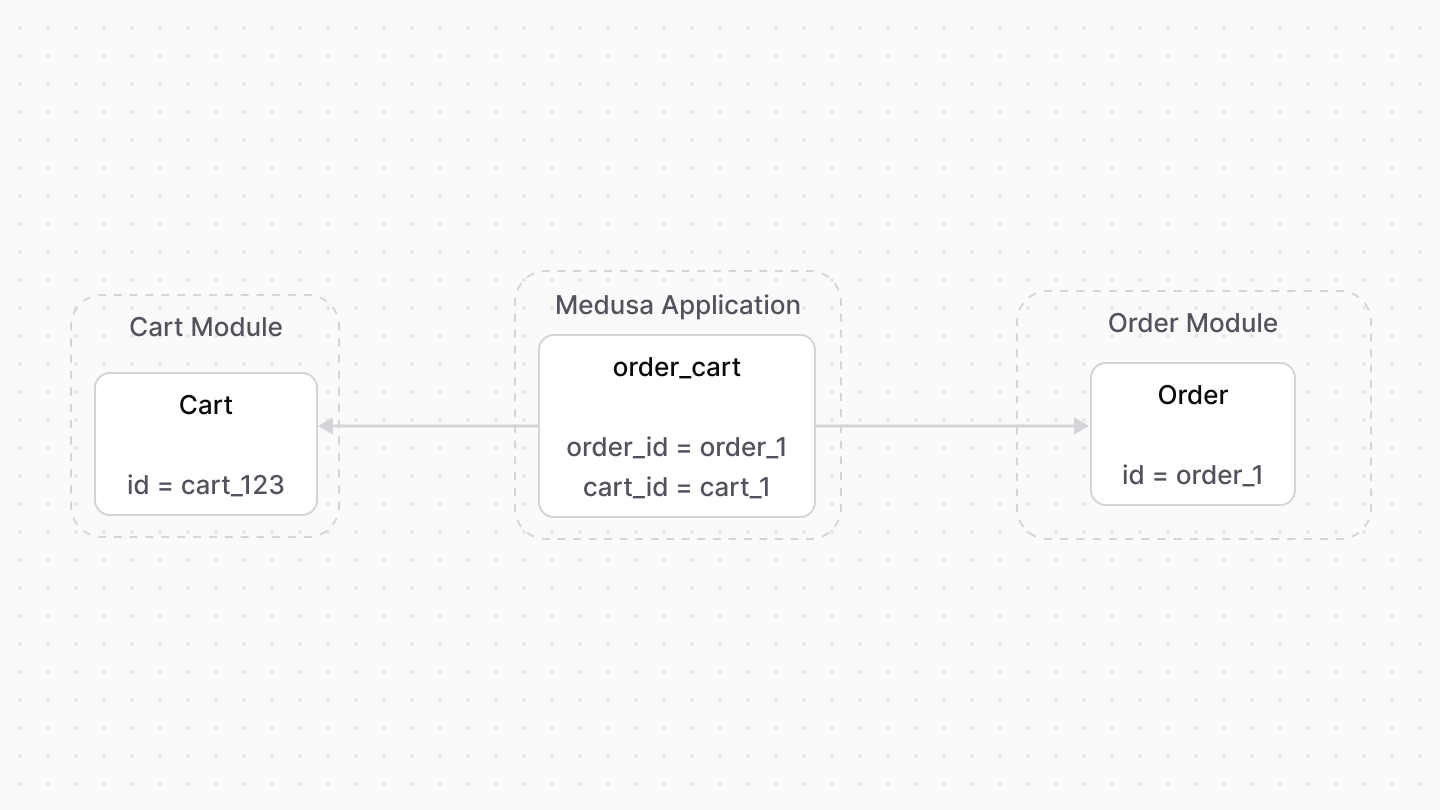
To retrieve the cart of an order with Query, pass cart.* in fields:
const { data: orders } = await query.graph({
  entity: "order",
  fields: [
    "cart.*",
  ],
})

// orders[0].cart
import { useQueryGraphStep } from "@medusajs/medusa/core-flows"
// ...
const { data: orders } = useQueryGraphStep({
entity: "order",
fields: [
"cart.*",
],
})
// orders[0].cartTo manage the cart of an order, use Link:
import { Modules } from "@medusajs/framework/utils"

// ...

await link.create({
  [Modules.ORDER]: {
    order_id: "order_123",
  },
  [Modules.CART]: {
    cart_id: "cart_123",
  },
})
import { Modules } from "@medusajs/framework/utils"
import { createRemoteLinkStep } from "@medusajs/medusa/core-flows"
// ...
createRemoteLinkStep({
[Modules.ORDER]: {
order_id: "order_123",
},
[Modules.CART]: {
cart_id: "cart_123",
},
})A fulfillment is created for an orders' items. Medusa defines a link between the Fulfillment and Order data models.
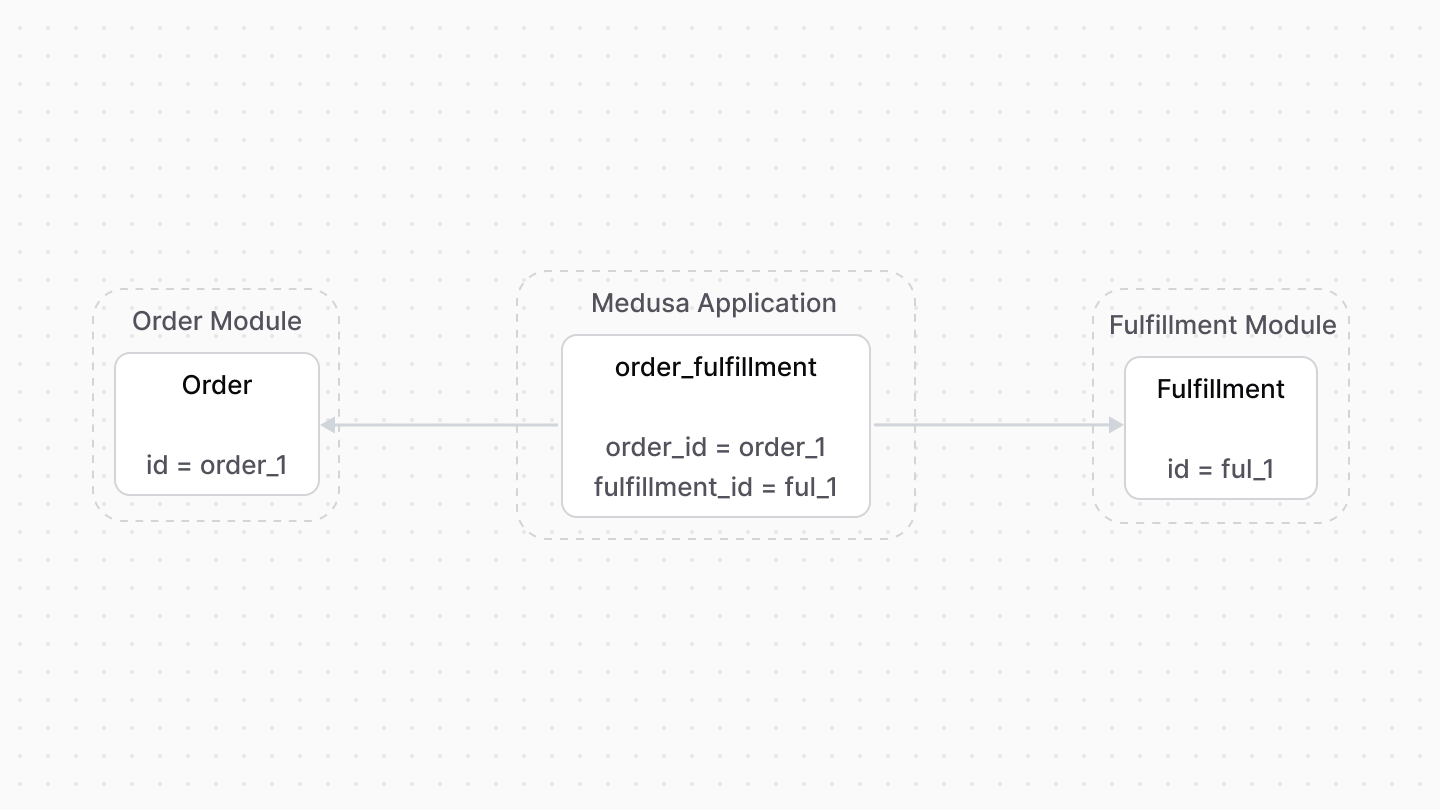
A fulfillment is also created for a return's items. So, Medusa defines a link between the Fulfillment and Return data models.

To retrieve the fulfillments of an order with Query, pass fulfillments.* in fields:
To retrieve the fulfillments of a return, pass fulfillments.* in fields.
const { data: orders } = await query.graph({
  entity: "order",
  fields: [
    "fulfillments.*",
  ],
})

// orders[0].fulfillments
import { useQueryGraphStep } from "@medusajs/medusa/core-flows"
// ...
const { data: orders } = useQueryGraphStep({
entity: "order",
fields: [
"fulfillments.*",
],
})
// orders[0].fulfillmentsTo manage the fulfillments of an order, use Link:
import { Modules } from "@medusajs/framework/utils"

// ...

await link.create({
  [Modules.ORDER]: {
    order_id: "order_123",
  },
  [Modules.FULFILLMENT]: {
    fulfillment_id: "ful_123",
  },
})
import { Modules } from "@medusajs/framework/utils"
import { createRemoteLinkStep } from "@medusajs/medusa/core-flows"
// ...
createRemoteLinkStep({
[Modules.ORDER]: {
order_id: "order_123",
},
[Modules.FULFILLMENT]: {
fulfillment_id: "ful_123",
},
})An order's payment details are stored in a payment collection. This also applies for claims and exchanges.
So, Medusa defines links between the PaymentCollection data model and the Order, OrderClaim, and OrderExchange data models.
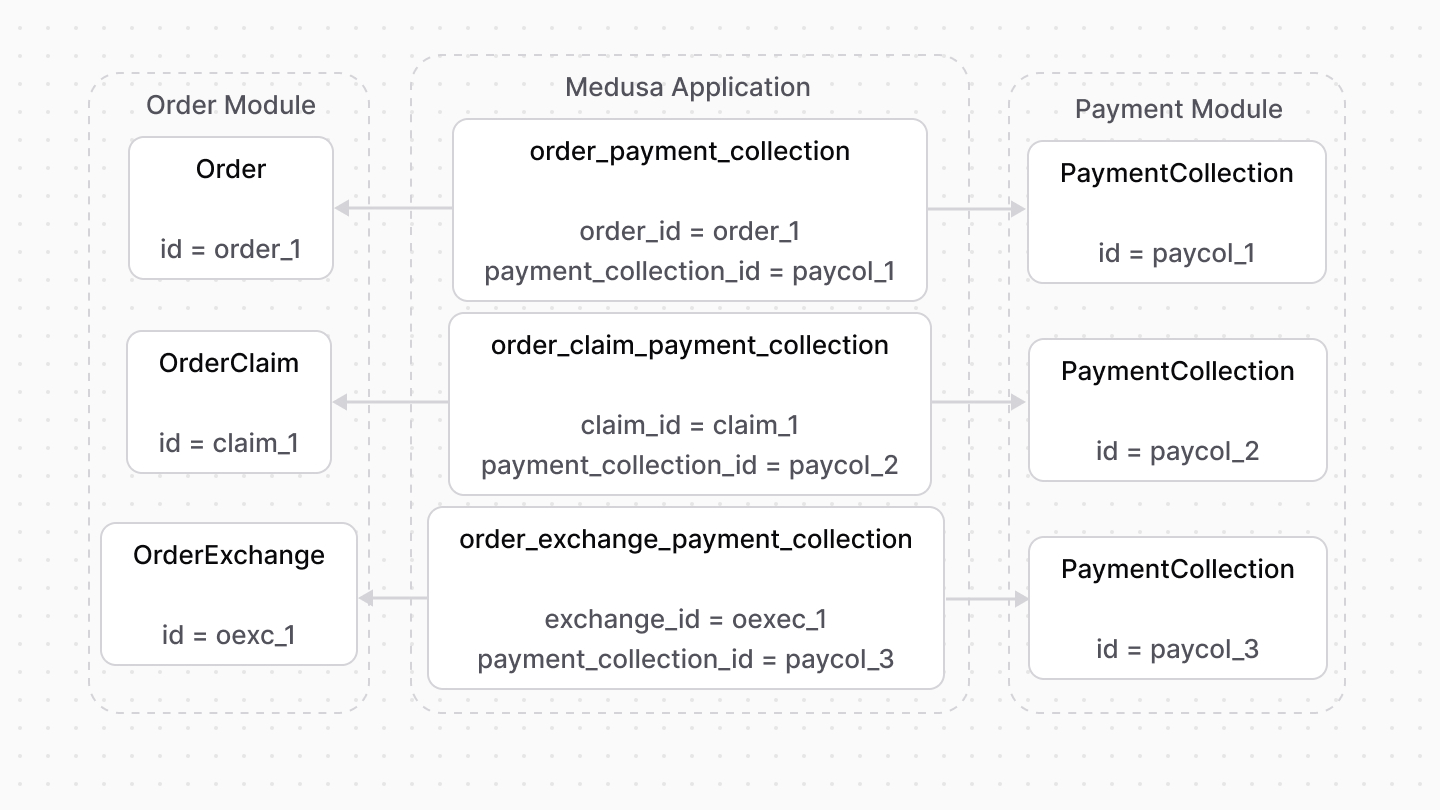
To retrieve the payment collections of an order, order exchange, or order claim with Query, pass payment_collections.* in fields:
const { data: orders } = await query.graph({
  entity: "order",
  fields: [
    "payment_collections.*",
  ],
})

// orders[0].payment_collections
import { useQueryGraphStep } from "@medusajs/medusa/core-flows"
// ...
const { data: orders } = useQueryGraphStep({
entity: "order",
fields: [
"payment_collections.*",
],
})
// orders[0].payment_collectionsTo manage the payment collections of an order, use Link:
import { Modules } from "@medusajs/framework/utils"

// ...

await link.create({
  [Modules.ORDER]: {
    order_id: "order_123",
  },
  [Modules.PAYMENT]: {
    payment_collection_id: "paycol_123",
  },
})
import { Modules } from "@medusajs/framework/utils"
import { createRemoteLinkStep } from "@medusajs/medusa/core-flows"
// ...
createRemoteLinkStep({
[Modules.ORDER]: {
order_id: "order_123",
},
[Modules.PAYMENT]: {
payment_collection_id: "paycol_123",
},
})Medusa defines read-only links between:
- the
OrderLineItemdata model and the Product Module'sProductdata model. This means you can retrieve the details of a line item's product, but you don't manage the links in a pivot table in the database. The product of a line item is determined by theproduct_idproperty of theOrderLineItemdata model. - the
OrderLineItemdata model and the Product Module'sProductVariantdata model. This means you can retrieve the details of a line item's variant, but you don't manage the links in a pivot table in the database. The variant of a line item is determined by thevariant_idproperty of theOrderLineItemdata model.
To retrieve the variant of a line item with Query, pass variant.* in fields:
To retrieve the product, pass product.* in fields.
const { data: lineItems } = await query.graph({
  entity: "order_line_item",
  fields: [
    "variant.*",
  ],
})

// lineItems.variant
import { useQueryGraphStep } from "@medusajs/medusa/core-flows"
// ...
const { data: lineItems } = useQueryGraphStep({
entity: "order_line_item",
fields: [
"variant.*",
],
})
// lineItems.variantAn order is associated with the promotion applied on it. Medusa defines a link between the Order and Promotion data models.
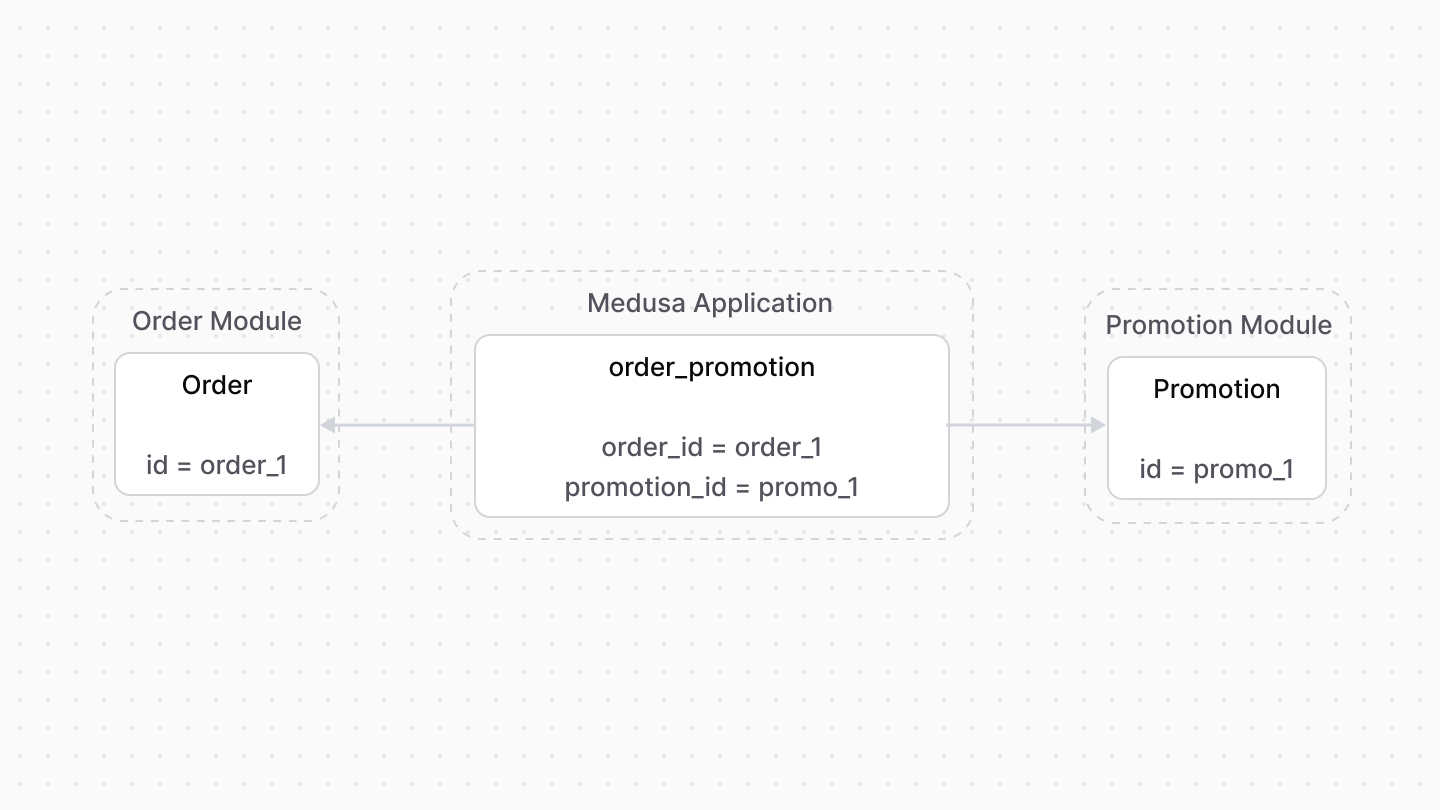
To retrieve the promotion applied on an order with Query, pass promotion.* in fields:
const { data: orders } = await query.graph({
  entity: "order",
  fields: [
    "promotions.*",
  ],
})

// orders[0].promotions
import { useQueryGraphStep } from "@medusajs/medusa/core-flows"
// ...
const { data: orders } = useQueryGraphStep({
entity: "order",
fields: [
"promotions.*",
],
})
// orders[0].promotionsTo manage the promotion of an order, use Link:
import { Modules } from "@medusajs/framework/utils"

// ...

await link.create({
  [Modules.ORDER]: {
    order_id: "order_123",
  },
  [Modules.PROMOTION]: {
    promotion_id: "promo_123",
  },
})
import { Modules } from "@medusajs/framework/utils"
import { createRemoteLinkStep } from "@medusajs/medusa/core-flows"
// ...
createRemoteLinkStep({
[Modules.ORDER]: {
order_id: "order_123",
},
[Modules.PROMOTION]: {
promotion_id: "promo_123",
},
})Medusa defines a read-only link between the Order data model and the Region Module's Region data model. This means you can retrieve the details of an order's region, but you don't manage the links in a pivot table in the database. The region of an order is determined by the region_id property of the Order data model.
To retrieve the region of an order with Query, pass region.* in fields:
const { data: orders } = await query.graph({
  entity: "order",
  fields: [
    "region.*",
  ],
})

// orders[0].region
import { useQueryGraphStep } from "@medusajs/medusa/core-flows"
// ...
const { data: orders } = useQueryGraphStep({
entity: "order",
fields: [
"region.*",
],
})
// orders[0].regionMedusa defines a read-only link between the Order data model and the Sales Channel Module's SalesChannel data model. This means you can retrieve the details of an order's sales channel, but you don't manage the links in a pivot table in the database. The sales channel of an order is determined by the sales_channel_id property of the Order data model.
To retrieve the sales channel of an order with Query, pass sales_channel.* in fields:
const { data: orders } = await query.graph({
  entity: "order",
  fields: [
    "sales_channel.*",
  ],
})

// orders[0].sales_channel
import { useQueryGraphStep } from "@medusajs/medusa/core-flows"
// ...
const { data: orders } = useQueryGraphStep({
entity: "order",
fields: [
"sales_channel.*",
],
})
// orders[0].sales_channel