This is template of a simple agent written with the Vercel AI SDK and using Restate for resilience and observability.
This example is for deployments where the agent is served directly, and not as part of a NextJS app. Use this template when deploying the agent on generic containers, FaaS (Lambda, Fly.io, etc.) or for simply experimenting locally.
Check out the AI Quickstart to run this example. s
-
Export your OpenAI key as an environment variable. If you want to use another model (e.g., Anthrophic Claude, Google Gemini) you need to change the dependencies in
package.jsonand the model insrc/app.tsaccordingly:export OPENAI_API_KEY=your_openai_api_key -
Start the Restate Server in a separate shell. The server is the durable orchstrator. It is queue, workflow engine, K/V store in one.
npx @restatedev/restate-server@latest
-
Start the agent.
npm install
npm run dev
-
Register the services, to let Restate Server know about the agent. The Server can now proxy invocations to the agent, adding durable execution that way.
npx @restatedev/restate -y deployments register localhost:9080
-
All should be ready. Now send a request to your agent. Note that we target Restate Server's endpoint (8080) because the server proxies requests to the service, to make them durable.
curl localhost:8080/agent/run --json '{"prompt": "What is the weather in San Francisco?"}'Returns:
The weather in San Francisco is currently 23°C and sunny.
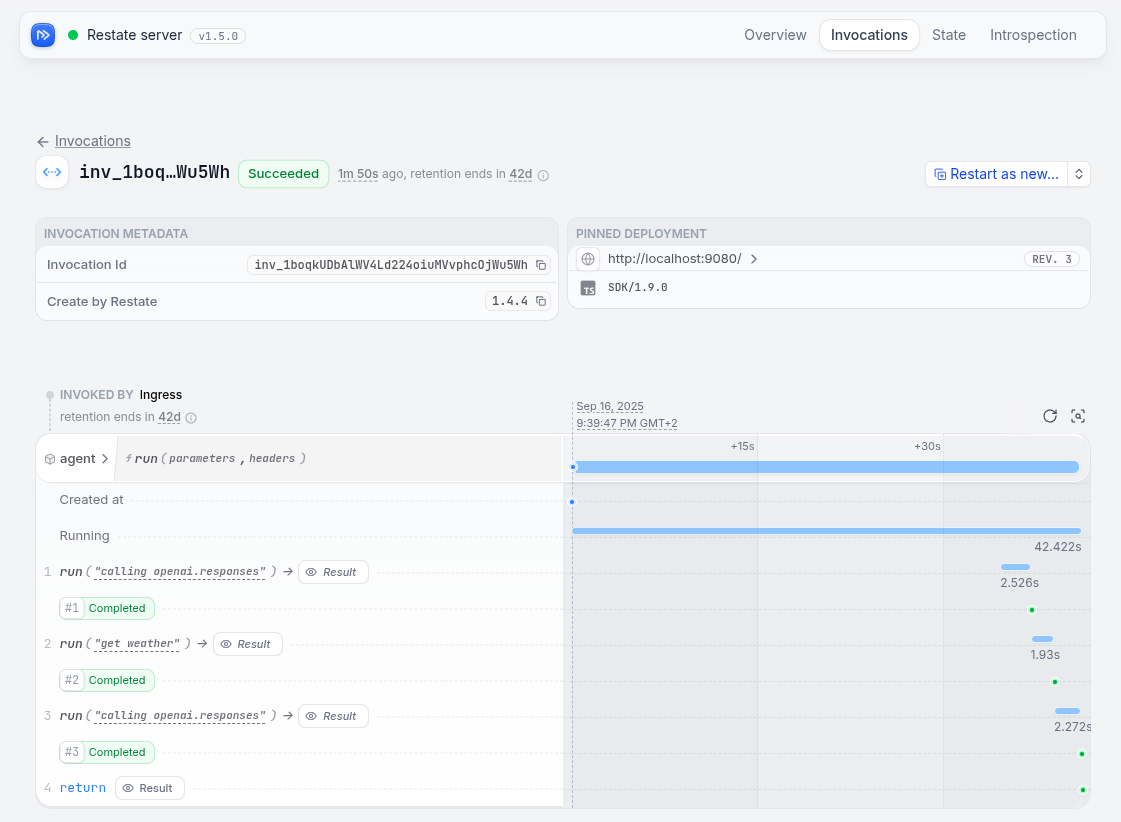
Check the Restate UI (localhost:9080) to see the journals of your invocations.
Restate does not allow executing tools in parallel, to avoid non-deterministic behavior on retries/resume. We are working on a solution to this.
If you use Claude Code or Codex, then the Restate plugin will automatically be installed. For Cursor, consult the skills repo README.
Plugin repo: https://github.com/restatedev/skills/tree/main