


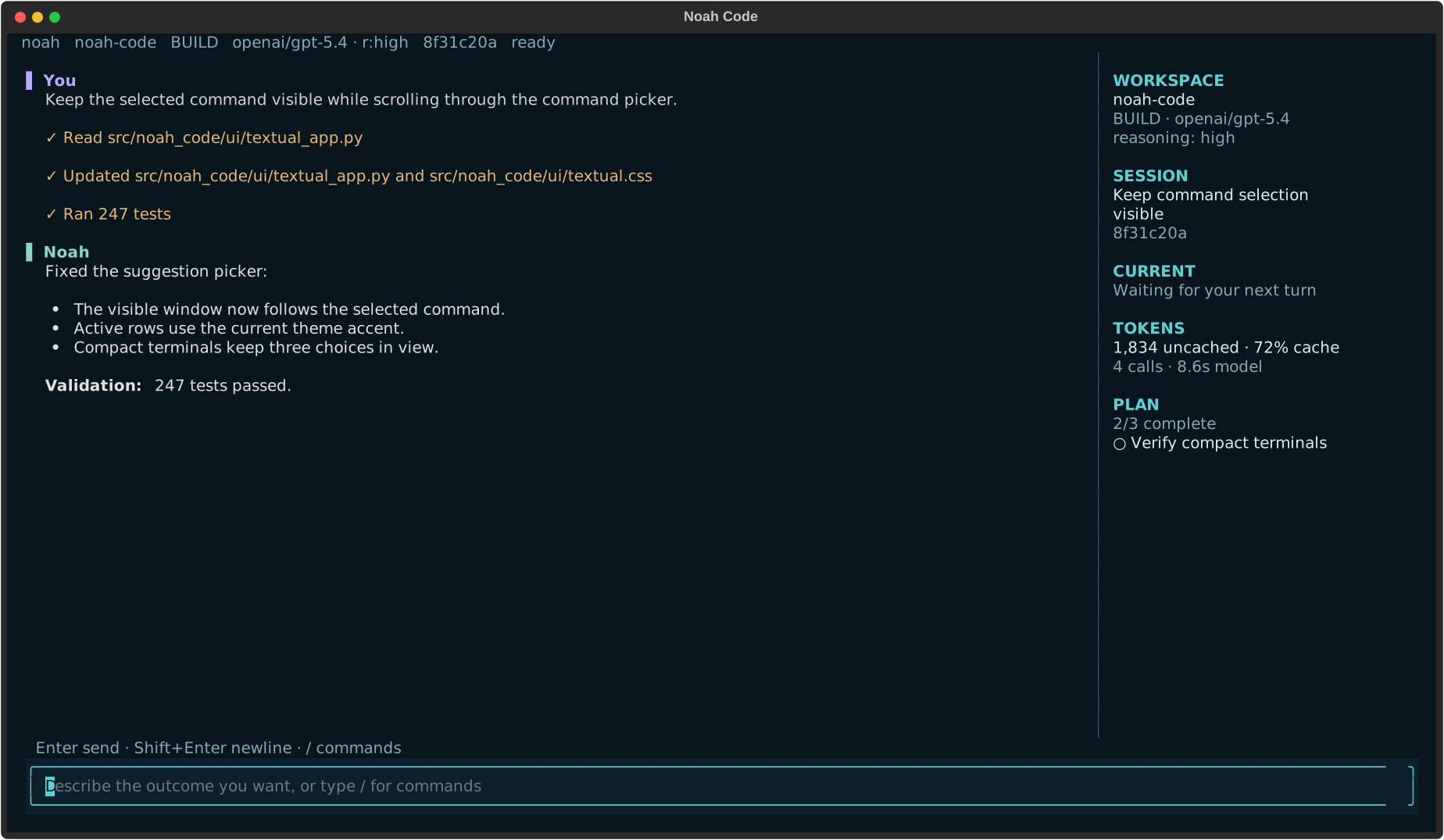
The real Textual interface, captured from a deterministic Noah Code session.
Noah keeps the conversation central while the context rail tracks live work, Git changes, session, model usage, and the current plan. Tool execution stays visible, completed work compacts into readable records, and every session remains scoped to its repository.
Built on the NVIDIA OO Agents (NOOA) runtime.
Install Noah Code and its managed Python runtime with one command:
curl -LsSf https://raw.githubusercontent.com/skundu42/noah-code/main/install.sh | shOpen a new terminal, move into a repository, and start Noah:
cd your-project
noah .
Noah is compatible with macOS on Apple Silicon and Intel, plus Linux on arm64 and x86_64.
On the first launch, the TUI walks through provider, API key, model, and reasoning setup. Keys are stored in Noah's private auth file with owner-only permissions; they are never written to project configuration or session history.
- Repository-aware exploration. Search with ripgrep, inspect Git history and diffs, navigate symbols through language servers, and use an mtime-cached repository map.
- Controlled edits. Apply anchored replacements or atomic multi-file patches with exact preimages, concurrent-change detection, immediate diagnostics, and rollback.
- Visible execution. Stream bounded shell output while commands run, keep servers and watchers
as managed background jobs, and revisit activity details with
F2. - Crash-safe work. Durable file intents roll back interrupted workspace-tool writes, Git checkpoints protect shell-driven changes, and interrupted model runs resume after restart.
- Persistent sessions. Resume repository-scoped conversations, steering, todos, model choices, budgets, background-job logs, and compacted context without losing full tool results.
- Token-efficient by construction. Lean tool-output bounds with disk-backed recall, condensed
subagent results, cache-stable request prefixes (volatile status arrives as appended events),
and pointer-eviction compaction — measured live with
/tokens. - Explicit control. Switch between implementation-focused build mode and read-only
plan mode, with ordered
allow,ask, anddenypermission rules. - Extensible workflows. Add slash commands, opt-in skills, MCP servers, or markdown subagents;
attach
@filesand images when the task needs more context. - Long-running by design. Provider retries and configurable fallback models handle transient
failures, while workspace leases, bounded artifacts, durable process ownership, and
/healthkeep unattended sessions observable.
Noah follows repository instructions from AGENTS.md, CLAUDE.md, and
.noah-code/instructions.md.
Describe the outcome you want rather than prescribing every edit:
Find the cause of the failing parser tests, implement the smallest safe fix, and run the
focused test file.
Useful launch modes:
# Open another workspace
noah /path/to/repository

# Inspect and plan without editing
noah --mode plan .

# Run one task and exit
noah run "Explain how authentication is wired" .

# Allow actions that would normally ask; explicit deny rules still apply
noah run --auto "Fix the failing unit test" .

# Resume previous work
noah --continue .
noah --session SESSION_ID .

# Use the line-oriented interface
noah --console .
Check the installation and resolved configuration with:
noah --version
noah doctor .
noah config show .
noah update --check
The package also installs noah-code and nc as equivalent entry points. Because nc commonly
means netcat, noah or noah-code is recommended.
Type / to search the full command and configuration reference. The most common controls are:
| Control | Action |
|---|---|
Enter |
Send the current prompt or accept a selected suggestion |
Shift+Enter |
Insert a newline |
Drag, then Cmd+C / Ctrl+Shift+C |
Select and copy TUI text |
Ctrl+Shift+C with no selection |
Copy the latest Noah reply |
Ctrl+G |
Open the searchable skills picker |
Ctrl+] |
Return to live transcript output |
Tab |
Switch between build and plan mode |
F2 |
Open execution activity |
F3 |
Open paginated conversation history |
/model |
Configure a provider or switch the session model |
/theme |
Choose Atom One Dark, Noah Ocean, Graphite, or High Contrast |
/diff |
Review staged and unstaged changes |
/undo / /redo |
Traverse the persistent edit journal |
/checkpoints |
List rolling Git worktree checkpoints |
/health |
Inspect durable run, job, inbox, event, and artifact state |
/tokens |
Inspect tokens, cache usage, prefix stability, model wait, and tool output |
/efficiency |
Switch between fast, balanced, and deep budgets |
On wide terminals, the side rail prioritizes the active operation, Git branch and change counts, session, model usage, update state, and plan. Git status is refreshed in the background at turn boundaries, so the animated working state stays responsive. The main pane remains centered on the large Noah wordmark until the first prompt, then becomes the conversation and execution timeline.
Start a new session with noah ., resume the latest repository session with
noah --continue ., or reopen an exact session with noah --session SESSION_ID .. Inside the TUI,
use Ctrl+O, /sessions, or /continue.
Noah stores conversational history and host runtime state separately. If the process stops during an active run, the next launch restores pending steering, usage and budget counters, durable job logs, and the original request. Incomplete workspace-tool writes are rolled back, verified orphan process groups are cleaned up, and non-interactive runs continue automatically. A request that was waiting for user input remains paused for the next user message.
By default, only one Noah process may own a checkout at a time. Use /worktree create when
independent agents need to work concurrently. See
Reliability and long-running sessions for the recovery model, provider retry
controls, quotas, and operational limits.
Noah supports OpenAI, Anthropic, OpenRouter, NVIDIA, and custom OpenAI-compatible providers. It also works with vLLM, LM Studio, Ollama, Azure OpenAI, Bedrock, Gemini, Groq, Mistral, xAI, DeepSeek, Together AI, and Perplexity.
The guided /model flow is the easiest way to configure a provider. Environment variables and
the CLI remain available for scripts and headless environments:
export OPENAI_API_KEY="..."  # or ANTHROPIC_API_KEY / OPENROUTER_API_KEY
noah providers list
noah providers add openai --model MODEL_NAME
noah .
/model MODEL changes only the current session and remembers that choice when resumed. Use
/model --global MODEL to set the default for future sessions in every repository.
For compatible reasoning models, choose default, none, minimal, low, medium, high, or
xhigh. default omits the provider parameter:
noah --model openai/MODEL --reasoning-effort high .See the provider configuration guide for
gateway-specific setup. Provider request deadlines, exponential retry, and ordered fallback models
are configured under [reliability.retries].
Noah checks PyPI for new versions at most once every 24 hours. New TUI sessions show a temporary banner when an update is available and keep the version visible in the context rail. Installation remains explicit by default:
noah update --check
noah update- Interactive interface and sessions
- Configuration, modes, permissions, and updates
- Reliability and long-running sessions
- Generated-code security
- Custom commands, skills, MCP, and tracing
- Development, CI, and releases
- Release notes
uv sync --extra dev --extra mcp --extra tracing
uv run ruff check src tests
uv run pytest tests
uv build
See the development guide for platform checks and the release process.
Apache-2.0. NOOA remains separately licensed by its upstream project.
Built on NVIDIA OO Agents (NOOA). Thanks to the NVIDIA NeMo team and NOOA contributors for the agent runtime that powers Noah Code.