



RL-Insight Recipe provides offline performance insight capabilities for RL training frameworks. It defines a general pipeline for parsing profiling data and rendering timeline, heatmap, and memory-analysis views.
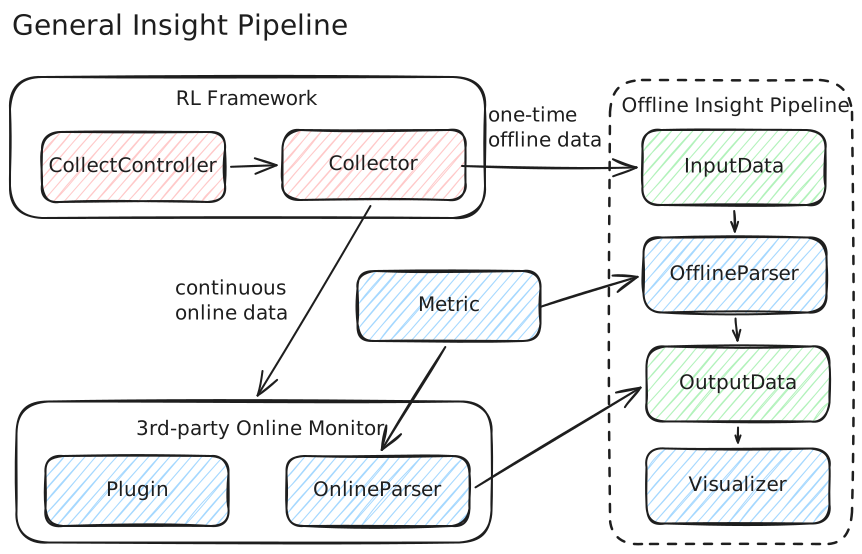
Offline Analysis
- Timeline visualization — interactive HTML Gantt charts for per-rank event timelines across RL training phases, with parallel multi-rank parsing for MSTX, Torch Profiler, and NVTX data sources. PNG export also supported.
- MoE Expert Load Heatmap — GMM-clustered heatmaps to visualize expert load distribution in Mixture-of-Experts models, helping identify load imbalance across experts and layers.
Python >= 3.10 required.
pip install "rl-insight[recipe]"For the latest unreleased features, install from source:
git clone https://github.com/verl-project/rl-insight.git
cd rl-insight
pip install -e ".[recipe]"Parse MSTX, Torch Profiler, or NVTX data and generate an interactive HTML timeline:
# MSTX
python -m recipe.main \
    input.path=<profiling_data_path> \
    timeline.parser.type=mstx \
    output.path=<output_path>

# Torch Profiler
python -m recipe.main \
    input.path=<torch_data_path> \
    timeline.parser.type=torch \
    output.path=<output_path>

# NVTX
python -m recipe.main \
    input.path=<nvtx_data_path> \
    timeline.parser.type=nvtx \
    output.path=<output_path>
Switch visualizer type for PNG output:
timeline.visualizer.type=html    # interactive timeline (default)
timeline.visualizer.type=png     # static PNG export
Convenience scripts are available in examples/recipe/:
bash examples/recipe/mstx_exec.sh
bash examples/recipe/torch_profiler_exec.sh
bash examples/recipe/nvtx_exec.shVisualize expert load distribution in Mixture-of-Experts models:
bash examples/recipe/gmm_exec.shOr with full CLI control:
python -m recipe.main \
    input.path=<gmm_data_path> \
    output.path=<output_path> \
    heatmap.parser.type=gmm \
    heatmap.visualizer.type=gmm_heatmap \
heatmap.visualizer.gmm_per_layer=3- Architecture & Design
- Offline Timeline Quickstart
- GMM Heatmap Quickstart
- Memory Parser Guide
- Extension Guide
See CONTRIBUTING.md.