Maverick Search is an open-source AI search engine designed to run locally. Any local model can be used but Athena-3 models are optimised with this code. Maverick Search uses Exa Search API which more information can be found at exa.ai. This project is designed to be an open-source alternative to major AI search engines such as Perplexity and etc. While this project is not as accurate or as extensive as certain features whch can be found from other AI providers e.g Perplexity AI's Deep Research, this project aims to replicate that and allow users to run it locally without having to worry about data privacy. Maverick Search can also use other API models from OpenRouter for users that lack the compute to run the Maverick models locally.
| Feature | Description | Benefits |
|---|---|---|
| API-Based Search | Search is conducted through an API, allowing queries to be processed externally. | Simplifies setup and ensures flexibility in accessing search models remotely. |
| Exa Search API Integration | Integrates with Exa Search API for enhanced search capabilities. | Users can access a wide range of powerful search models and results without heavy local compute. |
| Maverick-Optimized Models | Exposes optimized Maverick models via the API for search queries. | Delivers more tailored and accurate results through specialized AI models. |
| Privacy-Focused | The ability to run models locally ensures that users' data is not tracked or used to train models | Ensures that user data remains secure and only temporarily used for searches. |
| Customizable Search Options | Users can configure search parameters and model settings through the API. | Enables personalized search experiences based on user needs and preferences. |
| Model Compatibility | Allows integration with other external models via the API for flexible search. | Users can choose to use different AI models for their search tasks, offering more versatility. |
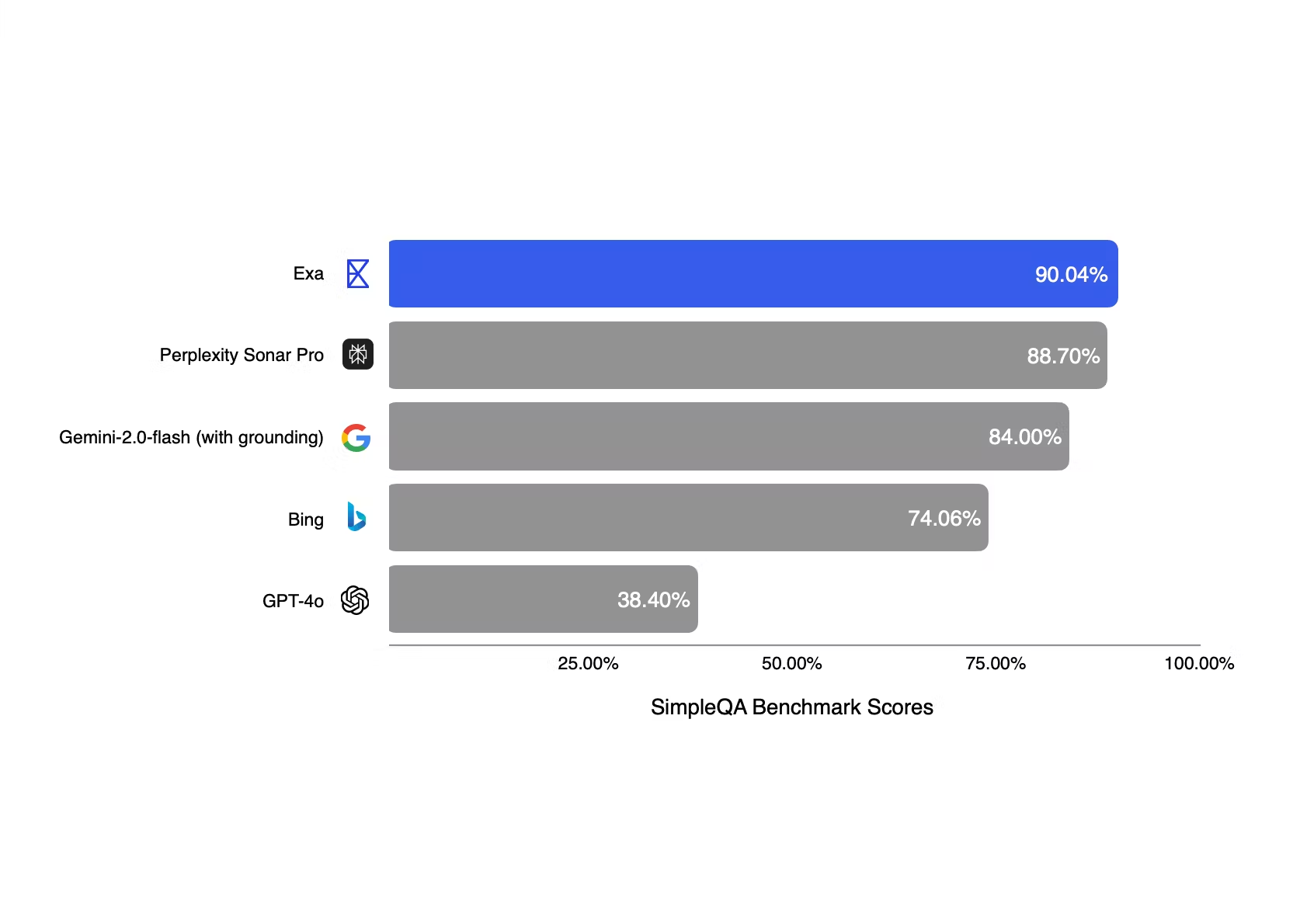
Exa Search API compared to other search engines. Source: Exa AI
This repository consists of 3 code files: Engine, CLI and UI
- Engine: This code file consists of just the Exa Search API call so that if you would like, you could build your own applications on the Exa python library. This is what Maverick-Search CLI and UI are based on
- CLI: This is the full code which consists of every feature e.g Search, Local Model usage and API model usage and etc. This is for more experienced users who want to use/modify the full code.
- UI: is a variation of CLI but has a Streamlit powered UI (Coming Soon)
You need to create an API key at exa.ai who provides new users with $15 worth of credit!
To clone the repository and enter it, simple run the following command in your CLI
git clone https://github.com/Aayan-Mishra/Maverick-Search.git
cd Maverick-SearchAll the dependencies are in the requirements.txt so you can install all of them with the following command:
pip install -r requirements.txtOnce all the depenecies are installed configure your Exa API Key in the following line:
exa = Exa('YOUR_EXA_API_KEY')Now you can run any one of the scripts using the following command!
python3 SCRIPT_NAME.pyNote: Make sure you have Ollama installed on your device, if not download here
All the dependencies are in the requirements.txt so you can install all of them with the following command:
pip install -r requirements.txtOnce all the depenecies are installed configure your Exa API Key in the following line:
exa = Exa('YOUR_EXA_API_KEY')Since we are using the model locally, we need to use Ollama to inference the model, below is an example command for a model that is works well with the Maverick Search code:
ollama run hf.co/NousResearch/Hermes-3-Llama-3.2-3B-GGUF:Q8_0Now you can run any one of the scripts using the following command!
python3 SCRIPT_NAME.pyMaverick Search couldn't have been possible without the following services:
- Exa AI: Exa Search API is what powers the powerful search API behind Maverick Search
- OpenRouter: OpenRouter provides an extensive list of models with free APIs that help people use AI models with Maverick Search
- Ollama: Ollama is a lightweight, extensible framework for building and running language models on the local machine, allowing Maverick Search the ability to infrence models locally with search results as a context