Releases: Evlos/portal
v0.1.2

✨ Release Notes — v0.1.2
Release Date: June 4, 2026

🆕 What's New
Multi-Column Layout Support
The vault panel now supports flexible grid layouts — choose between 1, 2, 3, or 4 columns to fit your workflow. Quickly switch between views using the new layout toggle in the top-right toolbar, giving you full control over information density and visual organization.
Light / Dark Mode Toggle
A new theme switcher has been added to the top-right corner, allowing you to seamlessly switch between Light and Dark mode at any time — tailored to your environment and preference.
Persistent User Preferences
Your chosen layout and theme settings are now automatically saved and restored across sessions. No more re-configuring after a page refresh — the app remembers exactly how you left it.
🔧 Improvements
Streamlined Edit Mode Experience
Entering Edit Mode now triggers a focused, optimized view designed for high-efficiency reordering. The layout automatically consolidates for clarity, and items adopt a compact display so you can navigate and reorganize even large lists with ease. Drag-and-drop works intuitively across the entire item — no precision required.
Cleaner Non-Edit Interface
Outside of Edit Mode, the interface is now cleaner and less cluttered. Action controls no longer occupy passive screen space, ensuring that content — names, links, and labels — always has room to breathe, especially in multi-column layouts.
🐛 Bug Fixes
- Fixed a layout overflow issue where items did not properly adapt their width when switching to multi-column view, causing unintended vertical scrolling
- Resolved a display inconsistency where interactive controls were incorrectly occupying layout space in read-only mode, compressing content in grid views
💡 These updates are part of our ongoing commitment to delivering a fluid, distraction-free experience — whether you're browsing, organizing, or building.
v0.1.1
Release Notes — v1.1.0
Date: 2026-03-30
✦ Preview

✨ New Features
🔧 Edit Mode
- Added
[ EDIT ]toggle button in the top-right corner of the page - Bookmark action buttons (EDIT / DEL) are now hidden by default and only visible when edit mode is active — no more hover-to-reveal behavior
- Drag-and-drop reordering is restricted to edit mode only; the drag handle icon remains visible in normal mode but is non-functional
- Exiting edit mode automatically closes any open inline edit panels
- Edit mode and Add mode are mutually exclusive — activating one will deactivate the other
➕ Add Mode
- Added
[ ADD ]toggle button in the top-right corner of the page - The ADD NEW ENTRY form is hidden by default and only revealed when Add mode is active
- A
[ CANCEL ]button is included in the form to exit Add mode and hide the form without submitting - URL input field receives focus automatically upon entering Add mode
🗑️ Delete Confirmation
- Deleting a bookmark now requires explicit confirmation to prevent accidental removal
- A modal overlay appears asking "CONFIRM DELETE? THIS ACTION CANNOT BE UNDONE."
- Clicking
[ DELETE ]proceeds with deletion; clicking[ CANCEL ]or the backdrop dismisses the dialog
🔄 Changes
item-actionsvisibility is now controlled by.edit-modeclass onbodyvia CSS, replacing the previous:hoveropacity transition- Sortable instance is initialized with
disabled: trueand toggled programmatically based on edit mode state - Delete handler replaced from direct
deleteItem()call to a two-stepconfirmDelete()→executeDelete()flow
📦 Files Changed
| File | Change |
|---|---|
templates/index.html |
All feature additions and UI changes |
app.py |
No changes required |
v0.1.0
✦ Preview
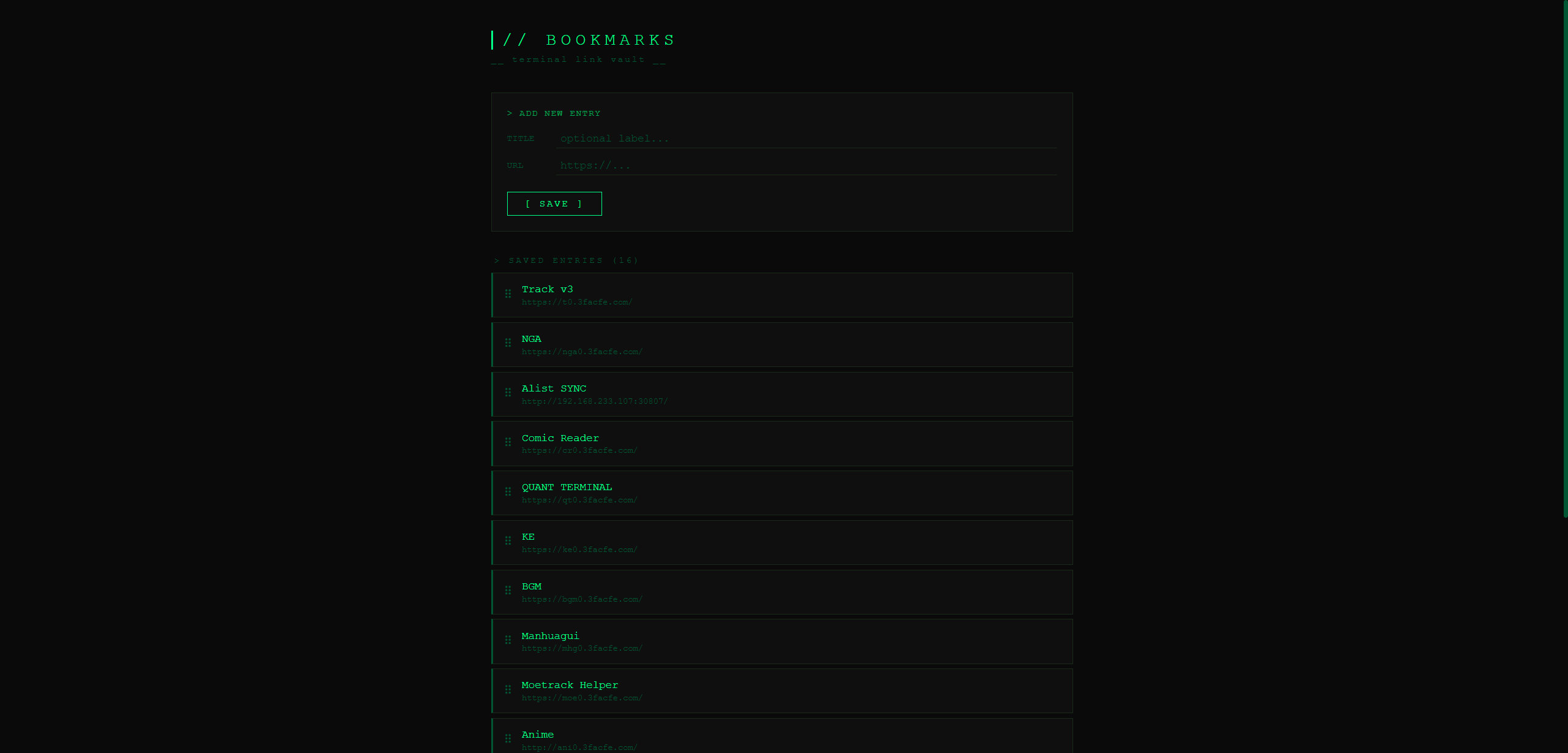
✦ Features
- CRUD operations — Add, edit, and delete bookmarks with custom titles.
- Drag-and-drop sorting — Drag items to instantly save their order using SortableJS, with no data lost on refresh.
- Inline editing — Click EDIT to expand the editing panel directly in the list, eliminating the need for page redirects.
- Toast notifications — Lightweight, terminal-style pop-ups appear after every action.
- Zero frontend dependencies — The project only imports SortableJS via CDN, avoiding heavy frontend frameworks.
- SQLite persistence — Data is securely stored in a local file without needing an external database.
- One-click Docker deployment — The multi-stage Alpine build keeps the container image extremely small.
- Comprehensive test coverage — Full workflow testing with pytest covers the homepage, adding, deleting, editing, and reordering.