We present Y-MAP-Net, a Y-shaped neural network architecture designed for real-time multi-task learning on RGB images. Y-MAP-Net simultaneously predicts depth, surface normals, human pose, semantic segmentation, and generates multi-label captions in a single forward pass. To achieve this, we adopt a multi-teacher, single-student training paradigm, where task-specific foundation models supervise the learning of the network, allowing it to distill their capabilities into a unified real-time inference architecture. Y-MAP-Net exhibits strong generalization, architectural simplicity, and computational efficiency, making it well-suited for resource-constrained robotic platforms. By providing rich 3D, semantic, and contextual scene understanding from low-cost RGB cameras, Y-MAP-Net supports key robotic capabilities such as object manipulation and human–robot interaction.

One click deployment in Google Collab :

- Real-time inference from webcam, video files, image folders or screen capture
- Multi-task outputs: 2D pose (17 COCO joints), depth, surface normals, segmentation, and text token embeddings
- Multiple backends: TensorFlow, TFLite, JAX and ONNX
- Interactive web UI via Gradio
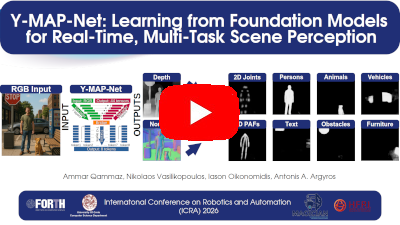
Youtube Supplementary Video of Y-MAP-Net
# Automated setup (creates a virtual environment and installs dependencies)
scripts/setup.sh
source venv/bin/activate
Or using Docker:
docker/build_and_deploy.sh
docker run ymapnet-container
docker attach ymapnet-container
cd workspace
scripts/setup.sh
source venv/bin/activatescripts/downloadPretrained.sh
./runYMAPNet.shThis starts real-time pose estimation from your default webcam.
To perform vehicle counting (supplementary example)
wget http://ammar.gr/datasets/car.mp4
./runYMAPNet.sh --from car.mp4 --fast --monitor Vehicle 100 128 right --monitor Vehicle 190 128 left
The "left" and "right" windows will contain the detection results graph
# Webcam (default)
./runYMAPNet.sh

# Video file
./runYMAPNet.sh --from /path/to/video.mp4

# Image directory / sequence
./runYMAPNet.sh --from /path/to/images/

# Screen capture
./runYMAPNet.sh --from screen

# Specific video device
./runYMAPNet.sh --from /dev/video0| Flag | Description |
|---|---|
--size W H |
Set input resolution (e.g. --size 640 480) |
--cpu |
Force CPU-only inference (slower) |
--fast |
Disable depth refinement, person ID, and skeleton resolution for speed |
--save |
Save output frames to disk |
--headless |
Run without any display window |
--illustrate |
Enable enhanced visualization overlay |
--collab |
Headless mode with save + illustrate (useful for Colab/remote) |
--profiling |
Enable performance profiling |
python3 gradioServer.py
# Open http://localhost:7860 in your browser- Python 3.x
- TensorFlow 2.16.1+ (with CUDA 12.3+ and cuDNN 8.9.6+ for GPU support)
- Keras 3+
- NumPy, OpenCV
- See
requirements.txtfor the full list
Install all dependencies:
pip install -r requirements.txt
# or run the setup script:
python3 scripts/setup.sh| Format | Model | Size | Download | Engine |
|---|---|---|---|---|
| Keras (ICRA26) | Full | 2.1GB | GDrive Link2 | --engine tf |
| Keras (dev) | Full | 1.8GB | Link | --engine tf |
| TFLite FP32 | Lite | ~268 MB | Link | --engine tflite |
| TFLite FP16 | Lite | ~210 MB | Link | --engine tflite |
| ONNX FP32 | Lite | ~268 MB | Link | --engine onnx |
| ONNX FP16 | Lite | ~209 MB | Link | --engine onnx |
| JAX (npz) | Lite | ~268 MB | Link | --engine jax |
To use a different engine you need to invoke it in the following way :
./runYMAPNet.sh --engine onnxTo evaluate the model against COCO17 follow the following commands from the root directory of the project to download the evaluation data unzip it and then run evaluateYMAPNet.py on it :
wget "https://huggingface.co/AmmarkoV/Y-MAP-Net/resolve/main/ymapnet_coco_validation_dataset.zip?download=true"
unzip ymapnet_coco_validation_dataset.zip
python3 evaluateYMAPNet.py
If you find our work useful or use it in your projects please cite :
@inproceedings{qammaz2026ymapnet,
  author = {Qammaz, Ammar and Vasilikopoulos, Nikos and Oikonomidis, Iason and Argyros, Antonis A},
  title = {Y-MAP-Net: Learning from Foundation Models for Real-Time, Multi-Task Scene Perception},
  booktitle = {IEEE International Conference on Robotics and Automation (ICRA 2026), (to appear)},
  year = {2026},
  month = {June},
  projects =  {MAGICIAN}
}
FORTH License — see LICENSE for details.