Removing Unintentionally Committed Files from Git.
This document is to show how to remove accidentally committed files from git version control. There's a few different cases where this happens, and different solutions for different mistakes. Here I'll give solution options for both text and binary files committed with varying degrees of complication. I typically use a combination of git guis to do my work. I primarily use Visual Studio's built in tools, but also
Text files are easier to deal with because they're unlikely to cause us any issues with storage or download speeds because they're so small. Accidentally committing text is no big deal. We'll handle this without much fuss.
Imagine you're working quickly, you commit an inappropriate file either solely, or as part of a larger commit. You recognize your mistake immediately.
As seen in GitHub Desktop
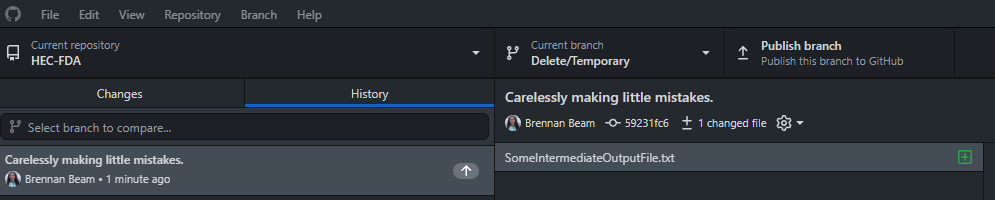
Easiest fix is to just undo your commit. GitHub desktop has a super convenient undo button in the changes tab.
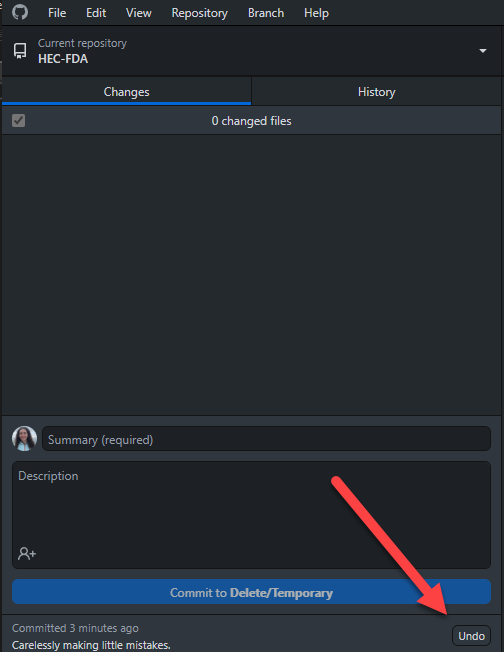
Notice once you undo, your changes are retained, just no longer committed. Go ahead and add that file to the git ignore, commit the rest of the things you want to commit, and you're done.
Now you've lost the ease of the undo because you've saved you progress to remote. Because this is just a text file, I'm not that worried about having it in the commit history, I just don't want it cluttering the repo. Go ahead and delete that file locally using file explorer, commit that change with an appropriate commit message, and push that commit, effectively undoing your mistake. In that same commit, add the offending file to the .gitignore so this doesn't happen again. You can check that you were successful by checking the files changed tab of your github pull request and verifying you don't see the offending files anymore.
Binaries can be big. Potentially really big. These increase the size of our overall repo which slows down cloning and uses up our limited space in GitHub (5Gb). Big repos take a long time to clone, which is the first step when we run checks on GitHub's servers. So big repos slow us down every check we run. We want to be small as reasonably possible. Also important to note, once a file has been committed, even if you delete it and commit that change, it still exists in the history, and so is still technically part of the repo, taking up space. This is why we'll handle bad binary commits differently.