Crossview Headlamp Plugin adds a dedicated Crossview page in Headlamp so you can install, update, uninstall, and open Crossview from the cluster UI.
Crossview project repository:
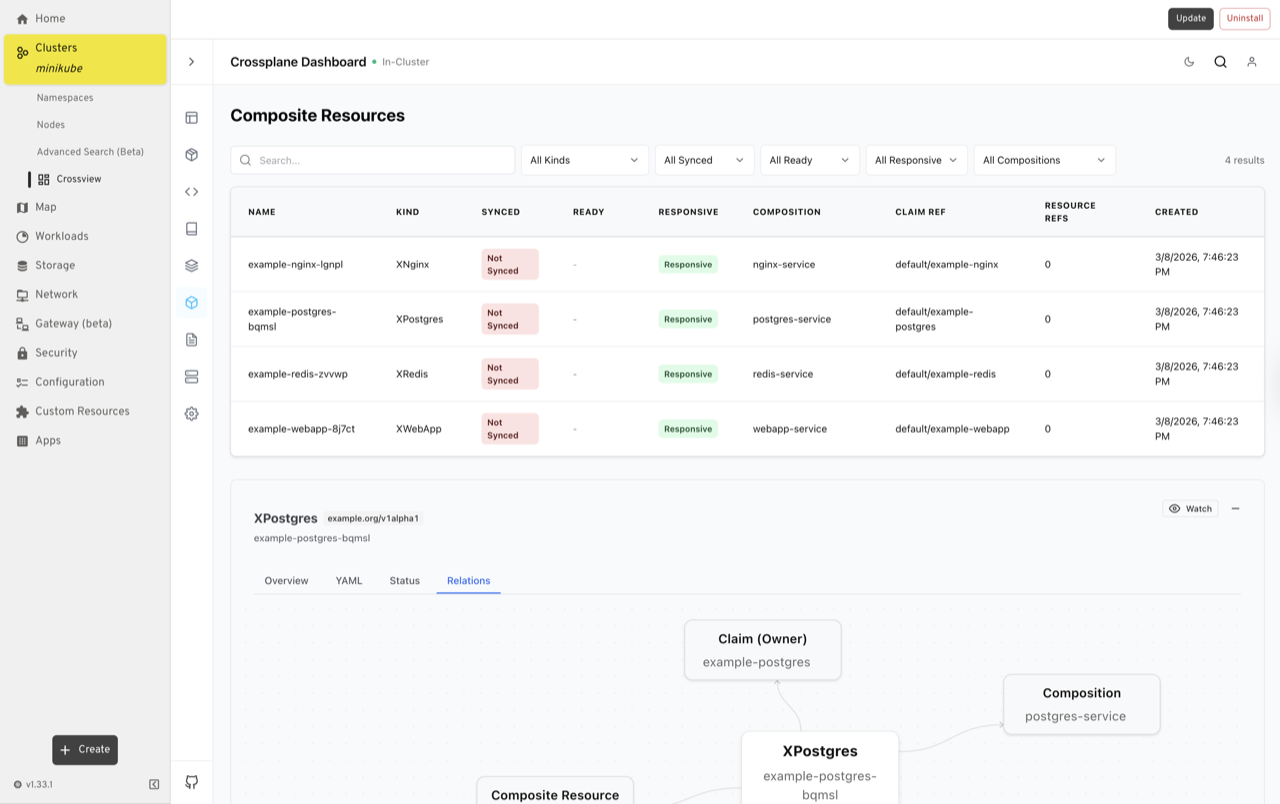
This plugin adds a Crossview sidebar page under a selected cluster and provides:
Install: Runs Helm upgrade-install for Crossview.Update: Prompts for a target chart version, then runs Helm upgrade-install.Update Helm Repo: Refreshes Helm index repositories when using repo-based charts.Uninstall: Removes the Crossview Helm release from the cluster.Open Crossview: Opens Crossview in an embedded iframe once available.Check Status: Reads deployment readiness from the cluster.
When you click Install, Update, or Uninstall, the plugin creates Kubernetes resources in namespace crossview and launches a short-lived Kubernetes Job that runs Helm commands inside an alpine/helm container.
Core resources used by the plugin:
- Namespace:
crossview - ServiceAccount:
crossview-helm-installer - ClusterRoleBinding:
crossview-helm-installer-admin(binds installer SA tocluster-admin) - Job: one per action, for example
crossview-helm-install-<timestamp>
There are two control layers involved:
-
Plugin action handlers (in Headlamp): They respond to UI clicks (
Install,Update,Uninstall,Update Helm Repo) and submit Kubernetes resources/jobs. -
Kubernetes controllers: The Kubernetes Job controller executes Helm installer jobs. After the chart is installed, normal Kubernetes controllers manage Crossview deployment resources.
Important permission note:
- The installer ServiceAccount is currently bound to
cluster-adminfor maximum compatibility and simplicity. - This is convenient for development/testing and broad cluster compatibility.
- For stricter environments, replace this with least-privilege RBAC tailored to your chart operations.
Each operation creates a new Job with backoffLimit: 0 and auto-cleanup enabled:
ttlSecondsAfterFinished: 90
This means finished jobs (successful or failed) are automatically garbage-collected by Kubernetes after roughly 90 seconds.
Why jobs are used:
- Keeps Helm execution in-cluster.
- Avoids requiring local Helm binary access from Headlamp runtime.
- Provides clear logs and events for failed operations.
- For OCI charts (
oci://...),Update Helm Repois skipped because repo index updates are not required. - For OCI chart version input, a leading
vis normalized (for examplev3.8.0-rc.3becomes3.8.0-rc.3) before Helm command execution. - For repo-based charts,
Updateperformshelm repo updatebeforehelm upgrade --install.
- Open Headlamp and select your cluster.
- Go to
Crossviewfrom the sidebar. - If Crossview is not installed:
Set
Remote Helm Chartand optionalChart Version, then clickInstall. - To update:
Click top
Update, enter the version in the dialog, confirm. - To refresh repo metadata (repo-based charts only):
Click
Update Helm Repo. - To remove Crossview from cluster:
Click
Uninstall.
Useful commands:
kubectl -n crossview get jobs,pods,deployments
kubectl -n crossview get events --sort-by=.lastTimestamp | tail -n 100
kubectl -n crossview logs <installer-job-pod-name>
Common issues:
Error: no repositories found: You ran repo update without configured Helm repos. This is expected for OCI-only flows.chart ... not found: The chart version/tag is invalid for the chosen chart reference.BackoffLimitExceededon a job: Check job pod logs for the underlying Helm error.
Build plugin:
npm run buildCopy plugin files to local Headlamp plugin directory (macOS):
mkdir -p "$HOME/Library/Application Support/Headlamp/plugins/crossview-headlamp"
cp -f dist/main.js package.json "$HOME/Library/Application Support/Headlamp/plugins/crossview-headlamp/"
cp -f dist/*.png "$HOME/Library/Application Support/Headlamp/plugins/crossview-headlamp/" 2>/dev/null || true