Like many, I quickly got addicted to Oh-My-Posh after finding out about it (thanks Scott Hanselman)! But the main issue I found is that I wanted to use it EVERYWHERE and the result of this was that each of my shells had the same colour scheme and felt a bit "samey" instead of fun and unique.
This theme was designed to be a single theme that can change colour based on your OS and also the shell you're using - hence the name!
This theme wouldn't have been possible without the hard work of creator/maintainer Jan De Dobbeleer. He put out a very nice feature to provide global environmental variables which this theme uses heavily. As such this theme is only compatible with oh-my-posh v7.0.0 or above.
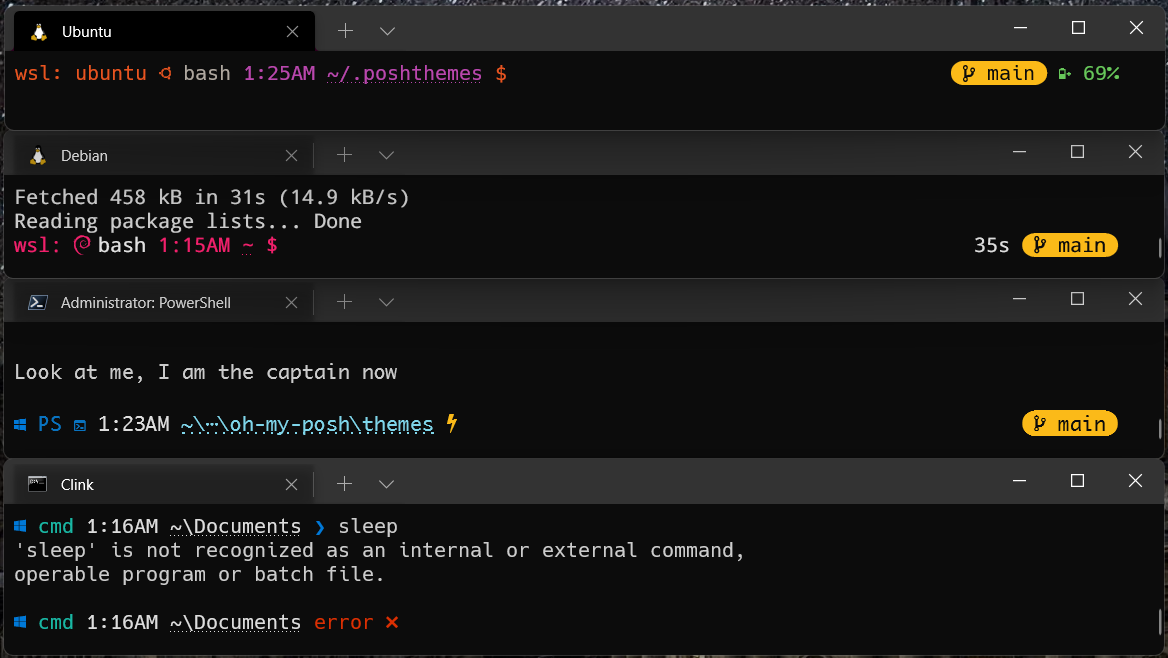
-
Prompt colours will change dynamically based on OS and Shell
-
Console marker will dynamically update for:
-
Windows
❱ -
MacOS
% -
Linux
$
-
-
Console marker replaced by
error ✖in red when last command gave an error -
Console marker replaced by
yellow lightningwhen using prompt as root or admin (see Powershell example in screenshot above) -
Execution time shown on far right when execution was greater than 150ms
-
Simple git marker on far right, showing current branch
-
Simple battery indicator when a battery is present, showing percentage full plus:
-
Yellow "battery minus" icon when discharging
-
Light green "battery plus" icon when charging
-
Green "battery charged" icon when full
-
-
Azure Shell marker
N.B. I had originally chosen the OS colours to be as close to the official hexadecimal values as I could find, but sadly many were just too dark to read. I have tried to boost the brightness while keeping the correct hues.
- Waiting on a standardized template which will allow more detailed battery iconography