Design, share, and chat through interactive digital business cards in seconds. A production-ready, self-hostable Next.js SaaS boilerplate with 7 premium templates, AI-styled custom layouts, QR sharing, and a visitor-facing AI chatbot that answers questions about you on your behalf. A free open-source alternative to Popl, HiHello, Linq, and Mobilo — powered by the MuAPI AI engine.
Tech stack: Next.js 14 (App Router) · Prisma · PostgreSQL · NextAuth (Google OAuth) · Stripe · Tailwind CSS · MuAPI · OpenAI (chatbot) Use cases: Networking events · Conference badges · Sales rep cards · Real estate agent cards · Freelancer portfolios · Creator landing pages · Lead capture pages · QR vCard sharing · Personal branding

GitHub Repository: github.com/SamurAIGPT/ai-business-card
Live Demo Preview: ai-business-card-ten.vercel.app
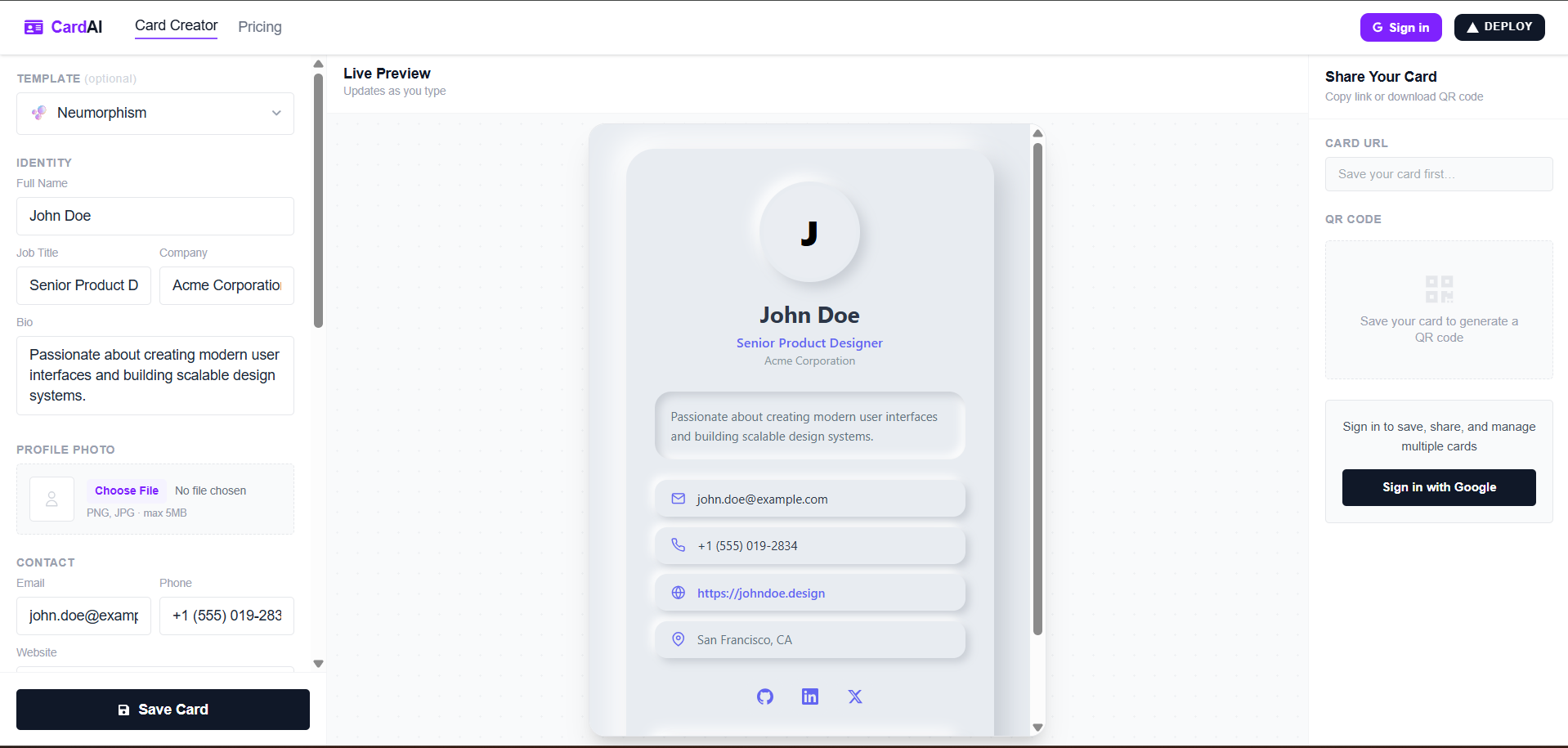
CardAI Creator is a highly optimized SaaS application designed to help professionals, creators, and teams build interactive digital business cards. It features a modern layout designer, real-time preview, QR code sharing, a visual cards dashboard, and a floating AI chatbot widget that lets visitors ask questions to a digital clone of the card owner.
Why use CardAI Creator?
- Production-Ready SaaS Boilerplate — Configured with Google OAuth, PostgreSQL connection pooling, and Stripe Checkout.
- AI Custom Layouts — Enter prompts like "make this look retro cyberpunk" to generate custom Tailwind card styling using OpenAI models via MuAPI.
- Interactive AI Clone Assistant — Shared cards feature a chatbot widget. Visitors can ask questions (e.g. "What is her email?", "What are his core specialties?"), resolved using the card's profile as LLM context.
- Base64 & MuAPI Image Uploading — Self-contained image selector uploads avatars to MuAPI with automatic inline data-URL fallback.
- 7 Premium Pre-designed Styles — Neumorphism, Cyberpunk Glitch, Holographic Glassmorphism, Interactive 3D Tilt, Swiss International Style, Classic Minimal, and Brutalist Marquee templates load instantly offline.
- Automatic QR Codes — Standard QR code generator overlay points directly to the card's public URL for quick mobile scanning.
- Split Save Protections — When editing an existing card, users can either "Save Changes" (update current) or "Save as New Copy" (clone to new ID), preventing accidental overwrites.
- Enter custom style prompts. The system calls custom LLMs via MuAPI and engineers a tailored Tailwind CSS component layout.
- Cost: 5 credits per generation.
- Polled asynchronously with spinner overlays while the design compiling runs in the background.
- Visitors viewing the public
/card/[hash]page can open a floating chat drawer. - Answers questions about your experience, contact info, and website by referencing profile details.
- Runs a synchronous backend polling script so that visitors get instant, snappy answers.
- A dedicated dashboard where users can see all their saved cards in a clean, visual grid of previews.
- Quick actions: Edit (opens in workspace), View (opens public page), Delete (with confirmation), Copy Link, and Show/Download QR Code.
- Left sidebar for form parameters editing.
- Center/Right live viewport displaying updates in real-time inside a mobile device mock iframe to prevent styles leaking.
- Tiers: Starter ($10/100 credits), Pro ($25/300 credits), and Business ($50/750 credits).
- Balance is automatically updated upon checkout completion using Stripe webhooks.
Configure these keys inside your local .env or production Vercel dashboard:
| Category | Variable | Purpose & Source |
|---|---|---|
| Database | DATABASE_URL |
PostgreSQL connection string (Supabase or Neon) |
| NextAuth / Google | NEXTAUTH_SECRET |
Random secret string for signing auth tokens (openssl rand -base64 32) |
NEXTAUTH_URL |
Local/production domain (e.g. http://localhost:3000) |
|
GOOGLE_CLIENT_ID |
Obtained from Google Cloud Console Credentials | |
GOOGLE_CLIENT_SECRET |
Obtained from Google Cloud Console Credentials | |
| Stripe Billing | STRIPE_SECRET_KEY |
Obtained from Stripe API Keys |
NEXT_PUBLIC_STRIPE_PUBLISHABLE_KEY |
Obtained from Stripe API Keys | |
STRIPE_WEBHOOK_SECRET |
Configured webhook secret to resolve transaction credits | |
| AI Generator | MUAPIAPP_API_KEY |
AI API key from muapi.ai |
- Node.js (v18 or higher)
- A local or remote PostgreSQL database instance.
-
Navigate to the App
cd apps/ai-business-card -
Install Dependencies
npm install
-
Configure Variables
cp .env.example .env # Populate your active database, Stripe, and OAuth API keys -
Initialize DB Schema
npx prisma generate
npx prisma db push
-
Start Dev Server
npm run dev # Runs locally on http://localhost:3000 -
Build for Production
npm run build