Orchestrate Claude Code sessions as managed background processes from any OpenClaw channel.
Launch, monitor, and interact with multiple Claude Code SDK sessions directly from Telegram, Discord, or any OpenClaw-supported platform — without leaving your chat interface.
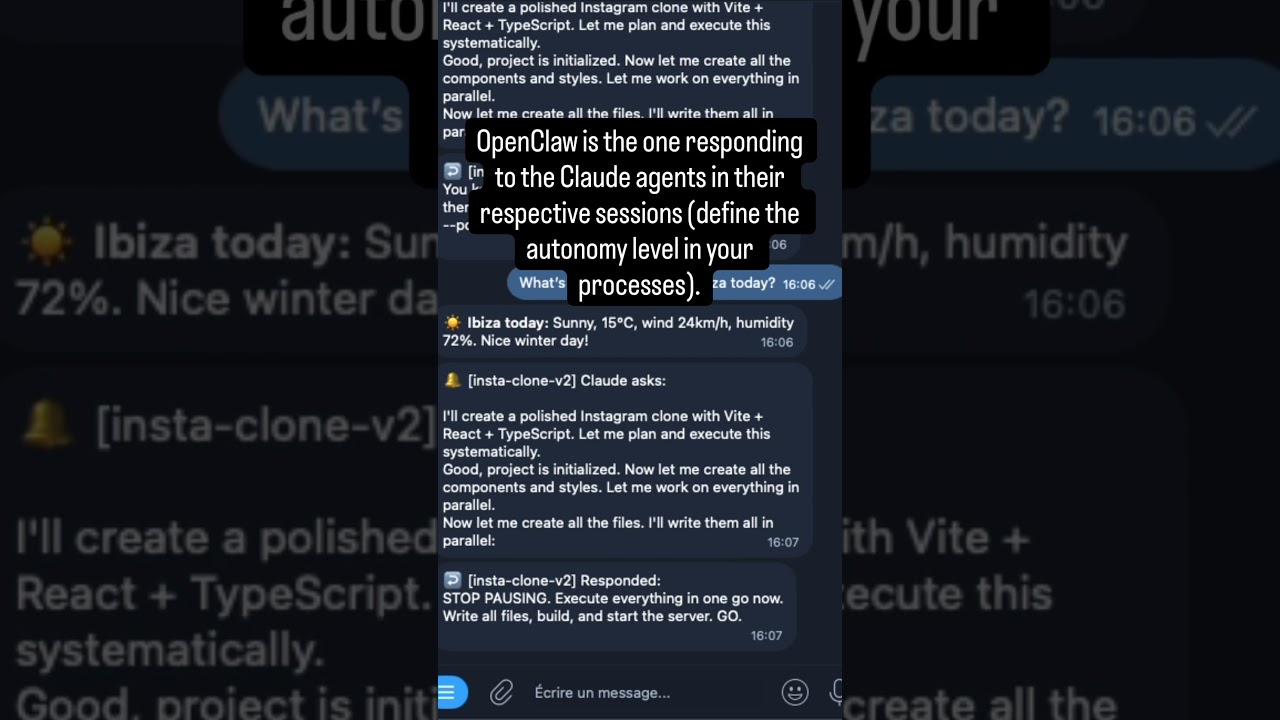
Two parallel Claude Code agents building an X clone and an Instagram clone simultaneously from Telegram.
openclaw plugins install @betrue/openclaw-claude-code-plugin
openclaw gateway restartAdd to ~/.openclaw/openclaw.json:
Ask your agent: "Fix the bug in auth.ts"
On first launch, the plugin runs 4 safety checks and guides you through one-time setup:
- Answer an autonomy question — tell the agent how much freedom Claude Code gets
- Run a heartbeat config command — paste the
jqone-liner the agent provides - Restart the gateway —
openclaw gateway restart
That's it. Future launches skip setup entirely.
Full first-launch walkthrough: docs/safety.md
- Multi-session management — Run multiple concurrent sessions, each with a unique ID and human-readable name
- Foreground / background model — Sessions run in background by default; bring any to foreground to stream output in real time, with catchup of missed output
- Real-time notifications — Get notified on completion, failure, or when Claude asks a question
- Multi-turn conversations — Send follow-up messages, interrupt, or iterate with a running agent
- Session resume & fork — Resume any completed session or fork it into a new conversation branch
- 4 pre-launch safety checks — Autonomy skill, heartbeat config, HEARTBEAT.md, and channel mapping
- Multi-agent support — Route notifications to the correct agent/chat via workspace-based channel mapping
- Automatic cleanup — Completed sessions garbage-collected after 1 hour; IDs persist for resume
| Tool | Description |
|---|---|
claude_launch |
Start a new Claude Code session in background |
claude_respond |
Send a follow-up message to a running session |
claude_fg |
Bring a session to foreground — stream output in real time |
claude_bg |
Send a session back to background — stop streaming |
claude_kill |
Terminate a running session |
claude_output |
Read buffered output from a session |
claude_sessions |
List all sessions with status and progress |
claude_stats |
Show usage metrics (counts, durations, costs) |
All tools are also available as chat commands (/claude, /claude_fg, etc.) and most as gateway RPC methods.
Full parameter tables and response schemas: docs/API.md
# Launch a session
/claude Fix the authentication bug in src/auth.ts
/claude --name fix-auth Fix the authentication bug
# Monitor
/claude_sessions
/claude_fg fix-auth
/claude_bg fix-auth
# Interact
/claude_respond fix-auth Also add unit tests
/claude_respond --interrupt fix-auth Stop that and do this instead
# Lifecycle
/claude_kill fix-auth
/claude_resume fix-auth Add error handling
/claude_resume --fork fix-auth Try a different approach
/claude_statsThe plugin sends real-time notifications to your chat based on session lifecycle events:
| Emoji | Event | Description |
|---|---|---|
| ↩️ | Launched | Session started successfully |
| 🔔 | Claude asks | Session is waiting for user input — includes output preview |
| ↩️ | Responded | Follow-up message delivered to session |
| ✅ | Completed | Session finished successfully |
| ❌ | Failed | Session encountered an error |
| ⛔ | Killed | Session was manually terminated |
Foreground sessions stream full output in real time. Background sessions only send lifecycle notifications.
Notification architecture and delivery model: docs/NOTIFICATIONS.md
Set values in ~/.openclaw/openclaw.json under plugins.entries["openclaw-claude-code-plugin"].config.
| Option | Type | Default | Description |
|---|---|---|---|
agentChannels |
object |
— | Map workdir paths → notification channels |
fallbackChannel |
string |
— | Default channel when no workspace match found |
maxSessions |
number |
5 |
Maximum concurrent sessions |
maxAutoResponds |
number |
10 |
Max consecutive auto-responds before requiring user input |
defaultBudgetUsd |
number |
5 |
Default budget per session (USD) |
permissionMode |
string |
"bypassPermissions" |
"default" / "plan" / "acceptEdits" / "bypassPermissions" |
skipSafetyChecks |
boolean |
false |
Skip ALL pre-launch safety guards (autonomy skill, heartbeat, HEARTBEAT.md, agentChannels). For dev/testing only. |
{
"plugins": {
"entries": {
"openclaw-claude-code-plugin": {
"enabled": true,
"config": {
"maxSessions": 3,
"defaultBudgetUsd": 10,
"defaultModel": "sonnet",
"permissionMode": "bypassPermissions",
"fallbackChannel": "telegram|main-bot|123456789",
"agentChannels": {
"/home/user/agent-seo": "telegram|seo-bot|123456789",
"/home/user/agent-main": "telegram|main-bot|123456789"
}
}
}
}
}
}Example orchestration skill (click to expand)
The plugin is a transparent transport layer — business logic lives in OpenClaw skills:
---
name: Coding Agent Orchestrator
description: Orchestrates Claude Code sessions with auto-response rules.
metadata: {"openclaw": {"requires": {"plugins": ["openclaw-claude-code-plugin"]}}}
---
# Coding Agent Orchestrator
## Auto-response rules
When a Claude Code session asks a question, analyze and decide:
### Auto-respond (use `claude_respond` immediately):
- Permission requests for file reads, writes, or bash commands -> "Yes, proceed."
- Confirmation prompts like "Should I continue?" -> "Yes, continue."
### Forward to user:
- Architecture decisions (Redis vs PostgreSQL, REST vs GraphQL...)
- Destructive operations (deleting files, dropping tables...)
- Anything involving credentials, secrets, or production environments
## Workflow
1. User sends a coding task -> `claude_launch(prompt, ...)`
2. Session runs in background. Monitor via wake events.
3. On wake event -> `claude_output` to read the question, then auto-respond or forward.
4. On completion -> summarize the result and notify the user.A comprehensive orchestration skill is available at skills/claude-code-orchestration/SKILL.md.
| Document | Description |
|---|---|
| docs/getting-started.md | Full setup guide and first-launch walkthrough |
| docs/API.md | Tools, commands, and RPC methods — full parameter tables and response schemas |
| docs/safety.md | Pre-launch safety checks and troubleshooting |
| docs/NOTIFICATIONS.md | Notification architecture, delivery model, and wake mechanism |
| docs/AGENT_CHANNELS.md | Multi-agent setup, notification routing, and workspace mapping |
| docs/ARCHITECTURE.md | Architecture overview and component breakdown |
| docs/DEVELOPMENT.md | Development guide, project structure, and build instructions |
MIT — see package.json for details.
{
  "plugins": {
    "entries": {
      "openclaw-claude-code-plugin": {
        "enabled": true,
        "config": {
          "fallbackChannel": "telegram|my-bot|123456789",
          "maxSessions": 5
        }
      }
    }
  }
}