Browser Details: Chrome Version 85.0.4183.102 (Official Build) (64-bit)
Device Details: macOS 10.15.6 (MacBook Pro)
Note: Tried on cloud.
Steps to replicate:
- Login with Account A (User A)
- Invite User B to User A's personal organization (Developer Access)
- Now , in User A's personal organization, User B can be seen as a Developer (Expected)
Note: User B receives an email, DO NOT DO ANYTHING from the email
- Invite User B to User A's personal organization (Administrator Access)
- Go to User B's email and accept the invite - now login to Appsmith
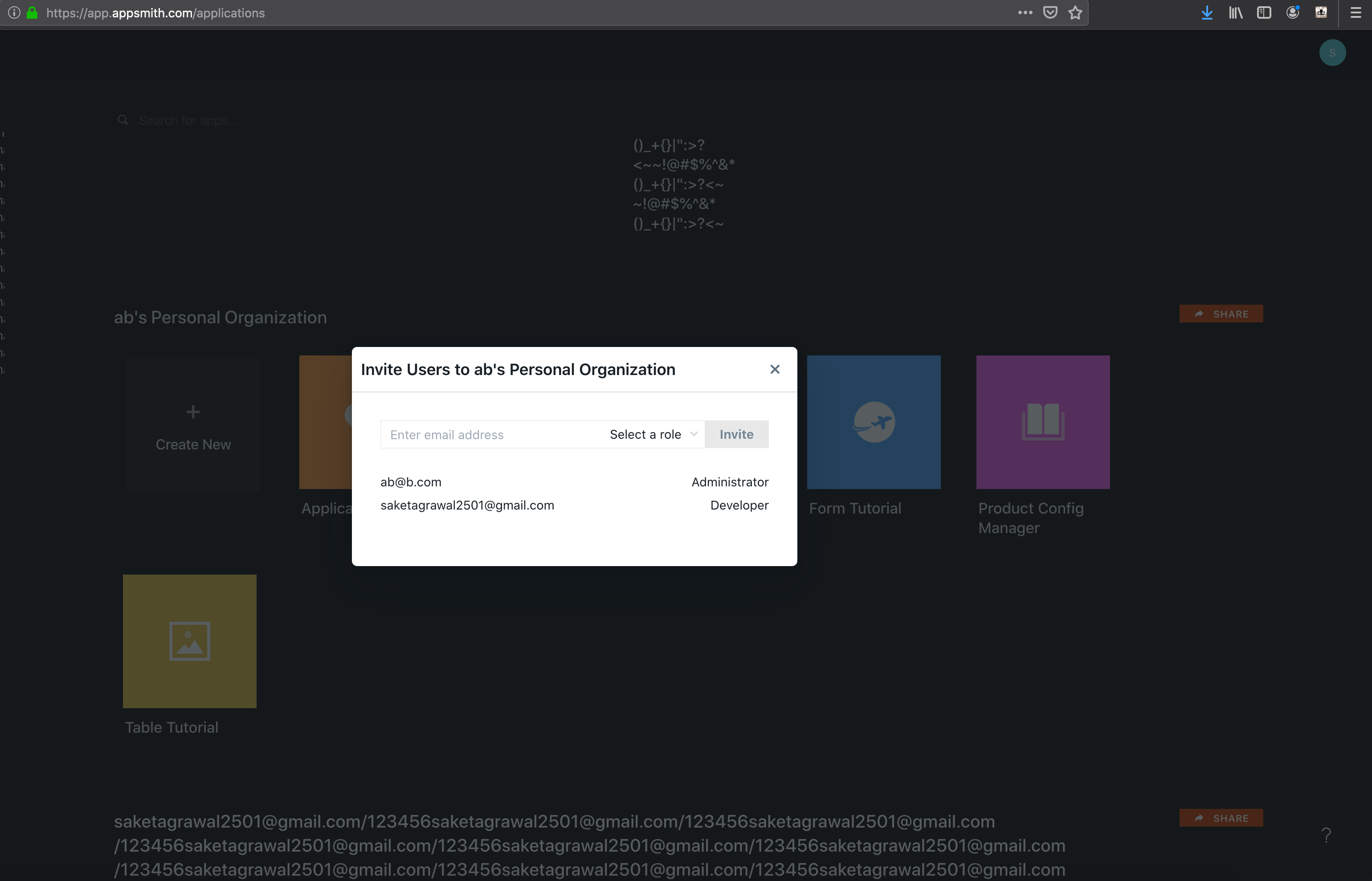
Bug : In User A's as well User B's account, User B is still shown with Develop access.
In the screenshot, User A is ab@b.com while User B is saketagrawal2501@gmail.com .
Browser Details: Chrome Version 85.0.4183.102 (Official Build) (64-bit)
Device Details: macOS 10.15.6 (MacBook Pro)
Note: Tried on cloud.
Steps to replicate:
Note: User B receives an email, DO NOT DO ANYTHING from the email
Bug : In User A's as well User B's account, User B is still shown with Develop access.
In the screenshot, User A is ab@b.com while User B is saketagrawal2501@gmail.com .