Purpose.
Picture this : you are at the verge of Android APK launch - but don't actually know how well the audience recieves it. No market research? No PRD team? Just a team of cracked devs- no worries we got you. Been there . Meet DroidTest , built on top of DroidRun its an army of agents: who replace the PRD and UI/UX critic team for you- and turn hours of efforts into miminutes of execution.
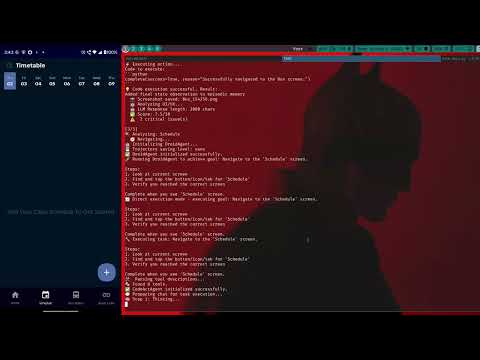
This absolutely dissects your product , screen-by-screen ( which one ? you control ) moves evaluates according to its own agentic workflow and rates , finds critical changes , moderate changes needed. To add a cherry : It generates Comprehensive UX Test Report- which has to be the most verbose and logical report you will witness.
src/uiux_tester/agent.py— main agent logic (navigation, screenshots, LLM analysis, report generation)src/uiux_tester/pdf_generator.py— professional PDF generator (based on ReportLab)src/uiux_tester/utils.py— small utilities (safe JSON parsing, defaults)src/uiux_tester/cli.py— CLI entrypoint, interactive and flags.env.example— sample env variablesrequirements.txt— packages to install
- Set up environment & install dependencies.
- Prepare your Android device (enable Developer Options, USB debugging or connect via ADB over network).
- Install and configure DroidRun and the DroidRun Portal on the phone (the Portal is an accessibility helper that helps the agent see UI elements).
- Run the CLI:
python -m uiux_tester.cli(or pass--appand--screensflags). - Find JSON/MD/PDF reports under
./test_reports/(or yourOUTPUT_DIR).
Use a clean venv (recommended Python 3.10+):
python -m venv .venv
source .venv/bin/activate
pip install -r requirements.txt
requirements.txt includes:
python-dotenv— load.envreportlab— PDF generationdroidrun,llama-index— used by the agent (installing these may pull native dependencies)
A .env.example is included in this package at the project root.
DroidRun gives AI agents native control of Android devices. Official sources / docs:
- DroidRun GitHub: https://github.com/droidrun/droidrun. citeturn0search0
- Quickstart / docs: https://docs.droidrun.ai (follow the quickstart and prerequisites). citeturn0search4turn0search13
Key prerequisites:
adb(Android SDK Platform Tools) in your PATH- Android device with Developer options and USB debugging enabled
- Install the DroidRun Portal APK on your device (it provides accessibility overlays and element info). See the portal repo: https://github.com/droidrun/droidrun-portal. Install droidrun from PyPI:
pip install droidrun(If you prefer the source or a specific release, check the GitHub releases page). citeturn0search1turn0search5
Once your device is connected (via USB or network ADB), verify basic connectivity:
- Check
adb devices:
adb devices- Start the DroidRun portal app on your phone (open it manually). Then run a simple droidrun check from your machine:
# start a quick droidrun session (example)\
droidrun setup
droidrun ping
DroidRun provides a device health check / ping utility in its CLI/docs. The ping or health check will verify the agent can reach and interact with the device. Consult the quickstart for the exact command if your installed version differs. citeturn0search4turn0search5
Interactive mode (prompts):
python -m uiux_tester.cli
# then follow the prompts:
# Enter app name: My App
# Screens: Home, Profile, Settings
Non-interactive mode:
python -m uiux_tester.cli --app "My App" --screens "Home,Profile,Settings"Optional flags:
--keyto passLLM_API_KEYdirectly (overrides .env)--outputto changeOUTPUT_DIR
What the script does:
- Launches DroidRun agent to open the app (best-effort)
- Navigates to each named screen (using a DroidAgent plan)
- Captures screenshots via
AdbTools.take_screenshot() - Sends screenshot + prompt to
GoogleGenAI.complete(...)for analysis - Aggregates feedback into
ScreenFeedbackdataclasses - Writes JSON + Markdown and generates a PDF via ReportLab
- If the LLM returns unparsable output, the agent will fall back to a safe default analysis and continue. Check the JSON report for raw LLM output if you need troubleshooting context.
- If screenshots are blank or tools fail, ensure the DroidRun Portal overlay is active and that adb has the correct permissions.
- On Linux, you might need udev rules for your Android device to allow ADB access without sudo.
- The project is split into small modules:
agent.py: orchestration and business logicpdf_generator.py: purely rendering concernsutils.py: parsing & fallback datacli.py: user interface and entrypoint
- DroidRun Quickstart & docs. citeturn0search4turn0search13
- DroidRun GitHub: https://github.com/droidrun/droidrun. citeturn0search0
- DroidRun Portal: https://github.com/droidrun/droidrun-portal. citeturn0search2
# after venv + deps + .env
python -m uiux_tester.cli --app "MyApp" --screens "Home,Profile,Settings"
# Outputs:
#  - ./test_reports/MyApp_<timestamp>_report.json
#  - ./test_reports/MyApp_<timestamp>_report.md
# - ./test_reports/UIUX_Report_MyApp_<timestamp>.pdf- The screenshots and reports may contain sensitive UI content. Store them securely.
- Keep
.envand API keys out of source control.