A smart shopping assistant that automatically searches for products across multiple e-commerce platforms, compares prices according to mathematical comparator engine, and adds the best deals to your cart. Built with Python and powered by DroidRun, dealDroid helps you find the best prices without manual searching , so tha you can leave your fingers to rest.
Have a look :
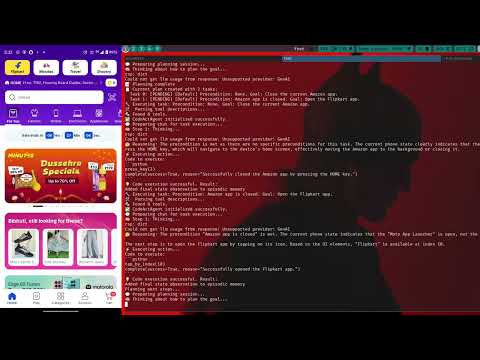
- 🔍 Multi-Platform Search: Automatically searches for products across multiple e-commerce apps (Amazon, Flipkart, etc. add in the .env)
- Price Comparison: Compares prices across platforms to find the best deals
- Smart Filtering: Considers product ratings and availability alongside price
- Automated Cart Addition: Automatically adds the best deal to your cart
- Detailed Reports: Generates comprehensive comparison reports with price statistics
- Beautiful CLI: Colorful and intuitive command-line interface
- Python 3.11 or higher
- Android device or emulator with shopping apps installed
- DroidRun portal
- ADB (Android Debug Bridge) set up and configured
- Google Cloud API key for Gemini AI
-
Clone the repository:
git clone https://github.com/bibhuti-ssh/dealDroid.git cd dealDroid -
Create and activate a virtual environment (recommended):
python -m venv venv
source venv/bin/activate  # On Windows: venv\Scripts\activate
-
Install required packages:
pip install -r requirements.txt
-
Set up environment variables by creating a
.envfile:GOOGLE_API_KEY=your_google_api_key_here SHOPPING_APPS=Amazon,Flipkart # Add more apps as needed, comma-separated
-
Make sure your Android device is connected via ADB:
adb devices
droidrun setup
droidrun ping
Read more about it in (https://docs.droidrun.ai/v3/guides/gemini)
-
Run the main script:
python3 main.py
-
Follow the prompts:
- Press Enter to start
- Type your product query when prompted
- Grab a cup of coffee !
- Wait while the agent searches across platforms
- Review the comparison results
- The best deal will be automatically added to cart
dealDroid uses three main agents:
-
Search Agent (
agents/search_app.py):- Searches for products in each configured app
- Extracts product details like name, price, and rating
- Saves results to JSON files
-
Compare Agent (
agents/compare.py):- Analyzes results from all apps
- Normalizes prices and ratings
- Identifies the best deal based on price and rating
- Generates comparison statistics
-
Cart Agent (
agents/add_to_cart.py):- Takes the best deal
- Automatically navigates to the product
- Adds it to the cart
- Each operation has multiple retry attempts
- Detailed error logging and status updates
- Graceful failure handling with informative messages
dealDroid/
├── main.py              # Main entry point
├── .env                 # Environment variables
├── agents/
│   ├── __init__.py     # Package initialization
│   ├── search_app.py   # Product search agent
│   ├── compare.py      # Price comparison agent
│   └── add_to_cart.py  # Cart automation agent
└── README.md           # This file
- Fork the repository
- Create your feature branch (
git checkout -b feature/amazing-feature) - Commit your changes (
git commit -m 'Add some amazing feature') - Push to the branch (
git push origin feature/amazing-feature) - Open a Pull Request
- Powered by droidrun for Android automation
- Colorama for beautiful CLI interface
This tool is for educational purposes only. Please ensure you comply with the terms of service of all e-commerce platforms you use this with.