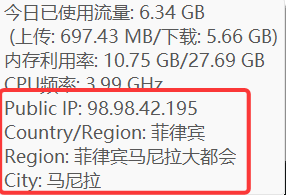
I've built a new IPLocation plugin for TrafficMonitor that accurately displays your public egress IP and geographic region, auto-refreshing every 30 seconds. It fixes the inaccurate display and lack of region support in the original plugin.
Verify VPN/proxy node switching instantly Check public IP quickly for remote development & server configuration Troubleshoot network issues with real egress IP Monitor IP status across multiple network environments
TrafficMonitor is a lightweight Windows tool. This plugin adds one feature that is especially useful if you work with VPN/proxy nodes:
- Show the current public (egress) IP on the taskbar window
- Provide a tooltip for quick copy/verification
The goal is simple: when you switch nodes, you should be able to confirm the current egress IP within seconds.
- Data source priority:
ipwho.is(returns IP + location; supportslang=zh-CN)- Fallback:
api.ipify.org(IP only) +ip-api.com(country)
This plugin also provides tooltip text via ITMPlugin::GetTooltipInfo().
PluginInterface.h: Official TrafficMonitor plugin interface header (from TrafficMonitorPlugins repo)IPLocationPlugin.*: Plugin implementation (ITMPlugin)IPLocationItem.*: Display item implementation (IPluginItem)NetworkHelper.*: WinHTTP GET helperHtmlParser.*: Legacy HTML parser (kept for compatibility; currently not the primary path)CMakeLists.txt: Build script
- TrafficMonitor: tested with
v1.85.1(x64) - Windows: Windows 10/11
- Architecture: the plugin DLL must match TrafficMonitor (x64 vs x86)
- CMake
- MSVC toolchain (Visual Studio / Build Tools)
Notes:
- When using MSVC, build in a Developer shell (or run
VsDevCmd.bat) socl.exe/nmake.exeare available. - For single-config generators (NMake/Ninja), use
-DCMAKE_BUILD_TYPE=Release.
Open the Visual Studio Developer environment (so cl.exe and nmake.exe are available), then run:
cd D:\Project\Test\IP\IPLocationPlugin

# Clean old build cache (recommended when changing generators/options)
rmdir build -Recurse -Force

cmake -S . -B build -G "NMake Makefiles" -DCMAKE_BUILD_TYPE=Release
cmake --build build
The output DLL is typically:
build\IPLocationPlugin.dll
If CMake can detect your Visual Studio installation:
cd D:\Project\Test\IP\IPLocationPlugin
rmdir build -Recurse -Force

cmake -S . -B build -G "Visual Studio 17 2022" -A x64
cmake --build build --config Release- Copy
IPLocationPlugin.dllinto TrafficMonitor'spluginsfolder. Example:D:\Utils\TrafficMonitor\plugins\ - Restart TrafficMonitor.
- Enable the item in:
- Taskbar window context menu -> Display Settings
- Or: More Functions -> Plugin Management
Tip: if you update the DLL, fully exit TrafficMonitor (ensure the process ends) before replacing the file.
- Auto refresh: every 30 seconds (full refresh: IP + location)
- Manual click refresh: not used (disabled)
- Tooltip: shows
Public IPand one merged地区line (avoids duplicated country/region/city)
IPv4 only:
- The displayed IP is forced to IPv4 (some networks return IPv6 by default).
Location databases may disagree for proxy/datacenter IPs. This plugin prioritizes ipwho.is because it provides stable JSON access without requiring a browser.
If you see different country/region in another software, it is usually due to:
- Different geolocation database vendors
- IP ownership/route changes (ASN prefix moved)
- Proxy/VPN/datacenter tagging differences
- If TrafficMonitor crashes on startup after copying the DLL, it is almost always an ABI mismatch.
Ensure you are using the official
PluginInterface.hthat matches your TrafficMonitor version. - If location looks inconsistent, note that different databases may return different results for proxy/datacenter IPs.
MIT License. See LICENSE.
- TrafficMonitor plugin system and interface header are provided by the TrafficMonitor project.
- Email: 1416679017@qq.com