


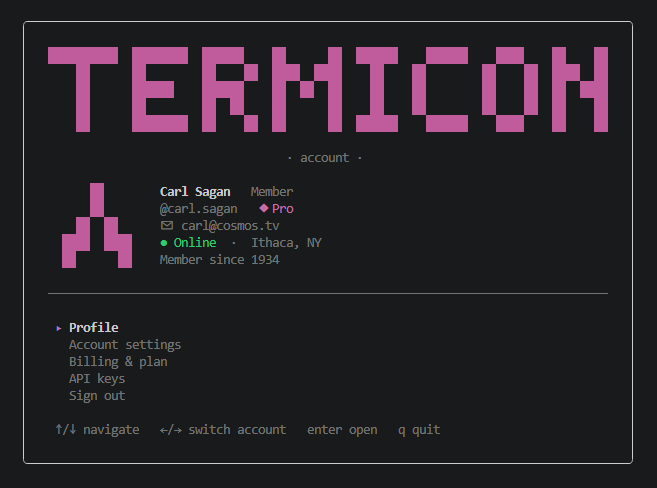
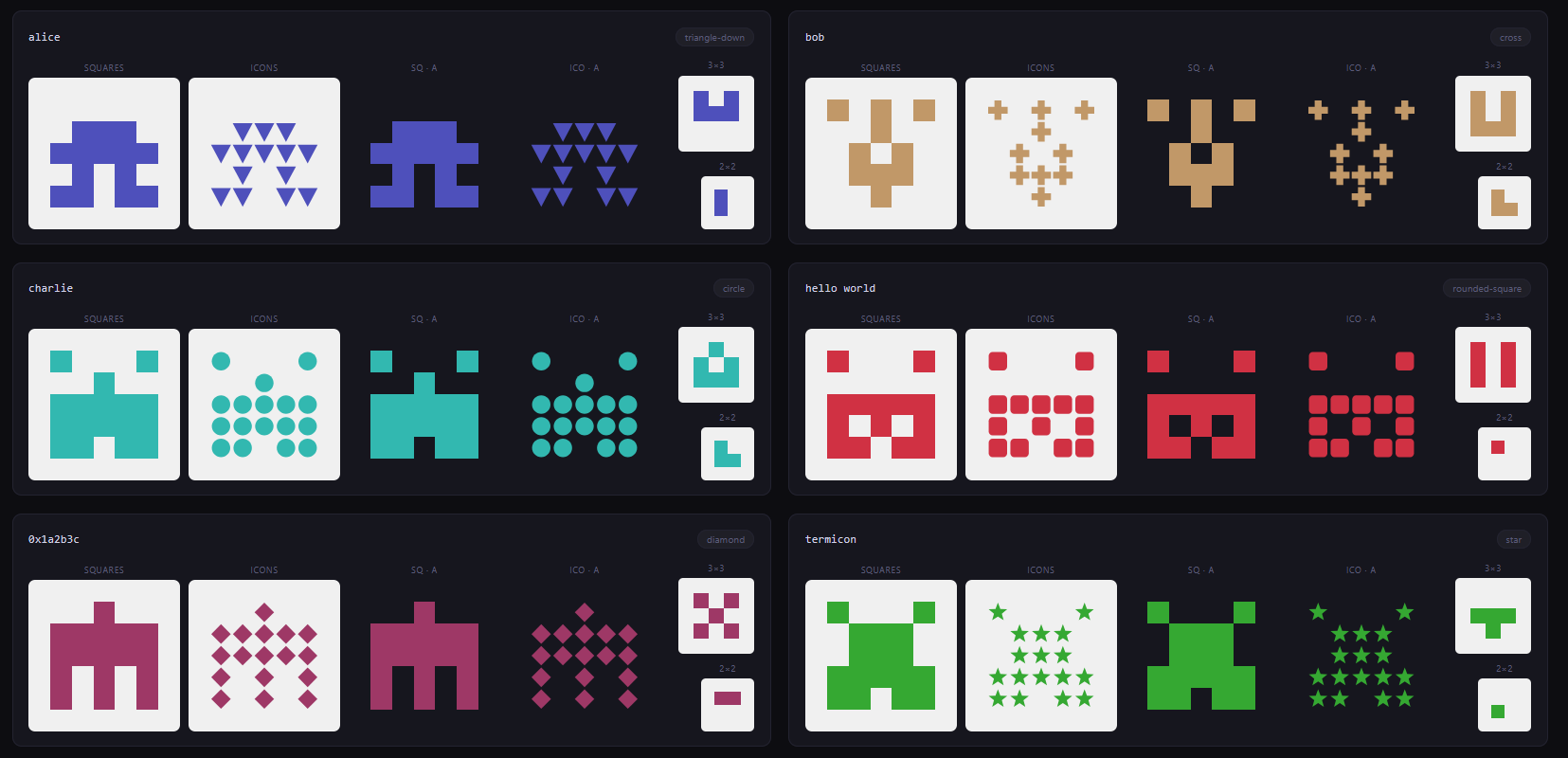
Identicon library that works with the terminal and browser. Generates deterministic, visually distinct avatars from any string — email address, username, hash, or arbitrary text.
yarn add termiconPick your environment — each example is everything you need to render an avatar from a string.
import { Identicon } from 'termicon/react'

export function UserAvatar({ email }) {
  return <Identicon value={email} pixelSize={48} />
}
The component generates the hash asynchronously and inlines the SVG. Configure colors and shape with palette, variant, background, and more — full prop list in the API section below.
<script setup>
import { Identicon } from 'termicon/vue'
defineProps(['email'])
</script>

<template>
  <Identicon :value="email" :pixel-size="48" />
</template>
Full prop list in the API section below.
No wrapper component — call the SVG renderer directly:
<script>
  import { generate } from 'termicon'
  import { toSvg } from 'termicon/svg'
  export let email
</script>

{#await generate(email) then id}
  {@html toSvg(id, { pixelSize: 48 })}
{/await}import { generate } from 'termicon'
import { toSvg, toDataUri } from 'termicon/svg'
const id = await generate('alice@example.com')
// Inject inline SVG…
document.querySelector('#avatar').innerHTML = toSvg(id)
// …or use a data URI on an <img>:
document.querySelector('img.avatar').src = toDataUri(id)import { generate } from 'termicon'
import { toAscii } from 'termicon/ascii'
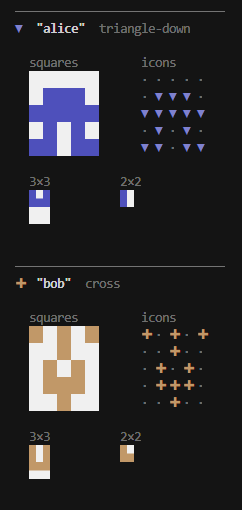
console.log(toAscii(await generate('alice@example.com'), { style: 'block' }))toAscii with style: 'block' returns a string of truecolor ANSI escapes that any terminal-UI library can pass through to stdout. Drop it into whichever "raw text" primitive your TUI exposes — don't wrap it in a styled container, since that fights with the per-cell background escapes termicon emits.
ink (React for terminals):
import React, { useEffect, useState } from 'react'
import { Text } from 'ink'
import { generate } from 'termicon'
import { toAscii } from 'termicon/ascii'

export function Identicon({ value }: { value: string }) {
  const [art, setArt] = useState('')
  useEffect(() => {
    generate(value).then((id) => setArt(toAscii(id, { style: 'block', transparent: true })))
  }, [value])
  return <Text>{art}</Text>
}
<Text> passes escape sequences through untouched. Avoid <Box backgroundColor="…"> around it — that conflicts with the per-cell color escapes.
blessed / blessed-contrib:
import blessed from 'blessed'
import { generate } from 'termicon'
import { toAscii } from 'termicon/ascii'

const screen = blessed.screen()
const box = blessed.box({ tags: false, width: 12, height: 5, top: 0, left: 0 })
box.setContent(toAscii(await generate('alice'), { style: 'block', cellWidth: 2 }))
screen.append(box)
screen.render()
Set tags: false so blessed doesn't try to interpret the escapes as its own markup. Size the box to cellWidth * gridSize columns × gridSize rows.
General TUI guidance:
- Layout math. A 5×5 identicon with default
cellWidth: 2occupies 10 columns × 5 rows. For 3×3 it's 6×3, for 2×2 it's 4×2. IncreasecellWidthfor a chunkier look (3 or 4 is common in TUI dashboards). - Backgrounds. Pass
transparent: trueto let the host terminal/TUI theme show through, orbackground: '#1a1a1a'(or any hex/rgb()/hsl()) to match your palette. - Truecolor support. termicon emits SGR
48;2;R;G;Btruecolor escapes — works in iTerm, Windows Terminal, Alacritty, Kitty, WezTerm, and modern xterm. In terminals that lack truecolor, colors degrade to nearest 256-color.
Hashes the input and returns an IdenticonResult describing the grid, color, and shape. All renderers take this result as their first argument.
import { generate } from 'termicon'

const id = await generate('alice@example.com')
// { grid: number[][], color: { h, s, l }, shape: number, cssColor: string }| Option | Type | Default | Description |
|---|---|---|---|
size |
2 | 3 | 5 |
5 |
Grid dimensions |
palette |
PaletteName | string[] |
— | Color palette — see Palettes below |
The returned IdenticonResult exposes the color so you can reuse it elsewhere:
| Field | Type | Description |
|---|---|---|
grid |
number[][] |
The on/off cell matrix |
color |
{ h, s, l } |
Hash-derived HSL color (hue 0–360, sat/lightness as percentages) |
cssColor |
string |
Resolved CSS color string — the exact color the renderers paint with (palette-aware) |
shape |
number |
Raw byte selecting the icon shape |
cssColor is the same value toSvg, toCanvas, and toAscii use to draw the icon, so reading it back gives you an exact match for borders, text, or other accents around the avatar:
const id = await generate('alice@example.com')

avatar.innerHTML = toSvg(id)
avatar.style.borderColor = id.cssColor   // accent matches the icon exactly

// Need RGB or HSL components instead? Use the raw `color`:
const { h, s, l } = id.color
nameLabel.style.color = `hsl(${h}, ${s}%, ${l}%)`
Note: when a palette is set, cssColor is the picked palette entry while color remains the hash-derived HSL — use cssColor to match what's rendered.
By default, foreground color is derived from the hash as HSL. Pass palette to pick from a curated preset or your own array of CSS colors.
const id = await generate('alice@example.com', { palette: 'pastel' })
// id.cssColor === '#a6c8e1' (or whichever entry the hash points to)

const custom = await generate('alice@example.com', {
  palette: ['#ff6b6b', '#4ecdc4', '#ffe66d', '#a8e6cf'],
})
Built-in presets: 'default' (hash-derived HSL), 'pastel', 'mono', 'vivid', 'earth', 'ocean', 'sunset'.
Returns an SVG string of squares.
| Option | Type | Default | Description |
|---|---|---|---|
pixelSize |
number |
120 |
Width and height of the output in pixels |
padding |
number |
1 |
Empty cells around the grid on each side |
background |
string |
'#f0f0f0' |
CSS color for the background |
transparent |
boolean |
false |
Omit the background rect (overrides background) |
Like toSvg but renders cells as shapes (circle, diamond, star, hexagon, etc.) instead of squares.
Returns a data:image/svg+xml;utf8,… URI. Drop straight into <img src> or CSS background-image — no DOM mounting required.
import { toDataUri } from 'termicon/svg'

const uri = toDataUri(await generate('alice@example.com'))
document.querySelector('img.avatar').src = uriDraws onto an existing CanvasRenderingContext2D. The caller is responsible for sizing the canvas to match pixelSize before calling.
import { toCanvas } from 'termicon/canvas'

const canvas = document.createElement('canvas')
canvas.width = canvas.height = 120
toCanvas(id, canvas.getContext('2d')!)| Option | Type | Default | Description |
|---|---|---|---|
pixelSize |
number |
120 |
Logical render size in pixels |
padding |
number |
1 |
Empty cells around the grid |
background |
string |
'#f0f0f0' |
CSS color for the background |
transparent |
boolean |
false |
Skip drawing the background |
Returns a multi-line string for the terminal. The style option selects the technique:
'text'(default) — a grid of characters:#/., or shape glyphs withvariant: 'icons'. On-cells are colored with a truecolor ANSI foreground (off-cells dimmed) by default; passcolor: falsefor a plain, escape-free string. Withcolor: falseandvariant: 'squares'the output is pure ASCII — the fallback for environments without color or Unicode support.'block'— solid truecolor cells drawn with background-color escapes (two columns per cell by default). The classic "colored blocks" look for CLIs and TUIs.'halfblock'— the▀glyph packs two grid rows into one line (foreground = upper pixel, background = lower pixel), so the icon looks ~square in half the height.
import { toAscii } from 'termicon/ascii'

console.log(toAscii(id))                         // colored '#'/'.' grid
console.log(toAscii(id, { color: false }))       // pure ASCII, no escapes
// #.#.#
// #####
// ##.##
// .#.#.
// .....

console.log(toAscii(id, { variant: 'icons' }))   // ●.●.● …
console.log(toAscii(id, { style: 'block' }))     // solid colored blocks
console.log(toAscii(id, { style: 'halfblock' })) // ▀ half-block, half the height| Option | Type | Default | Description |
|---|---|---|---|
style |
'text' | 'block' | 'halfblock' |
'text' |
Rendering technique (see above) |
cellWidth |
number |
1 (text) / 2 (block) |
Columns per cell; ignored by 'halfblock' |
onChar |
string |
'#' (or shape glyph when variant: 'icons') |
On-cell character ('text' style) |
offChar |
string |
'.' |
Off-cell character ('text' style) |
variant |
'squares' | 'icons' |
'squares' |
'icons' substitutes the on-cell with the Unicode glyph matching the shape toIconSvg would draw (●, ◆, ▲, ▼, ★, ✚, ⬡, ■) — 'text' style |
color |
boolean |
true |
Colorize the 'text' style with a truecolor ANSI foreground. Set false for plain text |
transparent |
boolean |
false |
'block'/'halfblock': off-cells use the terminal's default background |
background |
string |
'#f0f0f0' |
'block'/'halfblock': CSS color (hex, rgb(), hsl()) for off-cells |
console.log(toAscii(id, { variant: 'icons' }))
// ●.●.●
// ●●●●●
// ●●.●●
// .●.●.
// .....Returns a stable, human-readable string fingerprint of an identicon. Useful for test assertions.
import { fingerprint, generate } from 'termicon'

expect(fingerprint(await generate('alice'))).toBe(
  '5x5:0000001110111110101011011:hsl(239,44,52):35'
)import { Identicon, type IdenticonProps } from 'termicon/react'| Prop | Type | Default | Description |
|---|---|---|---|
value |
string |
(required) | Input string to hash |
size |
2 | 3 | 5 |
5 |
Grid dimensions |
palette |
PaletteName | string[] |
— | Color palette, see Palettes |
pixelSize |
number |
120 |
SVG width/height in pixels |
padding |
number |
1 |
Empty cells around the grid |
background |
string |
'#f0f0f0' |
CSS color for the background |
transparent |
boolean |
false |
Omit the background rect |
variant |
'squares' | 'icons' |
'squares' |
'icons' renders shapes per cell instead of squares |
title |
string |
— | Overrides the default aria-label |
className |
string |
— | Forwarded to the wrapper <span> |
style |
CSSProperties |
— | Forwarded to the wrapper <span> |
<script setup>
import { Identicon } from 'termicon/vue'
</script>| Prop | Type | Default | Description |
|---|---|---|---|
value |
string |
(required) | Input string to hash |
size |
2 | 3 | 5 |
5 |
Grid dimensions |
palette |
PaletteName | string[] |
— | Color palette |
pixelSize |
number |
120 |
SVG width/height in pixels |
padding |
number |
1 |
Empty cells around the grid |
background |
string |
'#f0f0f0' |
CSS color for the background |
transparent |
boolean |
false |
Omit the background rect |
variant |
'squares' | 'icons' |
'squares' |
'icons' renders shapes per cell |
title |
string |
— | Overrides the default aria-label |
yarn install
yarn dlx @yarnpkg/sdks vscode
yarn test
yarn build