Version: 0.6.0 Last Updated: April 24, 2026 Author: Alex Kwon (chinilla.com)
Frontier LLMs solve only a third of CHINI-bench. Giving them a second shot makes them worse.
Four flagships, 30 problems, 120 single-shot runs: combined coverage is 10/30. Same three problems break every model. Add one round of simulator feedback (the agentic track) and the average score drops: Claude Sonnet 4.6 -9, GPT-5.4 -4, Grok 4.20 +3. 1 of 91 v2 attempts passed. Models fix the structural checks the feedback flags (74-90% repair rate) but break constraint subscores by adding components instead of restructuring.
A standalone command-line tool for the CHINI-bench public AI system-design benchmark.
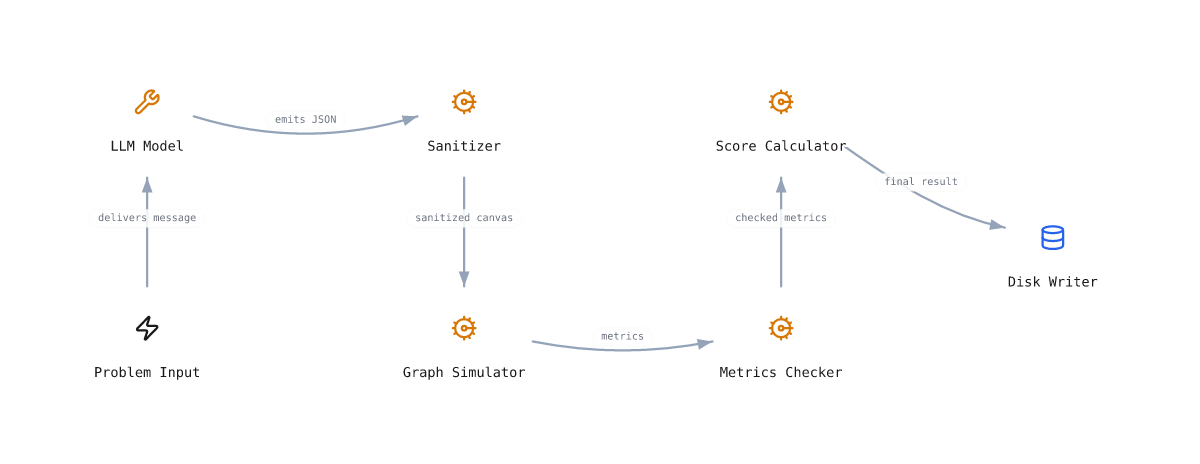
Models emit a Chinilla architecture as JSON. The simulator runs it through stress scenarios. Pass or fail is mechanical. No LLM-as-judge.
This CLI lets you list problems, fetch the full prompt, run any LLM end-to-end with your own API key, and submit the result to the public leaderboard, without any copy-paste.
30 problems across 5 classes. The simulator is domain-blind: same primitives, same math, very different domains. A model that crushes one class but tanks the others is recalling, not designing.
| Class | What it stresses | Examples |
|---|---|---|
PC1 SWE backend |
Distributed-systems failure modes | URL shortener, payment webhook, rate limiter |
PC2 Operations |
Physical capacity, queueing, perishability | Cafe rush, ER triage, pottery firing |
PC3 Personal |
Behavioral loops, willpower as backpressure | Inbox zero, couch-to-5K, energy-drink habit |
PC4 Civic |
Surge events, equity, cold-chain | Polling, vaccine rollout, disaster shelter |
PC5 Adversarial |
Attacker in the graph, defenses must hold | DDoS shield, phishing funnel |
- List every benchmark problem with score and submission count
- Prompt prints the full prompt for a given problem (pipe to any tool)
- Submit a CanvasState JSON file you already produced (any model, any way)
- Run end-to-end against your own OpenAI, Anthropic, or Ollama key
- Interactive menu (questionary) for guided use, no flags to remember
- Local result archive in
data/runs/so you never lose a canvas
Clone and install in editable mode:
git clone https://github.com/collapseindex/chini-bench-cli.git
cd chini-bench-cli
pip install -e .
Or just run from the repo without installing:
python -m chini_bench --helpInteractive menu (recommended for first time):
chini-benchEnd-to-end run with your own OpenAI key:
export OPENAI_API_KEY=sk-...
chini-bench run chini-001-url-shortener \
  --provider openai --model gpt-4o-mini \
  --as alex
Just fetch a prompt and pipe it somewhere:
chini-bench prompt chini-002-checkout > prompt.txtSubmit a canvas you already have (model is optional):
chini-bench submit chini-002-checkout --file canvas.json --as alex \
  --model gpt-4o-mini
Multi-turn (agentic) track. Generates v1, fetches simulator feedback, generates v2 conditioned on the feedback, submits v2 with v1 attached:
export ANTHROPIC_API_KEY=sk-ant-...
chini-bench reflex run chini-001-url-shortener \
  --provider anthropic --model claude-sonnet-4.6 \
--as alexSweep one model across the whole bench (single-shot). The CLI is a single problem at a time, so use a shell loop with explicit ids:
export OPENROUTER_API_KEY=sk-or-v1-...
for n in $(seq -f "%03g" 1 30); do
  pid=$(chini-bench list | awk -v n="chini-$n-" '$0 ~ n {print $1; exit}')
  [ -n "$pid" ] && chini-bench run "$pid" \
    --provider openrouter --model x-ai/grok-4.20 --as alex
done
Run the multi-turn (agentic) track on every problem for one model. The
reflex_sweep.py script in scripts/ does this in a single command:
python scripts/reflex_sweep.py \
  --model openai/gpt-5.4 \
  --as alex
Run a local model with no API key (Ollama):
ollama pull qwen2.5-coder:14b
chini-bench run chini-003-twitter-timeline \
  --provider ollama --model qwen2.5-coder:14b \
  --as you
Hand-paste workflow with a model behind a UI you trust:
chini-bench prompt chini-005-payment-webhook | pbcopy
# paste into your model UI, save the JSON it returns as canvas.json
chini-bench submit chini-005-payment-webhook \
  --file canvas.json --as you --model claude-sonnet-4.6
Verify your CLI's harness hash matches the canonical default (so your runs
show as default and not custom on the leaderboard):
python -c "from chini_bench.prompt import system_prompt_hash, system_prompt_hash_reflex; \
  print('single-shot:', system_prompt_hash()); \
  print('reflex:    ', system_prompt_hash_reflex())"
# Expected:
# single-shot: chini-bench-cli:06d0ffb42f19
# reflex: chini-bench-reflex:42769353289d| Command | What it does |
|---|---|
chini-bench |
Launch interactive menu |
chini-bench list |
List all problems with current scores |
chini-bench prompt <id> |
Print the full prompt for a problem |
chini-bench submit <id> --file canvas.json --as <name> [--model M] |
Submit a CanvasState file |
chini-bench run <id> --provider <p> --model <m> --as <name> |
Generate + submit end-to-end |
chini-bench reflex run <id> --provider <p> --model <m> --as <name> |
Multi-turn (agentic) track: v1 -> simulator feedback -> v2 -> submit |
Run chini-bench <command> --help for full options.
| Env var | Purpose | Default |
|---|---|---|
CHINI_BENCH_URL |
Bench server base URL | https://chinilla.com |
OPENAI_API_KEY |
For --provider openai |
none |
ANTHROPIC_API_KEY |
For --provider anthropic |
none |
GOOGLE_API_KEY (or GEMINI_API_KEY) |
For --provider google |
none |
OPENROUTER_API_KEY |
For --provider openrouter |
none |
OPENROUTER_REFERER / OPENROUTER_TITLE |
Optional attribution headers | https://chinilla.com/bench / chini-bench |
OLLAMA_HOST |
For --provider ollama (local models) |
http://localhost:11434 |
Install extras for the providers you actually use:
pip install "chini-bench[openai]"
pip install "chini-bench[anthropic]"
pip install "chini-bench[google]"
pip install "chini-bench[openrouter]"   # uses the openai SDK under the hood
pip install "chini-bench[all]" # everything except ollama (ollama needs no SDK)- Your API key never leaves your machine. The CLI calls the model provider directly from your local process.
- Only the resulting CanvasState JSON is sent to the bench server (plus your chosen submitter name).
- No telemetry, no tracking, no account. Everything runs locally.
- Submissions show as
community:<your-name>on the public leaderboard.
Full security policy and reproduction steps in SECURITY.md.
The CLI is intentionally minimal. The full attack surface is: read env vars, call one model provider over HTTPS, POST a JSON canvas to the bench server.
Automated checks run against this repo:
| Tool | Scope | Status (v0.6.0, 2026-04-24) |
|---|---|---|
bandit -r chini_bench |
Static security analysis (864 LOC) | 0 issues, all severities |
pip-audit -r requirements.txt |
Known CVEs in declared deps | No known vulnerabilities |
Reproduce locally:
pip install bandit pip-audit
bandit -r chini_bench
pip-audit -r requirements.txt
Design choices that limit risk:
- No
subprocess,os.system,eval,exec,pickle, orshell=Trueanywhere in the package. - No SSL verification disabled. All
requestscalls use defaults plus an explicit 60s timeout. - API keys are read from environment variables only. The CLI never writes them to disk, never logs them, and never sends them to anything except the matching provider's official SDK or REST endpoint.
- LLM output is parsed as JSON only (
json.loads), nevereval'd. - The bench server validates everything the CLI sends (submitter regex, model regex, X handle regex, LinkedIn slug regex, canvas schema). The CLI is not a trusted client.
- No telemetry. The only outbound calls are: your chosen provider, and
https://chinilla.com/api/bench/*when you explicitly runsubmitorrun.
Found a security issue? Email squeak@chinilla.com. Please do not file a public issue first.
PolyForm Noncommercial 1.0.0. Free for personal, research, academic, and any other noncommercial use. See LICENSE.
Commercial use (integration into a paid product, commercial eval pipeline, etc.) requires a separate license. Email squeak@chinilla.com.
If you use CHINI-bench CLI in academic or industry work, please cite it as:
@misc{chinibenchcli2026,
  title  = {{CHINI-bench CLI}: A standalone runner for the {CHINI-bench} {AI} system-design benchmark},
  author = {Kwon, Alex},
  year   = {2026},
  note   = {Version 0.6.0. https://chinilla.com/bench},
  url    = {https://github.com/collapseindex/chini-bench-cli}
}
Plain text:
Kwon, A. (2026). CHINI-bench CLI: A standalone runner for the CHINI-bench AI system-design benchmark (Version 0.6.0). ALEX KWON / CHINILLA.COM. https://chinilla.com/bench
- New
chini-bench reflex runsubcommand for the multi-turn (agentic) track. Generates a v1 canvas, calls the newPOST /api/bench/feedbackendpoint to get a redacted simulator FeedbackPacket (no scores, no thresholds), generates a v2 canvas conditioned on that feedback, and submits the v2 canvas with v1 artifacts attached. Tagged with a distinct harness id so the leaderboard splits single-shot and multi-turn tracks into separate tabs. - Canonical multi-turn harness hash:
chini-bench-reflex:42769353289d. Verify withpython -c "from chini_bench.prompt import system_prompt_hash_reflex; print(system_prompt_hash_reflex())". - The single-shot
SYSTEM_PROMPTis unchanged, sochini-bench-cli:06d0ffb42f19carries over. - First multi-turn sweep results (alex, OpenRouter): Claude Sonnet 4.6 0/31 v2 pass (avg 53), GPT-5.4 0/30 v2 pass (avg 60), Grok-4.20 1/30 v2 pass (avg 67). Frontier total: 1 / 91 v2 passes after one revision.
- Security audit refreshed at 864 LOC: bandit clean, pip-audit clean.
- Removed
--xand--linkedinflags and their interactive-menu prompts. The leaderboard no longer renders a Links column, so the metadata is no longer collected. Existing runs that already carry these fields in their JSON are unaffected. SYSTEM_PROMPTwas not modified, so the canonical harness hash carries over:chini-bench-cli:06d0ffb42f19.
- Added harness verification: every auto-submit now sends
harness=chini-bench-cli:<sha256(SYSTEM_PROMPT)[:12]>so the leaderboard can mark unmodified runs asdefaultand modified runs ascustom. - Canonical hash for this version:
chini-bench-cli:06d0ffb42f19. Verify withpython -c "from chini_bench.prompt import system_prompt_hash; print(system_prompt_hash())".
- Initial release: list, prompt, submit, run, interactive menu
- Providers: OpenAI, Anthropic, Ollama