







The complete Salesforce DX toolkit - for everyone. A click-driven UI on top of the sfdx-hardis CLI: deliver Salesforce projects with a state-of-the-art DevOps pipeline, monitor your orgs, generate AI-assisted documentation, and run hundreds of productivity commands - without having to learn Salesforce DX or Git first.
Built and maintained by Cloudity and the Trailblazer Community. Free, Open Source (AGPL-3.0), and commercial use allowed.

▶ Watch the sfdx-hardis v7 walkthrough · ▶ Watch the Dreamforce session · 📖 Online documentation
- Why VS Code SFDX Hardis?
- Who is it for?
- Installation
- Feature tour
- Unified Welcome panel
- Orgs Manager
- DevOps Pipeline (CI/CD)
- User Story workflow
- Metadata Retriever
- Data Workbench (SFDMU)
- Files Workbench
- Documentation Workbench
- Org Monitoring
- Monitoring Config Workbench
- Pipeline Settings
- Installed Packages Manager
- Run Anonymous Apex & Apex Debugger
- Flow Visual Git Diff
- Productivity commands
- AI assistance
- Commands tree & status panels
- Per-org VS Code colors
- Multi-language UI
- Customize the extension
- Articles & talks
- Open Source dependencies
- Telemetry & privacy
- Who we are
Salesforce DX is powerful, but you have to glue together dozens of sf commands, plugins, YAML files, and Git operations to ship a project safely. VS Code SFDX Hardis turns that toolbox into an integrated workspace:
- 🖱️ Click, don't memorize - every operation is a button with sensible defaults, tooltips, and contextual help.
- 🚦 CI/CD-ready from day one - set up a complete Salesforce CI/CD pipeline and visualize it inside VS Code.
- 🩺 Watch your orgs - monitor production and sandbox health, security, and limits, with notifications to Slack, MS Teams, email, Jira, Grafana…
- 📚 AI-generated documentation - turn your metadata into a browsable, diagram-rich knowledge base.
- 🤝 Native integrations - GitHub, GitLab, Azure DevOps, Bitbucket, Gitea · Jira, Azure Boards · Slack, MS Teams, Email · OpenAI, Anthropic, Agentforce, Ollama…

| Role | What you get |
|---|---|
| Salesforce Consultants / Admins | A guided, Git-free UI to build user stories, pull changes, and publish work without touching the command line. |
| Developers | Power-user shortcuts: anonymous Apex runner, debugger, delta deployment simulation, project cleaning, Flow git diff, package management. |
| Release Managers / Architects | A visual pipeline, deployment simulation, branch-strategy diagrams, and full org monitoring with notifications. |
| CTOs / Project sponsors | Open-Source tooling that standardizes DevOps across teams and makes Salesforce delivery auditable. |
- Install Visual Studio Code.
- Install the SFDX Hardis extension (or from Open VSX).
- Click the Hardis icon in the VS Code Activity Bar, then Install dependencies - the extension installs and updates everything for you (
@salesforce/cli,sfdx-hardis, SFDMU, sfdx-git-delta…).


A single dashboard that gives one-click access to every workbench, with localized labels, light/dark theme switching, and your favorite custom menus pinned alongside the built-ins.

Connect to new orgs, switch between sandboxes, scratch orgs and Dev Hubs, clean up stale authentications - all from one panel. Token and URL handling is performed safely by the sfdx-hardis CLI; nothing sensitive is ever displayed or logged.

Visualize and manage your entire CI/CD pipeline inside VS Code: branches, environments, automated deployments, merge checks, delta deployment - everything in one screen.
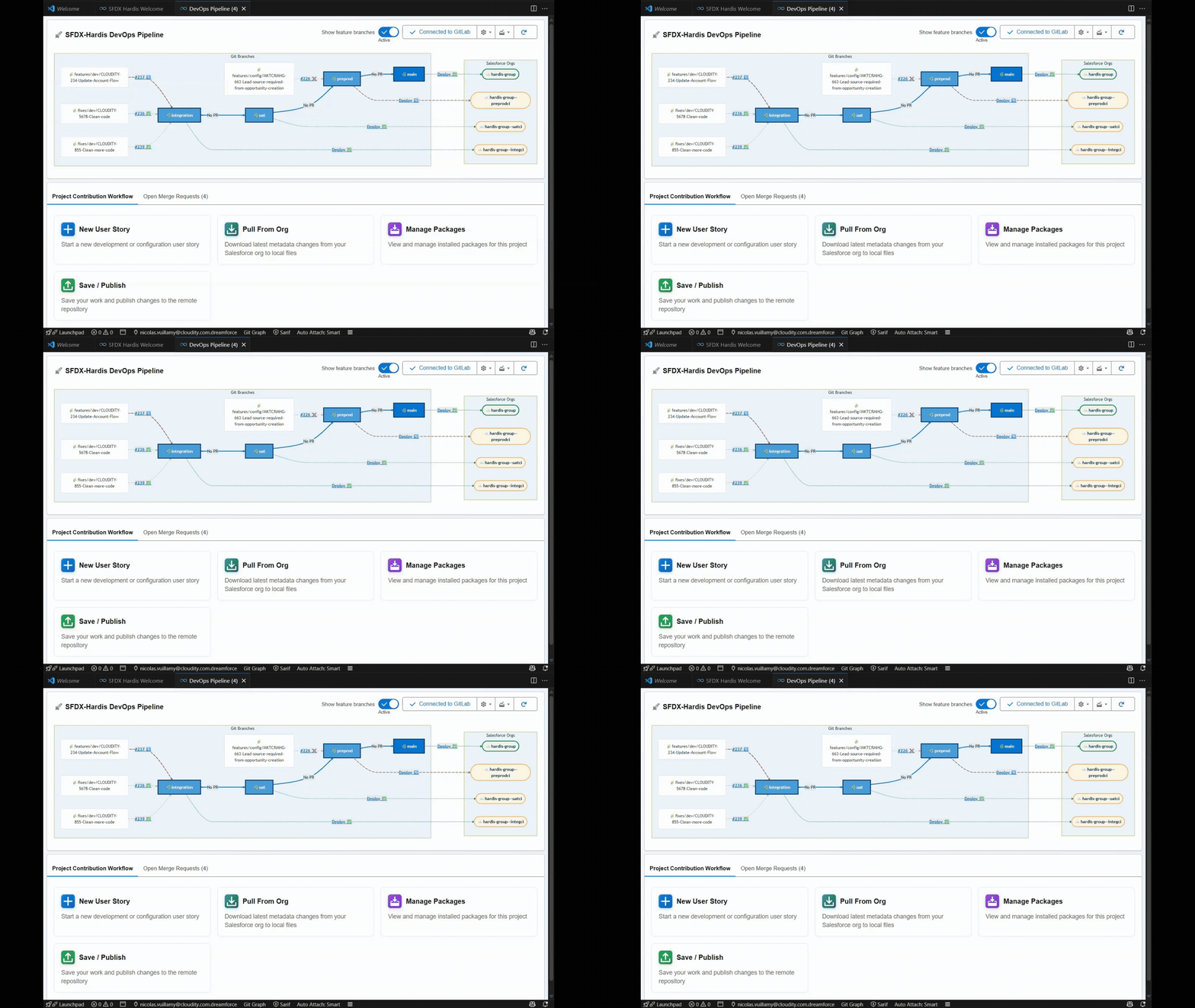
The pipeline supports the major Git platforms out of the box: GitHub, GitLab, Azure DevOps, Bitbucket, Gitea - with merge-request comments, Jira / Azure Boards integration, and notifications to Slack, MS Teams and Email.
Designed for consultant profiles: start a user story → work in the org → save & publish without ever opening a terminal.
| New user story | Retrieve & commit | Save & publish |
|---|---|---|
 |
 |
 |
- Start a new user story - branches and configures everything for you.
- Pull from org - retrieves only what you actually changed.
- Save / publish - cleans sources, commits, and opens the merge request.
A modern replacement for the standard Org Browser. Filter by type, name, last modified by, last modified date, managed package, multi-select and retrieve in a single click.

Import and export records between orgs using the Salesforce Data Move Utility (SFDMU), with full visual configuration support.

- Create export/import configurations
- Export / Import data with one click
Mass-download or upload files and attachments between orgs from a guided UI - no scripting required.

Generate a complete, AI-enriched knowledge base of your Salesforce project: Apex, Flows, profiles, permission sets, custom objects, with relationship diagrams.


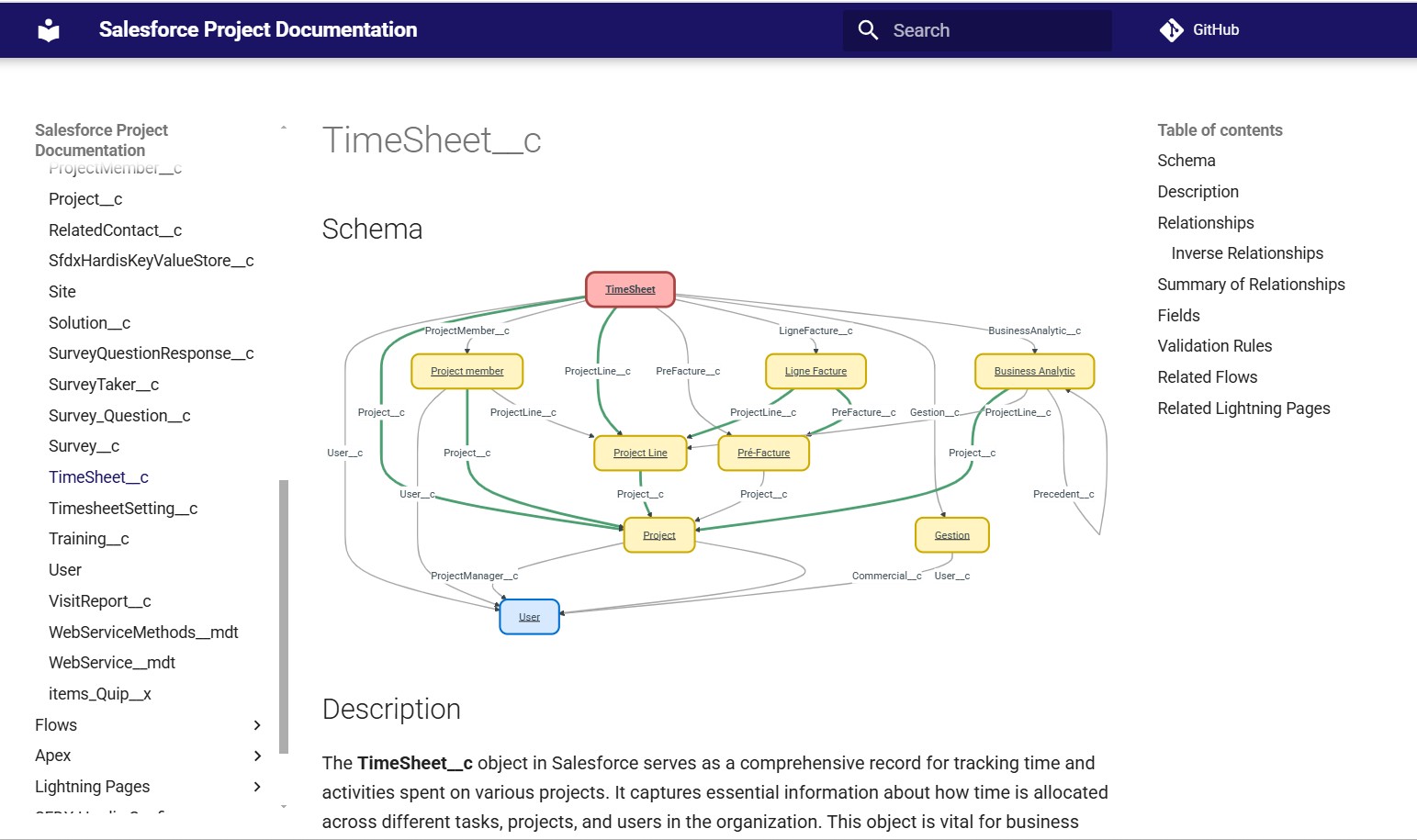
Deploy the docs to GitHub Pages, Cloudflare Pages, Salesforce, or Confluence - straight from the workbench.
Set up scheduled monitoring jobs to track your Salesforce orgs over time: metadata backup, legacy API usage, unused metadata / licenses / Apex, audit trail anomalies, inactive users, missing attributes, release updates, health checks, limits…

Results can be pushed to Slack, MS Teams, Email, Jira, Grafana / Prometheus, or browsed as Excel reports.
Generate a Data Dictionary documenting all your org objects and fields as a navigable Excel workbook: an index sheet listing every object with its label, field count, validation rules, record types and key prefix, plus one detailed sheet per object describing each field (type, required, unique, references, picklist values, default value, formula…).


Edit triggers, frequency, and notification channels for every monitoring command in a single visual editor - no YAML editing required.

A dedicated workbench to configure your CI/CD pipeline behavior: manual deployment actions, org authentication modes, branch strategies, deployment overrides, cleaning rules - all backed by the JSON-schema-validated .sfdx-hardis.yml.
List, install, update, and register installed packages into your CI/CD pipeline so every environment stays in sync.
- Run Anonymous Apex directly in VS Code, like the Developer Console.
- Apex Debugger shortcuts: activate replay debug, toggle checkpoints, tail logs, and display only debug log lines.
Compare two versions of a Salesforce Flow as a side-by-side visual diagram - see what changed at a glance, instead of squinting at XML.

Hundreds of ready-to-use commands organized in themed menus - Operations, Audit, Configuration, Packaging, Nerdy stuff - each with a help button that opens the official documentation.
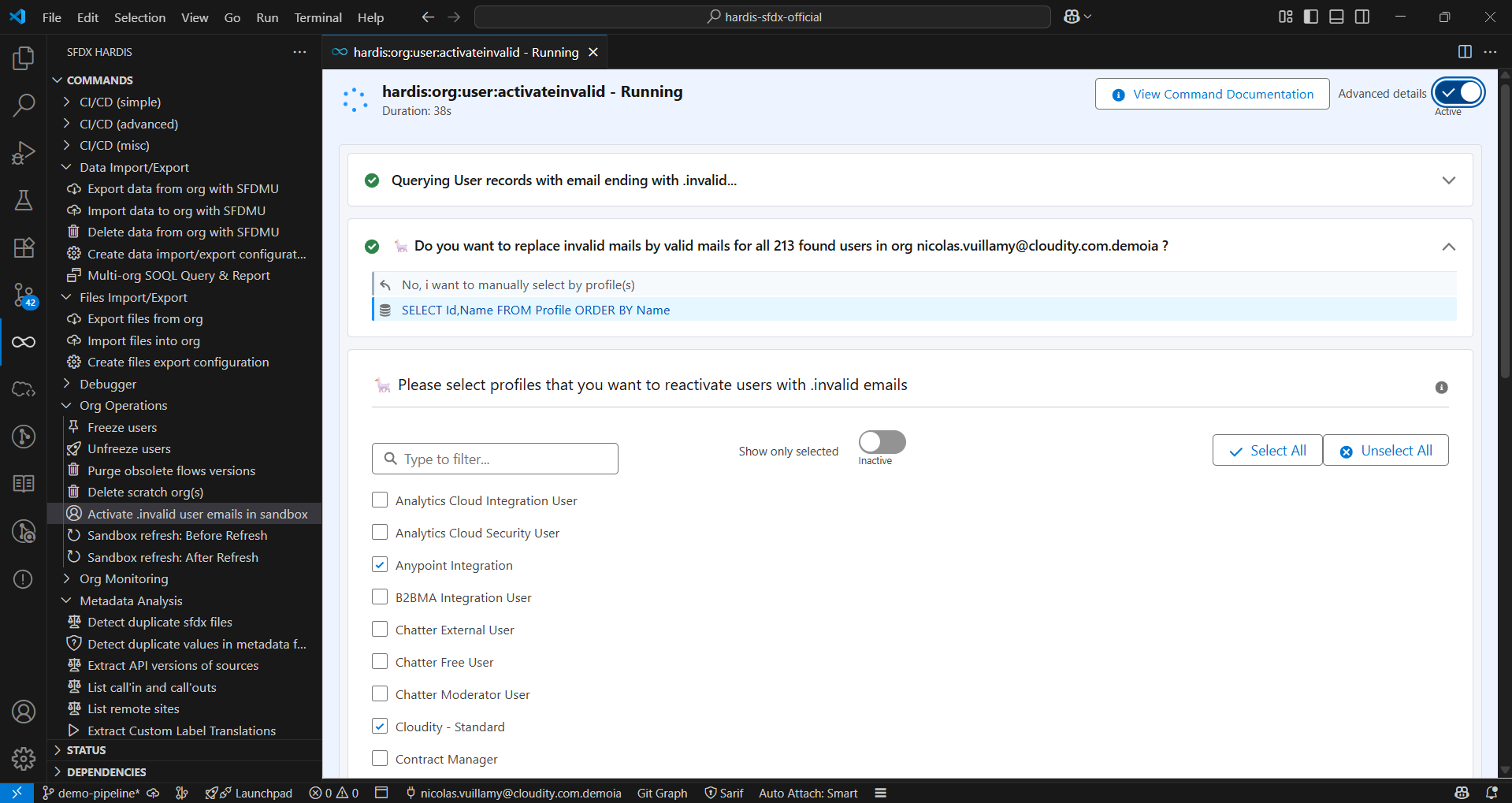
A few favorites:
- Freeze / unfreeze users during a deployment
- Purge obsolete Flow versions
- Reactivate
.invaliduser emails in a sandbox - Detect legacy API usage
- Simulate a deployment
- Clean SFDX project from unwanted references
- Create and manage Package V2 (managed & unlocked)
- Generate
package.xmlfrom Git diff with sfdx-git-delta
sfdx-hardis ships with an AI assistant that explains deployment errors, suggests fixes, and helps you understand legacy metadata. Bring your own provider: OpenAI, Anthropic, Salesforce Agentforce, Ollama - full control on which traffic leaves your machine.

See: AI setup · AI prompts
In addition to the workbenches, the extension contributes three classic tree views in the side bar:
- Commands - every sfdx-hardis command, organized by menu, with help links and shortcut buttons (refresh, debugger, configuration files).
- Status - current default org, Dev Hub, Git repo, branch, and org expiration date.
- Plugins - checks that all CLI dependencies are present and up to date, and offers a one-click upgrade if not.
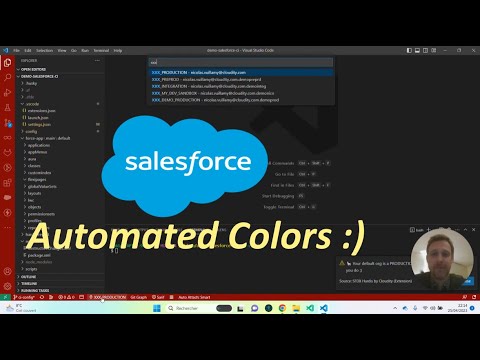
The status panel automatically tints VS Code based on the selected default org, so you never confuse Production with a sandbox:
- 🔴 Production - red
- 🟠 Major sandbox (UAT, integration…) - orange
- 🟢 Dev sandbox / scratch org - green
- 🔵 Other (Dev org, trial…) - blue
You can override a color per org, or per URL pattern (e.g. https://*.scratch.my.salesforce.com), and choose whether the change applies to your workspace or user settings via vsCodeSfdxHardis.colorUpdateLocation. Disable entirely with vsCodeSfdxHardis.disableVsCodeColors.
The whole extension UI is translated into English, French, Spanish, German, Italian, Dutch, Polish, Japanese, and Brazilian Portuguese. Switch language from the Welcome panel - VS Code auto-detection is also supported.
Add your own menus and buttons to the Commands panel and Welcome dashboard via .sfdx-hardis.yml:
customCommandsPosition: first   # or "last" (default)
customCommands:
  - id: custom-menu
    label: My custom commands
    description: Shortcuts used by my team
    vscodeIcon: symbol-misc     # any VS Code ThemeIcon id
    sldsIcon: utility:apps      # any SLDS icon "category:name"
    commands:
      - id: generate-manifest-xml
        label: Generate manifest
        icon: file.svg          # any SVG in /resources
        vscodeIcon: file
        sldsIcon: utility:file
        tooltip: Generates a manifest package.xml from local sources
        command: sf project generate manifest --source-dir force-app --name myNewManifest
        helpUrl: https://sfdx-hardis.cloudity.com/
      - id: list-all-orgs
        label: List all orgs
        icon: salesforce.svg
        tooltip: List all authenticated orgs
        command: sf org list --all
Configurations can live in config/.sfdx-hardis.yml, in an absolute local path, or behind an HTTPS URL - perfect for sharing a common toolkit across your team.
Make the Plugins panel monitor extra Salesforce CLI plugins:
plugins:
  - name: mo-dx-plugin
    helpUrl: https://github.com/msrivastav13/mo-dx-plugin
  - name: shane-sfdx-plugins
helpUrl: https://github.com/mshanemc/shane-sfdx-plugins- sfdx-hardis: A release management tool for open-source
- What DevOps experts want to know about Salesforce CI/CD
- Handle Salesforce API versions deprecation like a pro
- Mass-download notes & attachments from a Salesforce org
- Freeze / unfreeze users during a deployment
- Detect bad words in Salesforce records
- Reactivate sandbox users with
.invalidemails in 3 clicks
Français
- Versions d'API Salesforce décommissionnées : que faire ?
- Exporter en masse les fichiers d'une org Salesforce
- Suspendre l'accès aux utilisateurs lors d'une mise en production
sfdx-hardis builds on top of these excellent Open Source projects:
To help prioritize features, anonymous usage statistics are sent to Azure Application Insights via @vscode/extension-telemetry, strictly following the VS Code Telemetry Guidelines.
We collect only:
- Extension startup time
- Command names invoked, limited to the first two segments (e.g.
sf hardis:work:new,sf plugins:install)
We never collect command arguments, output, org URLs, tokens, usernames, or any business data. You can opt out at any time in VS Code settings.
VS Code SFDX Hardis is graciously provided by Cloudity, an international Salesforce consulting partner, and developed with the help of the Trailblazer Community.
If you need expert guidance to roll out Salesforce DevOps, monitoring, or AI-assisted documentation at your organization, get in touch with Cloudity - our multi-cloud business and technical experts can help.

Contributions are welcome! Open an issue, suggest a feature, or send a pull request - see the contributors guide.