The Flick is a reverb, tremolo, and delay pedal. The original goal of this pedal was to replace the Strymon Flint (Reverb and Tremolo) on a small pedal board and also include delay.
Platerra Reverb: This is a plate reverb based on the Dattorro reverb.
Tremolo: Tremolo with smooth sine wave, harmonic tremolo, and square wave (opto-like) settings.
Delay: Basic digital delay.
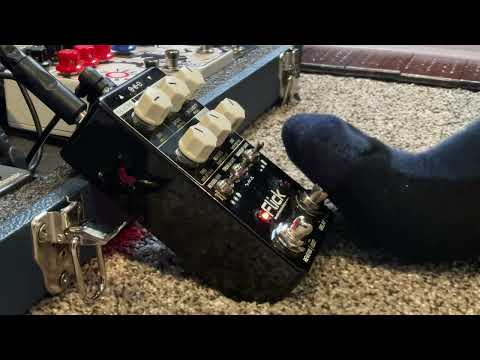
Quick demo - delay, plate reverb, and harmonic tremolo (18 March 2026):
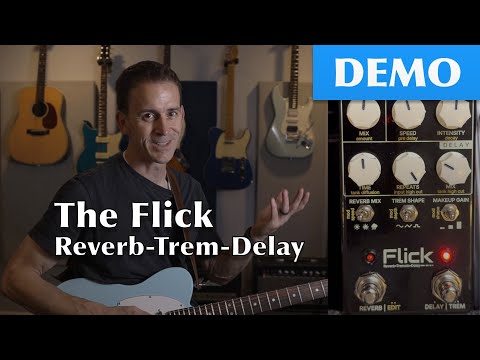
Feature demo video (28 June 2025):
| CONTROL | DESCRIPTION | NOTES |
|---|---|---|
| KNOB 1 | Reverb Dry/Wet Amount | |
| KNOB 2 | Tremolo Speed | |
| KNOB 3 | Tremolo Depth | |
| KNOB 4 | Delay Time | |
| KNOB 5 | Delay Feedback | |
| KNOB 6 | Delay Dry/Wet Amount | |
| SWITCH 1 | Reverb Type | LOW - Hall MID - Plate HIGH - Spring |
| SWITCH 2 | Tremolo Type | LOW - Smooth MID - Harmonic HIGH - Opto |
| SWITCH 3 | Delay Timing | LOW - Triplet (1/3) MID - Quarter (straight) HIGH - Dotted Eighth (3/4) |
| FOOTSWITCH 1 | Tremolo/Reverb | Normal press toggles tremolo on/off. Double press toggles reverb on/off. Long press enters Reverb Edit Mode (see below). LED 1: - 100% when only reverb is active - 40% pulsing when only tremolo is active - 100% pulsing when both are active |
| FOOTSWITCH 2 | Delay/Tap Tempo | Normal press toggles delay on/off. Double press enters Tap Tempo mode (see below). Long press for Device Settings (see below). LED 2: - Pulsing at the quarter-note delay tempo when delay is active - Off when delay is not active |
LED 2 flashes at tapped tempo. LED 1 shows reverb/tremolo status as normal.
Entering Tap Tempo mode automatically enables delay if it is currently off.
| CONTROL | DESCRIPTION | NOTES |
|---|---|---|
| KNOB 4 | Delay Time | Ignored until physically rotated. Overrides tapped tempo when moved. |
| SWITCH 3 | Delay Timing | Still applies timing subdivision to tapped tempo. |
| FOOTSWITCH 1 | Exit Tap Tempo | Immediately returns to Normal Mode. |
| FOOTSWITCH 2 | Register Tap | Each press registers a tap. LED 2 flashes briefly on each tap. Tempo is averaged from the last 3 taps. Auto-exits after 4 seconds of no taps. |
Both LEDs flash when in Reverb Edit Mode.
Parameter Capture: When entering Reverb Edit Mode, all knobs and switches freeze at their current values. To prevent sudden parameter jumps, each control remains frozen until you move it beyond a threshold (5% for knobs, any position change for switches). This allows you to adjust controls smoothly without parameter jumps when switching between normal and edit modes.
| CONTROL | DESCRIPTION | NOTES |
|---|---|---|
| KNOB 1 | Reverb Amount (Wet) | Not saved. Just here for convenience. |
| KNOB 2 | Pre Delay | 0 for Off, up to 0.25 Frozen until moved >5% |
| KNOB 3 | Decay | Frozen until moved >5% |
| KNOB 4 | Tank Diffusion | Frozen until moved >5% |
| KNOB 5 | Input High Cutoff Frequency | Frozen until moved >5% |
| KNOB 6 | Tank High Cutoff Frequency | Frozen until moved >5% |
| SWITCH 1 | Tank Mod Speed | LOW - Low MID - Medium HIGH - High Frozen until position changes |
| SWITCH 2 | Tank Mod Depth | LOW - Low MID - Medium HIGH - High Frozen until position changes |
| SWITCH 3 | Tank Mod Shape | LOW - Low MID - Medium HIGH - High Frozen until position changes |
| FOOTSWITCH 1 | CANCEL & Exit | Discards parameter changes and exits Reverb Edit Mode. |
| FOOTSWITCH 2 | SAVE & Exit | Saves all parameters and exits Reverb Edit Mode. |
Both LEDs flash alternatively when in Settings Edit Mode.
Parameter Capture: When entering Settings Edit Mode, the switches freeze at their current values. You must actively move a switch to get a change to happen. This helps prevent unexpected changes when jumping between normal and edit mode.
| CONTROL | DESCRIPTION | NOTES |
|---|---|---|
| SWITCH 1 | Reverb Knob Function | LOW - 0% Dry, 0-100% Wet MID - Dry/Wet Mix HIGH - 100% Dry, 0-100% Wet |
| SWITCH 2 | Polarity | LOW - Invert Right MID - Normal HIGH - Invert Left |
| SWITCH 3 | Mono/Stereo Mode | LOW - Mono in, Mono Out MID - Mono in, Stereo Out HIGH - Stereo In, Stereo Out |
| FOOTSWITCH 1 | CANCEL & Exit | Discards parameter changes and exits Settings Edit Mode. |
| FOOTSWITCH 2 | SAVE & Exit | Saves all parameters and exits Settings Edit Mode. |
To enter factory reset mode, press and hold Footswitch #2 when powering the pedal. The LED lights will alternatively blink slowly.
- Rotate Knob #1 to 100%. The LEDs will quickly flash simultaneously and start blinking faster.
- Rotate Knob #1 to 0%. The LEDs will quickly flash simultaneously and start blinking faster.
- Rotate Knob #1 to 100%. The LEDs will quickly flash simultaneously and start blinking faster.
- Rotate Knob #1 to 0%. The LEDs will quickly flash simultaneously, defaults will be restored, and the pedal will resume normal pedal mode.
To exit factory reset mode without resetting. Power off the pedal and power it back on.
Press and hold both footswitches simultaneously for 5 seconds to enter Program DFU mode. The lights will alternately flash 3 times when DFU mode is entered.
# Clone the repository
$ git clone https://github.com/joulupukki/Flick.git
$ cd Flick

# Initialize and set up submodules
$ git submodule update --init --recursive

# Build the daisy libraries (after installing the Daisy Toolchain):
#
# IMPORTANT: If you are planning to build this for FunBox, replace the daisy_petal files in `libDaisy/src` with the files in the `platforms/funbox/required_daisy_mods/` directory to properly map controls on Funbox.

$ make -C libDaisy
$ make -C DaisySP

# Build the Flick pedal firmware
$ cd src

# Build for FunBox
$ make

# Build for Hothouse
$ make PLATFORM=hothouse
If you have an ST-Link, you can install the software easily like this:
$ make program
If you only have USB, you'll need to put the Flick into DFU mode first and with it connected with a USB cable, you can then install the firmware by running:
$ make program-dfu