
A comprehensive PyTorch-based framework for Neural Cellular Automata research and applications



NCAtorch is an open-source, modular research framework that combines classical Cellular Automata concepts with learnable neural networks. This implementation provides a unified codebase for training, evaluating, and visualizing Neural Cellular Automata across diverse tasks.
Key features:
- 🎯 Modular Architecture: Composable perception and update modules for flexible experimentation
- 🎨 Diverse Tasks: Image generation (emoji, handbags), texture synthesis, self-classifying NCAs, video prediction
- 🖼️ Latent Space NCAs: High-resolution generation (512x512) via pre-trained autoencoders
- 🎮 Interactive Visualization: Real-time FastAPI-based web interface with painting tools
- 📊 Experiment Tracking: Integrated Weights & Biases logging
- ⚙️ YAML Configuration: Pydantic-validated configuration system
- [13-05-2026] 🌀 Initial release of NCAtorch framework!
If your work has improved NCAtorch and you would like more people to see it, please inform us!
- Python 3.10 or higher
- uv package manager
- CUDA-capable GPU (recommended)
- Install
uv(if not already installed):
curl -LsSf https://astral.sh/uv/install.sh | sh- Clone the repository:
git clone https://github.com/mspitzna/NCAtorch.git
cd NCAtorch- Install all dependencies (creates
.venvautomatically, pulls the correct PyTorch CUDA build):
uv sync --dev- Activate environment:
source .venv/bin/activateTrain an NCA model using a configuration file:
ncatorch-train --config config/emoji_config.yamlFor latent space NCA (requires training an autoencoder first):
# Step 1 — train the autoencoder (checkpoint saved to train_log/<run_folder>/ae_checkpoints/)
ncatorch-train-ae --config config/your_config.yaml

# Step 2 — train the CA, pointing --folder to the AE training log
ncatorch-train --folder train_log/<run_folder>
Activate experiment tracking with Weights & Biases
- WandB console login (needs Weights & Biases account + API Key):
wandb login- Edit config .yaml
WANDB: true- Train an NCA model using a configuration file:
ncatorch-train --config config/emoji_config.yaml💡 Tip: Start with the emoji generation task for quick results and visual feedback!
Launch the web interface to interact with trained models:
ncatorch-uiThen open your browser to http://localhost:8000
# Force a specific device
ncatorch-ui --device cuda:0
ncatorch-ui --device cpu

# Custom host/port
ncatorch-ui --host 0.0.0.0 --port 8080

# Auto-reload on code changes (development)
ncatorch-ui --reload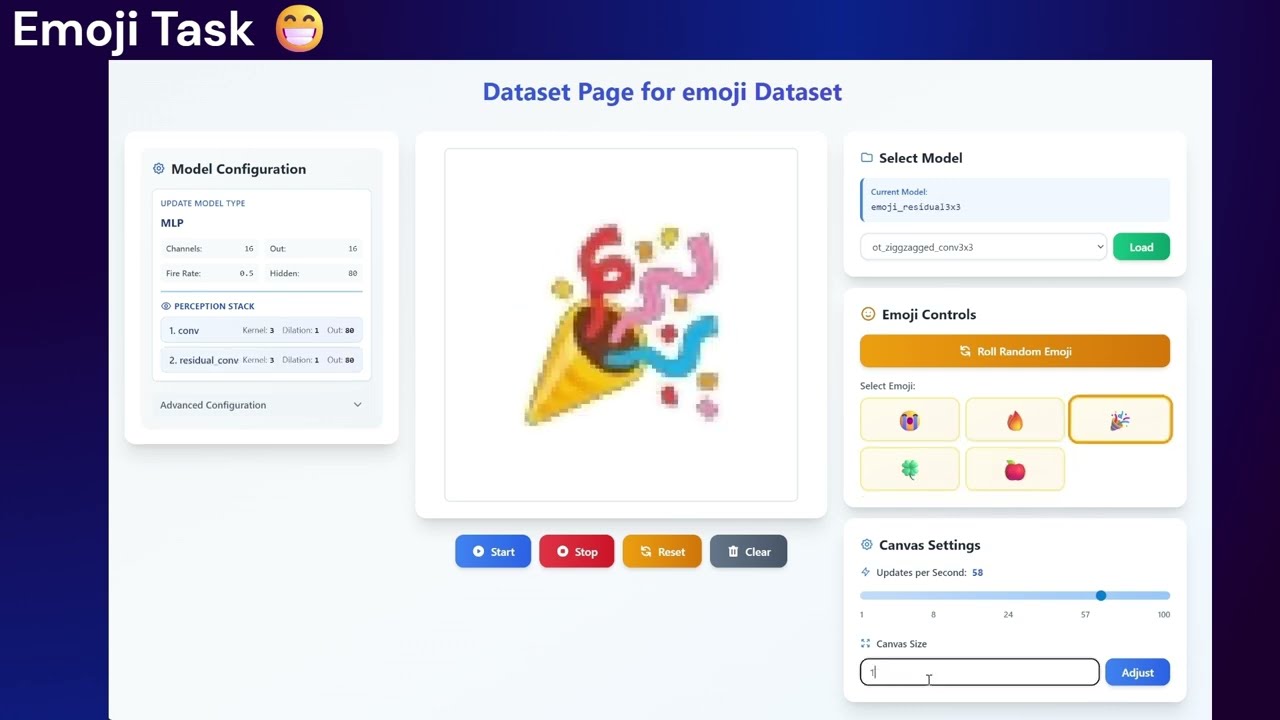
Click to watch the toolkit demo video
Models and training are configured via YAML files. Each perception entry declares its own OUT_CHANNEL to set the number of filters emitted from that branch. Here's a basic example:
SEED: 42                            # Random seed (-1 for random)
DEVICE: "cuda"

LOGGING:
  WANDB: true
  PROJECT_NAME: "your_project"
  TRAIN_NAME: "your_run_name"
  LOG_INTERVAL: 500
  SAVE_INTERVAL: 25000
  INTERMEDIATE_LOGGING_STEPS: [5, 20, 35]  # Steps at which intermediate states are logged (must be < ITER_N_MIN)

MODEL:
  NAME: "MLP"                       # Update model architecture: MLP or ResNet
  HIDDEN_CHANNELS: [64, 128]        # Hidden layer sizes in the update model
  CHANNEL_N: 16                     # Number of CA state channels - visible and classification channels are included here
  LIVING_MASK: true                 # Zero out updates for cells below the alive threshold
  LIVING_MASK_INDEX: 3              # Alpha channel as living mask
  CLAMP_OUTPUT: false               # Clamp state values to [-1, 1] after each step
  PERCEPTIONS:
    - MODE: "conv"                  # Neighbourhood operator: conv, attention, mh_attention, sobel
      KERNEL_SIZE: 3
      OUT_CHANNEL: 48               # Output channels from this perception branch
    - MODE: "attention"             # Multiple branches are concatenated before the update model
      OUT_CHANNEL: 32

TRAINING:
  BATCH_SIZE: 18
  STEPS: 50000
  LOSS_FN: "mse"                    # Reconstruction loss: mse, l1, lpips, vggstyle
  LEARNING_RATE: 0.0005
  LR_SCHEDULE_MODE: "cosine"        # LR schedule: step, cosine, constant
  WARMUP_STEPS: 2000                # Linear LR warm-up duration
  ITER_N_MIN: 20                    # Minimum CA rollout steps per batch
  ITER_N_MAX: 26                    # Maximum CA rollout steps per batch (sampled uniformly)

DATASET:
  NAME: "emoji"                     # Dataset: for example emoji, e2h, mnist, cifar10
  TARGET_SIZE: 64                   # Spatial resolution of the target image
  TARGET_PADDING: 16                # Zero-padding added around the target (depends on dataset used)
  EMOJIS:
    - "😭"
    - "🔥"

PATTERN_POOL:
  ENABLED: true                     # Use a persistent sample pool across steps
  POOL_SIZE: 256
  POOL_START_RATIO: 0.5             # Fraction of each batch drawn from the pool
💡 See the config/ directory for complete per-task examples.
- Emoji Generation: Generate emoji from Unicode characters
- Edge-to-Handbag (E2H): Conditional generation from edge maps
- Organizing Textures: DTD texture synthesis with style loss
- MNIST: Self-classifying digit recognition
- CIFAR-10: Multi-class image classification
- Moving MNIST: Temporal dynamics and video prediction
- Latent Space NCAs: 512x512 generation via pre-trained autoencoders
nca-torch/
├── nca/                      # Core library
│   ├── core/
│   │   ├── models/          # NCA models, autoencoders, critics
│   │   └── losses/          # Loss functions
│   ├── data/
│   │   └── datasets/        # Dataset implementations
│   ├── training/
│   │   └── trainers/        # Training logic
│   └── utils/               # Utilities and visualization
├── app/                      # FastAPI web application
│   ├── fastapi_backend.py   # Server entry point
│   ├── templates/           # HTML templates
│   └── scripts/             # Frontend JavaScript
├── train_scripts/            # Training entry points
├── config/                   # YAML configuration files
└── datasets/                 # Dataset storage
└── train_log/                # Training logs
| Guide | Description |
|---|---|
| Custom Perception | Add a new neighborhood operator |
| Custom Update Module | Add a new update architecture |
| Custom Dataset | Add a new dataset and wire it into the training pipeline |
| Custom Trainer | Add a new training loop by implementing two methods and registering one entry |
| Custom Logging Observer | Add a diagnostic that hooks into the CA rollout and logs itself |
When using this code or the NCAtorch framework in your project, consider citing our works as follows:
@article{ncatorch,
  title={A New Kind of Network? Review and Reference Implementation of Neural Cellular Automata},
  author={Martin Spitznagel and Janis Keuper},
  journal={Transactions on Machine Learning Research (TMLR)},
  year={2026}
}