
Voice control for Linux desktops. Fully local, no cloud, Wayland-native.
Say "Hey Jarvis" and control your desktop with your voice.





⚠️ Early development. This project works but is not polished. Expect bugs, incomplete docs, and changes without notice.
Linux desktop voice control is a gap. Talon exists but has a steep learning curve and costs money for the full version. Most other tools are X11-only, abandoned, or cloud-dependent.
EasySpeak is:
- Free and open source - GPL-3.0 licensed, no paywalls
- Fully local - No cloud, no accounts, no data leaving your machine
- Wayland-native - Works on modern GNOME desktops where X11 tools fail
- Simple - Say "Hey Jarvis, open downloads" and it works
- Extensible - Drop a Python file in plugins/ to add commands
Built for people with RSI, accessibility needs, hands-busy workflows, or anyone who wants to talk to their computer.
Current and in active development:
- Wake word activation - Hands-free with "Hey Jarvis"
- Mouse grid - Navigate anywhere on screen with voice ("grid", "3 7 5", "click")
- Head tracking - Control cursor with head movement (experimental)
- Browser control - Qutebrowser integration with link hints, tabs, scrolling
- Dictation - Voice-to-text in any text field with punctuation commands
- App launcher - Open and close applications by name
- Media control - Play, pause, skip via MPRIS
- System controls - Volume, brightness, do not disturb
- Fully local - OpenWakeWord + Whisper + Piper, no cloud services
- Wayland-native - Works properly on modern Linux desktops
- Plugin architecture - Easy to extend
Click the thumbnail to watch the demo video:
Terminal output:

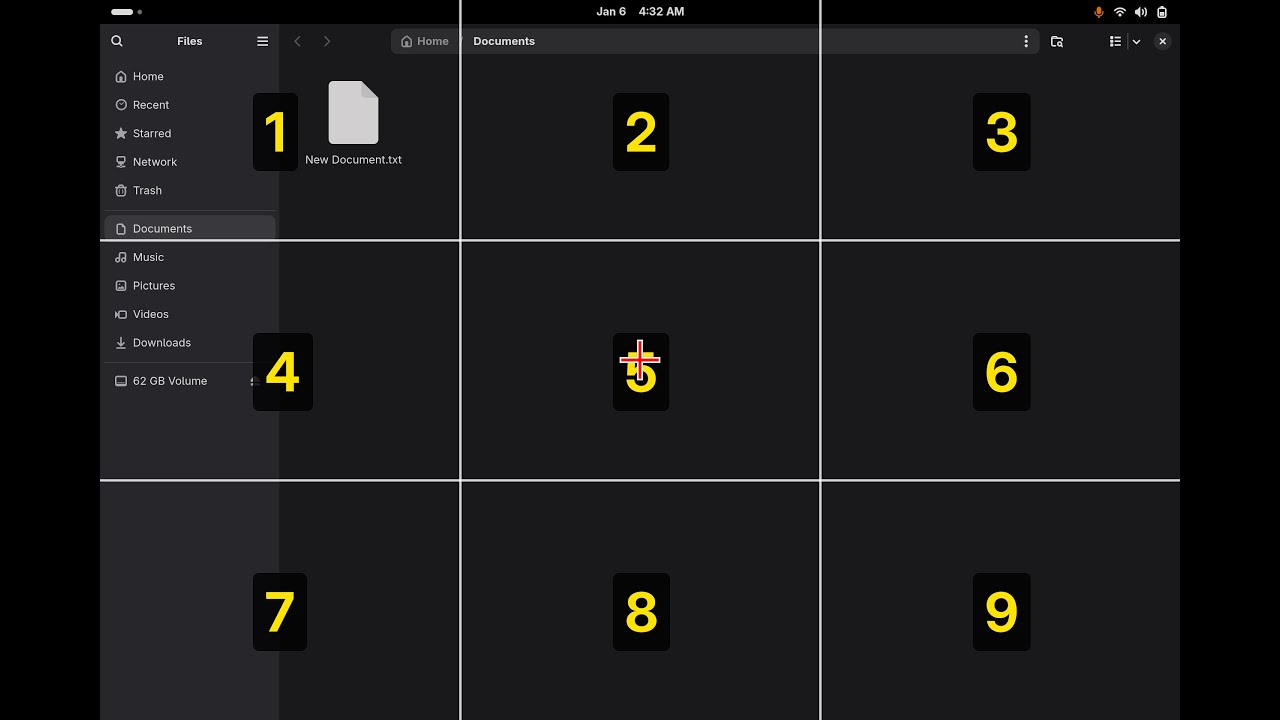
Mouse grid (Files):

Mouse grid (Browser):

Browser (Numbers click navigation):

- Linux with GNOME Shell 47+ on Wayland
- Python 3.12 (not 3.13 and 3.14 - see installation notes)
- Working microphone
- ~2GB disk space for models
Tested on Fedora 43.
Fedora 43's default python3 is 3.14. Unfortunately, we depend on a few Google packages that are not available for Python 3.13+ yet.
sudo dnf install python3.12
python3.12 --version # Verify it's installedsudo dnf install \
pipewire-utils \
wireplumber \
at-spi2-core \
python3-gobject \
qutebrowser \
glib2 \
ffmpeg-free \
pulseaudio-utils \
sound-theme-freedesktop \
portaudio-devel \
python3.12-devel \
gccpython3.12 -m venv ~/easyspeak-venv
source ~/easyspeak-venv/bin/activate
pip install faster-whisper openwakeword numpy pyaudio
cd ~/easyspeak
pip install -e .If you use uv you can ignore the steps that create a virtual environment and simply run:
uv run easyspeakuv will transparently create and update a virtual environment, and run easyspeak from in there.
mkdir -p ~/.local/bin
cd ~/.local/bin
wget https://github.com/rhasspy/piper/releases/download/2023.11.14-2/piper_linux_x86_64.tar.gz
tar xzf piper_linux_x86_64.tar.gz
rm piper_linux_x86_64.tar.gz
echo 'export PATH="$HOME/.local/bin/piper:$PATH"' >> ~/.bashrc
source ~/.bashrc
mkdir -p ~/.local/share/piper
cd ~/.local/share/piper
wget -O en_US-amy-medium.onnx \
"https://huggingface.co/rhasspy/piper-voices/resolve/v1.0.0/en/en_US/amy/medium/en_US-amy-medium.onnx"
wget -O en_US-amy-medium.onnx.json \
"https://huggingface.co/rhasspy/piper-voices/resolve/v1.0.0/en/en_US/amy/medium/en_US-amy-medium.onnx.json"git clone https://github.com/ctsdownloads/easyspeak.git ~/easyspeak
cd ~/easyspeakmkdir -p ~/.local/share/gnome-shell/extensions/easyspeak-grid@local
cp extension.js metadata.json ~/.local/share/gnome-shell/extensions/easyspeak-grid@local/Log out and back in (GNOME Shell must restart to detect new extensions).
Then enable:
gnome-extensions enable easyspeak-grid@localgsettings set org.gnome.desktop.interface toolkit-accessibility trueEasySpeak uses number hints (not letters). Configure qutebrowser:
mkdir -p ~/.config/qutebrowser
cat > ~/.config/qutebrowser/config.py << 'EOF'
config.load_autoconfig(False)
c.hints.chars = '0123456789'
EOFsource ~/easyspeak-venv/bin/activate # Now python = venv's python3.12
easyspeak # the project execution scriptActivate the venv each time you open a new terminal.
Say "Hey Jarvis" followed by a command.
Screen splits into a 3x3 layout (like a phone keypad):
1 2 3
4 5 6
7 8 9
Say "grid" to show it. Say a number to zoom into that zone. Keep zooming until you're over your target, then "click".
Chain numbers to go faster: "3 6 3" zooms three times at once.
Drag and drop:
- Navigate to the thing you want to drag
- Say "mark" - grabs it (mousedown)
- Grid resets to full screen
- Navigate to where you want to drop it
- Say "drag" - releases it (mouseup)
| Command | Action |
|---|---|
| grid | Show grid |
| 1-9 | Zoom to zone |
| 3 7 5 | Chain zones |
| click | Left click |
| double click | Double click |
| right click | Right click |
| middle click | Middle click |
| up/down/left/right | Nudge position |
| left 5, down 3, etc. | Nudge with repeat |
| scroll up/down/left/right | Scroll at cursor |
| scroll down 3, etc. | Scroll with repeat |
| mark | Grab (start drag) |
| drag | Drop (end drag) |
| again | Reopen at last spot |
| close | Hide grid |
Requires webcam and additional dependencies (pip install sixdrepnet opencv-python or pip install .[head-tracking], or run via uv run --extra head-tracking easyspeak).
| Command | Action |
|---|---|
| start tracking | Begin head tracking |
| stop tracking | End tracking |
| freeze | Lock cursor position |
| go | Resume tracking |
| recalibrate | Reset center position |
| nudge up/down/left/right | Fine tune when frozen |
| click | Left click |
| double click | Double click |
| right click | Right click |
| Command | Action |
|---|---|
| browser | Enter browser mode |
| numbers / hints | Show link hints |
| zero two | Click hint 02 |
| new tab | Open new tab |
| close tab | Close current tab |
| tab left/right | Switch tabs |
| tab [number] | Jump to specific tab |
| undo tab | Restore closed tab |
| back / forward | Navigate history |
| reload | Refresh page |
| scroll up/down | Scroll page |
| page up/down | Scroll by page |
| top / bottom | Go to top/bottom |
| find [text] | Search in page |
| find next/previous | Navigate matches |
| search [query] | Web search (DuckDuckGo) |
| go to [url] | Navigate to URL |
| open youtube | Open bookmark |
| exit browser | Leave browser mode |
Built-in bookmarks: youtube, google, gmail, github, reddit, twitter, facebook, amazon, netflix, duckduckgo
| Command | Action |
|---|---|
| notes | Start dictation mode |
| stop notes | End dictation mode |
| comma | Insert , |
| period | Insert . |
| question mark | Insert ? |
| exclamation mark | Insert ! |
| colon | Insert : |
| semicolon | Insert ; |
| apostrophe | Insert ' |
| quote | Insert " |
| dash | Insert - |
| new line | Insert newline |
| new paragraph | Insert double newline |
| new sentence | Insert . and capitalize next |
| backspace | Delete character |
| space | Insert space |
| tab | Insert tab |
| at sign | Insert @ |
| hashtag | Insert # |
| percent | Insert % |
| asterisk | Insert * |
| Command | Action |
|---|---|
| open [app] | Launch application |
| close [app] | Close application |
Default apps in plugins/apps.py (edit to match your system):
- firefox, steam, spotify, calculator, settings, files, terminal, browser
These are just examples. Edit apps.py to add your own apps.
| Command | Action |
|---|---|
| open documents | Open Documents folder |
| open downloads | Open Downloads folder |
| open pictures | Open Pictures folder |
| open music | Open Music folder |
| open videos | Open Videos folder |
| open home | Open home folder |
| open desktop | Open Desktop folder |
| Command | Action |
|---|---|
| play | Resume playback |
| pause | Pause playback |
| next / skip | Next track |
| previous / back | Previous track |
| Command | Action |
|---|---|
| volume up/down | Adjust volume |
| mute | Toggle mute |
| brightness up/down | Adjust brightness |
| do not disturb on/off | Toggle notifications |
| Command | Action |
|---|---|
| help | List all commands |
| stop / exit / quit | Exit EasySpeak |
easyspeak/
├── extension.js # GNOME Shell extension
├── metadata.json # Extension metadata
├── pyproject.toml
├── �[1;38;2;36;114;200msrc�[0m
│ ├── �[1;38;2;36;114;200mcore�[0m
│ │ ├── __init__.py
│ │ └── main.py # Main application
│ └── �[1;38;2;36;114;200mplugins�[0m
│ ├── __init__.py
│ ├── 00_eyetrack.py # Head tracking (experimental)
│ ├── 00_mousegrid.py # Grid overlay mouse control
│ ├── apps.py # Application launcher
│ ├── browser.py # Qutebrowser control
│ ├── dictation.py # Voice-to-text
│ ├── files.py # Folder navigation
│ ├── media.py # Playback controls
│ ├── system.py # Volume, brightness, DND
│ └── zz_base.py # Help and exit
└── �[1;38;2;36;114;200mtests�[0m
├── �[1;38;2;36;114;200mcore�[0m
│ └── test_main.py
└── �[1;38;2;36;114;200mplugins�[0m
└── test_apps.py
After installation, the extension is copied to:
~/.local/share/gnome-shell/extensions/easyspeak-grid@local/
├── extension.js
└── metadata.json
- Wake word: OpenWakeWord detects "Hey Jarvis" instantly
- Speech-to-text: faster-whisper transcribes commands locally
- Text-to-speech: Piper provides voice feedback
- Mouse control: GNOME Shell extension with Clutter virtual input
- Browser scroll: JavaScript injection via qutebrowser IPC
- Dictation: AT-SPI accessibility framework
All processing happens locally. No data leaves your machine.
Drop a Python file in plugins/ and it gets loaded automatically.
NAME = "myplugin"
DESCRIPTION = "What it does"
COMMANDS = [
"say hello - speaks a greeting",
]
def setup(core):
"""Called once at startup. Store core reference if needed."""
pass
def handle(cmd, core):
"""Called for every voice command. Return True if handled, None to pass to next plugin."""
if "say hello" in cmd:
core.speak("Hello there!")
return True
return NoneCore methods you can use:
core.speak("text")- text-to-speech responsecore.host_run(["cmd", "arg"])- run shell commandcore.transcribe(audio)- transcribe audio to textcore.wait_for_speech()- wait for user to start speakingcore.record_until_silence()- record until user stops
Loading order: Plugins load alphabetically. Use number prefixes to control order (00_mousegrid.py loads before apps.py).
"Failed to show grid - is extension enabled?"
gnome-extensions enable easyspeak-grid@local
# Then log out and back inDictation not working
gsettings set org.gnome.desktop.interface toolkit-accessibility true
# Log out and back inWake word not detecting
- Check microphone:
arecord -d 3 test.wav && aplay test.wav - Adjust
WAKE_THRESHOLDin core.py (lower = more sensitive)
Wake word triggers multiple times
Mic gain too high. Lower capture level:
alsamixer
# Press F6 to select your mic device
# Press Tab to switch to Capture
# Lower to ~70Commands misheard
- Adjust
SILENCE_THRESHOLDin core.py - Speak clearly after the beep
Piper permission denied
chmod +x ~/.local/bin/piper/piper
chmod +x ~/.local/bin/piper/espeak-ngpip install fails with PyAV/Cython errors
You're on Python 3.14 or 3.13. Use python3.12 with a venv instead:
sudo dnf install python3.12 python3.12-devel
python3.12 -m venv ~/easyspeak-venv
source ~/easyspeak-venv/bin/activate
pip install faster-whisper openwakeword numpy pyaudio
cd ~/easyspeak
pip install -e .See CONTRIBUTING.
GPL-3.0 License. See LICENSE for details.
- OpenWakeWord - Wake word detection
- faster-whisper - Speech recognition
- Piper - Text-to-speech (we use the last standalone binary from the original rhasspy/piper repo)
- Talon - Inspiration for voice control concepts