Releases: posit-dev/positron
2026.05.2-3

Thank you for using Positron!
Downloads
Please review Positron's license agreement and privacy policy. Your acceptance of this license agreement and privacy policy is required as a condition to proceeding with your download or use of the software.
| Platform | Download |
|---|---|
| Windows 10, 11 x64 (system level install) | Positron-2026.05.2-3-Setup-x64.exe |
| Windows 10, 11 x64 (user level install) | Positron-2026.05.2-3-UserSetup-x64.exe |
| Windows 10, 11 arm64 (system level install) | Positron-2026.05.2-3-Setup-arm64.exe |
| Windows 10, 11 arm64 (user level install) | Positron-2026.05.2-3-UserSetup-arm64.exe |
| MacOS 11.0+ (arm64/Apple Silicon) | Positron-2026.05.2-3-arm64.dmg |
| MacOS 11.0+ (x64/Intel) | Positron-2026.05.2-3-x64.dmg |
| Debian-based Linux x64 (Ubuntu 22+) | Positron-2026.05.2-3-x64.deb |
| Debian-based Linux arm64 (Ubuntu 24+) | Positron-2026.05.2-3-arm64.deb |
| Red Hat-based Linux x64 (RHEL9) | Positron-2026.05.2-3-x64.rpm |
| Red Hat-based Linux arm64 (RHEL9) | Positron-2026.05.2-3-arm64.rpm |
| REH Linux x64 | positron-reh-linux-x64-2026.05.2-3.tar.gz |
| REH Linux arm64 | positron-reh-linux-arm64-2026.05.2-3.tar.gz |
| Installer Checksums | positron-2026.05.2-3-checksums.json |
Patch notes
The 2026.05.1 patch release (2026-05-06) provides corrected builds for x64/Intel macOS.
The 2026.05.2 patch release (2026-05-14) fixes the behavior when switching tabs in the Positron notebook editor.
Release highlights
Check out all the changes for this release.
Announcing the Packages pane
Our Packages pane is available in this release as a preview feature. The new Packages pane brings streamlined package management directly into the IDE so you can see at a glance what's installed, what's attached, and what's out of date.
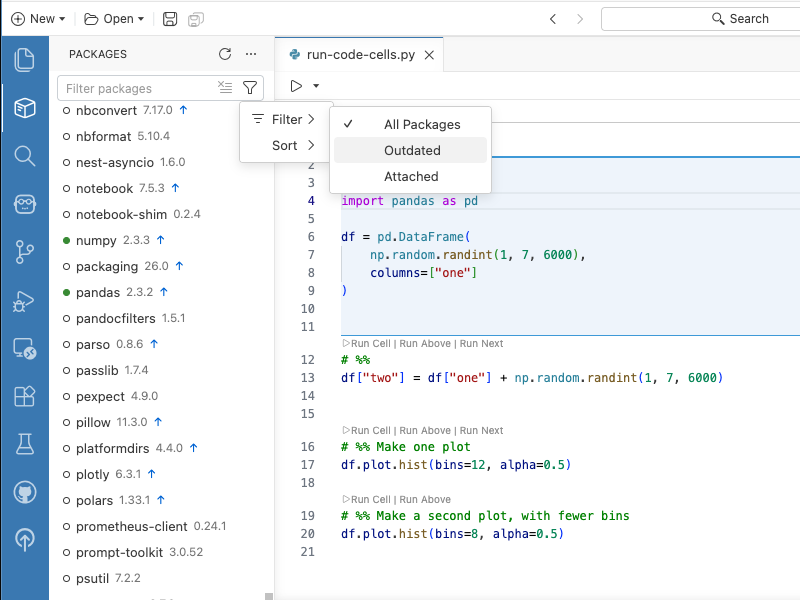
Find it in the Primary Sidebar by clicking the package icon. Positron automatically detects and integrates with your current interpreter; today we have support for pip, venv, uv, and conda for Python, plus base R, pak, and renv for R. You can search, sort, install, update, remove, filter by category (including "Outdated Packages"), and even see which packages are attached in your current session. To hide the pane, disable positron.packages.enable. Let us know how it fits into your workflow.
Inline output for Quarto
Inline output for .qmd documents was one of Positron's most-requested features ever, with many users telling us it was the one thing keeping them tied to RStudio or Jupyter notebooks. We are happy to share that Quarto inline output is available this release as a preview feature. Quarto kernels start automatically when you open a document with inline output, so you don't wait for a kernel on first execution. Each inline output cell shows a status line with execution status and elapsed time, and outputs are now collapsible when they get long. We've also added a tool to switch the interpreter used for inline output, support for Show Notebook Console for Quarto documents, and fixed a handful of papercuts around execution indicators, autocompletion, and the kernel selector. Enable inline output via the positron.quarto.inlineOutput.enabled setting.
Extensions available from Posit Public Package Manager
Positron's extension gallery now uses Posit Public Package Manager (P3M) by default, replacing Open VSX as the source for browsing and installing extensions. The catalog is the same set of extensions you already use, served from Posit infrastructure for reliable distribution. If you prefer to stay on Open VSX, the new positron.extensions.gallerySource setting lets you switch back at any time. For organizations on Posit Workbench, Posit Package Manager also added support for mirroring and serving VS Code extensions from your own instance, bringing the same governance, security, and air-gapped distribution to extensions that you already have for R and Python packages.
Positron Notebook Editor is now in beta
The Positron Notebook Editor for .ipynb files is officially moving from alpha to beta. This release brings a wave of polish and reliability we hope makes it ready for your daily workflow:
-
Cleaner git diffs by default: New
notebook.save.outputsandnotebook.save.executionCountssettings let you exclude outputs and execution counts from saved notebook files so reviewers see only the relevant code changes. -
Stronger R support: R notebooks can now be debugged with breakpoints and the "Debug Cell" action, and R dataframe outputs in notebook cells now render in the inline Data Explorer for the same interactive exploration you get in the Console.
-
Help on F1: Pressing F1 on a function in a notebook cell now opens the Help pane, just like in
.pyand.Rfiles. Works for both Python and R Jupyter notebooks. -
UX polish: Long cell outputs default to scrolling instead of overwhelming the page, the cell action bar stays visible as you scroll through tall cells, markdown cells render footnotes, and your scroll position is preserved when switching between notebook tabs.
Posit Assistant and Posit AI
This release introduces two new AI options: Posit Assistant and Posit AI.
-
You may have tried some of our previous experiments for AI code assistance available in Positron, Positron Assistant and/or Databot. We are now migrating to a more data-science-specific, holistic, unified approach to AI chat, built on the same Posit Assistant interface that we recently brought to RStudio. Instead of switching between tools, you get code generation, next edit suggestions, chat, and agentic tools all in one place. Learn how to get started.
-
Posit AI is a new, optional model provider service available to use with Posit Assistant. Posit AI is a subscription priced at $20/month for individual users; both Positron and Posit Assistant remain free to use. Learn how to sign up for an account.
2026.05.1-2
Thank you for using Positron!
Downloads
Please review Positron's license agreement and privacy policy. Your acceptance of this license agreement and privacy policy is required as a condition to proceeding with your download or use of the software.
| Platform | Download |
|---|---|
| Windows 10, 11 x64 (system level install) | Positron-2026.05.1-2-Setup-x64.exe |
| Windows 10, 11 x64 (user level install) | Positron-2026.05.1-2-UserSetup-x64.exe |
| Windows 10, 11 arm64 (system level install) | Positron-2026.05.1-2-Setup-arm64.exe |
| Windows 10, 11 arm64 (user level install) | Positron-2026.05.1-2-UserSetup-arm64.exe |
| MacOS 11.0+ (arm64/Apple Silicon) | Positron-2026.05.1-2-arm64.dmg |
| MacOS 11.0+ (x64/Intel) | Positron-2026.05.1-2-x64.dmg |
| Debian-based Linux x64 (Ubuntu 22+) | Positron-2026.05.1-2-x64.deb |
| Debian-based Linux arm64 (Ubuntu 24+) | Positron-2026.05.1-2-arm64.deb |
| Red Hat-based Linux x64 (RHEL9) | Positron-2026.05.1-2-x64.rpm |
| Red Hat-based Linux arm64 (RHEL9) | Positron-2026.05.1-2-arm64.rpm |
| REH Linux x64 | positron-reh-linux-x64-2026.05.1-2.tar.gz |
| REH Linux arm64 | positron-reh-linux-arm64-2026.05.1-2.tar.gz |
| Installer Checksums | positron-2026.05.1-2-checksums.json |
Patch notes
The 2026.05.1 patch release (2026-05-06) provides corrected builds for x64/Intel macOS.
Release highlights
Check out all the changes for this release.
Announcing the Packages pane
Our Packages pane is available in this release as a preview feature. The new Packages pane brings streamlined package management directly into the IDE so you can see at a glance what's installed, what's attached, and what's out of date.
Find it in the Primary Sidebar by clicking the package icon. Positron automatically detects and integrates with your current interpreter; today we have support for pip, venv, uv, and conda for Python, plus base R, pak, and renv for R. You can search, sort, install, update, remove, filter by category (including "Outdated Packages"), and even see which packages are attached in your current session. To hide the pane, disable positron.packages.enable. Let us know how it fits into your workflow.
Inline output for Quarto
Inline output for .qmd documents was one of Positron's most-requested features ever, with many users telling us it was the one thing keeping them tied to RStudio or Jupyter notebooks. We are happy to share that Quarto inline output is available this release as a preview feature. Quarto kernels start automatically when you open a document with inline output, so you don't wait for a kernel on first execution. Each inline output cell shows a status line with execution status and elapsed time, and outputs are now collapsible when they get long. We've also added a tool to switch the interpreter used for inline output, support for Show Notebook Console for Quarto documents, and fixed a handful of papercuts around execution indicators, autocompletion, and the kernel selector. Enable inline output via the positron.quarto.inlineOutput.enabled setting.
Extensions available from Posit Public Package Manager
Positron's extension gallery now uses Posit Public Package Manager (P3M) by default, replacing Open VSX as the source for browsing and installing extensions. The catalog is the same set of extensions you already use, served from Posit infrastructure for reliable distribution. If you prefer to stay on Open VSX, the new positron.extensions.gallerySource setting lets you switch back at any time. For organizations on Posit Workbench, Posit Package Manager also added support for mirroring and serving VS Code extensions from your own instance, bringing the same governance, security, and air-gapped distribution to extensions that you already have for R and Python packages.
Positron Notebook Editor is now in beta
The Positron Notebook Editor for .ipynb files is officially moving from alpha to beta. This release brings a wave of polish and reliability we hope makes it ready for your daily workflow:
-
Cleaner git diffs by default: New
notebook.save.outputsandnotebook.save.executionCountssettings let you exclude outputs and execution counts from saved notebook files so reviewers see only the relevant code changes. -
Stronger R support: R notebooks can now be debugged with breakpoints and the "Debug Cell" action, and R dataframe outputs in notebook cells now render in the inline Data Explorer for the same interactive exploration you get in the Console.
-
Help on F1: Pressing F1 on a function in a notebook cell now opens the Help pane, just like in
.pyand.Rfiles. Works for both Python and R Jupyter notebooks. -
UX polish: Long cell outputs default to scrolling instead of overwhelming the page, the cell action bar stays visible as you scroll through tall cells, markdown cells render footnotes, and your scroll position is preserved when switching between notebook tabs.
Posit Assistant and Posit AI
This release introduces two new AI options: Posit Assistant and Posit AI.
-
You may have tried some of our previous experiments for AI code assistance available in Positron, Positron Assistant and/or Databot. We are now migrating to a more data-science-specific, holistic, unified approach to AI chat, built on the same Posit Assistant interface that we recently brought to RStudio. Instead of switching between tools, you get code generation, next edit suggestions, chat, and agentic tools all in one place. Learn how to get started.
-
Posit AI is a new, optional model provider service available to use with Posit Assistant. Posit AI is a subscription priced at $20/month for individual users; both Positron and Posit Assistant remain free to use. Learn how to sign up for an account.
2026.05.0-179
Thank you for using Positron!
Downloads
Please review Positron's license agreement and privacy policy. Your acceptance of this license agreement and privacy policy is required as a condition to proceeding with your download or use of the software.
| Platform | Download |
|---|---|
| Windows 10, 11 x64 (system level install) | Positron-2026.05.0-179-Setup-x64.exe |
| Windows 10, 11 x64 (user level install) | Positron-2026.05.0-179-UserSetup-x64.exe |
| Windows 10, 11 arm64 (system level install) | Positron-2026.05.0-179-Setup-arm64.exe |
| Windows 10, 11 arm64 (user level install) | Positron-2026.05.0-179-UserSetup-arm64.exe |
| MacOS 11.0+ (arm64/Apple Silicon) | Positron-2026.05.0-179-arm64.dmg |
| MacOS 11.0+ (x64/Intel) | Positron-2026.05.0-179-x64.dmg |
| Debian-based Linux x64 (Ubuntu 22+) | Positron-2026.05.0-179-x64.deb |
| Debian-based Linux arm64 (Ubuntu 24+) | Positron-2026.05.0-179-arm64.deb |
| Red Hat-based Linux x64 (RHEL9) | Positron-2026.05.0-179-x64.rpm |
| Red Hat-based Linux arm64 (RHEL9) | Positron-2026.05.0-179-arm64.rpm |
| REH Linux x64 | positron-reh-linux-x64-2026.05.0-179.tar.gz |
| REH Linux arm64 | positron-reh-linux-arm64-2026.05.0-179.tar.gz |
| Installer Checksums | positron-2026.05.0-179-checksums.json |
Highlights
Check out all the changes for this release.
Announcing the Packages pane
Our Packages pane is available in this release as a preview feature. The new Packages pane brings streamlined package management directly into the IDE so you can see at a glance what's installed, what's attached, and what's out of date.
Find it in the Primary Sidebar by clicking the package icon. Positron automatically detects and integrates with your current interpreter; today we have support for pip, venv, uv, and conda for Python, plus base R, pak, and renv for R. You can search, sort, install, update, remove, filter by category (including "Outdated Packages"), and even see which packages are attached in your current session. To hide the pane, disable positron.packages.enable. Let us know how it fits into your workflow.
Inline output for Quarto
Inline output for .qmd documents was one of Positron's most-requested features ever, with many users telling us it was the one thing keeping them tied to RStudio or Jupyter notebooks. We are happy to share that Quarto inline output is available this release as a preview feature. Quarto kernels start automatically when you open a document with inline output, so you don't wait for a kernel on first execution. Each inline output cell shows a status line with execution status and elapsed time, and outputs are now collapsible when they get long. We've also added a tool to switch the interpreter used for inline output, support for Show Notebook Console for Quarto documents, and fixed a handful of papercuts around execution indicators, autocompletion, and the kernel selector. Enable inline output via the positron.quarto.inlineOutput.enabled setting.
Extensions available from Posit Public Package Manager
Positron's extension gallery now uses Posit Public Package Manager (P3M) by default, replacing Open VSX as the source for browsing and installing extensions. The catalog is the same set of extensions you already use, served from Posit infrastructure for reliable distribution. If you prefer to stay on Open VSX, the new positron.extensions.gallerySource setting lets you switch back at any time. For organizations on Posit Workbench, Posit Package Manager also added support for mirroring and serving VS Code extensions from your own instance, bringing the same governance, security, and air-gapped distribution to extensions that you already have for R and Python packages.
Positron Notebook Editor is now in beta
The Positron Notebook Editor for .ipynb files is officially moving from alpha to beta. This release brings a wave of polish and reliability we hope makes it ready for your daily workflow:
-
Cleaner git diffs by default: New
notebook.save.outputsandnotebook.save.executionCountssettings let you exclude outputs and execution counts from saved notebook files so reviewers see only the relevant code changes. -
Stronger R support: R notebooks can now be debugged with breakpoints and the "Debug Cell" action, and R dataframe outputs in notebook cells now render in the inline Data Explorer for the same interactive exploration you get in the Console.
-
Help on F1: Pressing F1 on a function in a notebook cell now opens the Help pane, just like in
.pyand.Rfiles. Works for both Python and R Jupyter notebooks. -
UX polish: Long cell outputs default to scrolling instead of overwhelming the page, the cell action bar stays visible as you scroll through tall cells, markdown cells render footnotes, and your scroll position is preserved when switching between notebook tabs.
Posit Assistant and Posit AI
This release introduces two new AI options: Posit Assistant and Posit AI.
-
You may have tried some of our previous experiments for AI code assistance available in Positron, Positron Assistant and/or Databot. We are now migrating to a more data-science-specific, holistic, unified approach to AI chat, built on the same Posit Assistant interface that we recently brought to RStudio. Instead of switching between tools, you get code generation, next edit suggestions, chat, and agentic tools all in one place. Learn how to get started.
-
Posit AI is a new, optional model provider service available to use with Posit Assistant. Posit AI is a subscription priced at $20/month for individual users; both Positron and Posit Assistant remain free to use. Learn how to sign up for an account.
2026.04.1-10
Thank you for using Positron!
Downloads
Please review Positron's license agreement and privacy policy. Your acceptance of this license agreement and privacy policy is required as a condition to proceeding with your download or use of the software.
| Platform | Download |
|---|---|
| Windows 10, 11 x64 (system level install) | Positron-2026.04.1-10-Setup-x64.exe |
| Windows 10, 11 x64 (user level install) | Positron-2026.04.1-10-UserSetup-x64.exe |
| Windows 10, 11 arm64 (system level install) | Positron-2026.04.1-10-Setup-arm64.exe |
| Windows 10, 11 arm64 (user level install) | Positron-2026.04.1-10-UserSetup-arm64.exe |
| MacOS 11.0+ (arm64/Apple Silicon) | Positron-2026.04.1-10-arm64.dmg |
| MacOS 11.0+ (x64/Intel) | Positron-2026.04.1-10-x64.dmg |
| Debian-based Linux x64 (Ubuntu 22+) | Positron-2026.04.1-10-x64.deb |
| Debian-based Linux arm64 (Ubuntu 24+) | Positron-2026.04.1-10-arm64.deb |
| Red Hat-based Linux x64 (RHEL9) | Positron-2026.04.1-10-x64.rpm |
| Red Hat-based Linux arm64 (RHEL9) | Positron-2026.04.1-10-arm64.rpm |
| REH Linux x64 | positron-reh-linux-x64-2026.04.1-10.tar.gz |
| REH Linux arm64 | positron-reh-linux-arm64-2026.04.1-10.tar.gz |
| Installer Checksums | positron-2026.04.1-10-checksums.json |
Patch notes
The 2026.04.1 patch release (2026-04-15) provides fixes for Positron Assistant and code completions in Quarto files.
Release highlights
Positron Server for academic use via JupyterHub 🎓
Academic institutions can now offer Positron Server to their students at no cost through JupyterHub. If your institution already runs JupyterHub, you can add Positron as a launcher option alongside JupyterLab, with no additional infrastructure required. Students simply log in and select Positron from the launcher, getting the full Positron experience including rich Python and R support, the extension marketplace, and (optionally) Positron Assistant. To get started, review the eligibility criteria and send an email to academic-licenses@posit.co to request a free teaching license.
Positron Notebook Editor improvements 📓
This release brings new quality-of-life improvements to the Positron Notebook Editor, currently available for alpha testing. You can now reorder cells by dragging them and a new output action bar makes it easy to expand, collapse, or clear outputs without hunting through menus. The find widget now supports replace, inline Data Explorers provide more functionality, and long text outputs can be individually truncated. We also fixed several bugs affecting side-by-side notebooks, real-time streaming output, and scrollbar rendering. If you are using Positron Assistant for AI chat, the Assistant can now analyze your current cell output and suggest a logical next step in a "ghost cell" at the bottom of your notebook.
New R commands and debugging features ✨
This release continues to deepen Positron R support across several areas. Shiny applications now run in Console sessions instead of the terminal, making it possible to use the Positron R debugger with your Shiny apps for the first time. The debugger also gains support for conditional breakpoints, log breakpoints, and hit count breakpoints. Two new commands make it easier to work with resources from R packages: R: Run RStudio Addin lets you browse and execute installed addins from the Command Palette, and R: New R Markdown from Template lets you discover and use .Rmd templates from your installed packages.
Check out the changes for this release.
2026.04.0-269
Thank you for using Positron!
Downloads
Please review Positron's license agreement and privacy policy. Your acceptance of this license agreement and privacy policy is required as a condition to proceeding with your download or use of the software.
| Platform | Download |
|---|---|
| Windows 10, 11 x64 (system level install) | Positron-2026.04.0-269-Setup-x64.exe |
| Windows 10, 11 x64 (user level install) | Positron-2026.04.0-269-UserSetup-x64.exe |
| Windows 10, 11 arm64 (system level install) | Positron-2026.04.0-269-Setup-arm64.exe |
| Windows 10, 11 arm64 (user level install) | Positron-2026.04.0-269-UserSetup-arm64.exe |
| MacOS 11.0+ (arm64/Apple Silicon) | Positron-2026.04.0-269-arm64.dmg |
| MacOS 11.0+ (x64/Intel) | Positron-2026.04.0-269-x64.dmg |
| Debian-based Linux x64 (Ubuntu 22+) | Positron-2026.04.0-269-x64.deb |
| Debian-based Linux arm64 (Ubuntu 24+) | Positron-2026.04.0-269-arm64.deb |
| Red Hat-based Linux x64 (RHEL9) | Positron-2026.04.0-269-x64.rpm |
| Red Hat-based Linux arm64 (RHEL9) | Positron-2026.04.0-269-arm64.rpm |
| REH Linux x64 | positron-reh-linux-x64-2026.04.0-269.tar.gz |
| REH Linux arm64 | positron-reh-linux-arm64-2026.04.0-269.tar.gz |
| Installer Checksums | positron-2026.04.0-269-checksums.json |
Highlights
Positron Server for academic use via JupyterHub 🎓
Academic institutions can now offer Positron Server to their students at no cost through JupyterHub. If your institution already runs JupyterHub, you can add Positron as a launcher option alongside JupyterLab, with no additional infrastructure required. Students simply log in and select Positron from the launcher, getting the full Positron experience including rich Python and R support, the extension marketplace, and (optionally) Positron Assistant. To get started, review the eligibility criteria and send an email to academic-licenses@posit.co to request a free teaching license.
Positron Notebook Editor improvements 📓
This release brings new quality-of-life improvements to the Positron Notebook Editor, currently available for alpha testing. You can now reorder cells by dragging them and a new output action bar makes it easy to expand, collapse, or clear outputs without hunting through menus. The find widget now supports replace, inline Data Explorers provide more functionality, and long text outputs can be individually truncated. We also fixed several bugs affecting side-by-side notebooks, real-time streaming output, and scrollbar rendering. If you are using Positron Assistant for AI chat, the Assistant can now analyze your current cell output and suggest a logical next step in a "ghost cell" at the bottom of your notebook.
New R commands and debugging features ✨
This release continues to deepen Positron R support across several areas. Shiny applications now run in Console sessions instead of the terminal, making it possible to use the Positron R debugger with your Shiny apps for the first time. The debugger also gains support for conditional breakpoints, log breakpoints, and hit count breakpoints. Two new commands make it easier to work with resources from R packages: R: Run RStudio Addin lets you browse and execute installed addins from the Command Palette, and R: New R Markdown from Template lets you discover and use .Rmd templates from your installed packages.
Check out the changes for this release.
2026.03.0-212
Thank you for using Positron!
Downloads
Please review Positron's license agreement and privacy policy. Your acceptance of this license agreement and privacy policy is required as a condition to proceeding with your download or use of the software.
| Platform | Download |
|---|---|
| Windows 10, 11 x64 (system level install) | Positron-2026.03.0-212-Setup-x64.exe |
| Windows 10, 11 x64 (user level install) | Positron-2026.03.0-212-UserSetup-x64.exe |
| Windows 10, 11 arm64 (system; experimental) | Positron-2026.03.0-212-Setup-arm64.exe |
| Windows 10, 11 arm64 (user; experimental) | Positron-2026.03.0-212-UserSetup-arm64.exe |
| MacOS 11.0+ (arm64/Apple Silicon) | Positron-2026.03.0-212-arm64.dmg |
| MacOS 11.0+ (x64/Intel) | Positron-2026.03.0-212-x64.dmg |
| Debian-based Linux x64 (Ubuntu 22+) | Positron-2026.03.0-212-x64.deb |
| Debian-based Linux arm64 (Ubuntu 24+) | Positron-2026.03.0-212-arm64.deb |
| Red Hat-based Linux x64 (RHEL9) | Positron-2026.03.0-212-x64.rpm |
| Red Hat-based Linux arm64 (RHEL9) | Positron-2026.03.0-212-arm64.rpm |
| REH Linux x64 | positron-reh-linux-x64-2026.03.0-212.tar.gz |
| REH Linux arm64 | positron-reh-linux-arm64-2026.03.0-212.tar.gz |
| Installer Checksums | positron-2026.03.0-212-checksums.json |
Support for Positron on Windows arm64 platforms is currently experimental; note that these builds do not include Quarto.
Highlights
Improved statement execution for R ✨
The most upvoted issue we addressed this release was about stepping through code with Cmd/Ctrl+Enter in R scripts and Quarto documents. Previously, if your R script or Quarto document had a syntax error anywhere, even far below your cursor, stepping through code could fail silently or behave unpredictably. This was especially confusing when teaching or during exploratory analysis. Now, code above a syntax error executes reliably. If you try to run code below an error, Positron shows a notification explaining why execution isn't possible and offers a button to jump directly to the problem. This works in R scripts, Quarto documents that use R, and even roxygen2 examples.
Integrated PDF viewer 📄
Positron now includes a built-in PDF viewer. Click any PDF in the Explorer and it opens directly in Positron, with no need for external applications or additional extensions. The viewer automatically matches your IDE theme (light or dark) and updates when you switch themes. This works in Positron Desktop, Positron Server, and Posit Workbench environments, making it easy to view reports, papers, and documentation alongside your code.
Positron Notebook Editor 📓
The Positron Notebook Editor continues to be available for alpha testing and is maturing with new features for data science workflows. Cell outputs for pandas and polars dataframes now render as interactive data grids with scrolling, sorting, and cell selection; you can open any dataframe directly in the Data Explorer with one click. This release also adds the ability to show or hide individual cell outputs, raw cell support for content that shouldn't be executed or rendered, and split/join cell commands with keyboard shortcuts matching Jupyter conventions. Right-click context menus are now available on cells and outputs for quick access to common actions.
Check out the changes for this release.
2026.02.1-5
Thank you for using Positron!
Downloads
Please review Positron's license agreement and privacy policy. Your acceptance of this license agreement and privacy policy is required as a condition to proceeding with your download or use of the software.
| Platform | Download |
|---|---|
| Windows 10, 11 x64 (system level install) | Positron-2026.02.1-5-Setup-x64.exe |
| Windows 10, 11 x64 (user level install) | Positron-2026.02.1-5-UserSetup-x64.exe |
| Windows 10, 11 arm64 (system; experimental) | Positron-2026.02.1-5-Setup-arm64.exe |
| Windows 10, 11 arm64 (user; experimental) | Positron-2026.02.1-5-UserSetup-arm64.exe |
| MacOS 11.0+ (arm64/Apple Silicon) | Positron-2026.02.1-5-arm64.dmg |
| MacOS 11.0+ (x64/Intel) | Positron-2026.02.1-5-x64.dmg |
| Debian-based Linux x64 (Ubuntu 22+) | Positron-2026.02.1-5-x64.deb |
| Debian-based Linux arm64 (Ubuntu 24+) | Positron-2026.02.1-5-arm64.deb |
| Red Hat-based Linux x64 (RHEL9) | Positron-2026.02.1-5-x64.rpm |
| Red Hat-based Linux arm64 (RHEL9) | Positron-2026.02.1-5-arm64.rpm |
| REH Linux x64 | positron-reh-linux-x64-2026.02.1-5.tar.gz |
| REH Linux arm64 | positron-reh-linux-arm64-2026.02.1-5.tar.gz |
| Installer Checksums | positron-2026.02.1-5-checksums.json |
Support for Positron on Windows arm64 platforms is currently experimental; note that these builds do not include Quarto and require an arm64 version of Python.
Patch notes
The 2026.02.1 patch release (2026-02-17) provides fixes for Positron Pro on Workbench.
Release highlights
New Positron Notebook Editor is available for alpha testing! 📓
We're excited to invite you to try the new Positron Notebook Editor, our reimagined experience for working with Jupyter (.ipynb) notebooks. While still in alpha, we're releasing early because we believe the best tools are built in collaboration with the community.
The Positron Notebook Editor provides a batteries-included environment for data science workflows with integrated panes for inspecting variables and exploring dataframes, context-aware AI that understands your notebook's execution history and variables, and streamlined interpreter management.
To try it out, enable the positron.notebook.enabled setting. Check out our documentation to get started, and please share your feedback!
Connections Pane 🔌
The Connections Pane lets you create connections to databases, explore their schemas, and interactively preview tables in the Data Explorer. This release expands Python database support with new drivers for SQL Server (via pymssql or pyodbc), Databricks, Snowflake, and BigQuery, each with multiple authentication methods including OAuth and service account options.
For R users, database connections now also appear in the Variables Pane, making it easier to access and explore your connections alongside other session objects.
Breakpoints and debugging in R 🛠️
R now has first-class support for breakpoints in Positron. Set breakpoints in the editor gutter and step through your code interactively. In scripts, breakpoints are enabled after evaluation or sourcing. In packages, install the latest version of pkgload and call load_all() to activate breakpoints.
This release also adds debug-specific command history; use Ctrl+R or Cmd/Ctrl+Up to navigate through commands from your debugging sessions separately from your regular console history.
Check out the changes for this release.
2026.02.0-139
Thank you for using Positron!
Downloads
Please review Positron's license agreement and privacy policy. Your acceptance of this license agreement and privacy policy is required as a condition to proceeding with your download or use of the software.
| Platform | Download |
|---|---|
| Windows 10, 11 x64 (system level install) | Positron-2026.02.0-139-Setup-x64.exe |
| Windows 10, 11 x64 (user level install) | Positron-2026.02.0-139-UserSetup-x64.exe |
| Windows 10, 11 arm64 (system; experimental) | Positron-2026.02.0-139-Setup-arm64.exe |
| Windows 10, 11 arm64 (user; experimental) | Positron-2026.02.0-139-UserSetup-arm64.exe |
| MacOS 11.0+ (arm64/Apple Silicon) | Positron-2026.02.0-139-arm64.dmg |
| MacOS 11.0+ (x64/Intel) | Positron-2026.02.0-139-x64.dmg |
| Debian-based Linux x64 (Ubuntu 22+) | Positron-2026.02.0-139-x64.deb |
| Debian-based Linux arm64 (Ubuntu 24+) | Positron-2026.02.0-139-arm64.deb |
| Red Hat-based Linux x64 (RHEL9) | Positron-2026.02.0-139-x64.rpm |
| Red Hat-based Linux arm64 (RHEL9) | Positron-2026.02.0-139-arm64.rpm |
| REH Linux x64 | positron-reh-linux-x64-2026.02.0-139.tar.gz |
| REH Linux arm64 | positron-reh-linux-arm64-2026.02.0-139.tar.gz |
| Installer Checksums | positron-2026.02.0-139-checksums.json |
Support for Positron on Windows arm64 platforms is currently experimental; note that these builds do not include Quarto and require an arm64 version of Python.
Release Notes
New Positron Notebook Editor is available for alpha testing! 📓
We're excited to invite you to try the new Positron Notebook Editor, our reimagined experience for working with Jupyter (.ipynb) notebooks. While still in alpha, we're releasing early because we believe the best tools are built in collaboration with the community.
The Positron Notebook Editor provides a batteries-included environment for data science workflows with integrated panes for inspecting variables and exploring dataframes, context-aware AI that understands your notebook's execution history and variables, and streamlined interpreter management.
To try it out, enable the positron.notebook.enabled setting. Check out our documentation to get started, and please share your feedback!
Connections Pane 🔌
The Connections Pane lets you create connections to databases, explore their schemas, and interactively preview tables in the Data Explorer. This release expands Python database support with new drivers for SQL Server (via pymssql or pyodbc), Databricks, Snowflake, and BigQuery, each with multiple authentication methods including OAuth and service account options.
For R users, database connections now also appear in the Variables Pane, making it easier to access and explore your connections alongside other session objects.
Breakpoints and debugging in R 🛠️
R now has first-class support for breakpoints in Positron. Set breakpoints in the editor gutter and step through your code interactively. In scripts, breakpoints are enabled after evaluation or sourcing. In packages, install the latest version of pkgload and call load_all() to activate breakpoints.
This release also adds debug-specific command history; use Ctrl+R or Cmd/Ctrl+Up to navigate through commands from your debugging sessions separately from your regular console history.
Changelog
Check out the changes for this release.
2026.01.0-147
Thank you for using Positron!
Downloads
Please review Positron's license agreement and privacy policy. Your acceptance of this license agreement and privacy policy is required as a condition to proceeding with your download or use of the software.
| Platform | Download |
|---|---|
| Windows 10, 11 x64 (system level install) | Positron-2026.01.0-147-Setup-x64.exe |
| Windows 10, 11 x64 (user level install) | Positron-2026.01.0-147-UserSetup-x64.exe |
| Windows 10, 11 arm64 (system; experimental) | Positron-2026.01.0-147-Setup-arm64.exe |
| Windows 10, 11 arm64 (user; experimental) | Positron-2026.01.0-147-UserSetup-arm64.exe |
| MacOS 11.0+ (universal) | Positron-2026.01.0-147-universal.dmg |
| MacOS 11.0+ (arm64/Apple Silicon) | Positron-2026.01.0-147-arm64.dmg |
| MacOS 11.0+ (x64/Intel) | Positron-2026.01.0-147-x64.dmg |
| Debian-based Linux x64 (Ubuntu 22+) | Positron-2026.01.0-147-x64.deb |
| Debian-based Linux arm64 (Ubuntu 24+) | Positron-2026.01.0-147-arm64.deb |
| Red Hat-based Linux x64 (RHEL9) | Positron-2026.01.0-147-x64.rpm |
| Red Hat-based Linux arm64 (RHEL9) | Positron-2026.01.0-147-arm64.rpm |
| REH Linux x64 | positron-reh-linux-x64-2026.01.0-147.tar.gz |
| REH Linux arm64 | positron-reh-linux-arm64-2026.01.0-147.tar.gz |
| Installer Checksums | positron-2026.01.0-147-checksums.json |
Support for Positron on Windows arm64 platforms is currently experimental; note that these builds do not include Quarto and require an arm64 version of Python.
Release Notes
Explore your Console history 📜
Positron has a new History Pane, similar to RStudio's. Your Console inputs are tracked by language and grouped by time period. You can search your history, send entries to the Console or an editor, and clear individual entries (handy if you accidentally entered a secret) or the entire history. Find the History pane on the right in the secondary side bar by default, or run History: Focus on History View from the command palette.
Positron Assistant 🤖
Positron Assistant, available as a preview feature, is now more powerful and reliable:
- Assistant has switched to using a native implementation of the Copilot completion engine, addressing a variety of authentication and performance issues. Copilot credentials now also work in Remote SSH sessions, and VS Code proxy settings are respected when connecting to GitHub Copilot.
- Assistant's tools, such as for editing files, installing packages, and getting directory structure, have been refined.
- You can now create custom agent files for your projects. Read more at https://positron.posit.co/assistant-chat-agents.
Try experimental Dev Container support 🐳
Positron now has early, experimental support for Dev Containers. You can build or rebuild a container and open your workspace inside it. To try it out, enable the dev.containers.enable setting. Note that this early version has some limitations; only single-container configurations are supported (no Docker Compose), and musl-based Linux distributions like Alpine are not yet supported.
Let us know how it goes with our new Dev Container support!
Changelog
Check out the changes for this release.
2025.12.2-5
Thank you for using Positron!
Downloads
Please review Positron's license agreement and privacy policy. Your acceptance of this license agreement and privacy policy is required as a condition to proceeding with your download or use of the software.
| Platform | Download |
|---|---|
| Windows 10, 11 x64 (system level install) | Positron-2025.12.2-5-Setup-x64.exe |
| Windows 10, 11 x64 (user level install) | Positron-2025.12.2-5-UserSetup-x64.exe |
| Windows 10, 11 arm64 (system level install) | Positron-2025.12.2-5-Setup-arm64.exe |
| Windows 10, 11 arm64 (user level install) | Positron-2025.12.2-5-UserSetup-arm64.exe |
| MacOS 11.0+ (universal) | Positron-2025.12.2-5-universal.dmg |
| MacOS 11.0+ (arm64/Apple Silicon) | Positron-2025.12.2-5-arm64.dmg |
| MacOS 11.0+ (x64/Intel) | Positron-2025.12.2-5-x64.dmg |
| Debian-based Linux x64 (Ubuntu 22+) | Positron-2025.12.2-5-x64.deb |
| Debian-based Linux arm64 (Ubuntu 24+) | Positron-2025.12.2-5-arm64.deb |
| Red Hat-based Linux x64 (RHEL9) | Positron-2025.12.2-5-x64.rpm |
| Red Hat-based Linux arm64 (RHEL9) | Positron-2025.12.2-5-arm64.rpm |
| REH Linux x64 | positron-reh-linux-x64-2025.12.2-5.tar.gz |
| REH Linux arm64 | positron-reh-linux-arm64-2025.12.2-5.tar.gz |
| Installer Checksums | positron-2025.12.2-5-checksums.json |
Patch notes
The 2025.12.2 patch release addresses this issue, contributing defaults for the Pyright extension to improve the Python editing experience.
The 2025.12.1 patch release addresses this issue, deduplicating Python completions and fixing some situations where Python hover popups and function signature help popups wouldn't appear.
Release highlights
Try our new Python language server options 🐍
Our new release provides both a better default experience for editing Python code, as well as more flexibility for folks who want more control. We changed our Python language server approach so you can install your own extension of choice to provide syntax highlighting and other language server features; we've tested out basedpyright, ty, Pyrefly, and ZubanLS and expect all to work in Positron now. One of our goals is to provide a great "batteries included" experience for all users (including those who aren't sure which to choose) so, starting with this release, we now bundle the Pyrefly extension.
We no longer bundle the Pyright extension because its functionality overlaps with Pyrefly. If you do not want to use Pyrefly, disable that extension. You also will want to uninstall the Python Environments extension if you have it, because its features do not work in Positron.
Let us know how it goes with our new Python language server support!
Positron Assistant 🤖
This release brings several improvements to make Assistant more reliable and easier to troubleshoot. Two new commands help you manage your Assistant configuration:
- Positron Assistant: Reset State lets you start totally fresh when needed.
- Positron Assistant: Collect Diagnostics generates a diagnostics report to help identify issues.
We have also improved token efficiency across many tools and introduced preview support for Snowflake Cortex as a language model provider.
Run your code with new keyboard shortcuts 💥
The most upvoted feature in this month's release is a new set of keyboard shortcuts for running code from your document beginning to the current line Ctrl/Cmd+Alt+Home and from the current line to your document end Ctrl/Cmd+Alt+End. If you opt in the RStudio Keymap, these are available as Ctrl/Cmd+Alt+B and Ctrl/Cmd+Alt+E.
Changelog
Check out the changes for this release.