English | 简体中文 | 日本語 | 한국어 | Русский
Multi-Engine AI Coding Client with Full Remote Agent Experience.


A multi-engine AI coding client with full agent chain-of-thought visualization and zero-config secure remote access — not another chat wrapper.
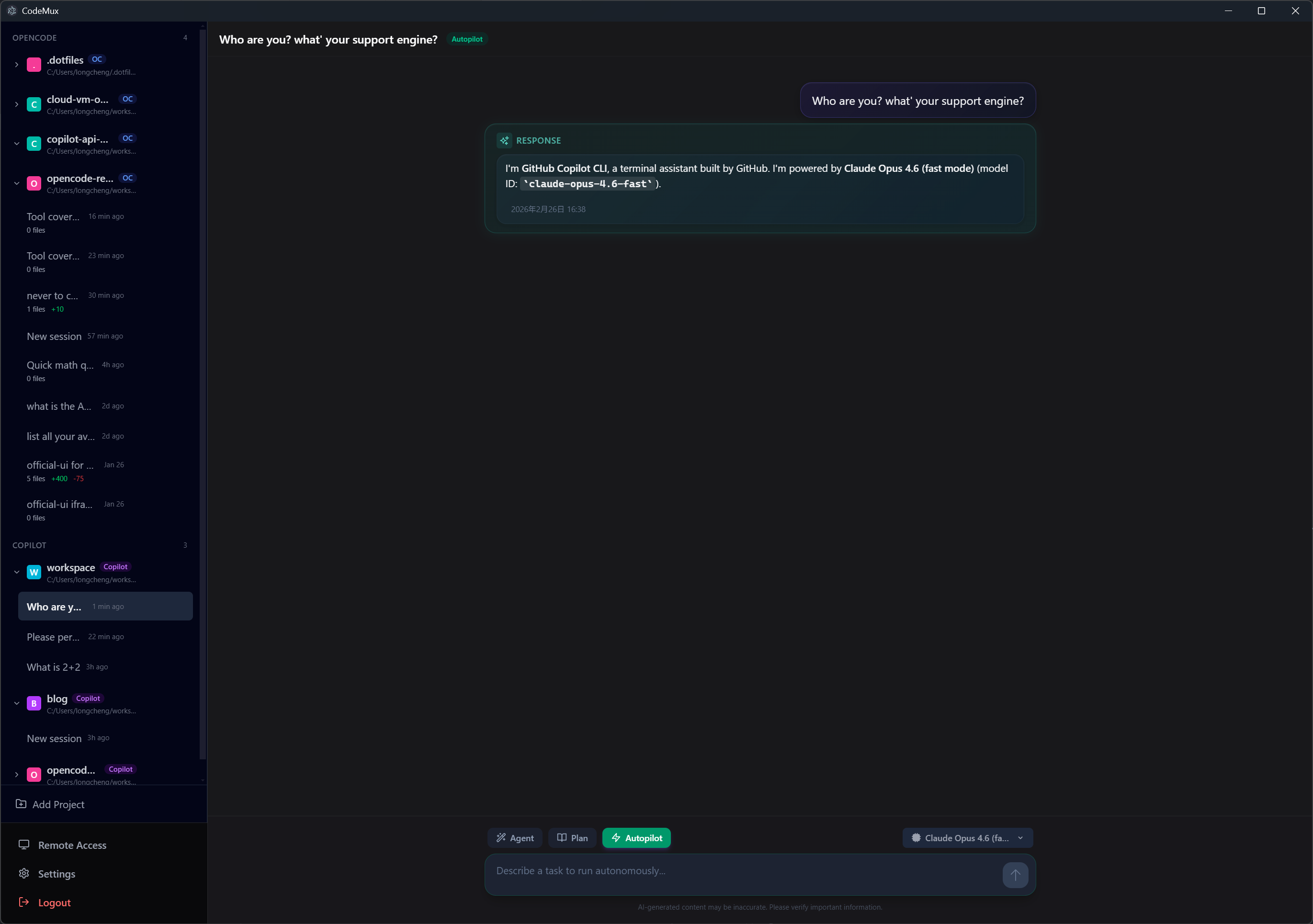
This is not a chat wrapper that swaps API keys. CodeMux is a protocol-level gateway — each engine runs with its own runtime, sessions, tool execution, and capabilities fully preserved.
Switch between engines from a single interface. Each keeps its full power — file editing, shell access, session history, project context — CodeMux just gives them a shared front door.
| Engine | Protocol | Status |
|---|---|---|
| OpenCode | HTTP REST + SSE | ✅ Stable |
| GitHub Copilot CLI | JSON-RPC/stdio | ✅ Stable |
| Claude Code | SDK (stdio) | ✅ Stable |
| Codex | JSON-RPC/stdio (app-server) |
💡 CodeMux is also the first — and currently only — open-source GUI for GitHub Copilot CLI, connecting at the protocol level (JSON-RPC over stdio) to deliver Copilot's complete agentic coding experience in a visual interface.
⚠️ Codex support is currently experimental/unstable. Expect protocol details and behavior to evolve as the upstream app-server protocol changes.
Every agent action is rendered as an expandable step — file diffs, shell commands, search results, tool calls — so you can see exactly what the agent is doing and why, not just the final answer.
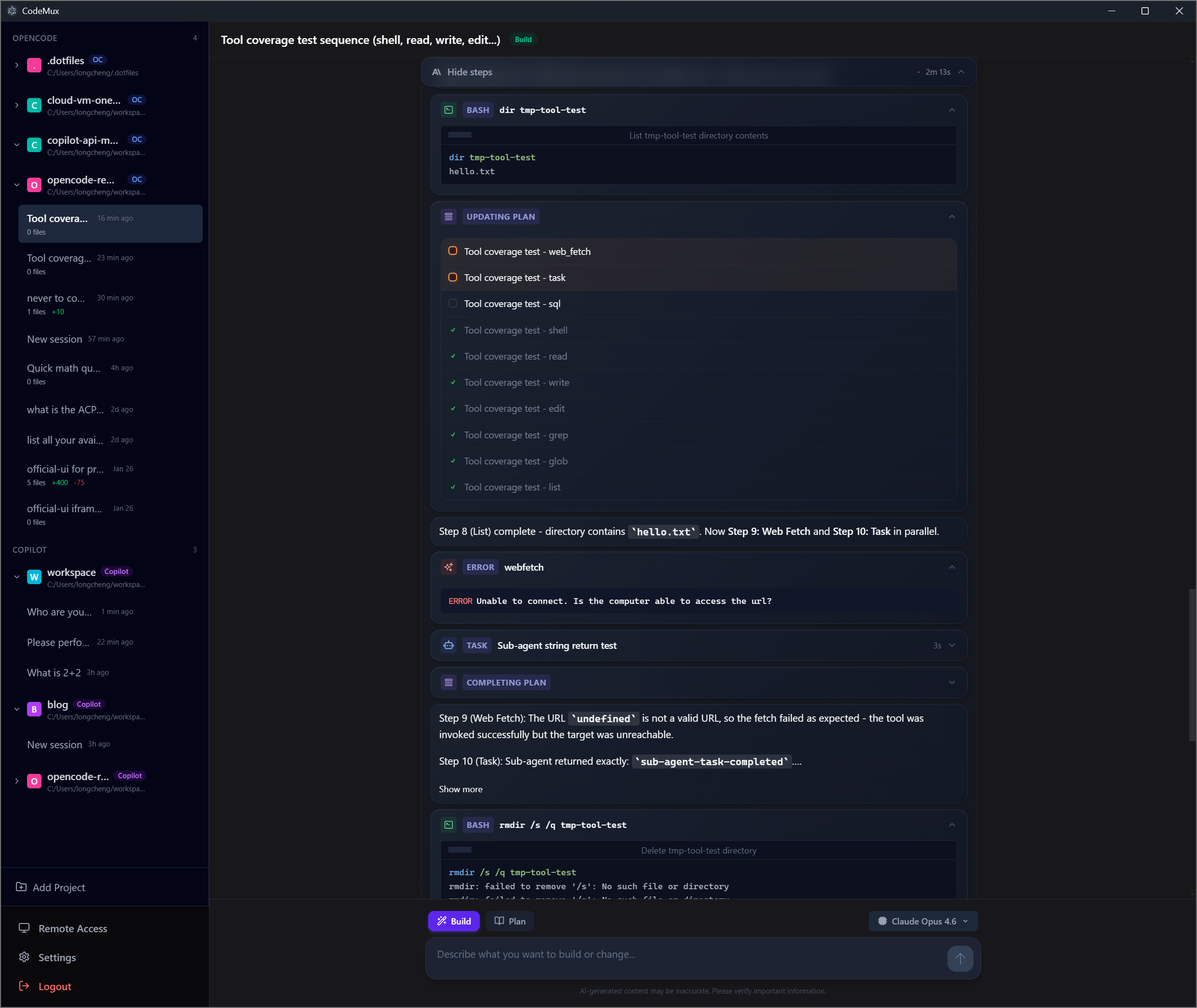
This isn't limited to the desktop app. The full chain-of-thought experience is preserved across every access method — whether you're on a browser via LAN or public internet, or interacting through an IM bot on your phone.
Tools like OpenClaw have popularized the idea of accessing AI from messaging apps — send a message on WhatsApp or Telegram, get a text reply. But for AI-assisted coding, a text reply isn't enough. You need to see what the agent is thinking, what files it's editing, what commands it's running — in real time.
CodeMux bridges this gap. Whether you access from a browser or an IM platform, you get the complete agent experience with structured streaming:
| Capability | CodeMux | Text-based assistants |
|---|---|---|
| Streaming output | ✅ Token-level real-time streaming | |
| Thinking steps | ✅ Each tool call rendered as expandable step | ❌ Final answer only |
| File diffs | ✅ Inline diff viewer with syntax highlighting | ❌ Plain text or none |
| Shell commands | ✅ Command + output rendered in real time | ❌ Text summary at best |
| Multi-engine | ✅ Switch between OpenCode / Copilot / Claude Code / Codex | ❌ Single model / provider |
| Coding context | ✅ Project-aware sessions with full tool access | |
| Image input | ✅ Paste/drag images for all engines to analyze | ❌ Text-only input |
Text-based coding tools are limited to text input. CodeMux breaks this barrier — attach images to your prompts and let the AI see what you see.
Paste a screenshot, drag in a design mockup, or upload an error image — all four engines can analyze images natively. Each engine adapter translates images into its native format behind the scenes, while you get a unified experience:
- Upload methods: File picker, drag & drop, clipboard paste
- Supported formats: JPEG, PNG, GIF, WebP (up to 4 images per message, 3MB each)
- Inline preview: Thumbnails shown before sending, images rendered in chat history
This works across all access methods — desktop, remote browser, and IM bots — wherever CodeMux runs, image input follows.
CodeMux goes beyond chat — it provides integrated tools to manage your development workflow directly from the interface.
-
Scheduled Tasks: Automate recurring agent tasks — run code reviews every morning, generate reports on an interval, or batch-process issues weekly. Supports manual trigger, interval (5 min – 12 hours), daily, and weekly scheduling with missed-run catch-up when the app restarts.
-
Git Worktree Parallel Sessions: Work on multiple branches simultaneously without
git stash. Create isolated worktrees from the sidebar, each with its own directory, branch, and AI sessions. Merge back with your choice of merge, squash, or rebase — all without leaving the UI. -
File Explorer & Git Monitoring: Browse project files with a collapsible tree, preview code with syntax highlighting, and track git changes in real time. A "Changes" tab shows modified files with line-level add/remove counts, and an inline diff viewer lets you inspect every change without leaving CodeMux.
-
Slash Commands & Engine Skills: Type
/in the input to invoke engine-native commands and skills with autocomplete —/cancel,/status,/mode,/model, and more. Each engine exposes its own commands; Copilot surfaces project-level and personal skills, Claude Code surfaces user-installed skills, OpenCode passes through its SDK commands, and Codex surfaces app-server skills — all through a unified autocomplete UI.
- Agent mode switching: Toggle between Build / Plan / Autopilot modes per engine — each with its own behavior and prompt style
- Live todo panel: Agent-generated task lists displayed above the input area with real-time progress tracking
- Permission approvals: Approve or deny sensitive operations (shell, file edits) inline — with "always allow" for trusted patterns
- Interactive questions: Engines can ask single/multi-select questions with descriptions and custom input
- Per-engine model selection: Pick different models for each engine independently; Claude Code and Codex support custom model ID input
- Token usage tracking: Monitor input, output, and cache token consumption with per-engine cost breakdowns
Access your coding agents from any device — phone, tablet, or another machine — without touching a single config file.
- LAN: Auto-detected IP + QR code, ready in seconds
- Public Internet: One-click Cloudflare Tunnel — no port forwarding, no VPN, no firewall changes. Supports both quick tunnels (random ephemeral URL, zero config) and named tunnels (persistent custom domain via
~/.cloudflared/credentials) - Security built-in: Device authorization, JWT tokens, HTTPS via Cloudflare; quick tunnel URLs rotate on every restart, named tunnels preserve your custom hostname
Use your AI coding agents directly from your favorite messaging apps with real-time streaming and structured rich content — not just plain text replies.
| Platform | Event Receiving | Streaming | Group Creation | Rich Content |
|---|---|---|---|---|
| Feishu (Lark) | WebSocket (长连接) | ✅ Edit-in-place | ✅ Auto-create group | Interactive Cards |
| DingTalk | Stream mode (WS) | ✅ AI Card | ✅ Scene groups | ActionCard / Markdown |
| Telegram | Webhook / Long Polling | ✅ sendMessageDraft | ❌ P2P only | MarkdownV2 + InlineKeyboard |
| WeCom | HTTP Callback (AES XML) | ❌ Batch mode | ✅ App group chat | Markdown / Template Card |
| Microsoft Teams | Bot Framework HTTP | ✅ Edit-in-place | ❌ P2P only | Adaptive Cards v1.5 |
- P2P entry point: Private chat with the bot to select projects and sessions
- Slash commands:
/cancel,/status,/mode,/model,/history,/help - Streaming responses: Real-time AI output with platform-appropriate update strategy
- Tool summary: Completion messages include action counts (e.g.
Shell(2), Edit(1)) - Auto-approve permissions: Engine permission requests are approved automatically
- One Group = One Session (Feishu, DingTalk, WeCom): Each group chat maps to a single CodeMux session. Start in P2P → select project → group auto-created.
- P2P Direct (Telegram, Teams): Interact directly in private chat with temporary sessions (2h TTL). In group chats, @mention the bot to interact.
Each platform requires creating a bot/app on its developer portal and configuring credentials in CodeMux Settings → Channels.
📖 Detailed setup guide → — Step-by-step instructions for each platform, including permissions, webhook configuration, and troubleshooting.
| Platform | Required Credentials | Developer Portal |
|---|---|---|
| Feishu | App ID, App Secret | open.feishu.cn |
| DingTalk | App Key, App Secret, Robot Code | open.dingtalk.com |
| Telegram | Bot Token (from @BotFather) | core.telegram.org |
| WeCom | Corp ID, Corp Secret, Agent ID, Callback Token, Encoding AES Key | developer.work.weixin.qq.com |
| Teams | Microsoft App ID, App Password, Tenant ID | Azure Portal + Teams Dev Portal |
macOS (Recommended — via Homebrew):
brew tap realDuang/codemux
brew install --cask codemux
Manual download:
- macOS (Apple Silicon):
CodeMux-x.x.x-arm64.dmg - macOS (Intel):
CodeMux-x.x.x-x64.dmg - Windows:
CodeMux-x.x.x-setup.exe
The desktop app bundles the Cloudflare Tunnel binary and the gateway server. OpenCode, Copilot CLI, Claude Code, and Codex must be installed separately (see below).
⚠️ macOS Users (manual download): The app is not code-signed. If macOS shows "App is damaged", run:xattr -cr /Applications/CodeMux.app
# Clone the repository
git clone https://github.com/realDuang/codemux.git
cd codemux

# Install dependencies
bun install

# Download cloudflared binary (for remote access)
bun run update:cloudflared

# Start development server (Electron + Vite HMR)
bun run devOn headless Linux hosts, bun run dev may exit early because Electron needs a virtual display, a DBus session, and a correctly configured chrome-sandbox helper. This repo includes Linux server helpers for that workflow:
# First-time bootstrap on a Linux server (installs Bun if needed)
./scripts/server-init.sh

# Run the full Electron dev stack in the foreground with Xvfb + DBus
bun run server:dev

# Run the same headless dev stack in the background
bun run server:up
bun run server:status
bun run server:down

# Run the headless dev stack and start a Cloudflare quick tunnel
bun run server:tunnel

# Show the 6-digit access code from the terminal
bun run server:access-code

# Review or approve pending device requests from the terminal
bun run server:access-requests
bun run start is still the lightest option for a web-only standalone server. The desktop app's "Public Access" toggle manages Cloudflare inside the packaged app; on a headless dev server, bun run server:tunnel provides the equivalent quick-tunnel workflow from the shell.
bun run server:tunnel now prints the access code after startup. When a remote browser submits that code, you can stay entirely in SSH and run bun run server:access-requests to review and interactively approve or deny pending requests. If you started CodeMux with bun run server:dev, open a second SSH session and run bun run server:access-code / bun run server:access-requests.
After a browser has been approved, it can open Settings → Channels in the web UI to configure or toggle IM channels directly from server mode; you no longer need the Electron-only host page for that workflow.
Engine Prerequisites: All engines are external dependencies that must be installed and available in your PATH:
- OpenCode: Install from opencode.ai —
curl -fsSL https://opencode.ai/install | bash(Unix) orirm https://opencode.ai/install.ps1 | iex(Windows)- Copilot CLI: Install GitHub Copilot CLI separately
- Claude Code: Install via
npm install -g @anthropic-ai/claude-codeand set yourANTHROPIC_API_KEY- Codex: Install the
codexCLI separately and ensurecodexis in PATH. CodeMux reuses Codex's existing OpenAI login or API key configuration. Experimental/unstable.CodeMux auto-detects installed engines on startup.
| Method | Setup | Best For |
|---|---|---|
| LAN Browser | Open http://<your-ip>:8233, enter 6-digit code or scan QR |
Quick access from another device on the same network |
| Public Internet | Toggle "Public Access" → share *.trycloudflare.com URL |
Access from anywhere, no port forwarding needed |
| IM Bot | Configure bot credentials in Settings → Channels (desktop or approved web UI) | Interact from Feishu, DingTalk, Telegram, WeCom, or Teams |
| Layer | Protection |
|---|---|
| Device Authorization | New devices require approval with a 6-digit code |
| JWT Tokens | Per-device tokens stored securely |
| HTTPS | Public tunnel uses HTTPS via Cloudflare automatically |
| Ephemeral URLs | Tunnel URLs change on every restart |
Manage connected devices from the Devices page — view last access time, rename for identification, or revoke access per-device.
CodeMux is designed for personal use. Revoke devices you no longer use and disable the public tunnel when not needed.
┌─────────────────────────────────────────────────────────────────┐
│                        Access Layer                             │
│                                                                 │
│  ┌──────────┐  ┌───────────────┐  ┌──────────────────────────┐  │
│  │ Electron │  │ Browser (LAN/ │  │ IM Bots (Feishu/DingTalk │  │
│  │   App    │  │  Cloudflare)  │  │ /Telegram/WeCom/Teams)   │  │
│  └────┬─────┘  └──────┬────────┘  └────────────┬─────────────┘  │
│       │               │                        │                │
│       └───────────────┼────────────────────────┘                │
│                       │                                         │
│              WebSocket (JSON-RPC)                               │
│                       │                                         │
│              ┌────────┴────────┐                                │
│              │  Gateway Server │                                │
│              │ (Engine Manager)│                                │
│              └──┬──────┬──────┬─────┬┘                            │
│                 │      │      │     │                             │
│           ┌─────┘   ┌──┘   ┌──┘   └──┐                            │
│           │         │      │         │                            │
│     ┌─────┴─────┐ ┌─┴──────┐ ┌┴───────┐ ┌─────────┐               │
│     │ OpenCode  │ │Copilot │ │ Claude │ │  Codex  │               │
│     │ Adapter   │ │Adapter │ │Adapter │ │ Adapter │               │
│     │(HTTP+SSE) │ │(stdio) │ │ (SDK)  │ │ (stdio) │               │
│     └───────────┘ └────────┘ └────────┘ └─────────┘               │
│                                                                 │
│     Unified Type System: UnifiedPart, ToolPart, AgentMode       │
└─────────────────────────────────────────────────────────────────┘
All access methods — desktop app, remote browser, and IM bots — connect through the same WebSocket gateway. Engines share a normalized type system, so tool calls, file diffs, and streaming messages are rendered identically regardless of which engine or access method is used.
./scripts/server-init.sh  # Bootstrap a Linux server before Bun is installed
bun run dev                # Electron + Vite HMR
bun run server:dev         # Foreground headless Electron dev
bun run server:up          # Background headless Electron dev
bun run server:tunnel      # Background headless Electron dev + quick tunnel
bun run server:access-code # Print the current 6-digit access code
bun run server:access-requests # Interactively review pending remote access requests
bun run server:down        # Stop background headless Electron dev
bun run server:status      # Show background headless Electron dev status
bun run build              # Production build
bun run dist:mac:arm64     # macOS Apple Silicon
bun run dist:mac:x64       # macOS Intel
bun run dist:win           # Windows NSIS installer
bun run typecheck          # Type checking
bun run update:cloudflared # Update Cloudflare Tunnel binarycodemux/
├── electron/
│ ├── main/
│ │ ├── engines/ # Engine adapters (OpenCode, Copilot, Claude Code, Codex)
│ │ ├── gateway/ # WebSocket server + engine routing
│ │ ├── channels/ # IM bot channels (Feishu, DingTalk, Telegram, WeCom, Teams)
│ │ │ └── streaming/ # Cross-channel streaming infrastructure
│ │ ├── services/ # Auth, device store, tunnel, sessions, file service, tray, etc.
│ │ └── utils/ # Shared utilities (ID generation, etc.)
│ └── preload/
├── src/ # SolidJS renderer
│ ├── pages/ # Chat, Settings, Devices, Entry
│ ├── components/ # UI components + content renderers
│ ├── stores/ # Reactive state (session, message, config)
│ ├── lib/ # Gateway client, auth, i18n, theme
│ ├── locales/ # i18n translation files (en, zh, ru)
│ └── types/ # Unified type system + tool mapping
├── shared/ # Shared backend modules (auth, JWT, device store base)
├── tests/ # Unit tests, e2e tests (Playwright), benchmarks
├── docs/ # Channel setup guides + design documents
├── website/ # Project website (SolidJS + Vite)
├── scripts/ # Setup, binary updaters, CI helpers
├── homebrew/ # Homebrew formula for macOS distribution
├── electron.vite.config.ts
└── electron-builder.yml
Contributions are welcome! See CONTRIBUTING.md for detailed guidelines.
Code Style: TypeScript strict mode, SolidJS reactive patterns, Tailwind for styling
Commit Convention: feat: | fix: | docs: | refactor: | chore:
Adding a New Engine: Implement EngineAdapter (see electron/main/engines/engine-adapter.ts), add tool name mapping in src/types/tool-mapping.ts, and register in electron/main/index.ts.
- Discussions — Roadmap, feature requests & community conversations
- Roadmap — Development roadmap and milestone tracking
- Issues — Bug reports
- OpenCode — Supported engine
- GitHub Copilot CLI — Supported engine
- Claude Code — Supported engine
- Feishu Open Platform — Feishu bot channel
- DingTalk Open Platform — DingTalk bot channel
- Telegram Bot API — Telegram bot channel
- WeCom Developer Center — WeCom bot channel
- Microsoft Teams Platform — Teams bot channel