A Windows desktop application that identifies and removes duplicate pages in Microsoft OneNote notebooks.
Traditional file-level duplicate removers cannot detect duplicate OneNote pages because they compare file hashes rather than page content. This tool solves that by comparing the actual content of each page using SHA-256 hashing.
- Windows
- Microsoft Office OneNote (desktop version)
- .NET Framework 4.8
setup.exe (ClickOnce installer)
- Connects to OneNote via the COM Interop API
- Retrieves the full page hierarchy across all notebooks
- For each page, extracts the content XML and computes a SHA-256 hash of the
InnerText(ignoring metadata likeobjectIDandlastModifiedTime) - Groups pages with identical hashes as duplicates
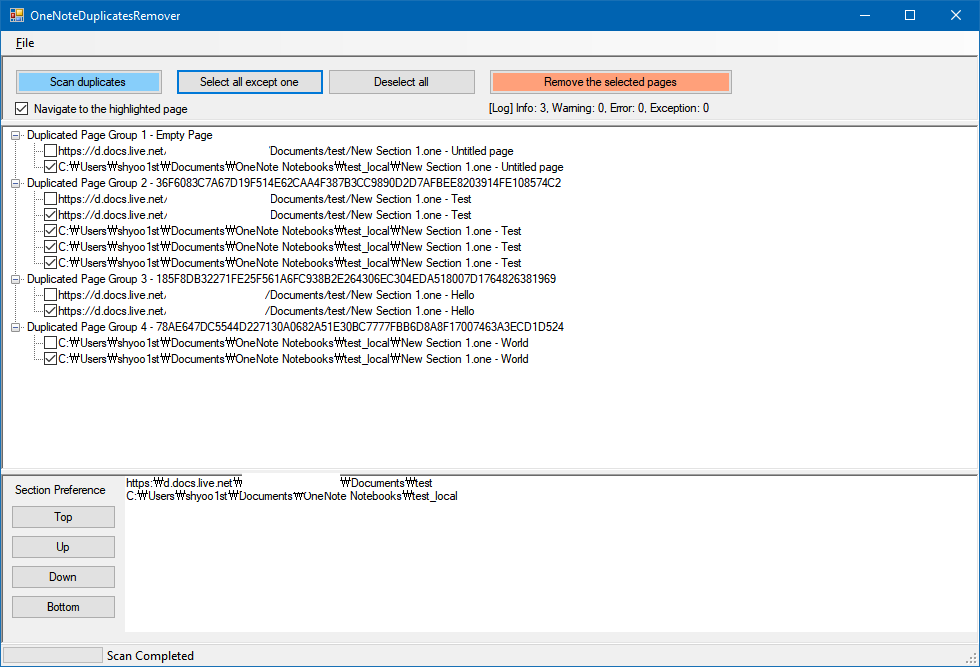
- Displays duplicate groups in a tree view for review and selective removal
When selecting duplicates for removal, the tool uses a section preference system that prioritizes keeping pages in cloud-synced notebooks over local ones, and avoids selecting pages from the Recycle Bin. You can also manually select/deselect individual pages.
After removal, an HTML report is generated showing which pages were successfully removed and which could not be removed.
Open OneNoteDuplicatesRemover.sln in Visual Studio and build. The project supports both x86 and x64 configurations.
msbuild OneNoteDuplicatesRemover.sln /p:Configuration=Release /p:Platform=x64
- Microsoft.Office.Interop.OneNote (COM reference)
- Newtonsoft.Json 12.0.2 (NuGet)
The application includes an Advanced menu (hidden by default) with additional utilities:
- Export to JSON - Dump duplicate groups to a JSON file for external processing
- Clean up using JSON - Remove pages listed in a previously exported JSON file (useful for batch operations across machines)
- Flatten Sections - Merge all sections into a single section named
MERGED_ONE - Export Sections/Pages to XML - Export the raw OneNote hierarchy data to XML files for analysis
- Back up your notebooks before removing any pages.
- There is a very small chance of SHA-256 hash collision, where two different pages produce the same hash. This could lead to unexpected data loss.
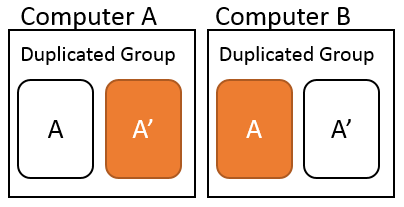
Do not run this program on multiple computers simultaneously. For example, if computers A and B both run this tool and delete different copies of the same page, the sync process may delete all copies, resulting in data loss.