
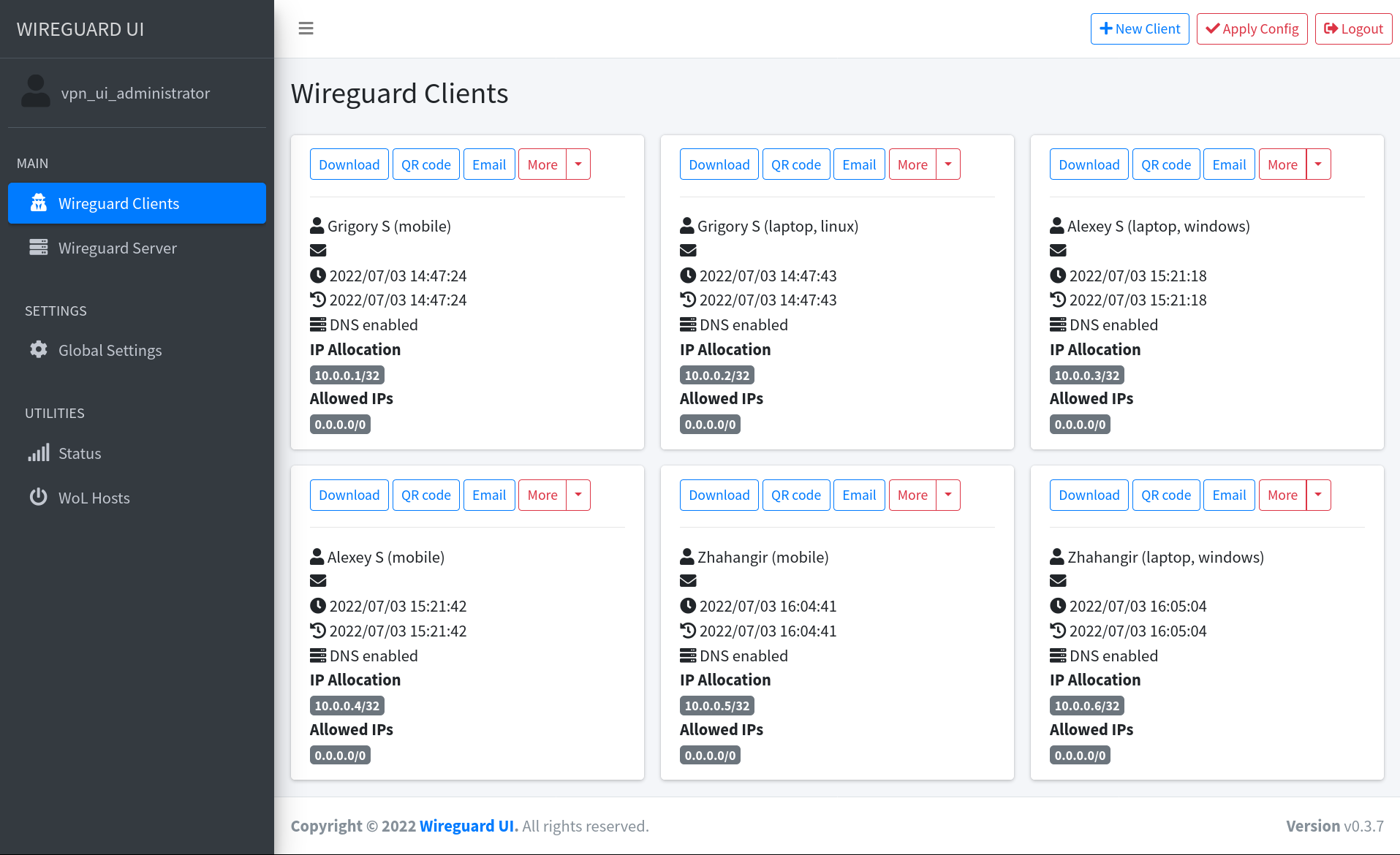
A web user interface to manage your WireGuard setup.
- Friendly UI
- Authentication
- Manage extra client information (name, email, etc.)
- Retrieve client config using QR code / file / email / Telegram
- Enhanced Email Automation:
- Configurable email subject and content with placeholders
- Auto-send emails on client creation/updates
- Personalized emails with client and server data
- Support for custom HTML email templates
### Split Tunnel Essentials
sysctl -w net.ipv4.conf.all.route_localnet=1
sysctl -w net.ipv4.ip_forward=1
⚠️ The default username and password areadmin. Please change it to secure your setup.
Download the binary file from the release page and run it directly on the host machine
./wireguard-ui
# /etc/systemd/system/wireguard-ui.service
[Unit]
Description=wireguard-ui
After=network-online.target
Wants=network-online.target systemd-networkd-wait-online.service

[Service]
Restart=on-abnormal

; User and group the process will run as.
User=root
Group=root
Environment=BIND_ADDRESS=127.0.0.1:5000
Environment=WGUI_DNS=10.19.11.1
Environment=EMAIL_FROM_ADDRESS=mail@gmail.com
Environment=EMAIL_FROM_NAME="SKY DAYS"
Environment=SMTP_HOSTNAME=smtp.gmail.com
Environment=SMTP_PORT=587
Environment=SMTP_USERNAME=mail@gmail.com
Environment=SMTP_PASSWORD="application password here"
Environment=SMTP_AUTH_TYPE=LOGIN
;Environment=SMTP_ENCRYPTION=NONE
Environment=EMAIL_SUBJECT="SKYDAYS VPN"
Environment=EMAIL_TEMPLATE_FILE=/opt/wireguard-ui/email-template.html
Environment=WGUI_SERVER_INTERFACE_ADDRESSES="10.19.11.1/24"

; FULLY VPN SETUP
;Environment=WGUI_SERVER_POST_UP_SCRIPT="iptables -A FORWARD -i %i -j ACCEPT; iptables -A FORWARD -o %i -j ACCEPT; iptables -t nat -A POSTROUTING -o eth0 -j MASQUERADE"
;Environment=WGUI_SERVER_POST_DOWN_SCRIPT="iptables -D FORWARD -i %i -j ACCEPT; iptables -D FORWARD -o %i -j ACCEPT; iptables -t nat -D POSTROUTING -o eth0 -j MASQUERADE"
; SPLIT TUNNEL SETUP
;Environment=WGUI_SERVER_POST_UP_SCRIPT="iptables -A FORWARD -i %i -j ACCEPT; iptables -A FORWARD -o %i -j ACCEPT"
;Environment=WGUI_SERVER_POST_DOWN_SCRIPT="iptables -D FORWARD -i %i -j ACCEPT; iptables -D FORWARD -o %i -j ACCEPT"

ExecStart=/usr/bin/wireguard-ui --data-dir="/var/lib/wireguard-ui"

; Limit the number of file descriptors; see `man systemd.exec` for more limit settings.
LimitNOFILE=1048576

; Use private /tmp and /var/tmp, which are discarded after traefik stops.
PrivateTmp=true
; Use a minimal /dev (May bring additional security if switched to 'true', but it may not work on Raspberry Pi's or other devices, so it has been disabled in this dist.)
;PrivateDevices=false
; Hide /home, /root, and /run/user. Nobody will steal your SSH-keys.
;ProtectHome=true
; Make /usr, /boot, /etc and possibly some more folders read-only.
;ProtectSystem=full
ReadWriteDirectories=/var/lib/wireguard-ui

; Note that you may have to add capabilities required by any plugins in use.
;CapabilityBoundingSet=CAP_NET_BIND_SERVICE
;AmbientCapabilities=CAP_NET_BIND_SERVICE
;NoNewPrivileges=true

[Install]
WantedBy=multi-user.target
systemctl enable --now wireugard-uiThe examples/docker-compose folder contains example docker-compose files. Choose the example which fits you the most, adjust the configuration for your needs, then run it like below:
docker-compose up
| Variable | Description | Default |
|---|---|---|
BASE_PATH |
Set this variable if you run wireguard-ui under a subpath of your reverse proxy virtual host (e.g. /wireguard) | N/A |
BIND_ADDRESS |
The addresses that can access to the web interface and the port, use unix:///abspath/to/file.socket for unix domain socket. | 0.0.0.0:80 |
SESSION_SECRET |
The secret key used to encrypt the session cookies. Set this to a random value | N/A |
SESSION_SECRET_FILE |
Optional filepath for the secret key used to encrypt the session cookies. Leave SESSION_SECRET blank to take effect |
N/A |
SESSION_MAX_DURATION |
Max time in days a remembered session is refreshed and valid. Non-refreshed session is valid for 7 days max, regardless of this setting. | 90 |
SUBNET_RANGES |
The list of address subdivision ranges. Format: SR Name:10.0.1.0/24; SR2:10.0.2.0/24,10.0.3.0/24 Each CIDR must be inside one of the server interfaces. |
N/A |
WGUI_USERNAME |
The username for the login page. Used for db initialization only | admin |
WGUI_PASSWORD |
The password for the user on the login page. Will be hashed automatically. Used for db initialization only | admin |
WGUI_PASSWORD_FILE |
Optional filepath for the user login password. Will be hashed automatically. Used for db initialization only. Leave WGUI_PASSWORD blank to take effect |
N/A |
WGUI_PASSWORD_HASH |
The password hash for the user on the login page. (alternative to WGUI_PASSWORD). Used for db initialization only |
N/A |
WGUI_PASSWORD_HASH_FILE |
Optional filepath for the user login password hash. (alternative to WGUI_PASSWORD_FILE). Used for db initialization only. Leave WGUI_PASSWORD_HASH blank to take effect |
N/A |
WGUI_ENDPOINT_ADDRESS |
The default endpoint address used in global settings where clients should connect to. The endpoint can contain a port as well, useful when you are listening internally on the WGUI_SERVER_LISTEN_PORT port, but you forward on another port (ex 9000). Ex: myvpn.dyndns.com:9000 |
Resolved to your public ip address |
WGUI_FAVICON_FILE_PATH |
The file path used as website favicon | Embedded WireGuard logo |
WGUI_DNS |
The default DNS servers (comma-separated-list) used in the global settings | 1.1.1.1 |
WGUI_MTU |
The default MTU used in global settings | 1450 |
WGUI_PERSISTENT_KEEPALIVE |
The default persistent keepalive for WireGuard in global settings | 15 |
WGUI_FIREWALL_MARK |
The default WireGuard firewall mark | 0xca6c (51820) |
WGUI_TABLE |
The default WireGuard table value settings | auto |
WGUI_CONFIG_FILE_PATH |
The default WireGuard config file path used in global settings | /etc/wireguard/wg0.conf |
WGUI_LOG_LEVEL |
The default log level. Possible values: DEBUG, INFO, WARN, ERROR, OFF |
INFO |
WG_CONF_TEMPLATE |
The custom wg.conf config file template. Please refer to our default template |
N/A |
EMAIL_FROM_ADDRESS |
The sender email address | N/A |
EMAIL_FROM_NAME |
The sender name | WireGuard UI |
SENDGRID_API_KEY |
The SendGrid api key | N/A |
SENDGRID_API_KEY_FILE |
Optional filepath for the SendGrid api key. Leave SENDGRID_API_KEY blank to take effect |
N/A |
SMTP_HOSTNAME |
The SMTP IP address or hostname | 127.0.0.1 |
SMTP_PORT |
The SMTP port | 25 |
SMTP_USERNAME |
The SMTP username | N/A |
SMTP_PASSWORD |
The SMTP user password | N/A |
SMTP_PASSWORD_FILE |
Optional filepath for the SMTP user password. Leave SMTP_PASSWORD blank to take effect |
N/A |
SMTP_AUTH_TYPE |
The SMTP authentication type. Possible values: PLAIN, LOGIN, NONE |
NONE |
SMTP_ENCRYPTION |
The encryption method. Possible values: NONE, SSL, SSLTLS, TLS, STARTTLS |
STARTTLS |
SMTP_HELO |
Hostname to use for the HELO message. smtp-relay.gmail.com needs this set to anything but localhost |
localhost |
EMAIL_SUBJECT |
Subject line for client configuration emails. Supports placeholders like {{.ClientName}} |
Your wireguard configuration |
EMAIL_CONTENT |
Content for client configuration emails (HTML allowed). Supports placeholders for personalization | Default HTML content |
EMAIL_TEMPLATE_FILE |
Path to custom email template file. If provided, overrides EMAIL_CONTENT |
N/A |
AUTO_EMAIL_ON_CREATE |
Automatically send email when a new client is created (if client has email address) | false |
AUTO_EMAIL_ON_CLIENT_UPDATE |
Automatically send email when a client is updated (if client has email address) | false |
TELEGRAM_TOKEN |
Telegram bot token for distributing configs to clients | N/A |
TELEGRAM_ALLOW_CONF_REQUEST |
Allow users to get configs from the bot by sending a message | false |
TELEGRAM_FLOOD_WAIT |
Time in minutes before the next conf request is processed | 60 |
These environment variables are used to control the default server settings used when initializing the database.
| Variable | Description | Default |
|---|---|---|
WGUI_SERVER_INTERFACE_ADDRESSES |
The default interface addresses (comma-separated-list) for the WireGuard server configuration | 10.252.1.0/24 |
WGUI_SERVER_LISTEN_PORT |
The default server listen port | 51820 |
WGUI_SERVER_POST_UP_SCRIPT |
The default server post-up script | N/A |
WGUI_SERVER_POST_DOWN_SCRIPT |
The default server post-down script | N/A |
These environment variables are used to set the defaults used in New Client dialog.
| Variable | Description | Default |
|---|---|---|
WGUI_DEFAULT_CLIENT_ALLOWED_IPS |
Comma-separated-list of CIDRs for the Allowed IPs field. (default ) |
0.0.0.0/0 |
WGUI_DEFAULT_CLIENT_EXTRA_ALLOWED_IPS |
Comma-separated-list of CIDRs for the Extra Allowed IPs field. (default empty) |
N/A |
WGUI_DEFAULT_CLIENT_USE_SERVER_DNS |
Boolean value [0, f, F, false, False, FALSE, 1, t, T, true, True, TRUE] |
true |
WGUI_DEFAULT_CLIENT_ENABLE_AFTER_CREATION |
Boolean value [0, f, F, false, False, FALSE, 1, t, T, true, True, TRUE] |
true |
When using custom email content or templates, you can use the following placeholders for personalization:
| Placeholder | Description | Example |
|---|---|---|
{{.ClientName}} |
Client's display name | John Doe |
{{.ClientEmail}} |
Client's email address | john@example.com |
{{.CreatedAt}} |
Account creation timestamp | 2024-03-15 10:30:00 UTC |
{{.UpdatedAt}} |
Last update timestamp | 2024-03-15 11:45:00 UTC |
{{.PublicKey}} |
Client's WireGuard public key | abc123... |
{{.Endpoint}} |
VPN server endpoint | vpn.example.com:51820 |
{{.AllowedIPs}} |
Allowed IP ranges | 0.0.0.0/0, ::/0 |
{{.ServerPublicKey}} |
Server's WireGuard public key | def456... |
{{.DNS}} |
DNS servers | 1.1.1.1, 1.0.0.1 |
<h1>Welcome {{.ClientName}}!</h1>
<p>Your WireGuard VPN configuration is ready.</p>
<p><strong>Server:</strong> {{.Endpoint}}</p>
<p><strong>Created:</strong> {{.CreatedAt}}</p>
<p>Please find your configuration files attached.</p># Set custom email content with placeholders
export EMAIL_SUBJECT="VPN Config for {{.ClientName}}"
export EMAIL_CONTENT="<p>Hi {{.ClientName}}, your VPN is ready! Connect to {{.Endpoint}}</p>"
# Enable auto-email on client creation
export AUTO_EMAIL_ON_CREATE=true
# Use custom email template file
export EMAIL_TEMPLATE_FILE="/path/to/custom-template.html"
./wireguard-uiA sample HTML email template with professional styling is available at examples/email-template.html.
These environment variables only apply to the docker container.
| Variable | Description | Default |
|---|---|---|
WGUI_MANAGE_START |
Start/stop WireGuard when the container is started/stopped | false |
WGUI_MANAGE_RESTART |
Auto restart WireGuard when we Apply Config changes in the UI | false |
WireGuard-UI only takes care of configuration generation. You can use systemd to watch for the changes and restart the service. Following is an example:
Create /etc/systemd/system/wgui.service
cd /etc/systemd/system/
cat << EOF > wgui.service
[Unit]
Description=Restart WireGuard
After=network.target

[Service]
Type=oneshot
ExecStart=/usr/bin/systemctl restart wg-quick@wg0.service

[Install]
RequiredBy=wgui.path
EOF
Create /etc/systemd/system/wgui.path
cd /etc/systemd/system/
cat << EOF > wgui.path
[Unit]
Description=Watch /etc/wireguard/wg0.conf for changes

[Path]
PathModified=/etc/wireguard/wg0.conf

[Install]
WantedBy=multi-user.target
EOF
Apply it
systemctl enable wgui.{path,service}
systemctl start wgui.{path,service}Create /usr/local/bin/wgui file and make it executable
cd /usr/local/bin/
cat << EOF > wgui
#!/bin/sh
wg-quick down wg0
wg-quick up wg0
EOF
chmod +x wgui
Create /etc/init.d/wgui file and make it executable
cd /etc/init.d/
cat << EOF > wgui
#!/sbin/openrc-run

command=/sbin/inotifyd
command_args="/usr/local/bin/wgui /etc/wireguard/wg0.conf:w"
pidfile=/run/${RC_SVCNAME}.pid
command_background=yes
EOF
chmod +x wgui
Apply it
rc-service wgui start
rc-update add wgui defaultSet WGUI_MANAGE_RESTART=true to manage Wireguard interface restarts.
Using WGUI_MANAGE_START=true can also replace the function of wg-quick@wg0 service, to start Wireguard at boot, by
running the container with restart: unless-stopped. These settings can also pick up changes to Wireguard Config File
Path, after restarting the container. Please make sure you have --cap-add=NET_ADMIN in your container config to make
this feature work.
Go to the project root directory and run the following command:
docker build --build-arg=GIT_COMMIT=$(git rev-parse --short HEAD) -t wireguard-ui .or
docker compose build --build-arg=GIT_COMMIT=$(git rev-parse --short HEAD)ℹ️ A container image is available on Docker Hub which you can pull and use
docker pull ngoduykhanh/wireguard-ui
Prepare the assets directory
./prepare_assets.shThen build your executable
go build -o wireguard-uiMIT. See LICENSE.
If you like the project and want to support it, you can buy me a coffee ☕
