Fork of woodser/monero-ts with support for arbitrary data in TX extra (on-chain memos).
This fork adds extraHex support to embed arbitrary data (up to 254 bytes) in Monero transactions via the TX extra field. Data is encoded using the 0x7F arbitrary data marker inside a standard extra nonce field, compatible with monero-oxide.
TypeScript (src/main/ts/wallet/model/MoneroTxConfig.ts)
- Added
extraHex: stringfield with getter/setter - Serialized to JSON for the WASM bridge
C++ model (external/monero-cpp/src/wallet/monero_wallet_model.h/.cpp)
- Added
boost::optional<std::string> m_extra_hextomonero_tx_config - Added to copy constructor, JSON serialization, and deserialization
C++ wallet (external/monero-cpp/src/wallet/monero_wallet_full.cpp)
create_txs(),sweep_account(),sweep_output(): hex-decodesextraHex, prepends0x7Fmarker, writes as a properly VarInt-length-encoded extra nonce (0x02tag)
Monero core (external/monero-cpp/external/monero-project/src/cryptonote_core/cryptonote_tx_utils.cpp)
- Patched
construct_tx_with_tx_key()to preserve arbitrary nonces (0x7Fmarker) through payment ID manipulation — upstream code strips all nonce fields when adding encrypted payment IDs - Skips dummy payment ID insertion when an arbitrary data nonce is present
Node.js compatibility (src/main/ts/common/LibraryUtils.ts)
- Injects
HttpClient,LibraryUtils,GenUtilsintoglobalThisfor non-browser environments, enablingproxyToWorker: falsein Node.js
import moneroTs from "monero-ts";

const wallet = await moneroTs.MoneroWalletFull.createWallet({...});

const memo = "swap:btc.btc:bc1q...:0/1/0:t:30";
const txs = await wallet.createTxs({
  accountIndex: 0,
  address: "4...",
  amount: 100000000000n,
  extraHex: Buffer.from(memo).toString("hex"),
  relay: true,
});- Max 254 bytes per memo (extra nonce max 255, minus 1 byte for
0x7Fmarker) - Data is plaintext on-chain (visible to all observers)
- Uses VarInt length encoding for nonces >127 bytes (required for correct parsing)
cp .env.example .env  # fill in your wallet details
npx babel test_memo.ts --extensions ".ts" --out-file test_memo.js
node test_memo.jsRequires emscripten SDK (tested with 3.1.46):
source /path/to/emsdk/emsdk_env.sh
./bin/build_boost_emscripten.sh
./bin/build_openssl_emscripten.sh
./bin/build_wasm_emscripten.sh
npm run build_commonjs
Note: after WASM build, patch dist/monero.js to add var asyncifyStubs = {}; at module start if using emsdk 3.1.46+.
Original README below.
A TypeScript library for creating Monero applications using RPC and WebAssembly bindings to monero v0.18.4.4 'Fluorine Fermi'.
- Supports client-side wallets in Node.js and the browser using WebAssembly.
- Supports wallet and daemon RPC clients.
- Supports multisig, view-only, and offline wallets.
- Wallet types are interchangeable by conforming to a common interface.
- Uses a clearly defined data model and API specification intended to be intuitive and robust.
- Query wallet transactions, transfers, and outputs by their properties.
- Fetch and process binary data from the daemon (e.g. raw blocks).
- Receive notifications when blocks are added to the chain or when wallets sync, send, or receive.
- Over 300 passing Mocha tests.
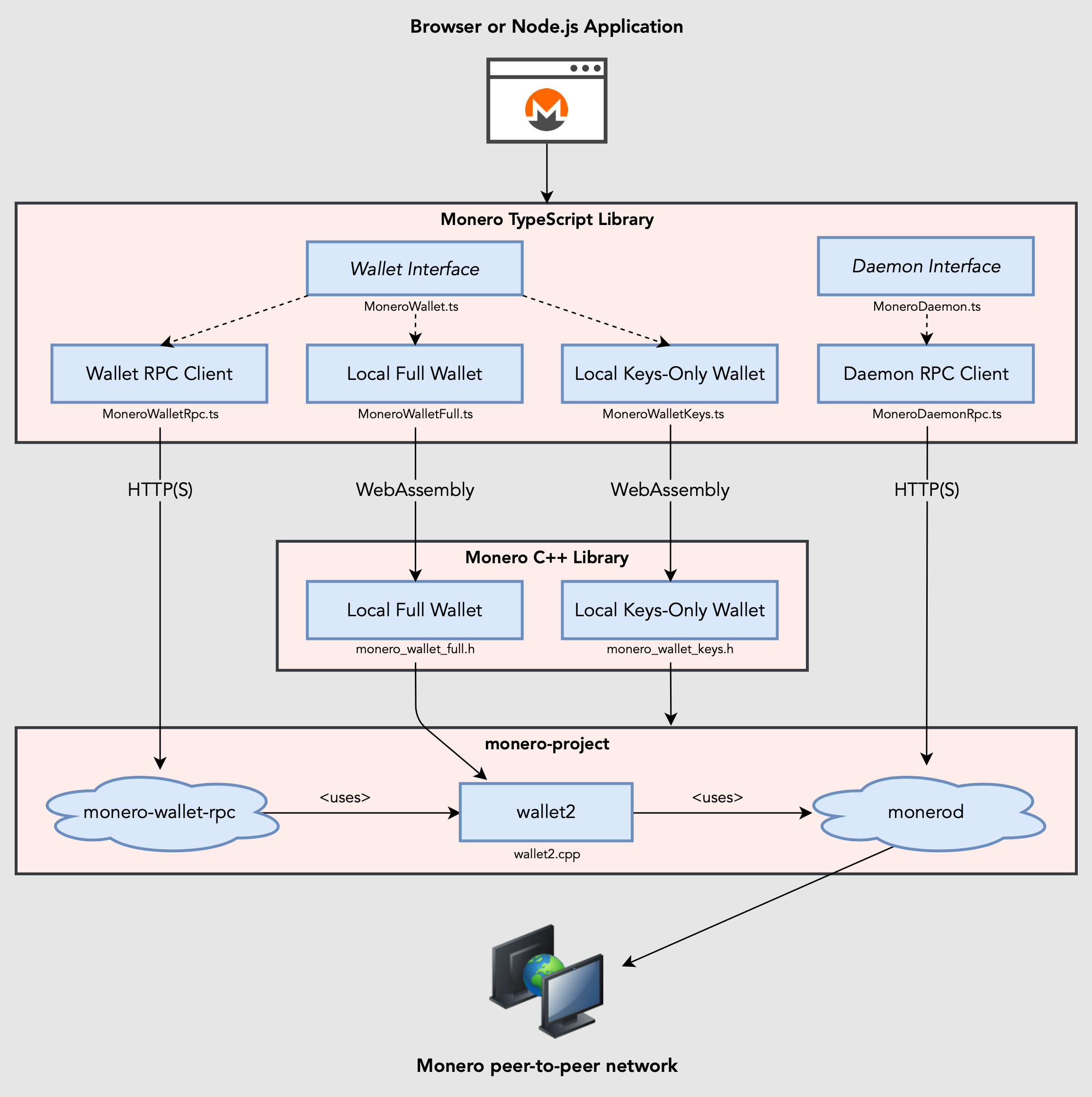
Build browser or Node.js applications using RPC or WebAssembly bindings to monero-project/monero. Wallet implementations are interchangeable by conforming to a common interface, MoneroWallet.ts.
// import monero-ts (or import types individually)
import moneroTs from "monero-ts";

// connect to daemon
let daemon = await moneroTs.connectToDaemonRpc("http://localhost:28081");
let height = await daemon.getHeight();        // 1523651
let txsInPool = await daemon.getTxPool();     // get transactions in the pool

// create wallet from mnemonic phrase using WebAssembly bindings to monero-project
let walletFull = await moneroTs.createWalletFull({
  path: "sample_wallet_full",
  password: "supersecretpassword123",
  networkType: moneroTs.MoneroNetworkType.TESTNET,
  seed: "hefty value scenic...",
  restoreHeight: 573936,
  server: { // provide url or MoneroRpcConnection
    uri: "http://localhost:28081",
    username: "superuser",
    password: "abctesting123"
  }
});

// synchronize with progress notifications
await walletFull.sync(new class extends moneroTs.MoneroWalletListener {
  async onSyncProgress(height: number, startHeight: number, endHeight: number, percentDone: number, message: string) {
    // feed a progress bar?
  }
});

// synchronize in the background every 5 seconds
await walletFull.startSyncing(5000);

// receive notifications when funds are received, confirmed, and unlocked
let fundsReceived = false;
await walletFull.addListener(new class extends moneroTs.MoneroWalletListener {
  async onOutputReceived(output: moneroTs.MoneroOutputWallet) {
    let amount = output.getAmount();
    let txHash = output.getTx().getHash();
    let isConfirmed = output.getTx().getIsConfirmed();
    let isLocked = output.getTx().getIsLocked();
    fundsReceived = true;
  }
});

// connect to wallet RPC and open wallet
let walletRpc = await moneroTs.connectToWalletRpc("http://localhost:28084", "rpc_user", "abc123");
await walletRpc.openWallet("sample_wallet_rpc", "supersecretpassword123");
let primaryAddress = await walletRpc.getPrimaryAddress(); // 555zgduFhmKd2o8rPUz...
let balance = await walletRpc.getBalance();   // 533648366742
let txs = await walletRpc.getTxs();           // get transactions containing transfers to/from the wallet

// send funds from RPC wallet to WebAssembly wallet
let createdTx = await walletRpc.createTx({
  accountIndex: 0,
  address: await walletFull.getAddress(1, 0),
  amount: 250000000000n, // send 0.25 XMR (denominated in atomic units)
  relay: false // create transaction and relay to the network if true
});
let fee = createdTx.getFee(); // "Are you sure you want to send... ?"
await walletRpc.relayTx(createdTx); // relay the transaction

// recipient receives unconfirmed funds within 5 seconds
await new Promise(function(resolve) { setTimeout(resolve, 5000); });
assert(fundsReceived);

// save and close WebAssembly wallet
await walletFull.close(true);

// terminate any running resources (e.g. workers)
await moneroTs.shutdown();- TypeDocs
- API and model overview with visual diagrams
- Creating wallets
- The data model: blocks, transactions, transfers, and outputs
- Getting transactions, transfers, and outputs
- Sending funds
- Multisig wallets
- View-only and offline wallets
- Connection manager
- HTTPS and self-signed certificates
- Mocha tests
- Installing prerequisites
- Getting started part 1: creating a Node.js application
- Getting started part 2: creating a web application
- Sample Node.js app
- Sample React app
- Sample Next.js app
- Sample Vite app
- Sample Webpack app
- Sample Deno app
- monero-cpp - C++ library counterpart
- monero-java - Java library counterpart
- haveno-ts - used for testing Haveno and its TypeScript library
cd your_projectormkdir your_project && cd your_project && npm initnpm install monero-ts- Add
import moneroTs from "monero-ts"in your application code (or import types individually).
Node 20 LTS is recommended. Alternatively, Node 16 and 18 LTS work using the --experimental-wasm-threads flag.
- Bundle your application code for a browser. See xmr-sample-webpack for an example project using Webpack.
- Copy assets from ./dist to your web app's build directory.
- Download and install Monero CLI.
- Start monerod, e.g.:
./monerod --stagenet(or use a remote daemon). - Start monero-wallet-rpc, e.g.:
./monero-wallet-rpc --daemon-address http://localhost:38081 --stagenet --rpc-bind-port 38084 --rpc-login rpc_user:abc123 --wallet-dir ./
This project uses WebAssembly to package and execute Monero's source code for a browser or other WebAssembly-supported environment.
Compiled WebAssembly binaries are committed to ./dist for convenience, but these files can be built independently from source code:
- Install and activate emscripten.
- Clone emscripten repository:
git clone https://github.com/emscripten-core/emsdk.git cd emsdkgit pull && ./emsdk install 3.1.66 && ./emsdk activate 3.1.66 && source ./emsdk_env.shexport EMSCRIPTEN=path/to/emsdk/upstream/emscripten(change for your system)
- Clone emscripten repository:
- Clone monero-ts repository:
git clone --recursive https://github.com/woodser/monero-ts.git cd monero-ts./bin/update_submodules.sh- Modify ./external/monero-cpp/external/monero-project/src/crypto/wallet/CMakeLists.txt from
set(MONERO_WALLET_CRYPTO_LIBRARY "auto" ...toset(MONERO_WALLET_CRYPTO_LIBRARY "cn" .... - Build the monero-cpp submodule (located at ./external/monero-cpp) by following instructions for your system. This will ensure all dependencies are installed. Be sure to install unbound 1.19.0 to your home directory (
~/unbound-1.19.0). ./bin/build_all.sh(install monero-project dependencies as needed for your system)
- Clone the project repository:
git clone https://github.com/woodser/monero-ts.git cd monero-ts- Start RPC servers:
- Download and install Monero CLI.
- Start monerod, e.g.:
./monerod --testnet(or use a remote daemon). - Start monero-wallet-rpc, e.g.:
./monero-wallet-rpc --daemon-address http://localhost:38081 --testnet --rpc-bind-port 28084 --rpc-login rpc_user:abc123 --wallet-dir ./
- Configure the appropriate RPC endpoints, authentication, and other settings in TestUtils.ts (e.g.
WALLET_RPC_CONFIGandDAEMON_RPC_CONFIG).
- Run all tests:
npm test - Run tests by their description, e.g.:
npm run test -- --grep "Can get transactions"
- Start monero-wallet-rpc servers used by tests:
./bin/start_wallet_rpc_test_servers.sh - In another terminal, build browser tests:
./bin/build_browser_tests.sh - Access http://localhost:8080/tests.html in a browser to run all tests
This project is licensed under MIT.
If this library has been valuable to you, please consider donating to support its continued development.

46FR1GKVqFNQnDiFkH7AuzbUBrGQwz2VdaXTDD4jcjRE8YkkoTYTmZ2Vohsz9gLSqkj5EM6ai9Q7sBoX4FPPYJdGKQQXPVz