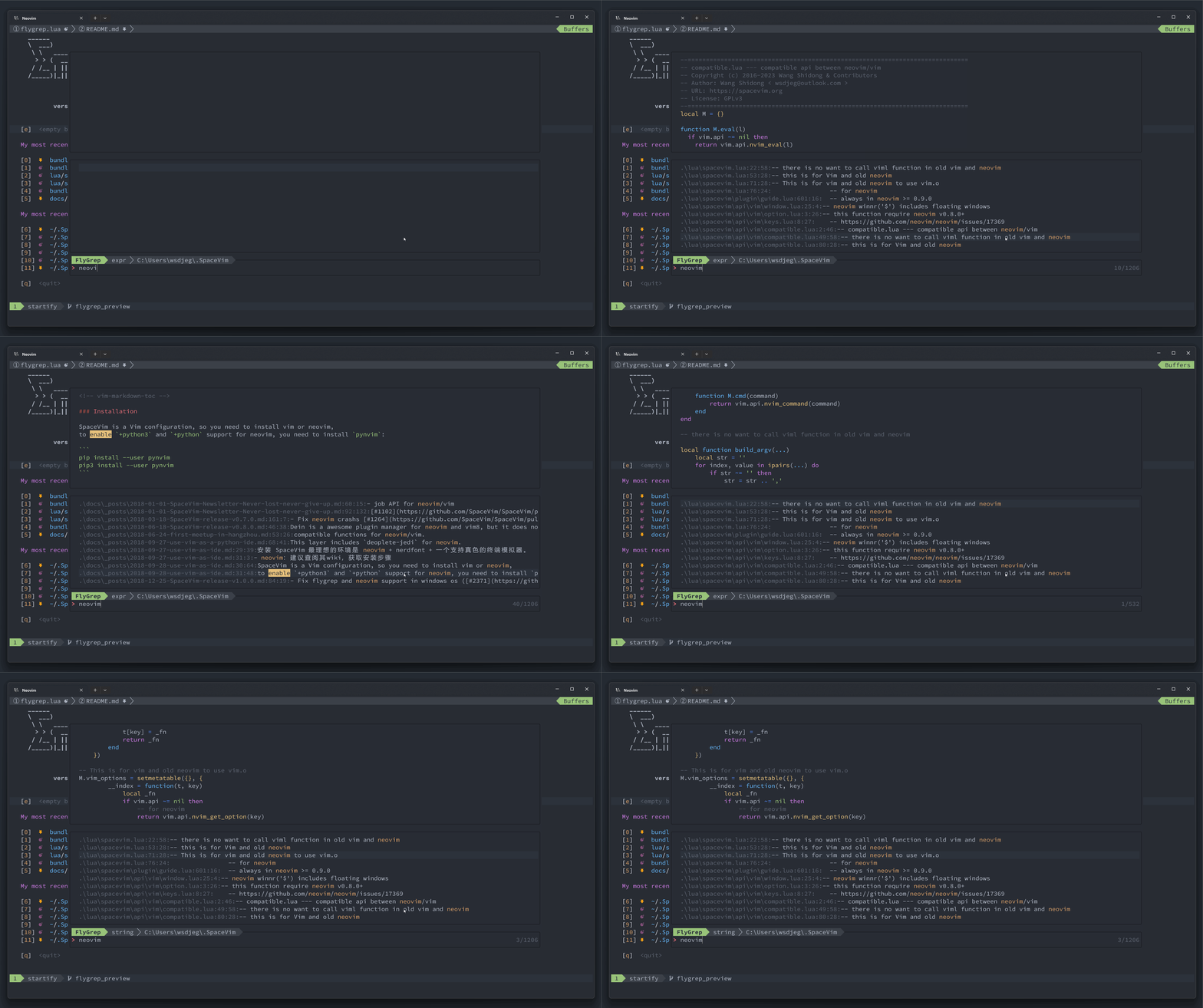
flygrep.nvim is a lightweight, asynchronous on-the-fly grep plugin for Neovim.
It provides real-time search results in a floating window as you type,
powered by ripgrep under the hood.
With live preview, configurable search commands, and flexible window layouts,
flygrep.nvim offers a fast and intuitive grep experience without leaving the editor.






- ✨ Features
- 📦 Requirements
- 🔌 Installation
- ⚙️ Configuration
- 🚀 Usage
- ⌨️ Key Bindings
- 📣 Self-Promotion
- 💬 Feedback
- 📄 License
- Asynchronous real-time grep as you type
- Powered by ripgrep for high-performance searching
- Floating window with live preview support
- Configurable search command and options
- Smart case / ignore case / fixed string toggle
- Hidden file toggle
- Quickfix integration
- Fully configurable key mappings and window layout
- Optional completion via nvim-cmp (graceful fallback)
- neovim: >= v0.10.0
- ripgrep: If you are using other searching tool, you need to set command option of flygrep.
- job.nvim: Required for asynchronous job execution.
flygrep.nvim works with all major Neovim plugin managers.
-
Using nvim-plug
require('plug').add({
    {
        'wsdjeg/flygrep.nvim',
        config = function()
            require('flygrep').setup()
        end,
        depends = { { 'wsdjeg/job.nvim' } },
    },
})
-
Using lazy.nvim
{ 'wsdjeg/flygrep.nvim', event = 'VeryLazy', dependencies = { 'wsdjeg/job.nvim' }, config = function() require('flygrep').setup() end, } -
Using packer.nvim
use({
    'wsdjeg/flygrep.nvim',
    requires = { 'wsdjeg/job.nvim' },
    config = function()
        require('flygrep').setup()
    end,
})
-
Using luarocks
luarocks install flygrep.nvim
This example shows a basic setup for flygrep.nvim. It customizes the search command, window layout, key mappings, and highlight groups to fit your workflow.
require('flygrep').setup({
    color_templete = {
        a = {
            fg = '#2c323c',
            bg = '#98c379',
            ctermfg = 16,
            ctermbg = 114,
            bold = true,
        },
        b = {
            fg = '#abb2bf',
            bg = '#3b4048',
            ctermfg = 145,
            ctermbg = 16,
            bold = false,
        },
    },
    timeout = 200, -- debounce timeout in milliseconds
    mappings = {
        next_item = '<Tab>',
        previous_item = '<S-Tab>',
        toggle_fix_string = '<C-e>',
        toggle_hidden_file = '<C-h>',
        toggle_preview_win = '<C-p>',
        open_item_edit = '<Enter>',
        open_item_split = '<C-s>',
        open_item_vsplit = '<C-v>',
        open_item_tabedit = '<C-t>',
        apply_quickfix = '<C-q>',
        -- prevent Ctrl-J from inserting a new line
        -- which can be overridden by mapping settings
        ignore_keys = { '<C-j>' },
    },
    command = {
        execute = 'rg',
        default_opts = {
            '--no-heading',
            '--color=never',
            '--with-filename',
            '--line-number',
            '--column',
            '-g',
            '!.git',
        },
        expr_opt = '-e',
        fixed_string_opt = '-F',
        default_fopts = { '-N' },
        smart_case = '-S',
        ignore_case = '-i',
        hidden_opt = '--hidden',
    },
    matched_higroup = 'IncSearch',
    enable_preview = false,
    window = {
        width = 0.8, -- flygrep screen width, default is vim.o.columns * 0.8
        height = 0.8, -- flygrep screen height, default is vim.o.lines * 0.8
        col = 0.1, -- flygrep screen start col, default is vim.o.columns * 0.1
        row = 0.1, -- flygrep screen start row, default is vim.o.lines * 0.1
    },
}):FlyGrep: open flygrep in current directory:lua require('flygrep').open(opt):optsupports following keys,cwd: root directory of searching jobinput: default input text in prompt window
Search text in buffer directory:
require('flygrep').open({
  cwd = vim.fn.fnamemodify(vim.fn.bufname(), ':p:h'),
})
Search text under the cursor:
require('flygrep').open({
  input = vim.fn.expand('<cword>')
})| Key binding | description |
|---|---|
<Enter> |
open cursor item |
<Tab> |
next item |
<S-Tab> |
previous item |
<C-s> |
open item in split window |
<C-v> |
open item in vertical split window |
<C-t> |
open item in new tabpage |
<C-p> |
toggle preview window |
<C-h> |
toggle display hidden files |
<C-e> |
toggle fixed string mode |
<C-q> |
apply all items into quickfix |
<Esc> |
close flygrep window |
<C-c> |
close flygrep window |
Like this plugin? Star the repository on GitHub.
Love this plugin? Follow me on GitHub or Twitter.
If you encounter any bugs or have suggestions, please file an issue in the issue tracker
Licensed under GPL-3.0.