English | 简体中文 | 日本語 | 한국어 | Русский
Multi-Engine AI Coding Client with Full Remote Agent Experience.


A multi-engine AI coding client with full agent chain-of-thought visualization and zero-config secure remote access — not another chat wrapper.
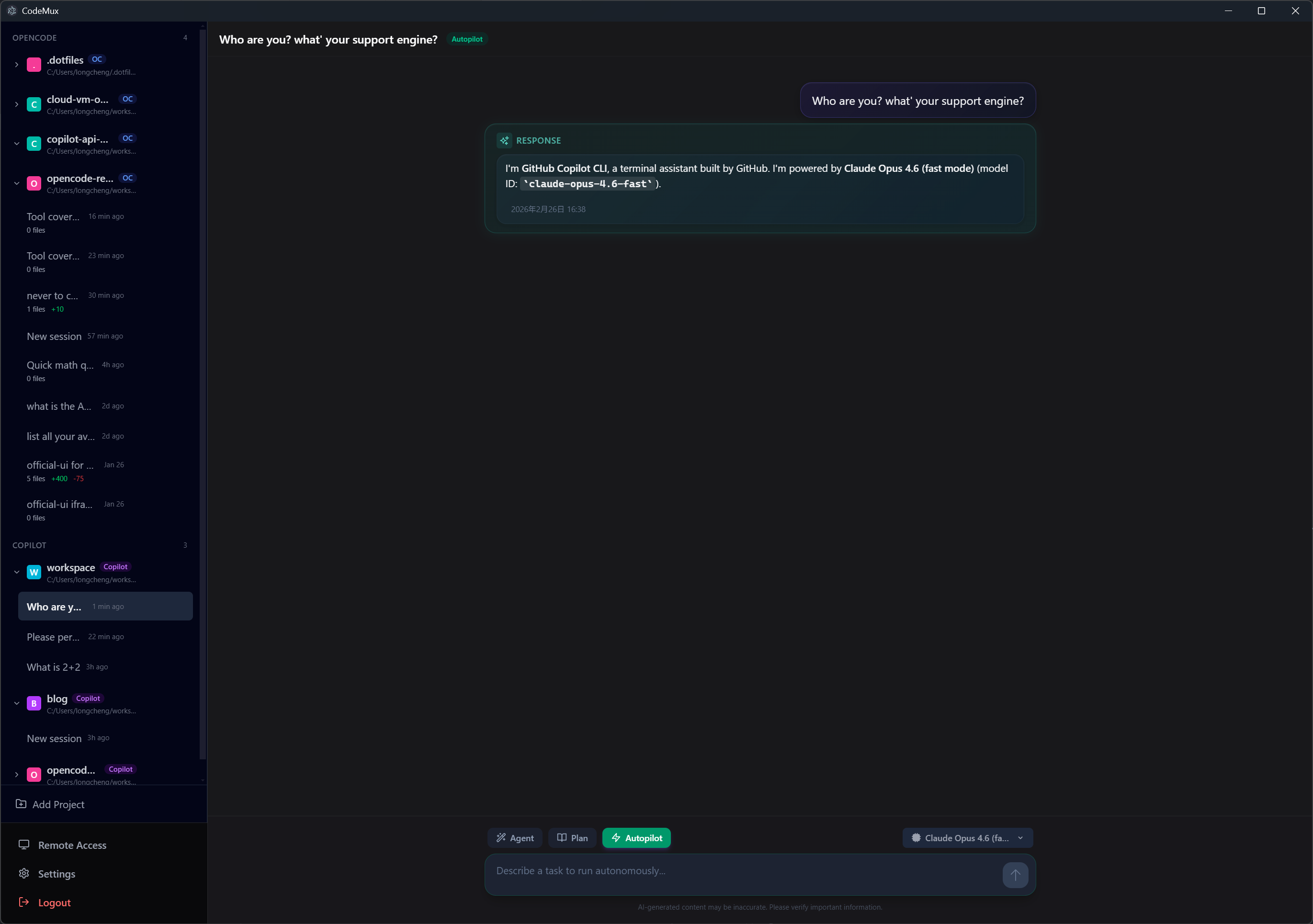
This is not a chat wrapper that swaps API keys. CodeMux is a protocol-level gateway — each engine runs with its own runtime, sessions, tool execution, and capabilities fully preserved.
Switch between engines from a single interface. Each keeps its full power — file editing, shell access, session history, project context — CodeMux just gives them a shared front door.
| Engine | Protocol | Status |
|---|---|---|
| OpenCode | HTTP REST + SSE | ✅ Stable |
| GitHub Copilot CLI | JSON-RPC/stdio | ✅ Stable |
| Claude Code | SDK (stdio) | ✅ Stable |
💡 CodeMux is also the first — and currently only — open-source GUI for GitHub Copilot CLI, connecting at the protocol level (JSON-RPC over stdio) to deliver Copilot's complete agentic coding experience in a visual interface.
Every agent action is rendered as an expandable step — file diffs, shell commands, search results, tool calls — so you can see exactly what the agent is doing and why, not just the final answer.
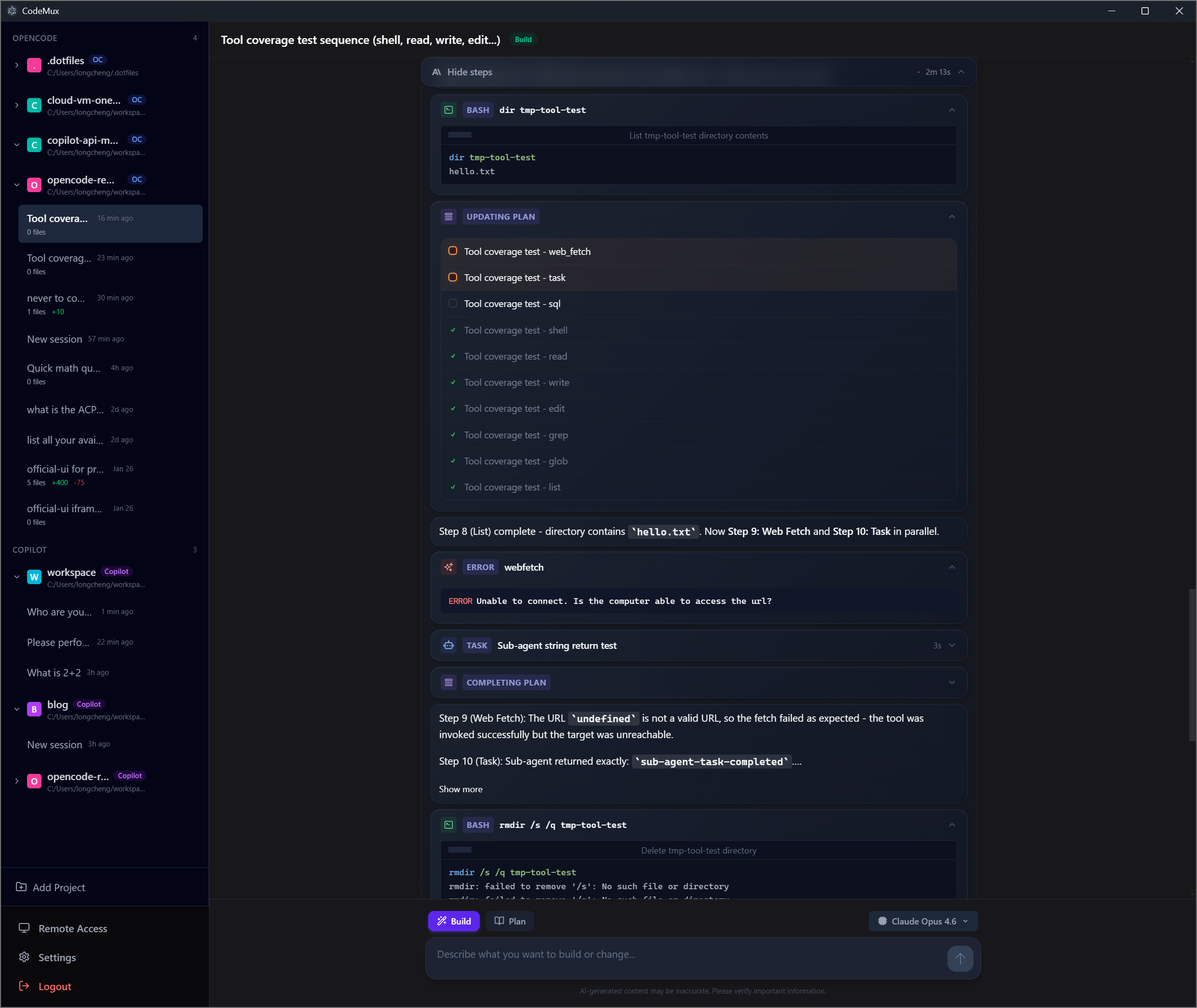
This isn't limited to the desktop app. The full chain-of-thought experience is preserved across every access method — whether you're on a browser via LAN or public internet, or interacting through an IM bot on your phone.
Tools like OpenClaw have popularized the idea of accessing AI from messaging apps — send a message on WhatsApp or Telegram, get a text reply. But for AI-assisted coding, a text reply isn't enough. You need to see what the agent is thinking, what files it's editing, what commands it's running — in real time.
CodeMux bridges this gap. Whether you access from a browser or an IM platform, you get the complete agent experience with structured streaming:
| Capability | CodeMux | Text-based assistants |
|---|---|---|
| Streaming output | ✅ Token-level real-time streaming | |
| Thinking steps | ✅ Each tool call rendered as expandable step | ❌ Final answer only |
| File diffs | ✅ Inline diff viewer with syntax highlighting | ❌ Plain text or none |
| Shell commands | ✅ Command + output rendered in real time | ❌ Text summary at best |
| Multi-engine | ✅ Switch between OpenCode / Copilot / Claude Code | ❌ Single model / provider |
| Coding context | ✅ Project-aware sessions with full tool access | |
| Image input | ✅ Paste/drag images for all engines to analyze | ❌ Text-only input |
Text-based coding tools are limited to text input. CodeMux breaks this barrier — attach images to your prompts and let the AI see what you see.
Paste a screenshot, drag in a design mockup, or upload an error image — all three engines can analyze images natively. Each engine adapter translates images into its native format behind the scenes, while you get a unified experience:
- Upload methods: File picker, drag & drop, clipboard paste
- Supported formats: JPEG, PNG, GIF, WebP (up to 4 images per message, 3MB each)
- Inline preview: Thumbnails shown before sending, images rendered in chat history
This works across all access methods — desktop, remote browser, and IM bots — wherever CodeMux runs, image input follows.
- Agent mode switching: Toggle between Build / Plan / Autopilot modes per engine — each with its own behavior and prompt style
- Live todo panel: Agent-generated task lists displayed above the input area with real-time progress tracking
- Permission approvals: Approve or deny sensitive operations (shell, file edits) inline — with "always allow" for trusted patterns
- Interactive questions: Engines can ask single/multi-select questions with descriptions and custom input
- Per-engine model selection: Pick different models for each engine independently; Copilot and Claude Code support custom model ID input
Access your coding agents from any device — phone, tablet, or another machine — without touching a single config file.
- LAN: Auto-detected IP + QR code, ready in seconds
- Public Internet: One-click Cloudflare Tunnel — no port forwarding, no VPN, no firewall changes. Supports both quick tunnels (random ephemeral URL, zero config) and named tunnels (persistent custom domain via
~/.cloudflared/credentials) - Security built-in: Device authorization, JWT tokens, HTTPS via Cloudflare; quick tunnel URLs rotate on every restart, named tunnels preserve your custom hostname
Use your AI coding agents directly from your favorite messaging apps with real-time streaming and structured rich content — not just plain text replies.
| Platform | Event Receiving | Streaming | Group Creation | Rich Content |
|---|---|---|---|---|
| Feishu (Lark) | WebSocket (长连接) | ✅ Edit-in-place | ✅ Auto-create group | Interactive Cards |
| DingTalk | Stream mode (WS) | ✅ AI Card | ✅ Scene groups | ActionCard / Markdown |
| Telegram | Webhook / Long Polling | ✅ sendMessageDraft | ❌ P2P only | MarkdownV2 + InlineKeyboard |
| WeCom | HTTP Callback (AES XML) | ❌ Batch mode | ✅ App group chat | Markdown / Template Card |
| Microsoft Teams | Bot Framework HTTP | ✅ Edit-in-place | ❌ P2P only | Adaptive Cards v1.5 |
- P2P entry point: Private chat with the bot to select projects and sessions
- Slash commands:
/cancel,/status,/mode,/model,/history,/help - Streaming responses: Real-time AI output with platform-appropriate update strategy
- Tool summary: Completion messages include action counts (e.g.
Shell(2), Edit(1)) - Auto-approve permissions: Engine permission requests are approved automatically
- One Group = One Session (Feishu, DingTalk, WeCom): Each group chat maps to a single CodeMux session. Start in P2P → select project → group auto-created.
- P2P Direct (Telegram, Teams): Interact directly in private chat with temporary sessions (2h TTL). In group chats, @mention the bot to interact.
Each platform requires creating a bot/app on its developer portal and configuring credentials in CodeMux Settings → Channels.
📖 Detailed setup guide → — Step-by-step instructions for each platform, including permissions, webhook configuration, and troubleshooting.
| Platform | Required Credentials | Developer Portal |
|---|---|---|
| Feishu | App ID, App Secret | open.feishu.cn |
| DingTalk | App Key, App Secret, Robot Code | open.dingtalk.com |
| Telegram | Bot Token (from @BotFather) | core.telegram.org |
| WeCom | Corp ID, Corp Secret, Agent ID, Callback Token, Encoding AES Key | developer.work.weixin.qq.com |
| Teams | Microsoft App ID, App Password, Tenant ID | Azure Portal + Teams Dev Portal |
macOS (Recommended — via Homebrew):
brew tap realDuang/codemux
brew install --cask codemux
Manual download:
- macOS (Apple Silicon):
CodeMux-x.x.x-arm64.dmg - macOS (Intel):
CodeMux-x.x.x-x64.dmg - Windows:
CodeMux-x.x.x-setup.exe
The desktop app bundles the Cloudflare Tunnel binary and the gateway server. OpenCode, Copilot CLI, and Claude Code must be installed separately (see below).
⚠️ macOS Users (manual download): The app is not code-signed. If macOS shows "App is damaged", run:xattr -cr /Applications/CodeMux.app
# Clone the repository
git clone https://github.com/realDuang/codemux.git
cd codemux

# Install dependencies
bun install

# Download cloudflared binary (for remote access)
bun run update:cloudflared

# Start development server (Electron + Vite HMR)
bun run dev
Engine Prerequisites: All engines are external dependencies that must be installed and available in your PATH:
- OpenCode: Install from opencode.ai —
curl -fsSL https://opencode.ai/install.sh | bash(Unix) orirm https://opencode.ai/install.ps1 | iex(Windows)- Copilot CLI: Install GitHub Copilot CLI separately
- Claude Code: Install via
npm install -g @anthropic-ai/claude-codeand set yourANTHROPIC_API_KEYCodeMux auto-detects installed engines on startup.
| Method | Setup | Best For |
|---|---|---|
| LAN Browser | Open http://<your-ip>:8233, enter 6-digit code or scan QR |
Quick access from another device on the same network |
| Public Internet | Toggle "Public Access" → share *.trycloudflare.com URL |
Access from anywhere, no port forwarding needed |
| IM Bot | Configure bot credentials in Settings → Channels | Interact from Feishu, DingTalk, Telegram, WeCom, or Teams |
| Layer | Protection |
|---|---|
| Device Authorization | New devices require approval with a 6-digit code |
| JWT Tokens | Per-device tokens stored securely |
| HTTPS | Public tunnel uses HTTPS via Cloudflare automatically |
| Ephemeral URLs | Tunnel URLs change on every restart |
Manage connected devices from the Devices page — view last access time, rename for identification, or revoke access per-device.
CodeMux is designed for personal use. Revoke devices you no longer use and disable the public tunnel when not needed.
┌─────────────────────────────────────────────────────────────────┐
│                        Access Layer                             │
│                                                                 │
│  ┌──────────┐  ┌───────────────┐  ┌──────────────────────────┐  │
│  │ Electron │  │ Browser (LAN/ │  │ IM Bots (Feishu/DingTalk │  │
│  │   App    │  │  Cloudflare)  │  │ /Telegram/WeCom/Teams)   │  │
│  └────┬─────┘  └──────┬────────┘  └────────────┬─────────────┘  │
│       │               │                        │                │
│       └───────────────┼────────────────────────┘                │
│                       │                                         │
│              WebSocket (JSON-RPC)                               │
│                       │                                         │
│              ┌────────┴────────┐                                │
│              │  Gateway Server │                                │
│              │ (Engine Manager)│                                │
│              └──┬──────┬─────┬┘                                 │
│                 │      │     │                                  │
│           ┌─────┘   ┌──┘    └──┐                                │
│           │         │          │                                │
│     ┌─────┴─────┐ ┌─┴──────┐ ┌┴───────┐                        │
│     │ OpenCode  │ │Copilot │ │ Claude │                        │
│     │ Adapter   │ │Adapter │ │Adapter │                        │
│     │(HTTP+SSE) │ │(stdio) │ │ (SDK)  │                        │
│     └───────────┘ └────────┘ └────────┘                        │
│                                                                 │
│     Unified Type System: UnifiedPart, ToolPart, AgentMode       │
└─────────────────────────────────────────────────────────────────┘
All access methods — desktop app, remote browser, and IM bots — connect through the same WebSocket gateway. Engines share a normalized type system, so tool calls, file diffs, and streaming messages are rendered identically regardless of which engine or access method is used.
bun run dev              # Electron + Vite HMR
bun run build            # Production build
bun run dist:mac:arm64   # macOS Apple Silicon
bun run dist:mac:x64     # macOS Intel
bun run dist:win         # Windows NSIS installer
bun run typecheck        # Type checking
bun run update:cloudflared # Update Cloudflare Tunnel binarycodemux/
├── electron/
│ ├── main/
│ │ ├── engines/ # Engine adapters (OpenCode, Copilot, Claude Code)
│ │ ├── gateway/ # WebSocket server + engine routing
│ │ ├── channels/ # IM bot channels (Feishu, DingTalk, Telegram, WeCom, Teams)
│ │ │ └── streaming/ # Cross-channel streaming infrastructure
│ │ ├── services/ # Auth, device store, tunnel, sessions, file service, tray, etc.
│ │ └── utils/ # Shared utilities (ID generation, etc.)
│ └── preload/
├── src/ # SolidJS renderer
│ ├── pages/ # Chat, Settings, Devices, Entry
│ ├── components/ # UI components + content renderers
│ ├── stores/ # Reactive state (session, message, config)
│ ├── lib/ # Gateway client, auth, i18n, theme
│ ├── locales/ # i18n translation files (en, zh, ru)
│ └── types/ # Unified type system + tool mapping
├── shared/ # Shared backend modules (auth, JWT, device store base)
├── tests/ # Unit tests, e2e tests (Playwright), benchmarks
├── docs/ # Channel setup guides + design documents
├── website/ # Project website (SolidJS + Vite)
├── scripts/ # Setup, binary updaters, CI helpers
├── homebrew/ # Homebrew formula for macOS distribution
├── electron.vite.config.ts
└── electron-builder.yml
Contributions are welcome! See CONTRIBUTING.md for detailed guidelines.
Code Style: TypeScript strict mode, SolidJS reactive patterns, Tailwind for styling
Commit Convention: feat: | fix: | docs: | refactor: | chore:
Adding a New Engine: Implement EngineAdapter (see electron/main/engines/engine-adapter.ts), add tool name mapping in src/types/tool-mapping.ts, and register in electron/main/index.ts.
- Discussions — Roadmap, feature requests & community conversations
- Roadmap — Development roadmap and milestone tracking
- Issues — Bug reports
- OpenCode — Supported engine
- GitHub Copilot CLI — Supported engine
- Claude Code — Supported engine
- Feishu Open Platform — Feishu bot channel
- DingTalk Open Platform — DingTalk bot channel
- Telegram Bot API — Telegram bot channel
- WeCom Developer Center — WeCom bot channel
- Microsoft Teams Platform — Teams bot channel