Clarifying the need of for zadig & flashing methods #46
There are no files selected for viewing
| Original file line number | Diff line number | Diff line change | |||||||||||||||||||||||||||||||||||||||||||||||||||||||||||||||||
|---|---|---|---|---|---|---|---|---|---|---|---|---|---|---|---|---|---|---|---|---|---|---|---|---|---|---|---|---|---|---|---|---|---|---|---|---|---|---|---|---|---|---|---|---|---|---|---|---|---|---|---|---|---|---|---|---|---|---|---|---|---|---|---|---|---|---|---|
|
|
@@ -2,11 +2,11 @@ | ||||||||||||||||||||||||||||||||||||||||||||||||||||||||||||||||||
|
|
|||||||||||||||||||||||||||||||||||||||||||||||||||||||||||||||||||
| ### Are Additional Drivers Required? | |||||||||||||||||||||||||||||||||||||||||||||||||||||||||||||||||||
|
|
|||||||||||||||||||||||||||||||||||||||||||||||||||||||||||||||||||
| Most new transmitter such as the Taranis series do not require any additional drivers to be installed on the computer to use it with Companion for configuration and model editing. Flashing the remotes via PC (with dfu-util) needs drivers installed but this can be avoided by flashing with the bootloader. The exception is the FrSKY Horus X12S that, unlike the Taranis model, does not have a bootloader that allows flashing without additional drivers. Once flashed using the bootloader menu (described below) the bootloader is also updated and windows drivers will not be required for FrSKY transmitters except the Horus X12S. | |||||||||||||||||||||||||||||||||||||||||||||||||||||||||||||||||||
|
|
|||||||||||||||||||||||||||||||||||||||||||||||||||||||||||||||||||
| You do not need install these drivers unless you are sure you need it. | |||||||||||||||||||||||||||||||||||||||||||||||||||||||||||||||||||
|
|
|||||||||||||||||||||||||||||||||||||||||||||||||||||||||||||||||||
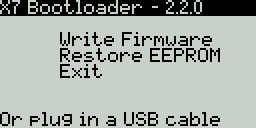
| To power up the transmitter in Bootloader mode: | |||||||||||||||||||||||||||||||||||||||||||||||||||||||||||||||||||
| * Power off the transmitter | |||||||||||||||||||||||||||||||||||||||||||||||||||||||||||||||||||
| * Pull the two horizontal trims towards the centre | |||||||||||||||||||||||||||||||||||||||||||||||||||||||||||||||||||
| * Power on the transmitter | |||||||||||||||||||||||||||||||||||||||||||||||||||||||||||||||||||
|
|
@@ -16,23 +16,19 @@ To check power up the transmitter in Bootloader mode: | ||||||||||||||||||||||||||||||||||||||||||||||||||||||||||||||||||
|  | |||||||||||||||||||||||||||||||||||||||||||||||||||||||||||||||||||
|
|
|||||||||||||||||||||||||||||||||||||||||||||||||||||||||||||||||||
|
|
|||||||||||||||||||||||||||||||||||||||||||||||||||||||||||||||||||
| | Tx | OpenTX Bootloader | Flash method | | |||||||||||||||||||||||||||||||||||||||||||||||||||||||||||||||||||
|
Contributor
Author
There was a problem hiding this comment. I deliberately chose the Add PC driver because users are reading about zadig and installing it... the idea of the table is that from the user point of view do I have to go get and install drivers.... no an under the hood technical document.... the table was posted in issues and discussed... consensus reached and then I posted the changes here.... I neither agree nor disagree with your changes... it is a different style....
Member
There was a problem hiding this comment. I wanted to be precise as the flash method is dfu-util even under windows. |
|||||||||||||||||||||||||||||||||||||||||||||||||||||||||||||||||||
| | --- | ------------------- | ------ | ----------------------- | | |||||||||||||||||||||||||||||||||||||||||||||||||||||||||||||||||||
| | X7 | 2.2 | Bootloader, Dfu-util | | |||||||||||||||||||||||||||||||||||||||||||||||||||||||||||||||||||
| | X9D | 1.x | Dfu-util | | |||||||||||||||||||||||||||||||||||||||||||||||||||||||||||||||||||
| | X9D | 2.x | Bootloader, Dfu-util | | |||||||||||||||||||||||||||||||||||||||||||||||||||||||||||||||||||
| | X9D+ | 2.x | Any | Bootloader, Dfu-util | | |||||||||||||||||||||||||||||||||||||||||||||||||||||||||||||||||||
| | X9E | 2.x | Any | Bootloader, Dfu-util | | |||||||||||||||||||||||||||||||||||||||||||||||||||||||||||||||||||
| | X12S | 2.2 + later | Windows | Dfu-util | | |||||||||||||||||||||||||||||||||||||||||||||||||||||||||||||||||||
|
|
|||||||||||||||||||||||||||||||||||||||||||||||||||||||||||||||||||
| Companion 2.2 for Mac and Windows comes with Dfu-util. Linux distribution usuall have a package for dfu-util. Windows needs drivers installed via Zadiag utility | |||||||||||||||||||||||||||||||||||||||||||||||||||||||||||||||||||
|
|
|||||||||||||||||||||||||||||||||||||||||||||||||||||||||||||||||||
|
|
|||||||||||||||||||||||||||||||||||||||||||||||||||||||||||||||||||
| ## Installing The Windows Driver with Zadiag (optional) | |||||||||||||||||||||||||||||||||||||||||||||||||||||||||||||||||||
|
Contributor
Author
There was a problem hiding this comment. Sure... I deliberately chose "If Required" based on forum feedback form people helping users who installed zadig and went through all of that when it was not required and did nothing to solve the problem they were addressing... but you approach is a different way... up to you...
Member
There was a problem hiding this comment. I would rather add an additional setence under that. if required in a title sounds a bit odd to me. |
|||||||||||||||||||||||||||||||||||||||||||||||||||||||||||||||||||
|
|
|||||||||||||||||||||||||||||||||||||||||||||||||||||||||||||||||||
| The first thing to do is to power your radio off and connect it to your computer's USB port. | |||||||||||||||||||||||||||||||||||||||||||||||||||||||||||||||||||
|
|
|||||||||||||||||||||||||||||||||||||||||||||||||||||||||||||||||||
|
|
@@ -121,7 +117,7 @@ There are two options to write the firmware: | ||||||||||||||||||||||||||||||||||||||||||||||||||||||||||||||||||
| * When the “Writing Complete” message is displayed press EXIT | |||||||||||||||||||||||||||||||||||||||||||||||||||||||||||||||||||
| * Power the transmitter off | |||||||||||||||||||||||||||||||||||||||||||||||||||||||||||||||||||
|
|
|||||||||||||||||||||||||||||||||||||||||||||||||||||||||||||||||||
| ## Using Companion (dfu-util) | |||||||||||||||||||||||||||||||||||||||||||||||||||||||||||||||||||
|
Member
There was a problem hiding this comment. This section is wrong. In order for Companion to use dfu-util/zadig the radio has to be in STM Bootloader. So the radio has to be OFF and then connected to computer. What you describe below is also possible, using OpenTX Bootloader like you described above. But in this case dfu-util/zadig is not used. This method uses USB mass storage mode (that is implemented by the OpenTX Bootloader) so no special driver needed for this.
Contributor
Author
There was a problem hiding this comment. I think the confusion is that we have writing firmware under the driver section... the writing firmware may be clearer if put in its own section... When I wrote the writing firmware instructions I wrote if for a majority audience of FrSKY Tx purchased today and going forward... well purchased within the last year... for this audience informaing them about dfu/zadig etc. is unnecessary and adds confusion... many users forst want to know how to do something and only want to know the why and underlying details later on out of curiosity or have problems... This section makes more sense when arranged as it is in this article Connecting The Transmitter In Bootloader Mode Most new transmitter such as the Taranis series do not require any additional software or drivers to be installed on the computer. One exception is the FrSKY Horus X12S which is covered here (link). So how do I remove this section from here while retaining the other edits that have passed?
Member
There was a problem hiding this comment. I've browsed trough your page (link above) and there instructions are much more clear. I agree that skipping whole dfu-util/zadig is a good thing. But on the other hand dfu-util/zadig has to be documented somewhere because it is needed for X12 and can be helpul/needed for X9D.
Just move the dfu-util/zadig to a separate section.
Contributor
Author
There was a problem hiding this comment. Ahh... I went back up and noticed this table which is not how I wrote it....
I wrote is as below after gaining a consensus here
MAC Note: Companion 2.2 for Mac comes with Dfu-util. (Need some wording for linux?) The difference is
versus
I wrote the rest of the instructions in the context on how to get something done without the what is being used.... So should I just close this pull request?
Member
There was a problem hiding this comment. Your last table looks good. Still I hope you realize that for example a 9XE with 2.x can also be written with dfu-util. Perhaps your way of mentioning only no driver needed is more appropriate since it is less confusing to the user. But the fact is that all radios in the above table regardless of the OpenTX version installed support dfu-util/zadig method, just that some of them also support no driver needed method. |
|||||||||||||||||||||||||||||||||||||||||||||||||||||||||||||||||||
|
|
|||||||||||||||||||||||||||||||||||||||||||||||||||||||||||||||||||
| * Read/Write -> Write Firmware to Radio | |||||||||||||||||||||||||||||||||||||||||||||||||||||||||||||||||||
| * A Flash Firmware window appears | |||||||||||||||||||||||||||||||||||||||||||||||||||||||||||||||||||
|
|
|||||||||||||||||||||||||||||||||||||||||||||||||||||||||||||||||||



There was a problem hiding this comment.
Choose a reason for hiding this comment
The reason will be displayed to describe this comment to others. Learn more.
Different style.... up to you... I obviously prefer my style but you have final say...
There was a problem hiding this comment.
Choose a reason for hiding this comment
The reason will be displayed to describe this comment to others. Learn more.
You removed that part, not me :)