Tray Icon
🌐 Language: English | Français
The dictee tray icon (dictee-tray) is a PyQt6 background service that provides the same features as the Plasmoid-Widget on non-KDE desktops: GNOME, XFCE, Cinnamon, Sway, Hyprland — anywhere a system tray protocol is available.
On KDE Plasma the tray integrates via StatusNotifierItem (SNI). On GNOME/Ubuntu it falls back to AppIndicator3 (auto-detected at startup). Both modes support automatic light/dark theme tracking and match the plasmoid feature-for-feature.
- When to use tray vs plasmoid
- Install
- Launch
- Autostart as systemd user service
- Menu structure
- Status icons
- Theme detection (light/dark)
- GNOME / Ubuntu (AppIndicator3)
- Tiling window managers
- Cross-process sync with plasmoid
- Known issues
| Desktop | Recommended | Why |
|---|---|---|
| KDE Plasma 6 | Plasmoid-Widget | Native QML, animation-rich popup |
| KDE Plasma 5 | Tray | No Plasma 5 plasmoid in v1.3 |
| GNOME (with extensions) | Tray | AppIndicator3 fallback works |
| GNOME (no extensions) | Tray via Top Icons Plus | Plain dictee-tray needs a status area |
| XFCE / Cinnamon / MATE | Tray | Native SNI / AppIndicator support |
| Sway / i3 / Hyprland | Tray via waybar SNI module | Or use keyboard shortcuts exclusively |
| LXDE / LXQt | Tray | Uses xembed-sni-proxy on Qt 6 |
Both can coexist — running both plasmoid + tray on the same KDE session just duplicates status indicators. Pick one.
The tray icon is bundled with the main dictee package:
sudo apt install ./dictee-cuda_1.3.0_amd64.deb
# or
sudo dnf install ./dictee-cuda-1.3.0-1.x86_64.rpm
No standalone package — the tray ships with the main binary.
Manual:
dictee-tray &Press Ctrl+C in the terminal or right-click the tray icon → Quit to stop.
A systemd unit is shipped at /usr/lib/systemd/user/dictee-tray.service:
[Unit]
Description=Dictée Tray Icon
After=dictee.service dictee-vosk.service dictee-whisper.service dictee-canary.service
BindsTo=graphical-session.target

[Service]
Type=simple
ExecStart=/usr/bin/dictee-tray
Restart=on-failure
RestartSec=3

[Install]
WantedBy=graphical-session.target
Enable on session start:
systemctl --user enable --now dictee-trayDisable:
systemctl --user disable --now dictee-trayStarting from graphical-session.target means the tray appears only after your desktop is fully loaded — no race with panel/shell initialization.
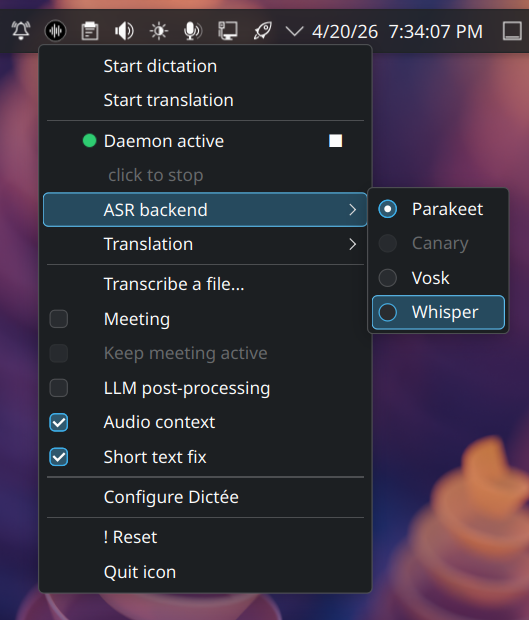
Left-click on the tray icon triggers immediate dictation (equivalent to pressing your shortcut). Middle-click cancels an ongoing recording.
Right-click opens a context menu:
┌─ Dictate
├─ Dictate + Translate
├─ Cancel
├─────────────
├─ ASR backend ▸
│    ├─ ◉ Parakeet-TDT
│    ├─ ○ Canary-1B
│    ├─ ○ faster-whisper
│    └─ ○ Vosk
├─ Translation backend ▸
│    ├─ ◉ Google
│    ├─ ○ Bing
│    ├─ ○ LibreTranslate
│    └─ ○ Ollama
├─ Target language ▸ (dynamic, per backend)
├─────────────
├─ ☐ LLM correction
├─ ☐ Short-text keepcaps
├─ ☐ Meeting mode (diarization)
├─────────────
├─ Open Setup Wizard
├─ Daemon ▸
│    ├─ Restart
│    ├─ Status
│    └─ Show logs
├─ About Dictée
└─ Quit
All backend switches trigger dictee-switch-backend under the hood — no service restart needed.
The icon reflects daemon state in real-time. All icons are custom parakeet SVGs (not emojis) shipped at /usr/share/dictee/icons/:
| State | Light theme | Dark theme | SVG file | Meaning |
|---|---|---|---|---|
| Ready (idle) |  |
 |
parakeet-active(.svg/-dark.svg) |
Daemon ready, no dictation |
| Recording |  |
(same) | parakeet-recording.svg |
Audio being captured |
| Transcribing |  |
(same) | parakeet-transcribing.svg |
Model inference in progress |
| Diarizing (meeting) |  |
(same) | parakeet-diarize.svg |
Meeting mode active |
| Inactive |  |
 |
parakeet-inactive(.svg/-dark.svg) |
Daemon stopped |
| Offline |  |
(same) | parakeet-offline.svg |
Daemon unavailable |
The tray picks the -dark variant automatically based on the detected theme (active + inactive ship both variants; other states use a single theme-neutral icon).
dictee-tray uses QPalette to detect the desktop theme at startup:
palette = QApplication.palette()
bg = palette.color(QPalette.ColorRole.Window)
is_dark = (bg.lightness() < 128)
It also listens for paletteChanged to switch icons live if you flip your theme mid-session.
For KDE Plasma specifically, a secondary check reads kdeglobals for ColorScheme — more robust than QPalette on fresh sessions where palette defaults haven't initialized (fix in v1.3-rc1).
GNOME Shell removed native system tray support in version 3.26 (2017). For dictee-tray to appear you need one of:
-
Ubuntu 22.04 / 24.04:
AppIndicatorextension preinstalled — works out of the box - Fedora GNOME: install AppIndicator and KStatusNotifierItem Support extension
- Other GNOME distros: same extension via extensions.gnome.org
dictee-tray auto-detects AppIndicator3 via python3-pyqt6.qtsvg + gir1.2-ayatanaappindicator3-0.1 and uses it transparently. If the extension is missing you'll see a console warning at startup.
Sway / i3 / Hyprland don't have a system tray by default. Two options:
Add to ~/.config/waybar/config.jsonc:
Then systemctl --user enable --now dictee-tray — the icon appears in waybar.
If you don't want a tray on your minimal setup, skip dictee-tray entirely and rely on:
- Keyboard shortcuts for dictate / translate / cancel (see Keyboard-Shortcuts)
-
dictee-switch-backendCLI for backend changes -
dictee-setupGUI for occasional reconfiguration
Perfectly functional — the tray is convenience, not required.
Same mechanism as the plasmoid: QFileSystemWatcher on /dev/shm/.dictee_state*. Changes made in the tray (backend switch, toggle flip) propagate to the plasmoid in < 50 ms on a typical kernel.
See Plasmoid-Widget#cross-process-sync for the full mechanism.
Install the AppIndicator extension from extensions.gnome.org and restart GNOME Shell (Alt+F2, r, Enter on Xorg; log out/in on Wayland).
Fixed in v1.3-beta4. Earlier versions could leak "ghost" notifications when KDE ignored replace-id on expired notifications. The fix uses timeout=0 + explicit D-Bus CloseNotification call.
If the tray icon doesn't appear on KDE / Sway:
sudo apt install xdg-desktop-portal xdg-desktop-portal-kde # or -gnome, -wlr- Plasmoid-Widget — KDE-native alternative
- Keyboard-Shortcuts — works with or without the tray
- CLI-Reference — full command-line options
- Troubleshooting — tray icon missing fixes
{
  "modules-right": ["tray", "pulseaudio", "clock"],
  "tray": {
    "icon-size": 21,
    "spacing": 10
  }
}